


elegantt
Overview
elegantt is gantt chart drawing library designed for developers and project managers who need to visualize project timeline efficiently. With support for both CSV and Mermaid formats. elegantt provides the flexibility and functionality you need to keep your projects on task.
Features
- Simpe and intuitive API
- Supports both CSV and Mermaid Gantt chart formats
- customizable chat size and colors
- Command line interface for quick usage
- Cross-platform support
Installation
Install elegantt via pip:
pip install elegantt
Fonts Installation
To ensure proper rendering of text, install the necessary fonts:
on Ubuntsu
apt install fonts-noto-cjk
on RedHat/RockyLinux
yum install google-noto-sans-cjk-ttc-fonts.noarch
on Mac
brew install --cask font-noto-sans
Usage
Command Line interface
Generate a Gantt chart from CSV file:
elegantt --fname sample.csv --out sample.png
CSV Format Example
2023-01-01,2023-01-04,Task 1
2023-01-02,2023-01-05,Task 2
2023-01-04,2023-01-06,Task 3
generate a Gantt chart from a Mermaid format:
elegantt --fname sample_mermaid.txt --out sample.png
Mermaid Format Example
gantt
    section task a
    task b            :active,  des2, 2024-05-20, 4d
    task c            :         des3, after des2, 7d
generate a Gantt chart from a Mermaid format:
elegantt --fname sample_markdown.md --out sample.png
Markdown Format Example
|2024-06-15|2024-06-18|task a|
|2024-06-20|2d        |task b|
|3d        |          |task c|
As a library
integrate elegantt into your python projects for advanced usage:
import elegantt

# Define chart properties
chartsize = (720,320)
bgcolor = (255,255,255)

# Create a Gant chart object
gchart = elegantt.EleGantt( chartsize, bgcolor, today="2019-10-15")

# Draw calendar and campains
gchart.draw_calendar()
gchart.draw_campain("2019-10-15","2019-10-18","Task 1")
gchart.draw_campain("2019-10-20","2019-10-23","Task 2")
gchart.draw_campain("2019-10-24","2019-10-30","Task 3")
gchart.save("gantt_chart.png")
or auto_draw for mermaid or markdown format
import elegantt

s = """
    task a  :done, des1, 2024-06-15, 2024-06-18
    task b  :active, des2, 2024-06-20, 2d
    task c  :         des3, after des2, 3d
"""
gchart = elegantt.EleGantt(today="2024-06-18")
gchart.auto_draw(s, mode="mermaid")
gchart.save("gantt_chart.png")
If you want to specify fonts, write set_font() before draw_calendar() or auto_draw().
import elegantt

s = """
    task a  :done, des1, 2024-06-15, 2024-06-18
    task b  :active, des2, 2024-06-20, 2d
    task c  :         des3, after des2, 3d
"""
gchart = elegantt.EleGantt(today="2024-06-18")
gchart.set_font("C:\Windows\Fonts\meiryo.ttc")
gchart.auto_draw(s, mode="mermaid")
gchart.save("gantt_chart.png")
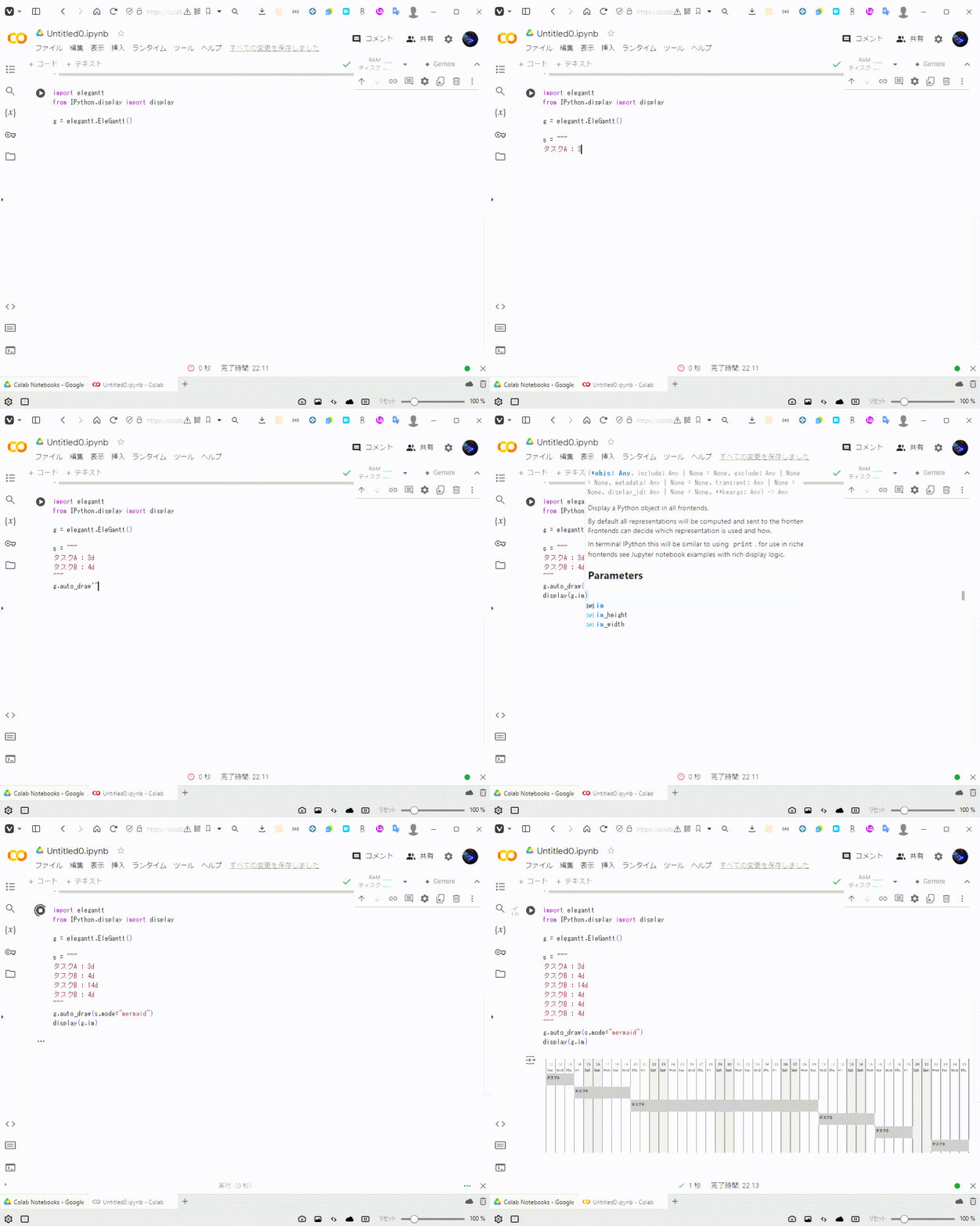
If you want to draw gantt chart on Google colab, import IPython and write like this.
import elegantt
from IPython.display import display

g = elegantt.EleGantt()
s = """
Task A: 2024-07-08,3d
Taks B: 3d
"""
g.auto_draw(s)
display(g.im)
You can set holidays like this.
gchart = elegantt.EleGantt(today="2024-06-18")
gchart.set_holidays(["2024-06-19",2024-06-25])
You can also set holidays with holidays lib.
import holidays
import pandas as pd

jp_holiday = holidays.country_holidays('JP')
my_holidays = []
days = 10

date_list = pd.date_range(
    start=pd.Timestamp("today").normalize(),
    end=pd.Timestamp("today")+pd.Timedelta(days=days)
).tolist()

for date in date_list:
  if date in jp_holiday:
    print(date, jp_holiday.get(date))
    my_holidays.append(date.strftime('%Y-%m-%d'))
  else:
    print(date)

gchart.set_holidays(my_holidays)
You can change color like this.
gchart = elegantt.EleGantt(today="2024-06-18")
gchart.parse_color_schema('{"bg_color":[255,255,255],"bar_color":[0,103,192]}')
more...
g = elegantt.EleGantt()
g.parse_color_schema('{"#red":[255,0,0]}')
s = """
task a : 3d
task b #red: 3d
task c : 1d
"""
g.auto_draw(s)
g.save("test.png")
Lisence
This project is licensed under the MIT License, see the LICENSE.txt file for details
Contributing
We welcome contributions!
Support
For support or any questions, feel free to open an issue on our Github page.
1 maintainer

Metadata
1 maintainer
Release files for elegantt 0.0.12
For a detailed explanation of source distributions (sdists) and built distributions (wheels), please see the package formats documentation.
Source distribution (sdist)
| File | Size | Uploaded | |
|---|---|---|---|
| elegantt-0.0.12.tar.gz | 12.9 kB | Details |
Built distribution (wheel)
| File | Interpreter | ABI | Platform | Reset |
|---|---|---|---|---|
| elegantt-0.0.12-py3-none-any.whl | Python 3 | none | any | Details |
Total release size: 26.0 kB
Release files / elegantt-0.0.12.tar.gz
| Download URL | elegantt-0.0.12.tar.gz |
|---|---|
| Size | 12.9 kB |
| Tags | Source |
|
SHA-256 checksum How to use checksums |
ec9b6cfbde83928147e7d95244f96d726e4766920dc2010f36c3ddbcb27ada6b
|
|
BLAKE2b-256 checksum How to use checksums |
bee98d0613d0538c9f3928ad9ca5b78325c70a1191b7a23a66b51a4d738a7163
|
| Upload date | |
|
Uploaded using Trusted Publishing? What is trusted publishing? |
No |
| Uploaded via |
twine/6.2.0 CPython/3.14.3
|
Release files / elegantt-0.0.12-py3-none-any.whl
| Download URL | elegantt-0.0.12-py3-none-any.whl |
|---|---|
| Size | 13.1 kB |
| Tags | Python 3 |
|
SHA-256 checksum How to use checksums |
155d881e75093498df9b2be90b7e25ce3ac6a636a29c0e96f7431dd817193de1
|
|
BLAKE2b-256 checksum How to use checksums |
8c94e93052577117394262864bf5f5581ed021c60f1da049e5df8a295ae75ed3
|
| Upload date | |
|
Uploaded using Trusted Publishing? What is trusted publishing? |
No |
| Uploaded via |
twine/6.2.0 CPython/3.14.3
|














