
Elektron MCP
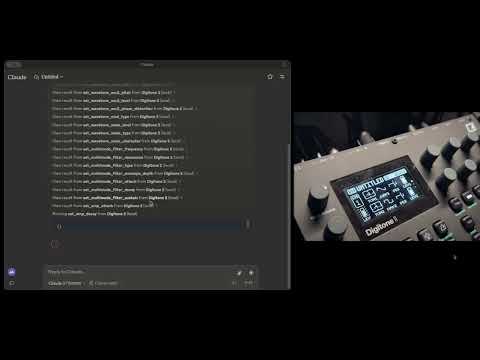
A Model Context Protocol (MCP) server that allows Claude and other MCP-compatible LLMs to interact with and control Elektron synthesizers via MIDI.
Features
- Complete MIDI control interface for the Elektron Digitone synthesizer
- Structured controllers for all Digitone sound engines:
- Wavetone (waveshaping synthesis)
- FM Tone (FM synthesis)
- FM Drum (percussive FM synthesis)
- Swarmer (unison/swarm synthesis)
- Comprehensive parameter control for:
- All filter types
- MultiMode
- Lowpass4
- Equalizer
- LegacyLpHp
- CombMinus
- CombPlus
- BaseWidth
- Amplitude and envelope settings
- Effects processing (delay, reverb, chorus, bit reduction, etc.)
- LFOs control
- All filter types
- MCP server exposing all synth parameters as tools for LLMs
- Type-safe parameter validation using Pydantic
- Modular architecture for easy extension to other Elektron devices
Demo
Watch Claude control the Elektron Digitone synthesizer in real-time:
Installation and Usage
Prerequisites
- Python 3.10+
- uv for package management
- An Elektron Digitone connected via USB
- Claude Desktop app (for full integration)
Installing Dependencies
uv is mandatory for this project so start by installing it:
For macOS:
brew install uv
For Windows:
Follow the instructions here
3. Installing with Claude Desktop
To use with Claude AI, add the MCP server configuration in Claude Desktop:
Go to Claude > Settings > Developer > Edit Config > claude_desktop_config.json to include the following:
{
  "mcpServers": {
    "Digitone 2": {
      "command": "uvx",
      "args": ["elektron-mcp"]
    }
  }
}
Architecture
The library is designed with a clean, object-oriented architecture:
- Base Controllers: Common functionality abstracted into base classes
- Specialized Controllers: Dedicated controllers for each synth engine and module
- MCP Tools: Direct interface between LLMs and the synth's parameters
- MIDI Interface: Reliable communication with Digitone hardware
Implementation Details
This library uses:
- FastMCP: For exposing synth controls to LLMs
- Pydantic models: For data validation, serialization, and type safety
- mido: For MIDI communication
Use Cases
- Allow Claude and other LLMs to create and modify sounds on the Digitone
- Programmatically control Digitone parameters for automated sound design
- Bridge between AI-generated music and hardware synthesis
Future Extensions
- Support for additional Elektron devices (Analog Four, Octatrack, etc.)
- Pattern sequencing and automation
- Sound preset management
- Additional synthesis parameters
1 maintainer

Metadata
1 maintainer
Release files for elektron-mcp 0.2.4
For a detailed explanation of source distributions (sdists) and built distributions (wheels), please see the package formats documentation.
Source distribution (sdist)
| File | Size | Uploaded | |
|---|---|---|---|
| elektron_mcp-0.2.4.tar.gz | 40.1 kB | Details |
Built distribution (wheel)
| File | Interpreter | ABI | Platform | Reset |
|---|---|---|---|---|
| elektron_mcp-0.2.4-py3-none-any.whl | Python 3 | none | any | Details |
Total release size: 71.3 kB
Release files / elektron_mcp-0.2.4.tar.gz
| Download URL | elektron_mcp-0.2.4.tar.gz |
|---|---|
| Size | 40.1 kB |
| Tags | Source |
|
SHA-256 checksum How to use checksums |
9122b4cbee60fe17ab653533f2d111008838ad881bdeb143d74ee48be536423f
|
|
BLAKE2b-256 checksum How to use checksums |
f99d9d0d45e493f00287276e23658fd71845cc41e16999a3d85daa61cadd4357
|
| Upload date | |
|
Uploaded using Trusted Publishing? What is trusted publishing? |
No |
| Uploaded via |
uv/0.6.8
|
Release files / elektron_mcp-0.2.4-py3-none-any.whl
| Download URL | elektron_mcp-0.2.4-py3-none-any.whl |
|---|---|
| Size | 31.2 kB |
| Tags | Python 3 |
|
SHA-256 checksum How to use checksums |
b6dddd1b3c5eb79d5e6fc049d19a72bb2e7a96374254eb8e7a6ede7b77d3f432
|
|
BLAKE2b-256 checksum How to use checksums |
7282ea6cc3c2922ecd7dc1dceb63b0078490d17eef2609cabd2b115e7d377358
|
| Upload date | |
|
Uploaded using Trusted Publishing? What is trusted publishing? |
No |
| Uploaded via |
uv/0.6.8
|














