
This release is a pre-release and may not be stable for production use.









elliprof
ELLIPROF is an astronomical isophote-fitting tool for measuring the radial surface-brightness and shape profiles of galaxies. Given a FITS image and an initial galaxy centre, it fits a sequence of elliptical isophotes and measures their intensity, centre, ellipticity, position angle, radial intensity slope, and higher-order deviations from a pure ellipse. By default it measures 3rd- and 4th-order isophotal Fourier terms; an optional 6th-order mode can be used in place of the 3rd-order term.
It can also build a smooth model image of the galaxy from the fitted isophotes.
elliprof packages the original ELLIPROF Fortran, compiled unchanged, as a command-line program and a Python library.
Documentation: https://ekourkchi.github.io/elliprof/
Source code and issue tracker: https://github.com/ekourkchi/elliprof
What it is for
ELLIPROF is intended primarily for galaxy images. It is particularly useful for:
- elliptical galaxies, smooth spheroidal systems and galaxy bulges, and other smooth light distributions;
- surface-brightness profiles, and how ellipticity and position angle change with radius (isophote twists);
- departures from pure elliptical isophotes, including 4th-order boxy/disky structure and other higher-order asymmetries.
It describes a galaxy as a set of nested ellipses, so it is not necessarily the best tool for irregular galaxies or strongly structured light (spiral arms, bars, dust lanes, bright clumps). Stars and other contaminants should be masked.
You supply the initial galaxy centre (X0, Y0). elliprof does not find the galaxy centre for you. Starting from your centre, ELLIPROF refines the centre of every isophote as part of its normal fit.
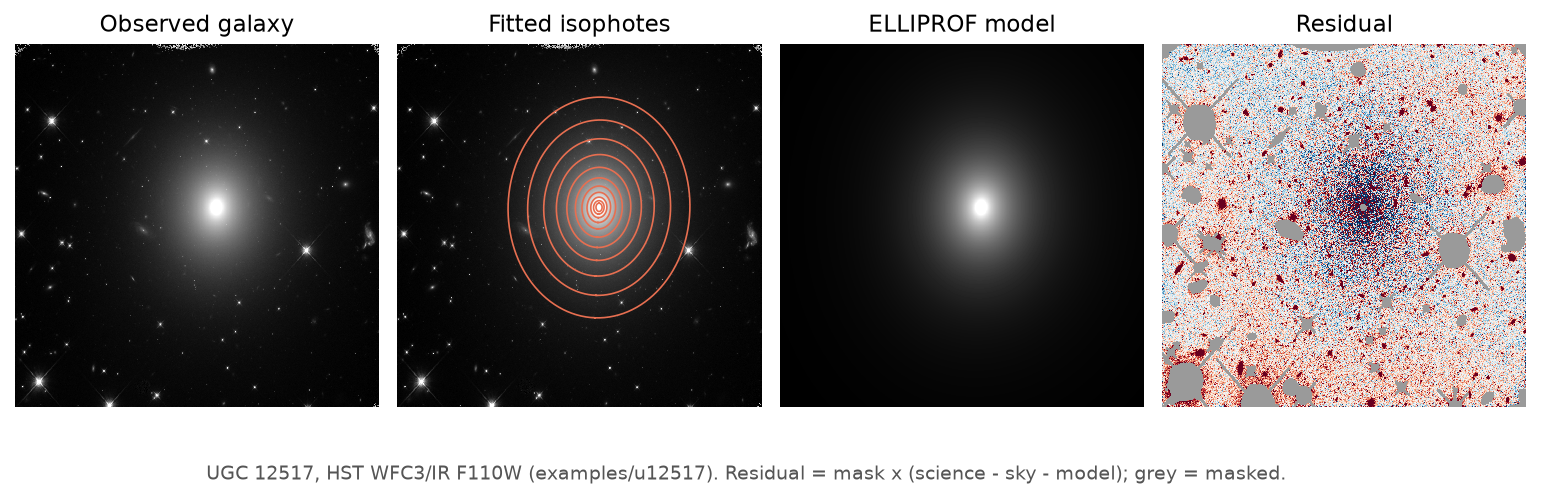
Example: UGC 12517 (HST WFC3/IR)
A real elliptical galaxy, fitted with the command in examples/u12517: the observed image, the fitted isophotes, the ELLIPROF model (-m) and the residual (--residual, image − sky − model; masked pixels grey).
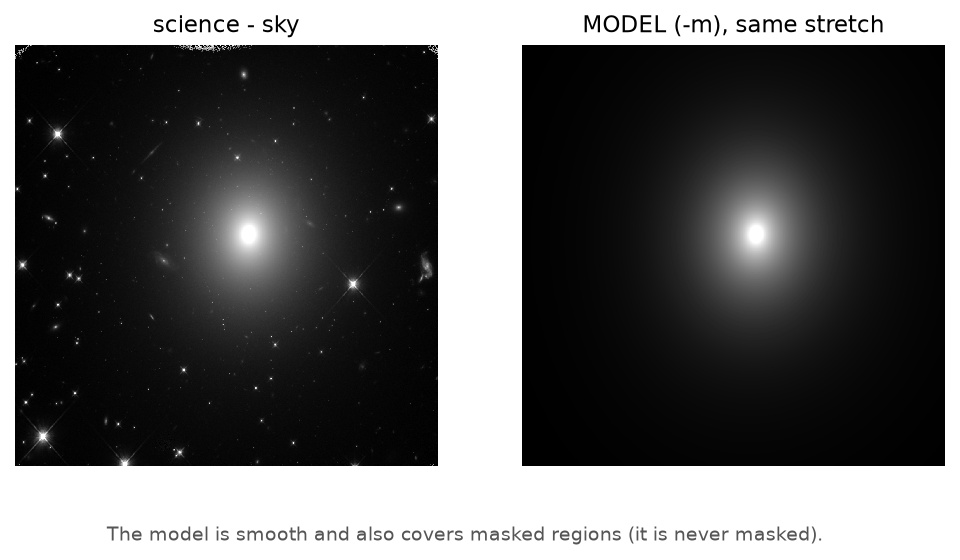
The model shown with the same brightness scale as the sky-subtracted image. It contains only the galaxy, and it also covers the masked regions:
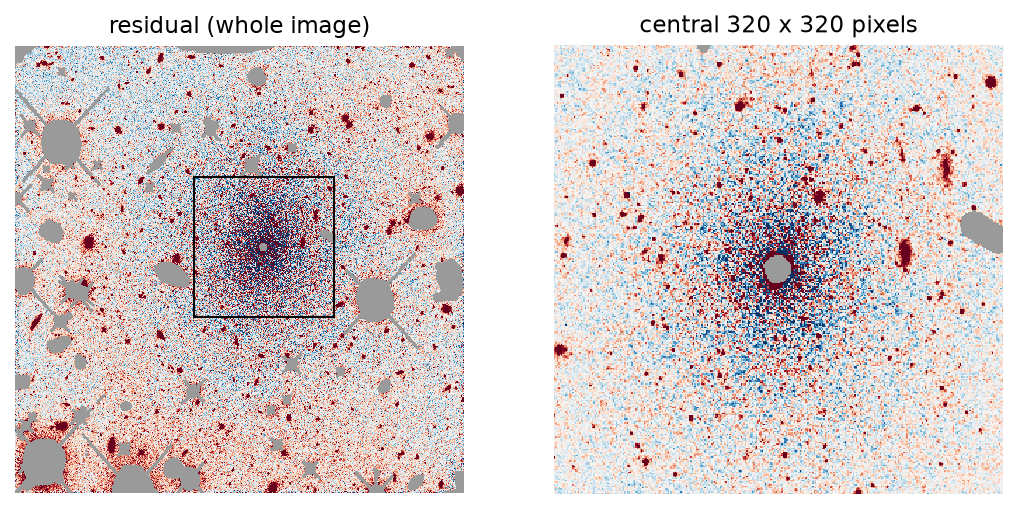
The residual, over the whole image and in the central 320 × 320 pixels. What is left is pixel noise, the galaxy's surface-brightness fluctuations, faint sources that the mask did not cover, and a small pattern at the very centre:
The fitted profile: intensity, ellipticity, position angle and the 4th-order (boxy/disky) amplitude against semi-major axis:

The image is in measured detector units; no calibrated surface brightness is implied.
Installation
python -m pip install elliprof
- Prebuilt wheels are provided for Linux, macOS and Windows.
- No Fortran compiler and no separate CFITSIO installation are needed.
Check the installation:
elliprof            # a short introduction
elliprof -v         # version (also --version)
elliprof -h         # full help: parameters, options and examples (also --help)
Updating
elliprof --check-update   # is a newer version on PyPI? (installs nothing)
elliprof --update         # install it (also: elliprof -u)
elliprof --update runs python -m pip install --upgrade elliprof with the same Python that runs elliprof. In a conda environment or a system Python that pip may not change ("externally managed"), update elliprof the way it was installed. After a fit in an interactive terminal, elliprof checks PyPI at most once a day, in the background, and prints one line when a newer version exists. It never installs anything by itself, never delays a fit, and stays silent offline and in scripts. Set ELLIPROF_NO_UPDATE_CHECK=1 to turn the check off.
Compatibility
Python and the operating system are separate requirements: a supported Python on an unsupported OS version still cannot install elliprof.
Supported Python: 3.6 through 3.14.
Supported macOS:
- Intel (x86_64): macOS 10.13 High Sierra or newer
- Apple Silicon (arm64): macOS 11 Big Sur or newer (the first macOS for Apple Silicon)
Supported Linux and Windows: see Platforms.
If pip says "No matching distribution found"
This message means pip found no elliprof build that fits your computer. The usual reasons are:
- a Python older than 3.6,
- an old pip that does not recognize current package names,
- an operating system older than the minimum above,
- a processor type with no elliprof build (for example 32-bit systems).
University and observatory computers often have an old Python or an old pip. First check what you have:
python --version
python -m pip --version
uname -m        # x86_64 = Intel, arm64 = Apple Silicon
sw_vers         # macOS only: the macOS version
On a Mac, Intel and Apple Silicon have different minimums: Intel needs macOS 10.13 or newer, Apple Silicon macOS 11 or newer.
If Python is 3.6–3.14, upgrade pip and try again:
python -m pip install --upgrade pip
python -m pip install elliprof
On Python 3.6, the newest pip is 21.3.1:
python -m pip install "pip==21.3.1"
python -m pip install elliprof
Very old pip versions do not recognize the platform tags of current wheels (pip 20.3 or newer is needed), and then report "No matching distribution found" even though a wheel exists.
If Python is older than 3.6, do not replace your system Python. Create a separate environment instead; this does not modify your existing astronomy environment. With conda:
conda create -n elliprof python=3.12 pip -y
conda activate elliprof
python -m pip install --upgrade pip
python -m pip install elliprof
Or, if a newer Python is already installed, with venv:
python3.12 -m venv elliprof-env
source elliprof-env/bin/activate
python -m pip install --upgrade pip
python -m pip install elliprof
(Python 3.12 is only an example; any version from 3.6 to 3.14 works.)
Several Pythons on one machine: prefer python -m pip install elliprof to pip install elliprof. On shared systems the pip command may belong to a different Python than the one you run. Naming the interpreter makes sure the package is installed for it:
python3.9 -m pip install elliprof
python3.12 -m pip install elliprof
NumPy 2 with an older Anaconda environment
If using elliprof prints messages such as "A module that was compiled using NumPy 1.x cannot be run in NumPy 2.x" or "_ARRAY_API not found", the problem is not elliprof. Its compiled part does not use NumPy. The messages come from older compiled packages already in that environment, usually numexpr or bottleneck, which pandas loads.
elliprof,elliprof -h,elliprof -vand command-line fits do not load pandas, so they are not affected.- The Python API returns the profile as a pandas table, so it needs pandas to work.
Update the old packages:
python -m pip install --upgrade numexpr bottleneck
(with Anaconda: conda update numexpr bottleneck). If they cannot be upgraded, go back to NumPy 1:
python -m pip install "numpy<2"
For a heavily aged environment, the safest solution is a fresh environment for elliprof (see above).
Quick start
elliprof n1234j.fits \
    RMSTAR \
    X0=514 Y0=514 \
    R0=10 R1=450 NR=25 NITER=5 \
    -o n1234.dat \
    -m n1234.prf
X0,Y0: initial galaxy centre, in pixels (see Coordinates).R0,R1: the range of semi-major axes to fit, in pixels (0 < R0 < R1).NR: number of isophotes (2–100), including R0 and R1, spaced evenly in r^¼ by default (RLAW=1for logarithmic,RLAW=0for linear spacing).NITER: number of fitting iterations (default 5;--niter 5is the same).RMSTAR: ignore star-like bright samples along each ellipse.-o n1234.dat: the profile, a text table with one set of values per isophote.-m n1234.prf: the galaxy model image (FITS). Giving-m FILEis all that is needed to compute and write the model.
The names follow the traditional ELLIPROF convention, .dat for the profile and .prf for the FITS model. They are only names: elliprof never checks or adds file extensions, so -m model.fits works just as well.
Add --csv n1234.csv for the profile as a CSV table, and --reg n1234.reg for the fitted ellipses as a DS9 region file (ds9 n1234j.fits -regions n1234.reg).
Profile files and images
elliprof produces two different kinds of result:
- The profile (
-o n1234.dat,--csv n1234.csv): numbers, one set per fitted isophote (radius, centre, intensity, position angle, ellipticity, harmonic terms, slope). The-ofile is ELLIPROF's native text profile format at full precision, with the run settings. It is a table of numbers, not an image. (Older elliprof documentation called this file.prf; in the traditional naming used here,.prfis the model image.) The CSV holds the same profile as a readable table. - Images (FITS, floating point: 32-bit from the single backend, 64-bit from the double one):
- model (
-m n1234.prf): the galaxy reconstructed from the fitted isophotes. It follows the fitted intensity, centre, ellipticity and position angle with radius, plus the harmonic terms chosen with--model-harmonics. It is relative to the subtracted sky, and it covers masked pixels too. The model is computed after the fit, so it never changes the profile. - prepared (
--prepared prepared.fits):mask × (science − sky), the image exactly as ELLIPROF fits it. - residual (
--residual residual.fits):mask × (science − sky − model). It is science − sky − model on good pixels and exactly 0 on masked ones. It uses the same model as-m;-mis not needed.
- model (
elliprof n1234j.fits \
    --mask n1234_mask.fits \
    --sky 1234.5 \
    X0=514 Y0=514 R0=10 R1=450 NR=25 \
    -o n1234.dat \
    -m n1234.prf \
    --prepared n1234_prepared.fits \
    --residual n1234_residual.fits
The MODEL keyword is no longer needed. Before version 0.1.4 the model needed both MODEL and -m FILE. Now -m FILE alone computes and writes the model. A bare MODEL in an old command is still accepted and has no effect (a note says so). MODEL=filename is an error: the model file is named only with -m.
All three images carry the header of the science image, including its WCS (CTYPE, CRPIX, CRVAL, CD/PC/CDELT, distortion terms), BUNIT and the other keywords. Only the cards that describe how the science data were stored are left out, such as BITPIX, BSCALE, BZERO and BLANK. The science, model, prepared and residual images therefore overlay exactly in DS9 and other WCS-aware software.
The residual shows the light that the smooth isophotal model does not describe. That can reveal dust, embedded disks, shells or tidal features, and it is also where fitting problems show up. It needs care in interpretation, because it depends on the fit, the mask and the model settings.
Images in FITS extensions
An image in an extension is selected with CFITSIO syntax, by name or number. Quote it, because brackets mean something to the shell:
elliprof 'galaxy.fits[SCI]' \
  X0=500 Y0=500 \
  R0=5 R1=200 NR=30 \
  -o galaxy.dat
Only the selected HDU is fitted, and its header and WCS go into the model, prepared and residual images. elliprof never falls back to another HDU; if the selected one is not a 2-D image, it stops with an error. --mask and --sky-image accept the same syntax, for example --mask 'products.fits[MASK]'. Tile-compressed images are read too.
Image data types, including 64-bit
The science image may be stored with any FITS data type: integers (BITPIX 8, 16, 32, 64) or floating point (BITPIX −32, −64), with BSCALE/BZERO applied. elliprof has two backends (--precision). single is the original ELLIPROF, in 32-bit floating point: pixel values are converted to the nearest 32-bit float as they are read, and the products are 32-bit. double is its port to IEEE-754 double precision: the double backend reads and processes 64-bit FITS data without reducing them to float32. Finite values are retained and calculations are performed using IEEE-754 double precision throughout the double path, subject to the representable range of the required intermediate and final mathematical operations; its products are 64-bit. auto (the default) uses double only for data single cannot hold: a science or sky image stored with BITPIX 64 or −64, or values beyond the 32-bit range or too small for it. The summary says which backend ran and why.
Sky and masks
Subtract a constant sky level:
elliprof galaxy.fits \
    --sky 1234.5 \
    X0=500 Y0=500 \
    R0=5 R1=200 NR=30
Subtract a 2-D sky (background) image:
elliprof galaxy.fits \
    --sky-image background.fits \
    X0=500 Y0=500 \
    R0=5 R1=200 NR=30
Mask stars and defects (and subtract a sky image):
elliprof galaxy.fits \
    --mask mask.fits \
    --sky-image background.fits \
    X0=500 Y0=500 \
    R0=5 R1=200 NR=30
The mask is logical: each pixel is either good (used) or bad (ignored). Its values are never used as weights: bad pixels become exactly 0 and good pixels keep their value. Two conventions are supported.
| Mask value | default: --mask-convention nonzero-good |
--mask-convention zero-good |
|---|---|---|
| 0 | bad (ignored) | good (used) |
| any other finite value (1, 2, −1, 0.5, …) | good | bad |
NaN, ±Inf, undefined (BLANK) |
bad | bad |
The default is ELLIPROF's convention, unchanged. zero-good is the opposite convention, common for bad-pixel maps, data-quality arrays and segmentation maps, where 0 marks a clean pixel:
elliprof galaxy.fits \
    --mask segmentation.fits --mask-convention zero-good \
    X0=500 Y0=500 R0=5 R1=200 NR=30
- Masks may be FITS images of any type (
BITPIX8, 16, 32, 64, −32, −64) or legacy.dmaskbitmaps (BITPIX = 1). The type is recognised from the file itself, not from its name. The test for 0 is made on the value as stored, at full precision. - A legacy
.dmaskbitmap always means 1 = good, so--mask-convention zero-goodis refused for it. - The mask and the sky image must have exactly the same dimensions as the science image. Nothing is ever resized, interpolated, cropped, padded, shifted or reprojected.
- The image is prepared as
mask × (science − sky), and ELLIPROF ignores pixels that are exactly 0.
Harmonic analysis
ELLIPROF measures departures from a perfect ellipse using Fourier terms around each fitted isophote.
By default it measures:
- 3rd order (
I3,A3): asymmetric departures from a pure ellipse. - 4th order (
I4,A4): the familiar boxy/disky isophotal term.A4near 0° (or 90°) means disky, near 45° boxy. The conversion to the conventional a4/a is on the Harmonic analysis page.
The 4th-order term is always measured.
Optional 6th order
ELLIPROF also supports an optional 6th-order isophotal Fourier term:
elliprof galaxy.fits \
    --sixth-order \
    X0=500 Y0=500 \
    R0=5 R1=200 NR=30
With --sixth-order, ELLIPROF measures the 6th-order term instead of the 3rd-order term. The 4th-order term is still measured.
For historical compatibility, the 6th-order measurement uses the same I3/A3 output fields; there are no separate I6/A6 columns.
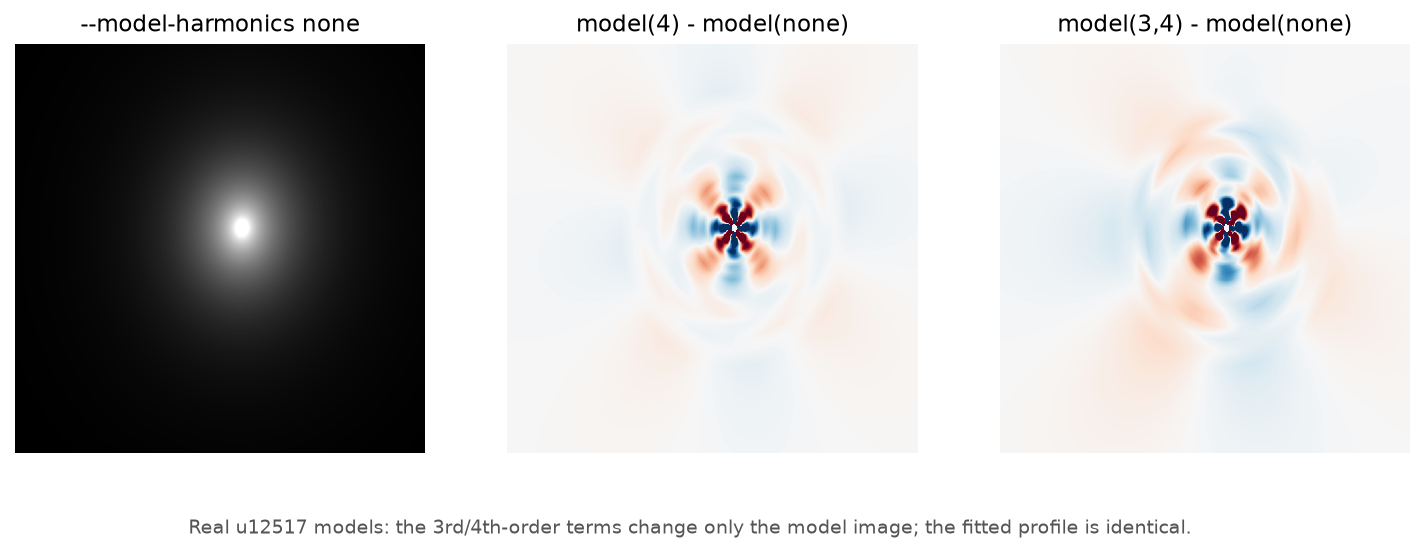
Harmonics in the model
Measuring a harmonic and including it in the model image (-m) are separate choices. --model-harmonics lists the measured terms to include:
--model-harmonics none      # pure ellipses
--model-harmonics 4         # the 4th-order term only
--model-harmonics 3,4       # both (the default)
With sixth-order mode:
--sixth-order --model-harmonics none
--sixth-order --model-harmonics 4
--sixth-order --model-harmonics 4,6     # both (default)
For a fixed choice of measured harmonic order, changing which terms are included in the model changes the model and residual, not the fitted profile.
The original COS3X= and COS4X= controls remain available for users familiar with the historical MONSTA/ELLIPROF interface. Their complete meanings, including median and measurement-only modes, are documented on the Harmonic analysis page, together with the exact conventions, the sixth-order details and tests.
6th-order model note: the original ELLIPROF model synthesis has a known limitation if the fitted position angle wraps through 0°/180°. The 6th-order measurement itself remains valid; see the harmonic-analysis documentation for details.
Python
from elliprof import run_elliprof

result = run_elliprof(
    image="galaxy.fits",
    x0=500,
    y0=500,
    r0=5,
    r1=200,
    nr=30,
)

print(result.profile)        # pandas DataFrame, one row per isophote
With a sky, a mask, 10 iterations, and a model image that contains only the 4th-order harmonic term:
result = run_elliprof(
    image="galaxy.fits", x0=500, y0=500, r0=5, r1=200, nr=30, niter=10,
    sky_image="background.fits", mask="mask.fits",
    prf_path="galaxy.dat",                  # the text profile (-o)
    model_path="galaxy.prf",                # the model image (-m)
    model_harmonics=(4,),                   # (), (3,), (4,) or (3, 4)
)
print(result.model_path)
model_path= alone computes and writes the model (model=True writes it under a default name). mask_convention="zero-good" selects the second mask convention.
model_harmonics= selects which measured harmonic terms are included in the model. sixth_order=True measures the 6th-order term instead of the 3rd. harmonic_mode="median" uses the median measured harmonic term in the model. The original cos3x= and cos4x= controls are also available for compatibility. The command line and the Python API run exactly the same backend with the same settings.
python -m elliprof is the same as the elliprof command. A worked example on a real HST image is in examples/u12517 and notebooks/elliprof_example.ipynb.
The profile
One row per isophote (result.profile, the CSV file, and the text profile written by -o):
| Column | Meaning |
|---|---|
Rmaj |
semi-major axis a of the isophote (pixels) |
x0, y0 |
fitted centre of the isophote (ELLIPROF coordinates, see below) |
I0 |
intensity of the isophote, in image units after sky subtraction |
alpha |
position angle of the major axis in degrees (0–180), counter-clockwise from the +y axis; the major axis lies at alpha + 90° counter-clockwise from +x |
ellip |
ellipticity, 1 − b/a |
I3, I4 |
amplitudes of the measured 3rd- and 4th-order isophotal Fourier terms, as fractions of I0 |
A3, A4 |
their phases in degrees (not position angles); see Harmonic analysis for the exact convention |
slope |
logarithmic slope d ln I / d ln r, from neighbouring isophotes (set to −2 where it would be positive) |
With --sixth-order, the historical I3/A3 fields contain the 6th-order measurement instead of the 3rd-order one.
Coordinates
X0, Y0 and the fitted x0, y0 are in ELLIPROF image coordinates: the centre of the pixel in FITS column i is at x = i − 0.5. This is half a pixel less than FITS or DS9 pixel numbering. The DS9 region files are already converted.
Command-line reference
| Keyword or option | Python | Meaning |
|---|---|---|
X0= Y0= |
x0 y0 |
initial centre (required) |
R0= R1= NR= |
r0 r1 nr |
radius range and number of isophotes (required) |
--sky V |
sky |
subtract a constant |
--sky-image F |
sky_image |
subtract an image |
--mask F |
mask |
logical mask; by default 0 (and NaN) = ignored, any other value = good |
--mask-convention zero-good |
mask_convention |
read the mask the other way: 0 = good, any nonzero value (and NaN) = ignored |
NITER=, --niter N |
niter |
iterations (default 5, at most 1000); each one samples every isophote once, fits it and moves the ellipse towards the isophote |
RLAW= |
rlaw |
radius spacing: 0 linear, 1 logarithmic, 2 r^¼ (default) |
LINEAR |
linear |
fit intensities instead of log intensities |
FIXCTR= |
fixctr |
0 free centres (default), 1 fixed at X0/Y0, 2 median centre |
ELLIP= |
ellip |
force this ellipticity |
RMSTAR |
rmstar |
along each ellipse, ignore samples brighter than median + 4 × (upper quartile − median); rejects bright outliers point by point, so mask larger contaminants |
-m F |
model_path (or model=True) |
compute the model image and write it as FITS |
--model-harmonics |
model_harmonics |
which measured harmonic terms are included in the model image |
--harmonic-mode |
harmonic_mode |
use each isophote's measured term or the median term in the model; see Harmonic analysis |
--sixth-order |
sixth_order |
measure the 6th-order term instead of the 3rd-order term |
COS3X= COS4X= |
cos3x cos4x |
original ELLIPROF harmonic controls; see Harmonic analysis |
TIE= |
tie |
smooth the parameters with radius |
AVG= |
avg |
average a (2n+1)² box when sampling |
GAIN= |
gain |
iteration gain (default 1) |
SCALE= |
scale |
arcsec/pixel, recorded in the profile |
SKY= |
elliprof_sky |
sky used only in ELLIPROF's de Vaucouleurs fit (it does not change the image) |
GC |
gc |
globular-cluster mode: circular annuli |
-o F --csv F --reg F |
prf_path csv_path reg_path |
profile (text), profile (CSV), DS9 regions |
--residual F |
residual_path |
residual image, mask × (science − sky − model) |
--verbose |
backend_verbose |
show ELLIPROF's full output (iteration tables, model progress) |
--prepared F |
prepared |
write the prepared image (after sky and mask) as ELLIPROF fits it |
--sc V |
– | deprecated alias of --sky |
--timeout S |
timeout |
stop a run after S seconds (default 1800; exit status 124) |
--check-update |
– | report whether a newer elliprof is on PyPI |
-u, --update |
– | install the newest elliprof with this Python's pip |
MODEL is no longer needed (it is accepted and ignored; MODEL=value is an error). OLD, EDIT and TV (interactive options) are not supported. Invalid input fails immediately with a clear message, and the program never waits for keyboard input.
A normal run prints a short summary: the image, sky and mask, the number of isophotes, notes about anything unusual, and the files written. The profile table is printed only when no profile file (-o, --csv) is asked for. --verbose shows ELLIPROF's full output. The legacy keyword VERBOSE still prints the parameters after every iteration, and also shows the full output. Errors are always shown in full. elliprof -h describes every parameter and option. elliprof -v prints the version, and elliprof --diagnostics prints version, platform and backend information for bug reports.
Platforms
| Platform | Status |
|---|---|
| Linux x86_64, aarch64 (manylinux_2_28) | Supported |
| Linux ppc64le, s390x (manylinux_2_28) | Supported (validated under QEMU emulation; not yet validated on native ppc64le/s390x hardware) |
| Linux riscv64 (manylinux_2_39) | Supported (validated under QEMU emulation; not yet validated on native riscv64 hardware) |
| Linux x86_64, aarch64 (musllinux_1_2, e.g. Alpine) | Supported |
| macOS 10.13+ x86_64 (Intel) | Supported |
| macOS 11+ arm64 (Apple Silicon) | Supported |
| Windows x86_64 | Supported |
| Windows ARM64 | Experimental: no wheel. CFITSIO builds, its Fortran ABI probe passes, and the backend builds and runs (LLVM flang); the full Python-package test cannot complete because PyPI has no Windows ARM64 wheel of pyerfa, which Astropy needs. Not an ELLIPROF numerical or backend failure |
Python 3.6 to 3.14. The Intel macOS wheel is built for macOS 10.13 throughout: the program, its CFITSIO, and the bundled Fortran runtime libraries. Supported means the wheel was installed and passed the installed-wheel and regression tests in a clean environment without a compiler or CFITSIO. On ppc64le, s390x and riscv64, PyPI has no numpy or pandas wheels, so install those from your Linux distribution or conda. 32-bit systems, Intel Macs older than macOS 10.13, and Apple Silicon Macs older than macOS 11 are not supported.
Development
brew install gcc cfitsio                  # or: apt install gfortran libcfitsio-dev
python -m pip install -e ".[test]"
make check                                # build and run all tests
The original numerical sources in src/original/ and include/ are never modified, and their SHA-256 hashes are checked on every test run. The test plan is in tests/TEST_PLAN.md.
Known limitations:
- NR ≤ 100.
- Isophotes smaller than about 3 pixels have too few samples.
GCmode assumes images at most 2048 pixels on a side.- The model image is written relative to the subtracted sky.
- With
--sixth-orderin the defaulteachmode, the original code can leave a few NaN pixels at the very centre of the model image, inside the innermost isophote.
Historical note: ELLIPROF was originally developed by John Tonry as part of MONSTA.
Maintained by Ehsan Kourkchi (Edwin Kay) Email: ekourkchi@gmail.com
License: MIT for the elliprof package code (see LICENSE). The original ELLIPROF sources and bundled libraries keep their own terms (see THIRD_PARTY_NOTICES.md).
Disclaimer. This software is provided as-is, without warranty of any kind. The maintainer is not responsible for software errors, incorrect scientific results, data loss, or decisions made using results produced by this software. Users are responsible for independently validating results for their scientific application.
1 maintainer

Metadata
1 maintainer
Release files for elliprof 0.2.0rc1
For a detailed explanation of source distributions (sdists) and built distributions (wheels), please see the package formats documentation.
Built distributions (wheels)
Total release size: 18.1 MB
Release files / elliprof-0.2.0rc1-py3-none-win_amd64.whl
| Download URL | elliprof-0.2.0rc1-py3-none-win_amd64.whl |
|---|---|
| Size | 2.5 MB |
| Tags | Python 3 Windows x86-64 |
|
SHA-256 checksum How to use checksums |
6a4a1eb7c9e832c8f8f33e53200ef867fee8fe3b792ec8c1c888d533d5d06712
|
|
BLAKE2b-256 checksum How to use checksums |
fc8f590f9ee175787d621a92bf7fc0ae136159ed9236855d683ffe15e7143c38
|
| Upload date | |
|
Uploaded using Trusted Publishing? What is trusted publishing? |
Yes |
| Uploaded via |
twine/7.0.0 CPython/3.13.14
|
Provenance
Provenance describes where a file came from. On PyPI, provenance is shared via attestations, which provide a verifiable record of the build or publishing details. View details, limitations and caveats.


PyPI Publish Attestation
PyPI verified that this artifact, at this checksum, originated from the publisher listed below.
Signed by GitHub Actions, verified by PyPI on Oct 8, 2026.
Transparency logRelease files / elliprof-0.2.0rc1-py3-none-musllinux_1_2_x86_64.whl
| Download URL | elliprof-0.2.0rc1-py3-none-musllinux_1_2_x86_64.whl |
|---|---|
| Size | 2.3 MB |
| Tags | Linux musl 1.2+ x86-64 Python 3 |
|
SHA-256 checksum How to use checksums |
73de51a0fb8eaf8f6f4ff9e992c183f5a6f031e7b40e3a4c1b310aa992b779cb
|
|
BLAKE2b-256 checksum How to use checksums |
e47a9371942b8b424df04e1016ed4d04e211d46c63b02c8ff8c351a43a7f253e
|
| Upload date | |
|
Uploaded using Trusted Publishing? What is trusted publishing? |
Yes |
| Uploaded via |
twine/7.0.0 CPython/3.13.14
|
Provenance
Provenance describes where a file came from. On PyPI, provenance is shared via attestations, which provide a verifiable record of the build or publishing details. View details, limitations and caveats.
PyPI Publish Attestation
PyPI verified that this artifact, at this checksum, originated from the publisher listed below.
Signed by GitHub Actions, verified by PyPI on Oct 8, 2026.
Transparency logRelease files / elliprof-0.2.0rc1-py3-none-musllinux_1_2_aarch64.whl
| Download URL | elliprof-0.2.0rc1-py3-none-musllinux_1_2_aarch64.whl |
|---|---|
| Size | 1.5 MB |
| Tags | Linux musl 1.2+ ARM64 Python 3 |
|
SHA-256 checksum How to use checksums |
d12d02ffbfeda9b7716d96191ad6ebed69780e8f466bb0a8039205caac6fa5f7
|
|
BLAKE2b-256 checksum How to use checksums |
dc87f1fa1adf59d0b1d1b1f5e0bb96fcd4c19e7a895e820a1e9a9e90e8134d45
|
| Upload date | |
|
Uploaded using Trusted Publishing? What is trusted publishing? |
Yes |
| Uploaded via |
twine/7.0.0 CPython/3.13.14
|
Provenance
Provenance describes where a file came from. On PyPI, provenance is shared via attestations, which provide a verifiable record of the build or publishing details. View details, limitations and caveats.
PyPI Publish Attestation
PyPI verified that this artifact, at this checksum, originated from the publisher listed below.
Signed by GitHub Actions, verified by PyPI on Oct 8, 2026.
Transparency logRelease files / elliprof-0.2.0rc1-py3-none-manylinux_2_38_riscv64.manylinux_2_39_riscv64.whl
| Download URL | elliprof-0.2.0rc1-py3-none-manylinux_2_38_riscv64.manylinux_2_39_riscv64.whl |
|---|---|
| Size | 1.4 MB |
| Tags | Linux glibc 2.38+ RISC-V 64 Linux glibc 2.39+ RISC-V 64 Python 3 |
|
SHA-256 checksum How to use checksums |
34dce1dc56edbc9e76b5fc77d86dae906ebb9396d4617e8393ebbe2d0efad5cc
|
|
BLAKE2b-256 checksum How to use checksums |
8c272bb607cdcfdbf50d9c6891a752b1b250dd805abe13a8aa669c8d0dd76b44
|
| Upload date | |
|
Uploaded using Trusted Publishing? What is trusted publishing? |
Yes |
| Uploaded via |
twine/7.0.0 CPython/3.13.14
|
Provenance
Provenance describes where a file came from. On PyPI, provenance is shared via attestations, which provide a verifiable record of the build or publishing details. View details, limitations and caveats.
PyPI Publish Attestation
PyPI verified that this artifact, at this checksum, originated from the publisher listed below.
Signed by GitHub Actions, verified by PyPI on Oct 8, 2026.
Transparency logRelease files / elliprof-0.2.0rc1-py3-none-manylinux_2_27_x86_64.manylinux_2_28_x86_64.whl
| Download URL | elliprof-0.2.0rc1-py3-none-manylinux_2_27_x86_64.manylinux_2_28_x86_64.whl |
|---|---|
| Size | 1.9 MB |
| Tags | Linux glibc 2.27+ x86-64 Linux glibc 2.28+ x86-64 Python 3 |
|
SHA-256 checksum How to use checksums |
2476583764eeeaaea2e337907d8686e0a7ffbd876aede39cbcd4c4a0ab985c7b
|
|
BLAKE2b-256 checksum How to use checksums |
20d9e9a8f590a35b3349c82c4414ca71fb85c00fd04b07239ce66c9ad6bad05e
|
| Upload date | |
|
Uploaded using Trusted Publishing? What is trusted publishing? |
Yes |
| Uploaded via |
twine/7.0.0 CPython/3.13.14
|
Provenance
Provenance describes where a file came from. On PyPI, provenance is shared via attestations, which provide a verifiable record of the build or publishing details. View details, limitations and caveats.
PyPI Publish Attestation
PyPI verified that this artifact, at this checksum, originated from the publisher listed below.
Signed by GitHub Actions, verified by PyPI on Oct 8, 2026.
Transparency logRelease files / elliprof-0.2.0rc1-py3-none-manylinux_2_27_s390x.manylinux_2_28_s390x.whl
| Download URL | elliprof-0.2.0rc1-py3-none-manylinux_2_27_s390x.manylinux_2_28_s390x.whl |
|---|---|
| Size | 1.6 MB |
| Tags | Linux glibc 2.27+ IBM System/390x Linux glibc 2.28+ IBM System/390x Python 3 |
|
SHA-256 checksum How to use checksums |
a71761f8d39e48160bc1ecaffd9421a29a9845c62dbe56cb730dcde3b6e83f75
|
|
BLAKE2b-256 checksum How to use checksums |
d53afde7158944721777a659102fea8bdd5343a5eb280c046ac97bf1452b84ee
|
| Upload date | |
|
Uploaded using Trusted Publishing? What is trusted publishing? |
Yes |
| Uploaded via |
twine/7.0.0 CPython/3.13.14
|
Provenance
Provenance describes where a file came from. On PyPI, provenance is shared via attestations, which provide a verifiable record of the build or publishing details. View details, limitations and caveats.
PyPI Publish Attestation
PyPI verified that this artifact, at this checksum, originated from the publisher listed below.
Signed by GitHub Actions, verified by PyPI on Oct 8, 2026.
Transparency logRelease files / elliprof-0.2.0rc1-py3-none-manylinux_2_27_ppc64le.manylinux_2_28_ppc64le.whl
| Download URL | elliprof-0.2.0rc1-py3-none-manylinux_2_27_ppc64le.manylinux_2_28_ppc64le.whl |
|---|---|
| Size | 1.7 MB |
| Tags | Linux glibc 2.27+ PowerPC 64-le Linux glibc 2.28+ PowerPC 64-le Python 3 |
|
SHA-256 checksum How to use checksums |
4df4325f8744e564c91c02093a84463e3281aa9ddc1befaeabff33b54017a9d5
|
|
BLAKE2b-256 checksum How to use checksums |
3bb84f716afab594123c132cf38b2079e029f2744cc2f1a3ef8725cbd0c5b9bc
|
| Upload date | |
|
Uploaded using Trusted Publishing? What is trusted publishing? |
Yes |
| Uploaded via |
twine/7.0.0 CPython/3.13.14
|
Provenance
Provenance describes where a file came from. On PyPI, provenance is shared via attestations, which provide a verifiable record of the build or publishing details. View details, limitations and caveats.
PyPI Publish Attestation
PyPI verified that this artifact, at this checksum, originated from the publisher listed below.
Signed by GitHub Actions, verified by PyPI on Oct 8, 2026.
Transparency logRelease files / elliprof-0.2.0rc1-py3-none-manylinux_2_27_aarch64.manylinux_2_28_aarch64.whl
| Download URL | elliprof-0.2.0rc1-py3-none-manylinux_2_27_aarch64.manylinux_2_28_aarch64.whl |
|---|---|
| Size | 1.3 MB |
| Tags | Linux glibc 2.27+ ARM64 Linux glibc 2.28+ ARM64 Python 3 |
|
SHA-256 checksum How to use checksums |
e80066a71d0c68a59ab0ae33df35649c62ec3936985c45c8a7883131c54ad7cb
|
|
BLAKE2b-256 checksum How to use checksums |
22a6963543c1ede9e23e44f363f98459b5fdf619496702c04972565638366b82
|
| Upload date | |
|
Uploaded using Trusted Publishing? What is trusted publishing? |
Yes |
| Uploaded via |
twine/7.0.0 CPython/3.13.14
|
Provenance
Provenance describes where a file came from. On PyPI, provenance is shared via attestations, which provide a verifiable record of the build or publishing details. View details, limitations and caveats.
PyPI Publish Attestation
PyPI verified that this artifact, at this checksum, originated from the publisher listed below.
Signed by GitHub Actions, verified by PyPI on Oct 8, 2026.
Transparency logRelease files / elliprof-0.2.0rc1-py3-none-macosx_11_0_arm64.whl
| Download URL | elliprof-0.2.0rc1-py3-none-macosx_11_0_arm64.whl |
|---|---|
| Size | 1.6 MB |
| Tags | Python 3 macOS 11.0+ ARM64 |
|
SHA-256 checksum How to use checksums |
681f30654bdd42b508ecf5cedebceadd2553f7e9326ee01fb0b63f9704eee96f
|
|
BLAKE2b-256 checksum How to use checksums |
1c6188c9ccd59b5d55b6fd622c9e64346bab4057201126e1a9a96ed21bae9987
|
| Upload date | |
|
Uploaded using Trusted Publishing? What is trusted publishing? |
Yes |
| Uploaded via |
twine/7.0.0 CPython/3.13.14
|
Provenance
Provenance describes where a file came from. On PyPI, provenance is shared via attestations, which provide a verifiable record of the build or publishing details. View details, limitations and caveats.
PyPI Publish Attestation
PyPI verified that this artifact, at this checksum, originated from the publisher listed below.
Signed by GitHub Actions, verified by PyPI on Oct 8, 2026.
Transparency logRelease files / elliprof-0.2.0rc1-py3-none-macosx_10_13_x86_64.whl
| Download URL | elliprof-0.2.0rc1-py3-none-macosx_10_13_x86_64.whl |
|---|---|
| Size | 2.3 MB |
| Tags | Python 3 macOS 10.13+ x86-64 |
|
SHA-256 checksum How to use checksums |
45cedadaf2b43c429f477dcda1d40b332c679c21869d0d6e5531822a605b2e1d
|
|
BLAKE2b-256 checksum How to use checksums |
17ab8597520dd99367426c4abb908d6126d3da176bf72b1bb8e97c8f8d6d65e7
|
| Upload date | |
|
Uploaded using Trusted Publishing? What is trusted publishing? |
Yes |
| Uploaded via |
twine/7.0.0 CPython/3.13.14
|
Provenance
Provenance describes where a file came from. On PyPI, provenance is shared via attestations, which provide a verifiable record of the build or publishing details. View details, limitations and caveats.
PyPI Publish Attestation
PyPI verified that this artifact, at this checksum, originated from the publisher listed below.
Signed by GitHub Actions, verified by PyPI on Oct 8, 2026.
Transparency logSecurity for elliprof 0.2.0rc1
Provenance
Provenance describes where a file came from. On PyPI, provenance is shared via attestations, which provide a verifiable record of the build or publishing details. View details, limitations and caveats.
Full provenance
All 10 files in this release have been uploaded with provenance metadata.
Attestation for elliprof-0.2.0rc1-py3-none-win_amd64.whl
PyPI Publish Attestation
PyPI verified that this artifact, at this checksum, originated from the publisher listed below.
Signed by GitHub Actions, verified by PyPI on Oct 8, 2026.
Transparency logA note on package security
PyPI is a repository for distributing packages, not a service for auditing them. While third-party security researchers and our staff do their best to detect and remove malicious packages, PyPI cannot guarantee the quality, security or suitability of any given package.
To learn more about protecting yourself from malicious actors, visit our package security documentation.














