
elm327obd: OBD2 car diagnostics in your terminal





A free, open-source OBD-II scanner for your terminal. Plug a cheap ELM327 WiFi adapter into your car, join its Wi-Fi, and get a live dashboard, check-engine-light trouble codes explained in plain English, readiness monitors, freeze frame, VIN/calibration info, manufacturer (Mode 22) PIDs, CSV logging and a raw command console. Runs on macOS and Linux.
Website: jeffcaldwell.ca/elm327-obd, with an online trouble-code lookup.
Features
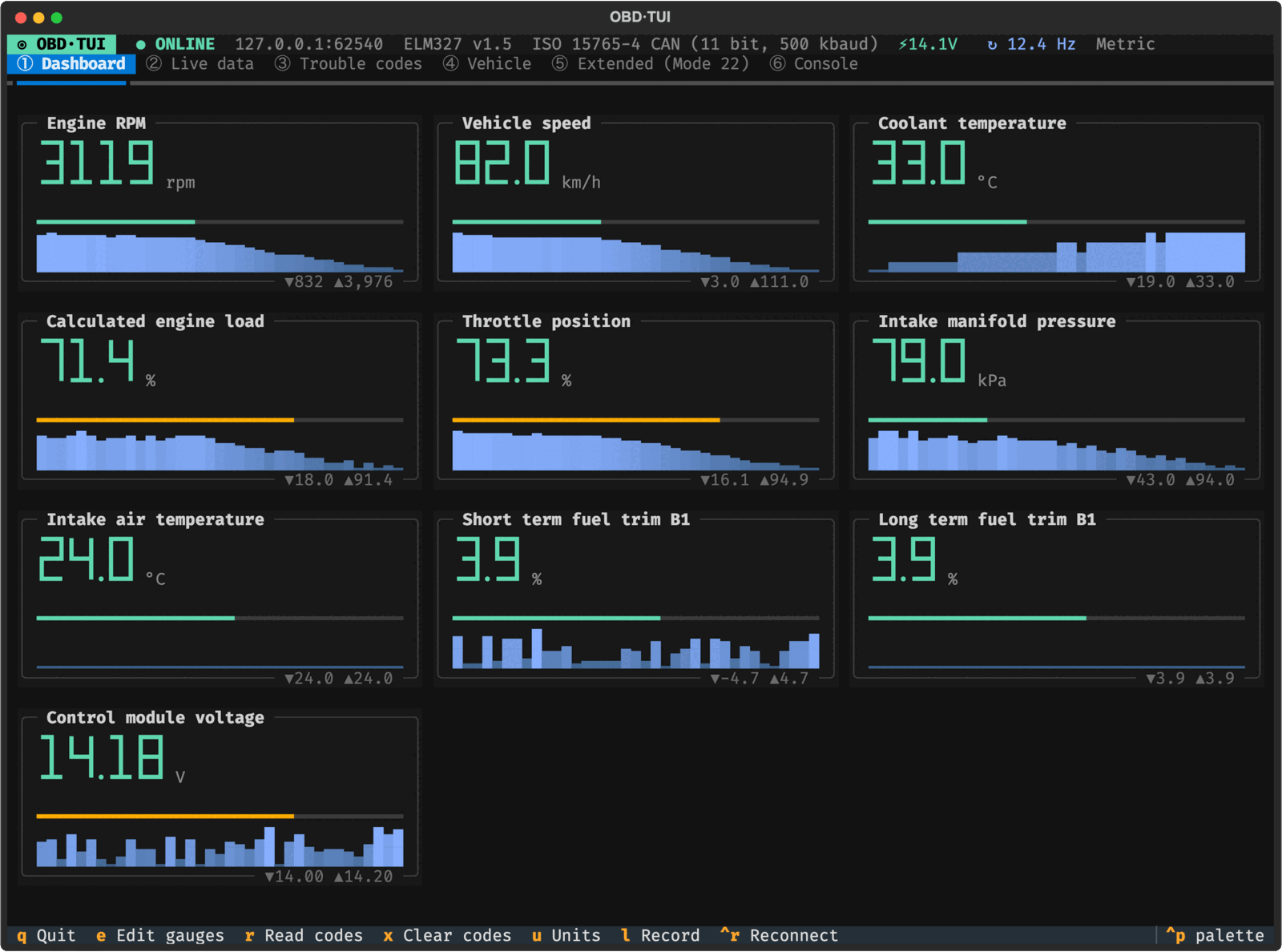
- Live dashboard of big-digit gauges with sparklines and min/max, refreshing at 10+ Hz over Wi-Fi
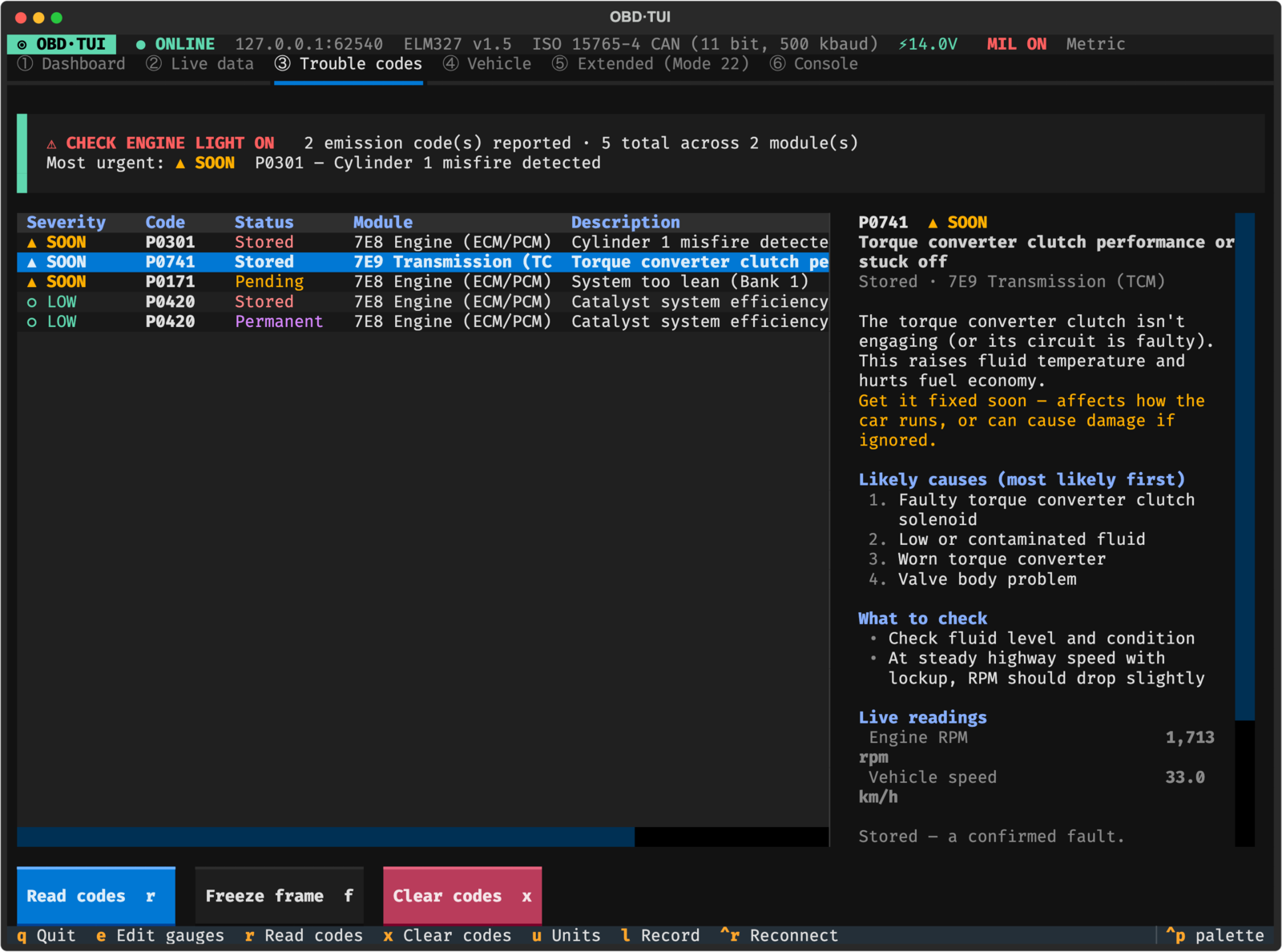
- Trouble codes (DTCs) from every module: stored, pending and permanent, sorted by severity, with likely causes, what to check and the sensors to watch
- Offline code lookup with no car connected:
obd explain P0420 - Readiness monitors, freeze frame, VIN, calibration IDs/CVNs: handy before an emissions inspection
- Mode 22 / UDS manufacturer PIDs with profiles for Ford, GM and Hyundai/Kia, plus a read-only DID scanner
- CSV data logging and a raw AT/OBD console that decodes replies and asks before risky commands
- Demo mode (
obd --demo) and a built-in ELM327 emulator for trying it or testing other tools without a car
Install
With pipx (or uv tool install elm327obd):
pipx install elm327obd
obd --demo            # try it without a car
Or from a clone, which also sets up the test suite:
git clone https://github.com/jeffcaldwellca/elm327-obd.git
cd elm327-obd
./setup.sh            # virtualenv + dependencies, links ~/.local/bin/obd
./setup.sh --test     # same, and runs the test suite
./setup.sh --no-link  # don't create the ~/.local/bin/obd symlink
Needs Python 3.11+ and internet access for the first install (it downloads Textual).
setup.sh is safe to re-run; it reuses .venv.
| Platform | Status |
|---|---|
| macOS | Tested (Python 3.14). brew install python if needed. |
| Linux | Tested in Debian 12 / Python 3.11 containers. Stock Debian/Ubuntu Python needs sudo apt install python3-venv; Ubuntu 22.04 ships 3.10, so install 3.11+ first (deadsnakes PPA or uv). The script tells you which case applies. |
| Windows | Not supported by setup.sh. WSL may work but is untested. |
Linux notes: the Wi-Fi name isn't shown on the connect screen (macOS-only lookup), and
adapter scanning uses ip route to find the router.
Manual equivalent: python3 -m venv .venv && .venv/bin/pip install -e ".[dev]",
then run .venv/bin/obd.
Connect to the adapter
- Plug the adapter into the OBD port (under the dash, driver side). Turn the ignition ON — engine running or not.
- On your computer, join the adapter's Wi-Fi network (commonly
WiFi_OBDII,V-LINK,OBDII, password none or12345678). Your computer will have no internet while joined — that's normal. - Run
obd. It scans the usual addresses (192.168.0.10:35000is most common) and connects automatically when it finds exactly one adapter. The last good address is remembered.
No adapter handy? obd --demo runs the whole app against a built-in simulated vehicle.
macOS Local Network permission
On recent macOS, the terminal app needs Local Network access to reach the adapter. If connection fails with "No route to host" / timeouts while you're definitely on the adapter's Wi-Fi: System Settings → Privacy & Security → Local Network → enable Terminal / iTerm / Ghostty (whichever you use), then restart it.
Commands
| Command | What it does |
|---|---|
obd |
Full-screen TUI (scan → connect) |
obd -a 192.168.0.10:35000 |
TUI, connect directly |
obd --demo |
TUI against the built-in emulator |
obd --imperial |
Start in °F / mph / psi (toggle anytime with u) |
obd scan |
List adapters found on the current network |
obd info [-a HOST:PORT] |
Print VIN, modules, calibration IDs, readiness (no TUI) |
obd codes [--clear] |
Print trouble codes with severity; optionally clear (asks first) |
obd explain P0171 P0420 |
Explain codes offline: severity, likely causes, what to check |
obd emulator [--port 35000] [--ignition-off] |
Run a fake ELM327 for other tools / testing |
Keys
| Key | Action |
|---|---|
1–6 |
Switch tabs (press esc first if you're typing in the console) |
e |
Choose dashboard gauges |
r / f / x |
Read codes / freeze frame / clear codes (clear always asks for confirmation) |
u |
Toggle metric ↔ imperial |
l |
Start/stop CSV recording of dashboard PIDs (→ ~/Documents/OBD Logs/) |
m |
Reset min/max markers |
ctrl+r |
Retry vehicle detection / reconnect |
ctrl+p |
Command palette |
q |
Quit |
Tabs
- Dashboard: big-digit gauges with colored level bars, sparklines and session min/max. The grid reflows to the terminal width. Gauges dim when their data goes stale.
- Live data: every supported Mode 01 PID with value, min/max and an inline trend. Requests are batched (up to 6 PIDs per CAN request), which usually gives 10+ Hz over Wi-Fi.
- Trouble codes: stored, pending and permanent codes from every module, sorted most urgent first, with the check-engine light (MIL) status and a freeze-frame snapshot. Selecting a code shows its severity, plain-English meaning, likely causes (most likely first), what to check, and live readings of the relevant sensors (e.g. fuel trims for a lean code).
- Vehicle: VIN, protocol, modules found, calibration IDs/CVNs, odometer (where supported) and the readiness monitors — useful before an emissions inspection.
- Extended (Mode 22): per-make profiles (Ford, GM, Hyundai/Kia) plus a read-only DID scanner to discover what identifiers a module answers.
- Console: send raw AT/OBD commands and see decoded replies (
010C→ "Engine RPM = 797 rpm").:monitorshows the poller's traffic. Commands that write to, actuate, reset or reflash a module (services 04, 08, 10, 11, 27, 28, 2C, 2E, 2F, 30, 31, 34–37, 3B, 3D, 85, 87) andATPPneed confirmation. Leaving the console restores the adapter's settings (headers, filters, formatting) so the live poller keeps working even after you've experimented.
Manufacturer profiles
Built-ins live in src/elm327obd/profiles/*.toml. Add or override your own in
~/.config/elm327obd/profiles/<name>.toml:
name = "My truck"

[[pid]]
name     = "Transmission fluid temp"
header   = "7E2"        # physical request address (ATSH)
rx       = "7EA"        # optional CAN receive filter (ATCRA)
command  = "221940"     # service 22 + DID
formula  = "A - 40"     # A,B,C… = bytes after the DID echo; b[i]; signed(), s16(), u16(), bit()
unit     = "°C"
min      = -40
max      = 150
verified = true
formula = "ascii" or "hex" shows the raw payload. Entries marked unverified in the
built-ins are community-sourced values, so check them against a known reading before you trust them.
The standard UDS identifiers (F190 VIN, F188/F195 software numbers) work on most 2010+
modules that support service 22.
Custom DTC descriptions (e.g. manufacturer P1xxx codes) go in ~/.config/elm327obd/dtc.csv
(code,description per line).
Trouble-code guidance
Every code gets a severity:
| Severity | Meaning |
|---|---|
| ■ STOP | Stop driving as soon as it's safe: risk of engine damage or unsafe operation (e.g. overheating, low oil pressure) |
| ▲ SOON | Get it fixed soon: affects how the car runs or can cause damage (e.g. misfires, lean/rich, transmission slipping) |
| ● MONITOR | Fix when convenient; keep an eye on it |
| ○ LOW | Mainly emissions/inspection; the car drives fine (e.g. catalyst efficiency, EVAP leaks, O2 heaters) |
Where the information comes from:
- Hand-written guidance (
src/elm327obd/dtc_guide.toml) for the ~200 codes people actually see: summary, likely causes, checks and which live PIDs to watch. - Estimated severity for every other code, from keywords in its name and its category, labelled "estimated" in the UI. Manufacturer-specific codes (P1xxx, B1xxx, U1xxx…) have no public definition, so look those up for your make.
- Names: your
~/.config/elm327obd/dtc.csvfirst, then the built-in list, then the python-OBD list (2,066 generic P0/P2/P3/U0 codes), then a description derived from the code's structure.
You can override or add guidance in ~/.config/elm327obd/dtc_guide.toml (same format as the
built-in file, e.g. for a manufacturer code your mechanic has explained). This is general
guidance, not a diagnosis for your specific vehicle. A flashing check-engine light always
means stop.
Third-party data and licensing
src/elm327obd/data/python_obd_dtc.tsv is derived from
python-OBD (GPL-2.0; license in
data/LICENSE.python-OBD). It was converted to TSV and 48 OCR typos ("lntake") were fixed;
regenerate it with tools/import_python_obd.py. This project is itself GPL-2.0-or-later, so
the two licenses are compatible. If you want to reuse this code under other terms, delete the
file: names then fall back to the built-in list and code categories.
What an ELM327 can't do: tuning
This tool reads data, reads/clears codes and sends raw diagnostic requests. It does not reflash or tune ECUs, and an ELM327 isn't suited to that job. Flashing needs a reliable high-throughput interface (J2534 / vendor tools), the manufacturer's security-access algorithms, and correct calibration files. A Wi-Fi dropout halfway through a flash can leave the module unusable. For tuning, use a platform-specific tool: HP Tuners (GM/Ford), Cobb/SCT (Ford), or the manufacturer's service software. FORScan (Ford) can also change module configuration with a suitable adapter.
Troubleshooting
- "Adapter only – vehicle not responding": the ignition is off, or the car's OBD port
isn't powered. Turn the key to ON and press
ctrl+r. - Slow or erratic data: many cheap clones are fake "v1.5"/"v2.1" chips. If batched requests fail, the app falls back to single-PID mode automatically (shown on the Vehicle tab).
- Mode 22 "no reply": wrong header or receive address for that module. Try the DID scanner
on
7E0,7E1,7E2, … - Other adapter address:
obd -a HOST:PORT. In macOS Wi-Fi details, the router field is usually the adapter's IP.
Development
.venv/bin/pytest            # protocol, decoders, client-vs-emulator, TUI + regression tests
.venv/bin/obd emulator      # fake adapter on 127.0.0.1:35000
Layout: transport.py (TCP + prompt handling) → protocol.py (frame / ISO-TP parsing) →
elm.py (client: Mode 01/02/03/04/07/09/0A/22) → tui/ (Textual app). pids.py, dtc.py
and profiles.py hold the decoders. The GitHub Pages site lives in docs/; after changing the
trouble-code guidance or names, regenerate its data with .venv/bin/python tools/build_site_data.py.
Contributing
Bug reports and pull requests are welcome. ELM327 clones vary a lot, so reports of which adapters and vehicles work (or don't) are especially useful: use the adapter / vehicle report issue template.
License
GPL-2.0-or-later. The bundled python-OBD code-name data is GPL-2.0 as well; see Third-party data and licensing.
1 maintainer

Metadata
1 maintainer
Release files for elm327obd 0.1.1
For a detailed explanation of source distributions (sdists) and built distributions (wheels), please see the package formats documentation.
Source distribution (sdist)
| File | Size | Uploaded | |
|---|---|---|---|
| elm327obd-0.1.1.tar.gz | 117.3 kB | Details |
Built distribution (wheel)
| File | Interpreter | ABI | Platform | Reset |
|---|---|---|---|---|
| elm327obd-0.1.1-py3-none-any.whl | Python 3 | none | any | Details |
Total release size: 231.1 kB
Release files / elm327obd-0.1.1.tar.gz
| Download URL | elm327obd-0.1.1.tar.gz |
|---|---|
| Size | 117.3 kB |
| Tags | Source |
|
SHA-256 checksum How to use checksums |
c518e5c16c1dd0f769541e1c51423288e39fd828d29fe6c57c51acfd0542304f
|
|
BLAKE2b-256 checksum How to use checksums |
6850065d945ec46f4bb75b05a569fa4300267151afc163491d017751b37d1e92
|
| Upload date | |
|
Uploaded using Trusted Publishing? What is trusted publishing? |
Yes |
| Uploaded via |
twine/7.0.0 CPython/3.13.14
|
Provenance
Provenance describes where a file came from. On PyPI, provenance is shared via attestations, which provide a verifiable record of the build or publishing details. View details, limitations and caveats.


PyPI Publish Attestation
PyPI verified that this artifact, at this checksum, originated from the publisher listed below.
Signed by GitHub Actions, verified by PyPI on Oct 1, 2026.
Transparency logRelease files / elm327obd-0.1.1-py3-none-any.whl
| Download URL | elm327obd-0.1.1-py3-none-any.whl |
|---|---|
| Size | 113.8 kB |
| Tags | Python 3 |
|
SHA-256 checksum How to use checksums |
131d0202eaa051e88efe75070e72bcbc3f33fa1b58c5bd6fb38b1730421d13d5
|
|
BLAKE2b-256 checksum How to use checksums |
6bd3cb758a21d74e7d9736a54176dcf5d08f917ee2609674a4c371fd8496947b
|
| Upload date | |
|
Uploaded using Trusted Publishing? What is trusted publishing? |
Yes |
| Uploaded via |
twine/7.0.0 CPython/3.13.14
|
Provenance
Provenance describes where a file came from. On PyPI, provenance is shared via attestations, which provide a verifiable record of the build or publishing details. View details, limitations and caveats.
PyPI Publish Attestation
PyPI verified that this artifact, at this checksum, originated from the publisher listed below.
Signed by GitHub Actions, verified by PyPI on Oct 1, 2026.
Transparency log












