
Strategies for Efficient Data Embedding
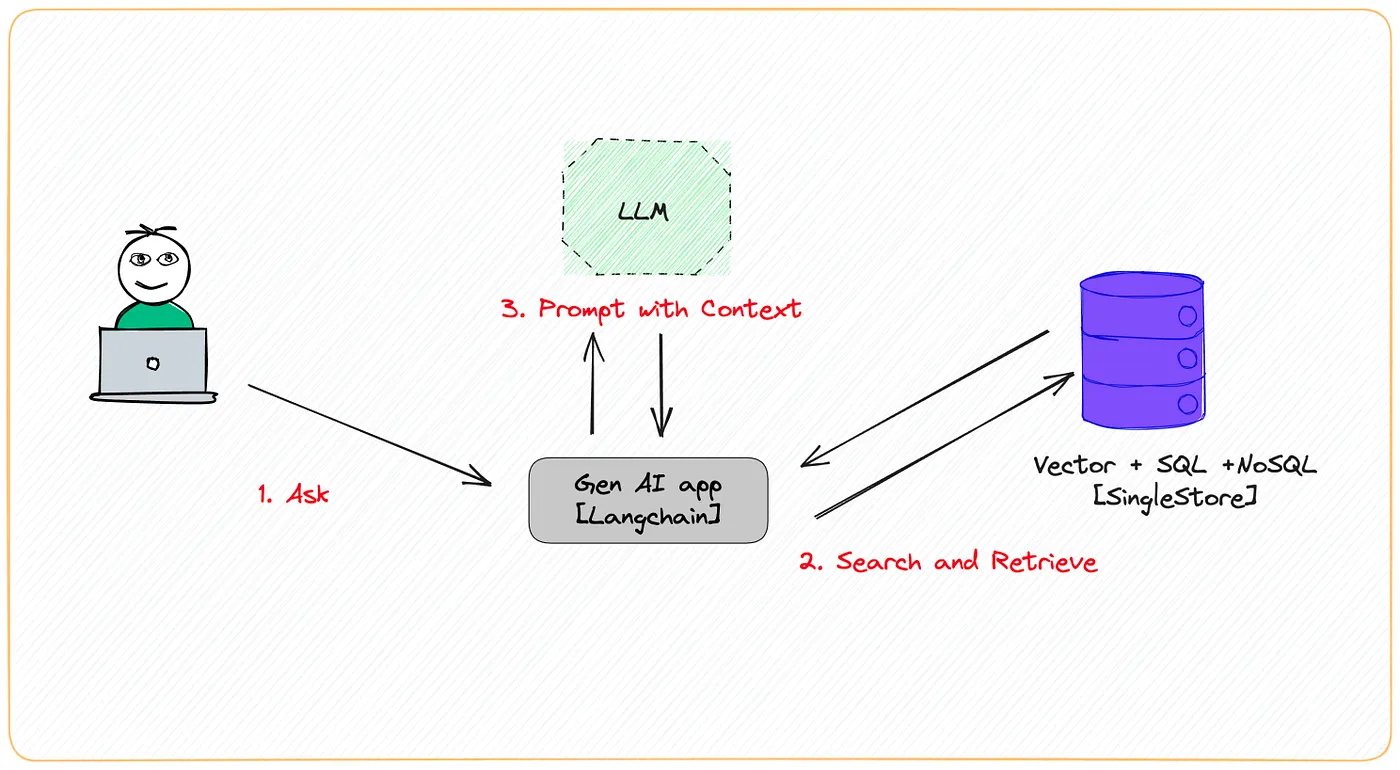
Two approaches to generating optimized embeddings in the Retrieval-Augmented Generation (RAG) Pattern
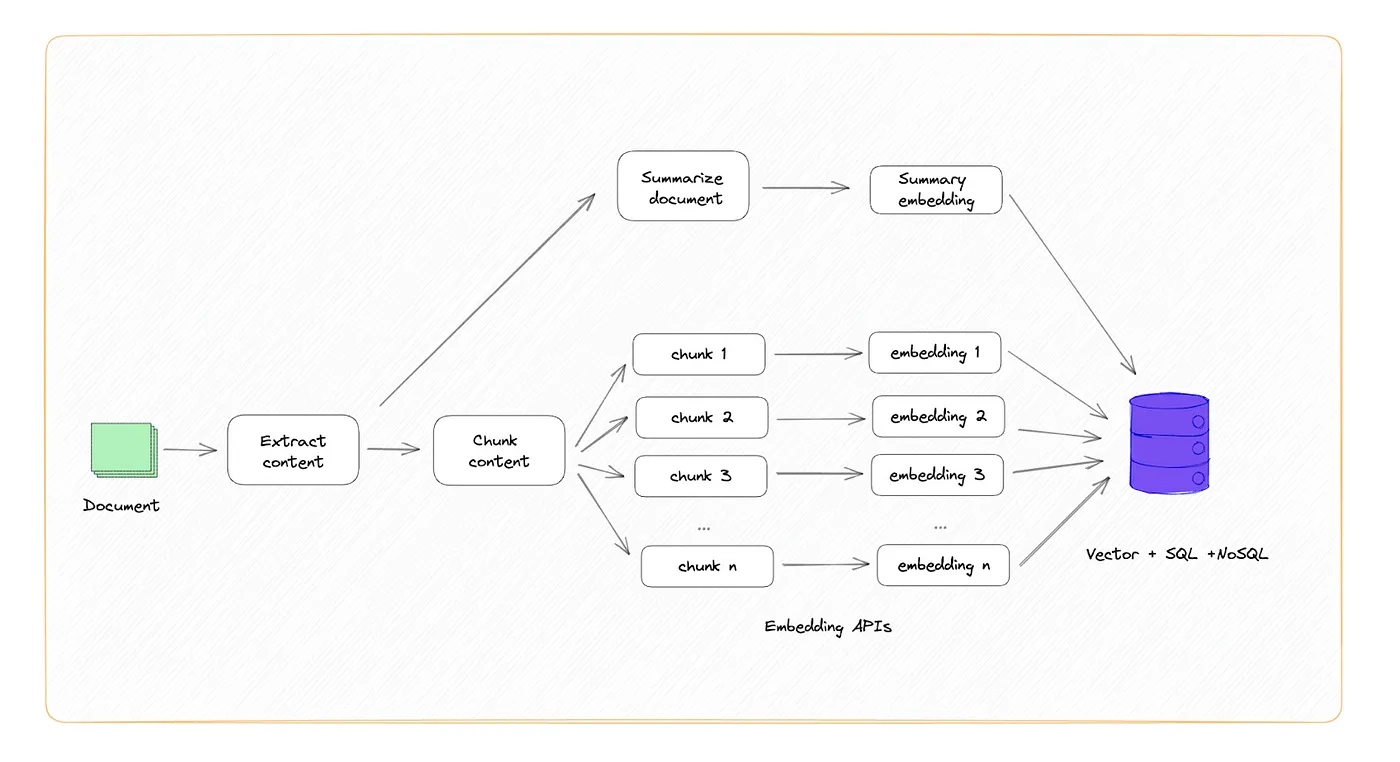
- Creating Embeddings Optimized for Accuracy
If you’re optimizing for accuracy, a good practice is to first summarize the entire document, then store the summary text and the embedding together. For the rest of the document, you can simply create overlapping chunks and store the embedding and the chunk text together.
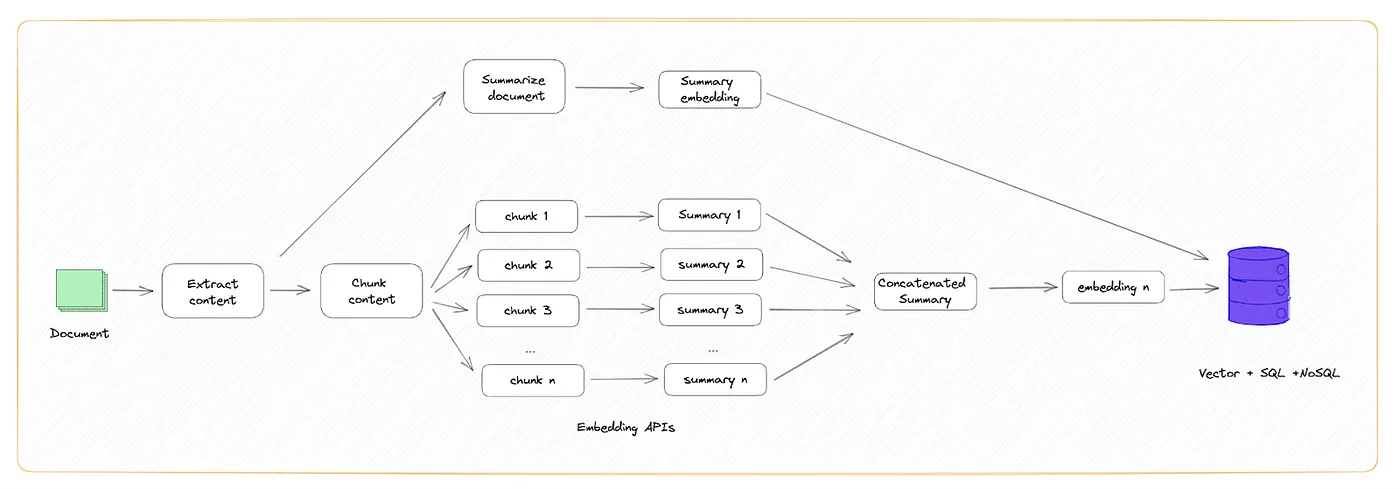
- Creating Embeddings Optimized for Storage
If you’re optimizing for space, you can chunk the data, summarize each chunk, concatenate all the summarizations, then create an embedding for the final summary.
Example
import os

from langchain_community.document_loaders import TextLoader
from langchain_openai import OpenAIEmbeddings
from langchain_text_splitters import CharacterTextSplitter
from langchain.docstore.document import Document
from langchain_community.vectorstores import FAISS
from openai import OpenAI

from embedding_optimizer.optimizer import EmbeddingOptimizer

# Set your OpenAI API Key
os.environ['OPENAI_API_KEY'] = ''

# Load your document
raw_document = TextLoader('test_data.txt').load()

# If your document is long, you might want to split it into chunks
text_splitter = CharacterTextSplitter(separator=".", chunk_size=1000, chunk_overlap=0)
documents = text_splitter.split_documents(raw_document)

embedding_optimizer = EmbeddingOptimizer(openai_api_key='')

# documents_optimizer = embedding_optimizer.optimized_documents_for_storage(raw_document[0].page_content, documents)
documents_optimizer = embedding_optimizer.optimized_documents_for_accuracy(raw_document[0].page_content, documents)

# Embed the document chunks and the summary
embedding_model = OpenAIEmbeddings(openai_api_key=os.environ["OPENAI_API_KEY"])

db = FAISS.from_documents(documents_optimizer, embedding_model)

# query it
query = "What motivated Alex to create the Function of Everything (FoE)?"
docs = db.similarity_search(query)

print(docs[0].page_content)
Additionally, there are two functions available for summarizing extensive texts via OpenAI
First method: summarize each part independently The first solution would be to split the text into multiple chunks. Then for each chunk, we would ask the API to summarize this part of the text. Then we would join together all the sub-summaries.
from embedding_optimizer.optimizer import EmbeddingOptimizer

summary_optimizer = EmbeddingOptimizer(openai_api_key='')
summary = summary_optimizer.summarize_each_part_independently("What motivated Alex to create the Function of Everything (FoE)?", chunk_size=100)
Second method: summarize the text incrementally For this second solution, our main goal is to solve the problems encountered with our first solution. We want to have a more coherent and structured summary. Our solution is to build our summary progressively. Instead of creating multiple sub-summaries and then combining them into one big summary, for each prompt, we are going to provide a chunk of text to summarize and the last 500 tokens of our summary. Then we will ask OpenAI to summarize the chunk of text and add it organically to the current summary.
from embedding_optimizer.optimizer import EmbeddingOptimizer

summary_optimizer = EmbeddingOptimizer(openai_api_key='')
summary = summary_optimizer.summarize_text_incrementally("What motivated Alex to create the Function of Everything (FoE)?", chunk_size=100)
Installation
$ pip install embedding-optimizer
Also can be found on pypi
How can I use it?
- Install the package by pip package manager.
- After installing, you can use it and call the library.
Issues
Feel free to submit issues and enhancement requests.
Contributing
Please refer to each project's style and contribution guidelines for submitting patches and additions. In general, we follow the "fork-and-pull" Git workflow.
- Fork the repo on GitHub
- Clone the project to your own machine
- Update the Version inside init.py
- Commit changes to your own branch
- Push your work back up to your fork
- Submit a Pull request so that we can review your changes
1 maintainer

Metadata
1 maintainer
Release files for embedding-optimizer 0.0.6
For a detailed explanation of source distributions (sdists) and built distributions (wheels), please see the package formats documentation.
Source distribution (sdist)
| File | Size | Uploaded | |
|---|---|---|---|
| embedding_optimizer-0.0.6.tar.gz | 5.7 kB | Details |
Built distribution (wheel)
| File | Interpreter | ABI | Platform | Reset |
|---|---|---|---|---|
| embedding_optimizer-0.0.6-py3-none-any.whl | Python 3 | none | any | Details |
Total release size: 11.9 kB
Release files / embedding_optimizer-0.0.6.tar.gz
| Download URL | embedding_optimizer-0.0.6.tar.gz |
|---|---|
| Size | 5.7 kB |
| Tags | Source |
|
SHA-256 checksum How to use checksums |
0a402228f92cce4d1eabbc7f317cd79795b4c50abd0e4f2c2bbee0e0748db6d2
|
|
BLAKE2b-256 checksum How to use checksums |
143a99dbeb106d4425eaf88e2a8d3d5568db334901da6e5b9a9ff5576078b766
|
| Upload date | |
|
Uploaded using Trusted Publishing? What is trusted publishing? |
No |
| Uploaded via |
twine/5.0.0 CPython/3.11.4
|
Release files / embedding_optimizer-0.0.6-py3-none-any.whl
| Download URL | embedding_optimizer-0.0.6-py3-none-any.whl |
|---|---|
| Size | 6.2 kB |
| Tags | Python 3 |
|
SHA-256 checksum How to use checksums |
a7918d9fcd00eadc2747862f3c234eddde77b805dc90eddfcf167ad27e9a85cd
|
|
BLAKE2b-256 checksum How to use checksums |
6d3e5c8cdc119f01339987de7ec747cc6c0cd60df2b59da5300d9ab3ae295d0d
|
| Upload date | |
|
Uploaded using Trusted Publishing? What is trusted publishing? |
No |
| Uploaded via |
twine/5.0.0 CPython/3.11.4
|














