

✦ ember
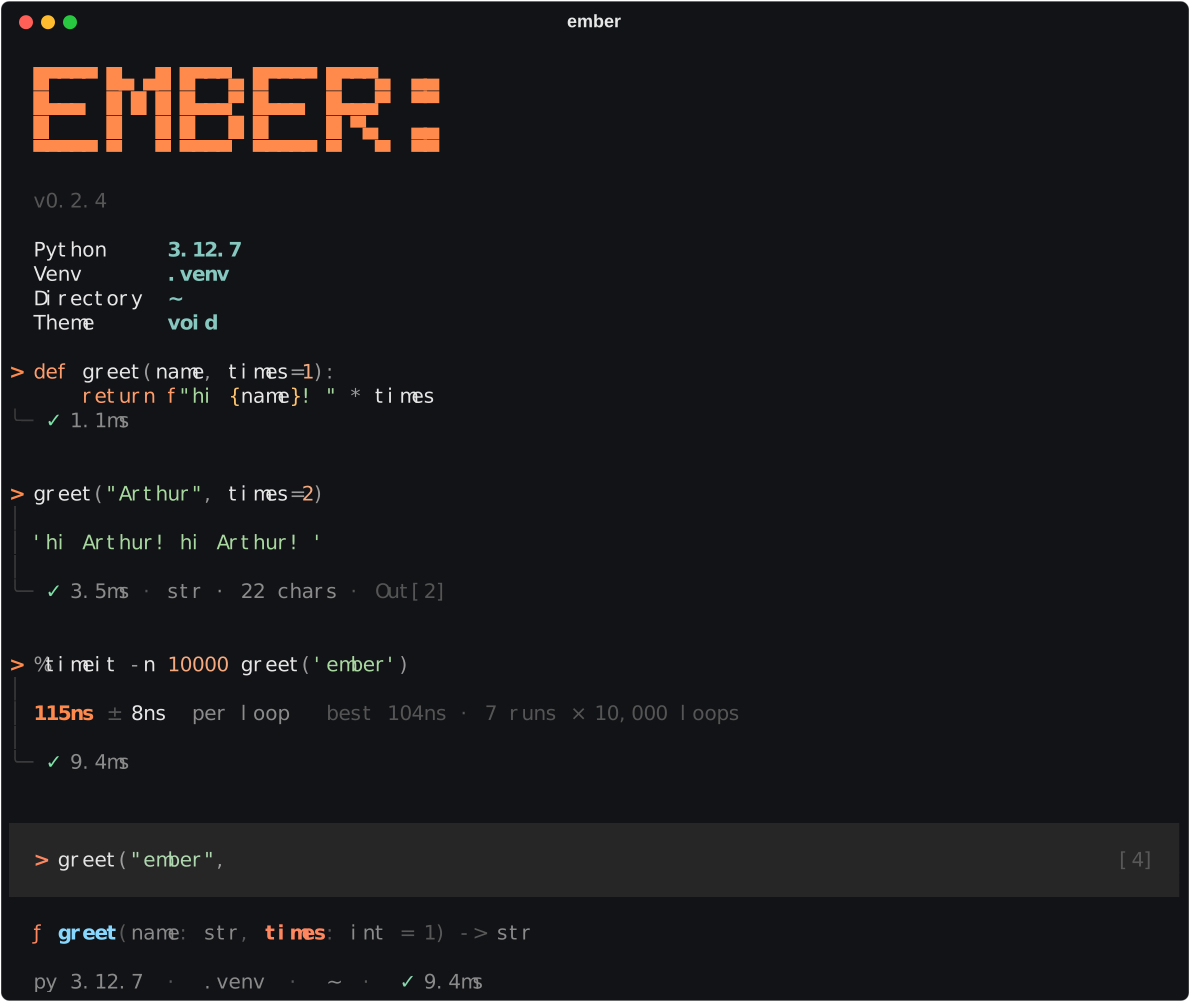
A modern, beautiful interactive Python shell. IPython's power — magics, history, debugging, extensions — rebuilt around a calm terminal UI.




See it in action
Why ember
- Readable sessions. Every cell is a block: your code, its output on a rail, and a footer with status, time, result type and
Out[N]. - Help while you type. Completions with type icons, and live signatures with declared and inferred types —
greet(name: str, times: int = 1) -> str— even for functions without annotations. - Everything you use IPython for. 85 magics,
obj?,!shell, session history in SQLite,%autoreload,%debug,%timeit,%prun, top-levelawait, GUI event loops… - Runs IPython code.
get_ipython(),IPython.display, custom magics and IPython extensions likeline_profilerwork unchanged. - Feels good. Paste code straight from docs (
>>>prompts are stripped), Shift+Enter for new lines, vi or emacs keys, three themes, two layouts.
Install
pipx install ember-shell     # the `ember` command everywhere, isolated from your projects
pip install ember-shell      # or into the current environment
The package is ember-shell on PyPI; the command is ember. To try the latest unreleased code: pip install git+https://github.com/arthurdaquinosilva/ember.git.
Then run ember. Requires Python 3.10+ on macOS or Linux.
Tip: ember runs code with the Python it's installed into. To work with a project's packages, install ember inside that project's virtual environment.
Quick tour
> import json
> data = {"name": "ember", "tags": ["repl", "python"]}
> data?                     # inspect any object (?? shows the source)
> json.*load*?              # wildcard name search
> files = !ls               # shell output as a list with .grep() / .fields()
> %timeit sorted(range(1000))
> %history -g json          # search history across sessions
> %xmode verbose            # tracebacks with local variables
> %debug                    # debugger on the last error (or breakpoint() in your code)
> %help                     # every key, syntax and magic
| Enter | run the cell (adds a newline while a block is unfinished) |
| Shift+Enter · Alt+Enter · Ctrl+J | insert a newline |
| Tab / Shift+Tab | complete · indent / dedent |
| → | accept the grey suggestion from history |
| ↑ ↓ · Ctrl+R | history · search history |
| Ctrl+O | edit the cell in $EDITOR |
| Ctrl+C · Ctrl+D | clear input / interrupt · exit |
Shift+Enter needs a terminal that reports modified keys (iTerm2, WezTerm, Ghostty, kitty, xterm; inside tmux set extended-keys on). Alt+Enter and Ctrl+J work everywhere.
Documentation
| Guide | What's inside |
|---|---|
| Features | The interface, input syntax, display, errors & debugging, history, shell, GUI and completion |
| Magic reference | All 85 magics with options (generated from the code) |
| Configuration | config.toml, layouts and themes, profiles, startup files, command-line options |
| IPython compatibility | get_ipython(), custom magics, extensions, display protocol, what's different |
| Releasing | How versions are published to PyPI |
Command line
ember                        # interactive
ember script.py args…        # run a file (-i to stay interactive afterwards)
ember -m package.module      # run a module
ember -c "print('hi')"       # run a command
ember --profile work --vi --theme nebula --no-startup
Development
git clone https://github.com/arthurdaquinosilva/ember.git && cd ember
python -m venv .venv && .venv/bin/pip install -e '.[dev]'
.venv/bin/python -m pytest              # unit tests
.venv/bin/python scripts/gen_magic_docs.py   # regenerate docs/magics.md
.venv/bin/python scripts/screenshot.py       # re-record docs/assets/demo.svg
ember is built on prompt_toolkit (input and layout), Rich (output), Jedi (completion and signatures) and Pygments (highlighting).
Known limits
- Terminal only — no Jupyter kernel; images (
Image,SVG,%matplotlib inline) show a placeholder. !cmdstreams through a pipe, so fully interactive programs (vim, less) should run outside ember.- With the real IPython installed, ember leaves it untouched, so libraries calling IPython's own
get_ipython()see no shell.
License
MIT © Arthur D'Aquino
1 maintainer

Metadata
1 maintainer
Release files for ember-shell 0.2.1
For a detailed explanation of source distributions (sdists) and built distributions (wheels), please see the package formats documentation.
Source distribution (sdist)
| File | Size | Uploaded | |
|---|---|---|---|
| ember_shell-0.2.1.tar.gz | 96.5 kB | Details |
Built distribution (wheel)
| File | Interpreter | ABI | Platform | Reset |
|---|---|---|---|---|
| ember_shell-0.2.1-py3-none-any.whl | Python 3 | none | any | Details |
Total release size: 195.2 kB
Release files / ember_shell-0.2.1.tar.gz
| Download URL | ember_shell-0.2.1.tar.gz |
|---|---|
| Size | 96.5 kB |
| Tags | Source |
|
SHA-256 checksum How to use checksums |
0bb48887e7093c80af76d13e9f6759eff3332ef2f136610d3f47a65ef2c0f782
|
|
BLAKE2b-256 checksum How to use checksums |
f7f30c8419b5ace7f6bd6f9fb3f13f1fb9d018c796959f40b20a4005571925f5
|
| Upload date | |
|
Uploaded using Trusted Publishing? What is trusted publishing? |
Yes |
| Uploaded via |
twine/7.0.0 CPython/3.13.14
|
Provenance
Provenance describes where a file came from. On PyPI, provenance is shared via attestations, which provide a verifiable record of the build or publishing details. View details, limitations and caveats.


PyPI Publish Attestation
PyPI verified that this artifact, at this checksum, originated from the publisher listed below.
Signed by GitHub Actions, verified by PyPI on Sep 17, 2026.
Transparency logRelease files / ember_shell-0.2.1-py3-none-any.whl
| Download URL | ember_shell-0.2.1-py3-none-any.whl |
|---|---|
| Size | 98.6 kB |
| Tags | Python 3 |
|
SHA-256 checksum How to use checksums |
13bd448b992732d17c35a20554fac0748278950222f27c281792c57d1f1eca9b
|
|
BLAKE2b-256 checksum How to use checksums |
078a6c457cf5c708c6f8e618fe5e652c5f41d81a6368bd1b454a8fd5bcfb333f
|
| Upload date | |
|
Uploaded using Trusted Publishing? What is trusted publishing? |
Yes |
| Uploaded via |
twine/7.0.0 CPython/3.13.14
|
Provenance
Provenance describes where a file came from. On PyPI, provenance is shared via attestations, which provide a verifiable record of the build or publishing details. View details, limitations and caveats.
PyPI Publish Attestation
PyPI verified that this artifact, at this checksum, originated from the publisher listed below.
Signed by GitHub Actions, verified by PyPI on Sep 17, 2026.
Transparency log













