
Interactive widget for embedding comparison

Project description
Emblaze - Interactive Embedding Comparison
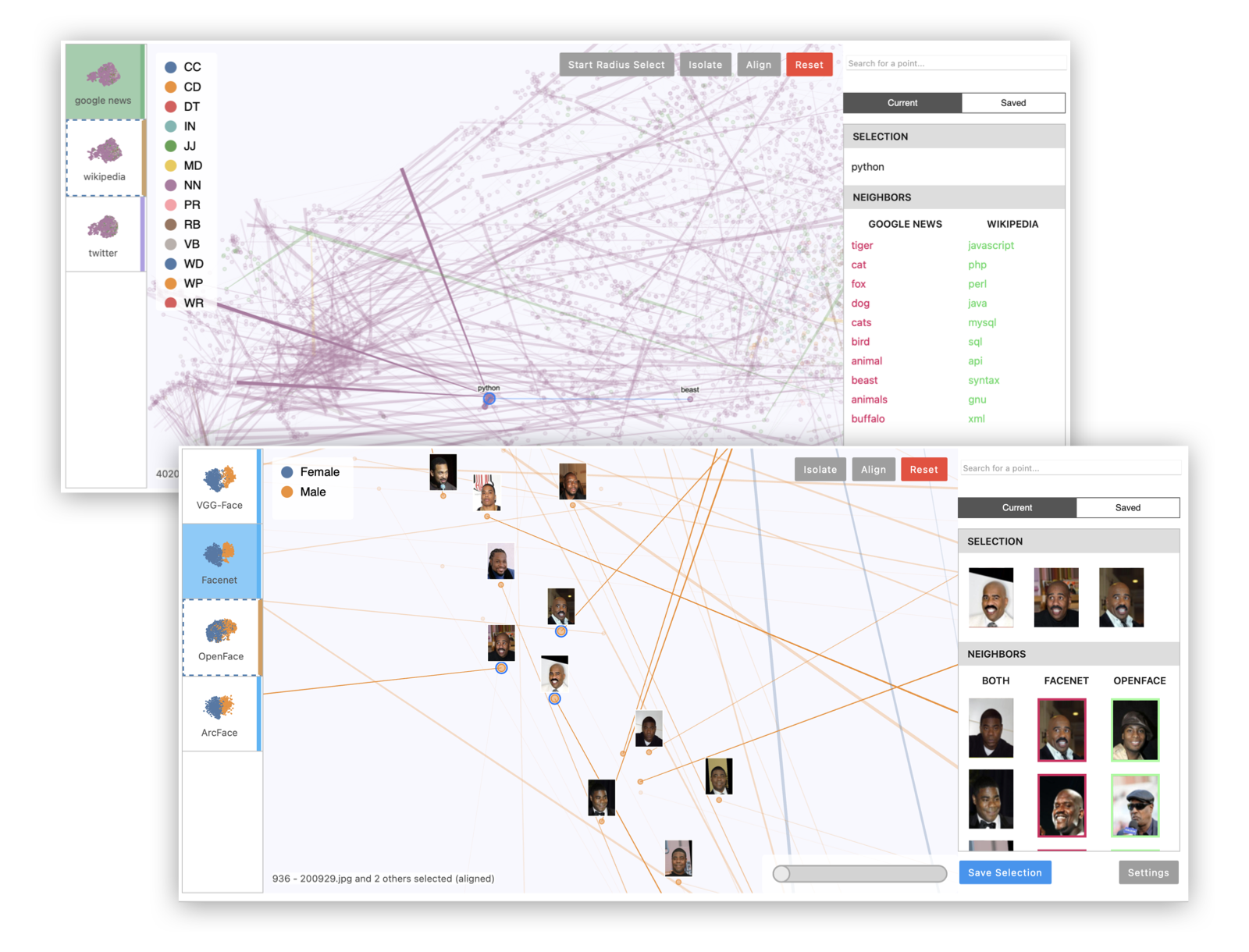
Emblaze is a Jupyter notebook widget for visually comparing embeddings using animated scatter plots. It bundles an easy-to-use Python API for performing dimensionality reduction on multiple sets of embedding data (including aligning the results for easier comparison), and a full-featured interactive platform for probing and comparing embeddings that runs within a Jupyter notebook cell. Read the documentation >
Installation
Compatibility Note: Note that this widget has been tested using Python >= 3.7. If you are using JupyterLab, please make sure you are running version 3.0 or higher. The widget currently does not support displaying in the VS Code interactive notebook environment.
Install Emblaze using pip:
pip install emblaze
The widget should work out of the box when you run jupyter lab (see example code below).
Jupyter Notebook note: If you are using Jupyter Notebook 5.2 or earlier, you may also need to enable the nbextension:
jupyter nbextension enable --py --sys-prefix emblaze
Examples
Please see examples/example.ipynb to try using the Emblaze widget on the Boston housing prices or MNIST (TensorFlow import required) datasets.
Example 1: Multiple projections of the same embedding dataset. This can reveal areas of variation in the dimensionality reduction process, since tSNE and UMAP are randomized algorithms.
import emblaze
from emblaze.utils import Field, ProjectionTechnique

# X is an n x k array, Y is a length-n array
X, Y = ...

# Represent the high-dimensional embedding
emb = emblaze.Embedding({Field.POSITION: X, Field.COLOR: Y})
# Compute nearest neighbors in the high-D space (for display)
emb.compute_neighbors(metric='cosine')

# Generate UMAP 2D representations - you can pass UMAP parameters to project()
variants = emblaze.EmbeddingSet([
    emb.project(method=ProjectionTechnique.UMAP) for _ in range(10)
])
# Compute neighbors again (to indicate that we want to compare projections)
variants.compute_neighbors(metric='euclidean')

w = emblaze.Viewer(embeddings=variants)
w
Example 2: Multiple embeddings of the same data from different models. This is useful to see how different models embed data differently.
# Xs is a list of n x k arrays corresponding to different embedding spaces
Xs = ...
# Y is a length-n array of labels for color-coding
Y = ...
# List of strings representing the name of each embedding space (e.g.
# "Google News", "Wikipedia", "Twitter"). Omit to use generic names
embedding_names = [...]

# Make high-dimensional embedding objects
embeddings = emblaze.EmbeddingSet([
    emblaze.Embedding({Field.POSITION: X, Field.COLOR: Y}, label=emb_name)
    for X, emb_name in zip(Xs, embedding_names)
])
embeddings.compute_neighbors(metric='cosine')

# Make aligned UMAP
reduced = embeddings.project(method=ProjectionTechnique.ALIGNED_UMAP)

w = emblaze.Viewer(embeddings=reduced)
w
Example 3: Visualizing image data with image thumbnails. The viewer will display image previews for each point as well as its nearest neighbors. (For text data, you can use TextThumbnails to show small pieces of text next to the points.)
# images is an n x 100 x 100 x 3 numpy array of 100x100 RGB images (values from 0-255)
images = ...
thumbnails = emblaze.ImageThumbnails(images)
w = emblaze.Viewer(embeddings=embeddings, thumbnails=thumbnails)
w
You can also visualize embeddings with multimodal labels (i.e. where some points have text labels and others have image labels) by initializing an emblaze.CombinedThumbnails instance with a list of other Thumbnails objects to combine.
See the documentation for more details on defining and configuring comparisons with Emblaze.
Development Installation
Clone repository, then install dependencies. (Note: you may find it easier to install SciPy using conda first - conda install scipy)
pip install -r requirements.txt
Install the python package.
pip install -e .
In one terminal, cd into the client directory and then run vite. This will start a live reload service for the frontend. In another terminal, start a jupyter lab server and open a notebook to start the Emblaze viewer. When you edit the frontend code, you will need to reload the JupyterLab webpage to see the results. When you edit the backend code, you will need to restart the Jupyter Python kernel.
Building Documentation
Install pdoc3: pip install pdoc3
Build documentation:
pdoc --html --force --output-dir docs --template-dir docs/templates emblaze
Deployment
Bump the widget version in emblaze/_version.py, package.json, and pyproject.toml if applicable. Then build the notebook widgets:
vite build
Run the packaging script to generate the wheel for distribution:
pip install --upgrade build twine
python -m build
Upload to PyPI (replace <VERSION> with the version number):
twine upload dist/emblaze-<VERSION>*
Development Notes
- Svelte transitions don't seem to work well as they force an expensive re-layout operation. Avoid using them during interactions.
Release history Release notifications | RSS feed


Download files
Download the file for your platform. If you're not sure which to choose, learn more about installing packages.
Source Distribution
Built Distribution
Filter files by name, interpreter, ABI, and platform.
If you're not sure about the file name format, learn more about wheel file names.
Copy a direct link to the current filters
File details
Details for the file emblaze-0.11.0.tar.gz.
File metadata
- Download URL: emblaze-0.11.0.tar.gz
- Upload date:
- Size: 9.5 MB
- Tags: Source
- Uploaded using Trusted Publishing? No
- Uploaded via: twine/6.1.0 CPython/3.9.21
File hashes
| Algorithm | Hash digest | |
|---|---|---|
| SHA256 |
f857f869c6b92457e87e68ed8bccfb4009291d7c41e137e31bfed4a97a00a7e7
|
|
| MD5 |
095c08d38fc4ce3ecc959b76115590ce
|
|
| BLAKE2b-256 |
e4c8237506f8d328b82af6d3921f7fb7c7fa01f44bafd0de1c7b6b7074d680ac
|
File details
Details for the file emblaze-0.11.0-py3-none-any.whl.
File metadata
- Download URL: emblaze-0.11.0-py3-none-any.whl
- Upload date:
- Size: 7.7 MB
- Tags: Python 3
- Uploaded using Trusted Publishing? No
- Uploaded via: twine/6.1.0 CPython/3.9.21
File hashes
| Algorithm | Hash digest | |
|---|---|---|
| SHA256 |
b933ea05ede34157d3d3822cae5b3f01e00ad7c51df940a5777bfb0811355251
|
|
| MD5 |
8906c837ffb95b39b4d88381e7e5d30d
|
|
| BLAKE2b-256 |
4a8a3578b1a0929505e793ccbfd9113934c817831234c3b215222e4842d5e674
|






