
This is a simple monitoring class built around psutil. The idea is that this will monitor cpu and ram usage between starting and stopping the monitoring.
-
To use simply import the package:
from emerald_monitor import ResourceMonitor -
Then you can initialize the monitor:
monitor = ResourceMonitor() -
Start the logger:
monitor.start_logging() -
Run any function or process
-
Stop the logger:
monitor.stop_logging()
You can view a plot of the logs using:
monitor.plot_logs()
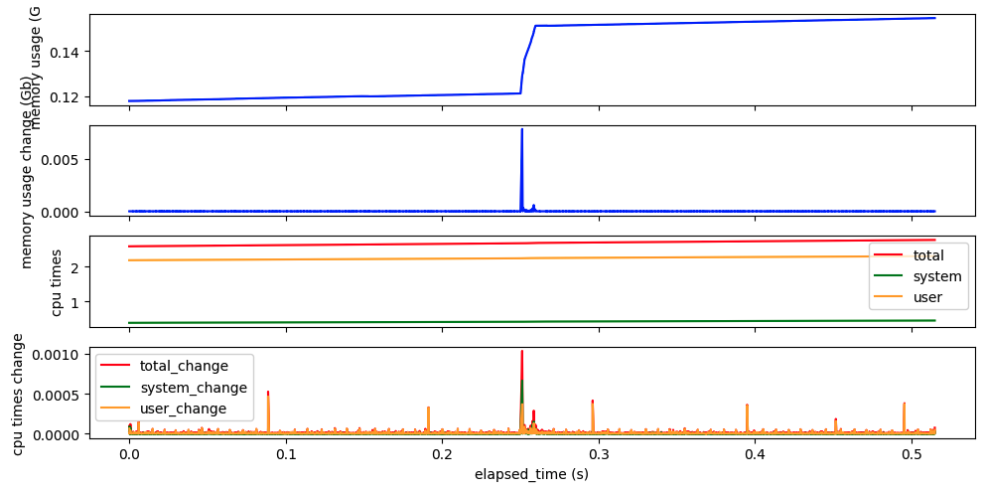
and, you can view the logs as a pandas dataframe:
monitor_info = monitor.get_logs().
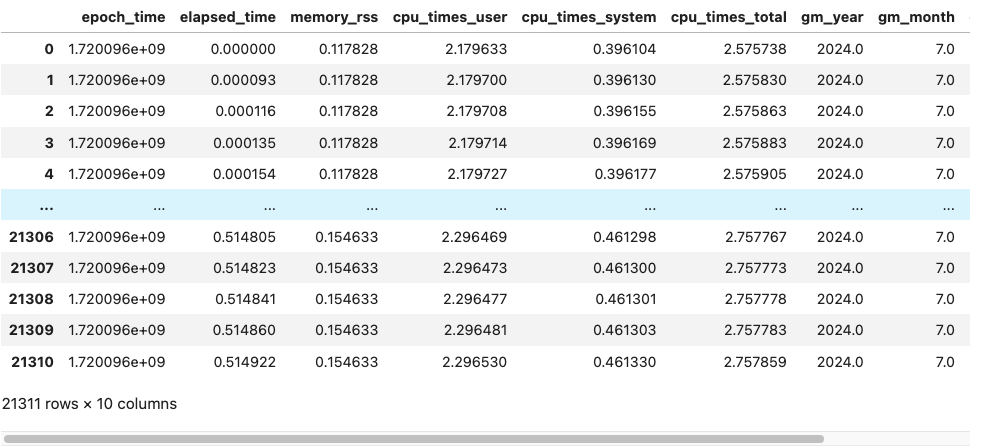
And, of course you can export the logs using pandas export options. For example:
monitor_info.to_csv(<output file path>, index=False)
See the example usage notebook for a more detailed out line of the usage
Running the tests
Install the test extra and run pytest from the repository root:
pip install -e .[test]
pytest
The tests use a short sampling interval and run headlessly (matplotlib is pinned to the Agg backend), so the whole suite takes a few seconds and never opens a plot window.
1 maintainer

Metadata
1 maintainer
Release files for emerald-monitor 0.1.0
For a detailed explanation of source distributions (sdists) and built distributions (wheels), please see the package formats documentation.
Source distribution (sdist)
| File | Size | Uploaded | |
|---|---|---|---|
| emerald_monitor-0.1.0.tar.gz | 8.5 kB | Details |
Built distribution (wheel)
| File | Interpreter | ABI | Platform | Reset |
|---|---|---|---|---|
| emerald_monitor-0.1.0-py3-none-any.whl | Python 3 | none | any | Details |
Total release size: 14.1 kB
Release files / emerald_monitor-0.1.0.tar.gz
| Download URL | emerald_monitor-0.1.0.tar.gz |
|---|---|
| Size | 8.5 kB |
| Tags | Source |
|
SHA-256 checksum How to use checksums |
caa85b3045a6f27d642766eea84a228df9cedeacc95411346e3e15bb065d9162
|
|
BLAKE2b-256 checksum How to use checksums |
151be66e3a77ab8a76fbf15bee787c7c61b40873902fd14917b3ebdb61848eca
|
| Upload date | |
|
Uploaded using Trusted Publishing? What is trusted publishing? |
No |
| Uploaded via |
twine/7.0.0 CPython/3.10.19
|
Release files / emerald_monitor-0.1.0-py3-none-any.whl
| Download URL | emerald_monitor-0.1.0-py3-none-any.whl |
|---|---|
| Size | 5.6 kB |
| Tags | Python 3 |
|
SHA-256 checksum How to use checksums |
b87d528785c1d5c7544df0a101e75abd3bd175a96d9480cb338616d036e1906a
|
|
BLAKE2b-256 checksum How to use checksums |
eafdb3cf474600d464b6f8dc53f47c41557a00bb2182c6aabab5a0fcd8cd6245
|
| Upload date | |
|
Uploaded using Trusted Publishing? What is trusted publishing? |
No |
| Uploaded via |
twine/7.0.0 CPython/3.10.19
|














