
An open source EM FEM simulator in Python

Project description





Introduction
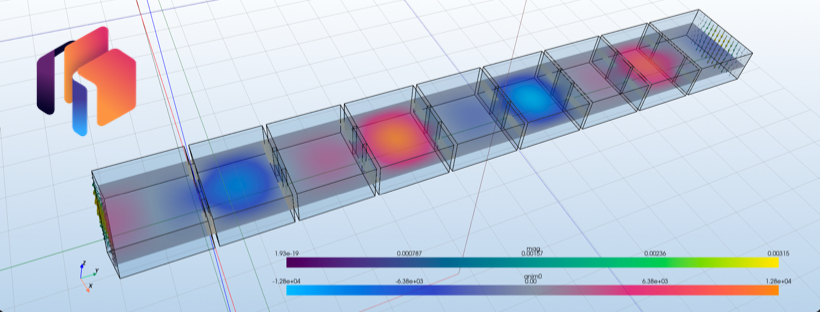
Hello everybody. Thanks for showing interest in my EM FEM library!
EMerge is a python based FEM EM library for the time harmonic helmholtz formulation. It is thus best suited for Electromagnetic wave phenomenon. You can use it to simulate:
- RF Filters
- Signal propagation through PCBs
- Antennas
- Optycal systems
- Arrays and periodic structures
- Much more!
It is designed to be as easy to use and compatible as possible. It runs on all operating systems allthough some solvers are a bit harder to make work on some systems than others.
EMerge is designed to have your entire simulation start and finish in the same Python script (or more if you want). You require no awkward configuration files, JSON's, external software to do modelling etc. It allows you to do everything in Python:
- Geometry Creation/description
- Material assignment
- Meshing + mesh settings and adaptive mesh refinement
- Boundary condition setup
- Solving
- Post processing and visualization
If you have questions, suggestions, bug reports or just want to hang out, feel free to join the discord!
How to install
You can now install the basic version of emerge from PyPi!
pip install emerge
Direct solvers
EMerge solves all systems with direct solvers only. Some are faster than others. Depending on the operating system and hardware you have, some might work better and/or are easier to install than others.
MacOS (ARM)
It is advised to use the Apple Accelerate sparse solver for all cases. On all versions before 2.5.3 install through
pip install https://github.com/FennisRobert/emerge-aasds@v0.2.0
By default the Accelrate solver will be limited to a single thread for frequency distributed sweeps. To allow for more threads either set the environment variable manually:
VECLIB_MAXIMUM_THREADS = 4
Or in Python before loading EMerge:
import os
os.environ['VECLIB_MAXIMUM_THREADS'] = '4'
Of from 2.5.3 onwards also through the config sister module
from emerge_config import config
config.set_acc_threads(4)
Single threaded UMFPACK
There is also an UMFPACK interface but it is more difficult to install and not as fast as the Accelerate solver.
brew install cmake swig suite-sparse pkg-config #MacOS
sudo apt-get install libsuitesparse-dev #Linux
Then on MacOS do:
export PKG_CONFIG_PATH="/opt/homebrew/lib/pkgconfig:$PKG_CONFIG_PATH"
export CFLAGS="-I/opt/homebrew/include"
export LDFLAGS="-L/opt/homebrew/lib"
export CFLAGS="-Wno-error=int-conversion"
Finally:
pip install meson-python ninja
pip install --no-build-isolation --no-binary=scikit-umfpack scikit-umfpack
note: If you have any corrections to these instructions (for any os) please let me know!
Multi threaded MUMPS
To install the MUMPS solver on MacOS, download the installer directory from my website and follow the instructions. Please note that Accelerate is also faster than MUMPS in multi-core performance.
https://www.emerge-software.com/resources
Windows (x86)
Windows has easy access to the lightning fast PARDISO solver out of the box, no installation needed. If you want to install the UMFPACK solver for distributed sweeps this distribution should work through conda forge:
conda install conda-forge::scikit-umfpack
Otherwise try the solution in the user manual.
https://www.emerge-software.com/resources
GPU bsed CuDSS solver
If you have a new NVidia card you can try the first test implementation of the cuDSS solver. The dependencies can be installed through:
pip install emerge[cudss]
Limitations: * Cupy is currently only supporting 32 bit integer address so large EM problems cannot be correctly solved currently. This is not something I can do anything about.
Required libraries
To run this FEM library you need the following libraries
- numpy
- scipy
- gmsh
- loguru
- numba
- matplotlib (for the matplotlib base display)
- pyvista (for the PyVista base display)
- mkl (x86 devices only)
- emsutil
Optional:
- scikit-umfpack
- cudss
- ezdxf
Resources / Manual
You can find the latest versions of the manual on: https://www.emerge-software.com/resources/
Release history Release notifications | RSS feed


Download files
Download the file for your platform. If you're not sure which to choose, learn more about installing packages.
Source Distribution
Built Distribution
Filter files by name, interpreter, ABI, and platform.
If you're not sure about the file name format, learn more about wheel file names.
Copy a direct link to the current filters
File details
Details for the file emerge-2.5.4.tar.gz.
File metadata
- Download URL: emerge-2.5.4.tar.gz
- Upload date:
- Size: 889.8 kB
- Tags: Source
- Uploaded using Trusted Publishing? No
- Uploaded via: twine/6.2.0 CPython/3.10.19
File hashes
| Algorithm | Hash digest | |
|---|---|---|
| SHA256 |
29421c3181331af65eb173bc0eedf303d03ab1f8b85c62ccafd1878ae355f5f5
|
|
| MD5 |
7098050670e71bb669b6c6ed97f9d8ec
|
|
| BLAKE2b-256 |
6e111bd677e0e09db8ba1fa0f7793e72d179ddd940f27a61c3a377fd77c9acab
|
File details
Details for the file emerge-2.5.4-py3-none-any.whl.
File metadata
- Download URL: emerge-2.5.4-py3-none-any.whl
- Upload date:
- Size: 389.8 kB
- Tags: Python 3
- Uploaded using Trusted Publishing? No
- Uploaded via: twine/6.2.0 CPython/3.10.19
File hashes
| Algorithm | Hash digest | |
|---|---|---|
| SHA256 |
2c9312e0bf8c8a84f218c9bfd7f157b8528b49e65b07a5bf0d366a816aab75fb
|
|
| MD5 |
5312e77e142911954bcb27447e27a662
|
|
| BLAKE2b-256 |
720f5b5c57ca2de79728cf493a4bc4bd408fe3dfb9455df115bc9610913c7f83
|






