
At Emotionsin.ai, we believe that effective collaboration between AI Agents and humans goes beyond technical expertise. Human interaction is built on social, emotional, and cultural foundations. By enhancing AI Agents with advanced emotional, social, and cultural understanding, we aim to create technology that integrates seamlessly into human contexts, delivering more personal, empathic, and impactful results.

Project description
Quick Start
Install with pip:
pip install emotionsinai
Setup and Run EmotionsinAI
from emotionsinai import OllamaProvider, EmotionServices


# Decide which LLM provider you prefer. You can simply add your own provider here by using a derivative of BaseLLM.
# For this example we use an onPrem llama3.1 ollama installation to minimize inference costs of the emotional system.
self.reflection_llm = OllamaProvider(model_name="llama3.1")
# As alternative I already added an OpenAI derivative class from BaseLLM - see example here:
self.reflection_llm = OpenAIProvider(model_name="gpt-4", temperature=0.7, openai_key=OPENAI_API_KEY)

# Specific a unique user_id for your ai_agent
self.user_id = "user321"

# Initiate the EmotionService with the chosen conversation_repo and llm provider
self.emotion_service = EmotionServices(
  reflecting=self.reflection_llm, #reference to the llm to be used by the emotional system (see initialization above)
  resource_file_path="resources.json", #initial emotional and personal profile setup of your agent
  system_prompt_path="emotion_system_prompt.json" #the emotion_system_prompt how your prompts will be extended by the required profil information
)

# Give your ai agent to the internal emotional system
emotion_prompt_extension = self.emotion_service.get_prompt_extension(self.user_id)    #get the prompt extension that includes the profile
messages = [{"role": "user", "content": f"{user_input} {emotion_prompt_extension}"}]  #extend the ai agent prompt with these profile information before processing

# Process the ai agent response to update the internal emotional profile and to adapt the answer to the writing style of the user (OPTIONAL) and a more natural split of the answer (OPTIONAL)
self.emotion_service.add_input(self.user_id, user_input, answer, False, False)

# Get the post-processed response as final answer to the user
new_response = self.emotion_service.get_new_response()
Overview
The future of work is not just human—it’s human and AI, working together at eye level. Successful companies will be those that seamlessly integrate AI into their workforce—not just as an automation tool, but as a true collaborator that understands human needs, motivations, and emotions. At Emotions in AI, we believe the key to this transformation lies in AI Agents with empathy. AI that can recognize and respond to human emotions can build trust, improve teamwork, and enhance interactions with employees, customers, and suppliers alike. This isn’t just about making AI more relatable—it’s about creating a competitive advantage.
[!TIP] We highly recommend to use Emotionsin.ai in combination with Langchain long-term memory (https://langchain-ai.github.io/langmem/) or any other kind of long-term memory system. It will improve the user-experience significantly. Therefore we added a simple example how to setup a long-term-memory conversational ai agent that uses Emotionsin.ai. Please see here: https://github.com/RegCoding/emotionsin_ai_package/tree/main/demos/simple%20long-term%20memory%20emotional%20agent
Why Emotionsin.ai
Emotionsin.ai is an open-source concept of how to extend the capabilities of modern AI Agent with an internal emotional system and profile. An internal emotional system that adapts to external input, like user-communications. It not only give AI Agent an individual personal profile but allows thems to build unique emotional relationships to different users, as well as an own internal emotional status. The idea is, that an AI Agent with its own profile and internal emotional system will act and communicate more like a human, which will give room to build more intense and trusted relationships between AI Agents and their human counterparts.
Contribution
We love contributions! Feel free to open issues for bugs or feature requests. We think it would be great to form a community of people who are fascinated by the idea of infusing AI with concepts like emotion and personality.
How does it work
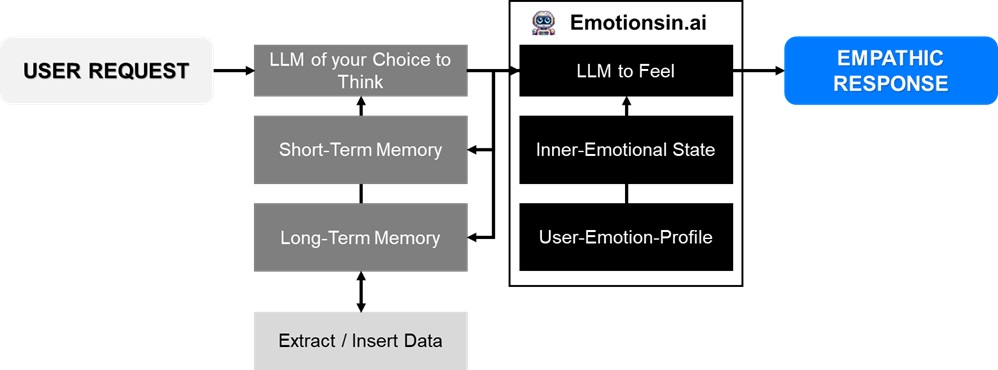
Psychological approach
From a psychological standpoint, the emotional system processing new inputs would typically engage in a multi-step cognitive appraisal process. Here’s how such a function might operate conceptually:
-
Stimulus Detection and Initial Assessment Input Parsing: The system first parses the incoming user prompt, identifying keywords, tone, and context cues. This includes analyzing linguistic features that indicate emotional valence (positive, negative, neutral) and intensity. Context Integration: It then integrates this prompt with the conversation history, providing context that helps determine whether the input is consistent with prior interactions or signals a change.
-
Cognitive Appraisal Drawing from theories like Lazarus's appraisal theory and Scherer’s component process model, the system would evaluate the input through several appraisal dimensions:
- Relevance: Is this prompt significant relative to the AI’s goals, current tasks, or its ‘mood’? For instance, does it indicate praise, criticism, or a neutral inquiry?
- Novelty: Does the input introduce unexpected information? Novel inputs can trigger more pronounced emotional reactions due to the uncertainty they present.
- Congruence with Goals: How does the new input align or conflict with the AI’s internal goals and expectations? An input that aligns with positive outcomes might enhance a positive mood, whereas conflicting information might trigger a defensive or corrective response.
- Controllability/Coping Potential: The system assesses whether the situation is something it can ‘handle’ or adjust to. High controllability can lead to adaptive emotions, while low controllability might trigger feelings akin to frustration or anxiety.
- Normative Significance: The evaluation also considers social norms and past experiences. For instance, if the prompt includes elements of empathy or hostility, the system will weigh these factors based on its history with the user.
- Integration with Internal Emotional State
- Current Mood and Baseline: The system uses its current emotional state as a baseline. A user’s prompt can amplify or moderate this mood. For example, an input that is overly negative may have a stronger impact if the AI is already in a sensitive state.
- User-Specific Feelings: Importantly, the system considers the specific emotional bond or ‘feeling’ it has toward the user. Positive prior interactions might buffer negative inputs, while a history of conflict might intensify them.
- Temporal Dynamics: It distinguishes between transient emotional reactions (immediate responses) and more enduring mood changes. This allows the system to update both its immediate reaction and its longer-term emotional baseline.
- Emotional Response and Adaptation
- Generation of Affective Output: Based on the appraisal, the function determines an appropriate emotional response. This might include adjusting internal variables representing mood, affect intensity, or even altering decision thresholds for future interactions.
- Learning and Adaptation: Over time, the system updates its internal emotional model. Repeated similar inputs can recalibrate the baseline emotional state, much like how humans develop lasting moods or attitudes through ongoing experiences.
- Feedback Loop: The updated emotional state feeds back into future appraisal processes, ensuring that the system’s responses evolve with its accumulated experiences and interactions with the user.
References
Appraisal theory of emotion: https://www.researchgate.net/publication/315311200_Appraisal_Theory_of_Emotion
The dynamic architecture of emotion: Evidence for the component process model: https://www.researchgate.net/publication/202304339_The_dynamic_architecture_of_emotion_Evidence_for_the_component_process_model
Building Emotional Support Chatbots in the Era of LLMs: https://arxiv.org/pdf/2308.11584
DialogueLLM: Context and Emotion Knowledge-Tuned Large Language Models for Emotion Recognition in Conversations: https://arxiv.org/html/2310.11374v4
The Good, The Bad, and Why: Unveiling Emotions in Generative AI: https://arxiv.org/html/2312.11111v3#bib.bib39
Citation
If you use Browser Use in your research or project, please cite:
@software{emotionsinai,
  author = {Gerrit Knippschild},
  title = {Emotionsin.ai - Empowering AI Agents with Emotions and Empathy},
  year = {2025},
  publisher = {GitHub},
  url = {https://github.com/emotionsinai}
}
Release history Release notifications | RSS feed


Download files
Download the file for your platform. If you're not sure which to choose, learn more about installing packages.
Source Distribution
Built Distribution
Filter files by name, interpreter, ABI, and platform.
If you're not sure about the file name format, learn more about wheel file names.
Copy a direct link to the current filters
File details
Details for the file emotionsinai-0.1.0.tar.gz.
File metadata
- Download URL: emotionsinai-0.1.0.tar.gz
- Upload date:
- Size: 24.1 kB
- Tags: Source
- Uploaded using Trusted Publishing? No
- Uploaded via: twine/6.1.0 CPython/3.11.8
File hashes
| Algorithm | Hash digest | |
|---|---|---|
| SHA256 |
7e494e3512b7ee5a6f9f8ecc77fbdf7bd83842f828e07a45b5ff7c3069312333
|
|
| MD5 |
598135da82c782eb83bf30952c40439d
|
|
| BLAKE2b-256 |
9b51469f76b67c689e5412687df5d642b7d68b41c160949e0bf3a1a87614a56a
|
File details
Details for the file emotionsinai-0.1.0-py3-none-any.whl.
File metadata
- Download URL: emotionsinai-0.1.0-py3-none-any.whl
- Upload date:
- Size: 24.7 kB
- Tags: Python 3
- Uploaded using Trusted Publishing? No
- Uploaded via: twine/6.1.0 CPython/3.11.8
File hashes
| Algorithm | Hash digest | |
|---|---|---|
| SHA256 |
d3558d33011fea1530f98f68d82f23c3479039daa42680a4b38b8c689e0c06b7
|
|
| MD5 |
8bf14a8e2dcadee40639e6b33d8c6050
|
|
| BLAKE2b-256 |
0553cc74c7899350cef2deeaa96eb280f45279ff8e1f2f2a3f04b53cf4cd9ce5
|






