
emscan





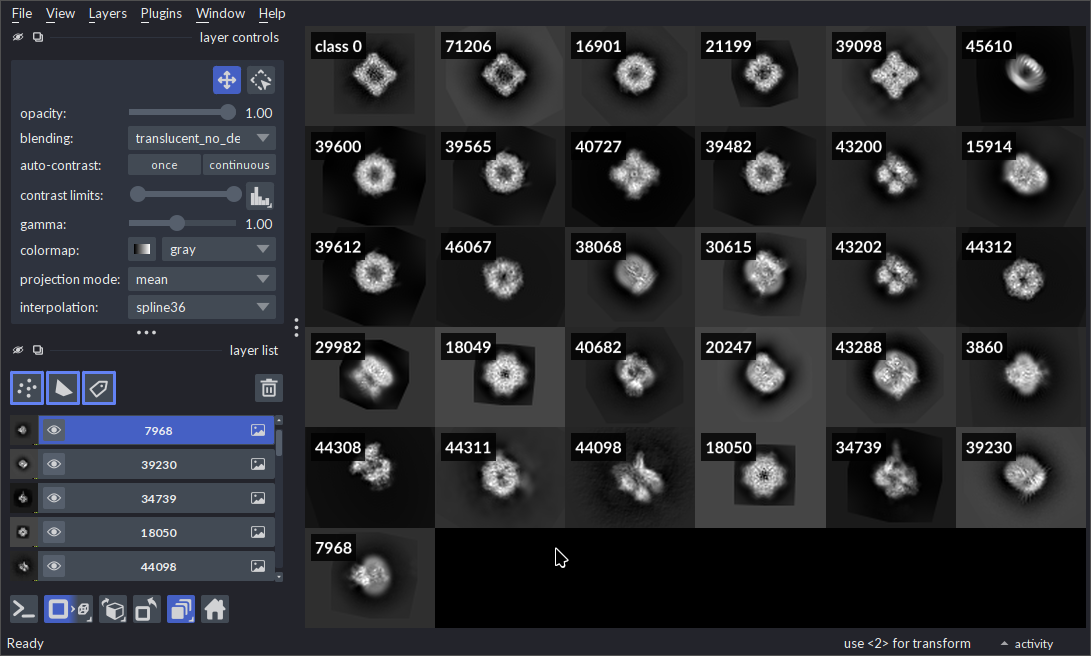
emscan is a command line and GUI tool that can be used to cross-correlate 2D projections of unkown objects against the entirety1 of the EMDB. For example, it can be used to find existing homologous (also partial) complexes of unknown particle picks from a cell-extract shotgun cryo-em experiment:
Disclaimer
emscan requires a lot of time to set up (~days for the first gen-db run) and a large amount of space. While you won't store the whole EMDB (entries are stored downsampled, pre-projected and with limited rotational resolution), it will still use up potentially up to TBs of space.
Installation
Install from pypi via pip (ideally in a new virtual environment):
pip install emscan
To verify the installation and print out the usage, run:
emscan -h
or for a specific subcommand:
emscan gen-db -h
Read the help messages for more specific information on the various parameters.
Locked dependencies
If you read this from the future (hi!) and are having dependency issues, you might prefer to install from source with uv sync, using the uv.lock in the repository.
Usage
Using emscan requires a 3 step process:
- Database generation (downloading, extracting, projecting). This requires the longest time and biggest space on dist.
- Scanning (comparing the input 2D image against the whole database). Faster than generation but still a heavy job.
- Inspecting results (visually comparing best hits and investigating the most promising ones). Very fast.
Note that all need to know where your database lives. By default it will be put into your home directory under ~/.emdb_projections, but you might want to provide a different path via --db-path to all commands.
To do so, the 3 main commands are:
emscan --db-path <my_db_path> gen-db
emscan --db-path <my_db_path> scan <some_2d_class>.mrc
emscan --db-path <my_db_path> show <some_2d_class>.mrc
Note that <some_2d_class.mrc> can actually be a stack of 2D classes!
Since scan saves the correlation results for each class individually, you can mix and match various cross-correlation results when running show.
For example, if you suspect that two or more different classes might be different views of the same object, put all of them in a stack, e.g. stack.mrc. In that case:
emscan --db-path <my_db_path> show stack.mrc
will show the combined score of all classes, meaning that EMDB entries that can match well against all classes will be at the top. You can select a different subset (eg, the 0th and 3rd one) of classes to see different combinations with:
emscan --db-path <my_db_path> show stack.mrc -s 0,3
-
not quite: some entries are (clearly) discarded in a few specific cases; some parameters allow tweaking this selection. ↩
1 maintainer

Metadata
1 maintainer
Release files for emscan 1.0.0
For a detailed explanation of source distributions (sdists) and built distributions (wheels), please see the package formats documentation.
Source distribution (sdist)
| File | Size | Uploaded | Provenance | Actions |
|---|---|---|---|---|
| emscan-1.0.0.tar.gz | 359.3 kB | With provenance | Details for emscan-1.0.0.tar.gz |
Built distribution (wheel)
| File | Interpreter | ABI | Platform | Actions Reset |
|---|---|---|---|---|
| emscan-1.0.0-py3-none-any.whl | Python 3 | none | any | Details for emscan-1.0.0-py3-none-any.whl |
Total release size: 388.1 kB
Release files / emscan-1.0.0.tar.gz
| Download URL | emscan-1.0.0.tar.gz |
|---|---|
| Size | 359.3 kB |
| Tags | Source |
|
SHA-256 checksum How to use checksums |
2d22f892b0774c80fcda388c2f147a2df01a372009dac29d1c92f5da32c2dac3
|
|
BLAKE2b-256 checksum How to use checksums |
a0992446ae6ba11f8d6f41dba465f10ed007a05038fd7e55c86cf77c3dbbba8b
|
| Upload date | |
|
Uploaded using Trusted Publishing? What is trusted publishing? |
Yes |
| Uploaded via |
twine/7.0.0 CPython/3.13.16
|
Provenance
Provenance describes where a file came from. On PyPI, provenance is shared via attestations, which provide a verifiable record of the build or publishing details. View details, limitations and caveats.


PyPI Publish Attestation
PyPI verified that this artifact, at this checksum, originated from the publisher listed below.
Signed by GitHub Actions, verified by PyPI on Nov 20, 2026.
Transparency logRelease files / emscan-1.0.0-py3-none-any.whl
| Download URL | emscan-1.0.0-py3-none-any.whl |
|---|---|
| Size | 28.8 kB |
| Tags | Python 3 |
|
SHA-256 checksum How to use checksums |
fc4161fe52cc0d6ed062db43e52d5cd13409c01d5b317c8ae99556aa9d60b302
|
|
BLAKE2b-256 checksum How to use checksums |
897bc769f26820f8673f8085d49db010367678178174045f9484f039293a6a4c
|
| Upload date | |
|
Uploaded using Trusted Publishing? What is trusted publishing? |
Yes |
| Uploaded via |
twine/7.0.0 CPython/3.13.16
|
Provenance
Provenance describes where a file came from. On PyPI, provenance is shared via attestations, which provide a verifiable record of the build or publishing details. View details, limitations and caveats.
PyPI Publish Attestation
PyPI verified that this artifact, at this checksum, originated from the publisher listed below.
Signed by GitHub Actions, verified by PyPI on Nov 20, 2026.
Transparency logSecurity for emscan 1.0.0
Provenance
Provenance describes where a file came from. On PyPI, provenance is shared via attestations, which provide a verifiable record of the build or publishing details. View details, limitations and caveats.
Full provenance
Both files in this release have been uploaded with provenance metadata.
Attestation for emscan-1.0.0.tar.gz
PyPI Publish Attestation
PyPI verified that this artifact, at this checksum, originated from the publisher listed below.
Signed by GitHub Actions, verified by PyPI on Nov 20, 2026.
Transparency logA note on package security
PyPI is a repository for distributing packages, not a service for auditing them. While third-party security researchers and our staff do their best to detect and remove malicious packages, PyPI cannot guarantee the quality, security or suitability of any given package.
To learn more about protecting yourself from malicious actors, visit our package security documentation.













