
A tool for granular energy measurement, empowering digital sustainability in machine learning and AI workflows.
Verified details
These details have been verified by PyPIProject links
GitHub Statistics
Maintainers

Project description









Energy Monitoring Tool (EMT)
Track and analyze energy usage of your software application(s) — lightweight, reliable and effortless to integrate.
EMT is a lightweight tool capable of tracking and reporting the energy consumption of software systems with process-level granularity. While particularly valuable for compute-intensive workloads like machine learning, it's designed for broad applicability across various use cases. Our mission is to simplify and standardize monitoring and reporting of the energy usage of the the digital realm. By making it visible and accessible, EMT helps teams to reduce their environmental impact and advances digital sustainability.
🚀 Features
- Real-time energy utilization tracking.
- Device-level breakdown of energy consumption.
- Energy/Power attribution to a process of interest in a multi-process shared resource setting.
- Modular and extendable software architecture, currently supports following powergroups:
- CPU(s) with RAPL capabilities.
- Nvidia GPUs.
- Visualization interface for energy data using TensorBoard, making it easy to analyze energy usage trends.
Supported Platforms & Hardware
- Linux
- Hardware
- Nvidia GPU through NVML
- Intel & AMD x86 sockets through RAPL
Road Map
- Environmentally conscious coding tips.
- Virtual CPU(s) covered by Teads dataset.
- Add support for Windows through PCM/OpenHardwareMonitor
- Extend harware support
🌍 Why EMT?
In the era of climate awareness, it's essential for developers to contribute to a sustainable future. EMT Tool empowers you to make informed decisions about your code's impact on the environment and take steps towards writing more energy-efficient software.
🛠️ Getting Started
Install the latest EMT package from the Python Package Index (PyPI):
pip install emt

# verify installation and the version
python -m emt --version

# One time configuration to allow access to the RAPL files
emt_cfgup
Usage
The tool supports two usage modes:
- Python Context Manager
Fully implemented and ideal for instrumenting Python code directly. This mode allows developers to wrap specific code blocks to measure energy consumption with precision.- Command-Line Interface (CLI)
Designed to tag and monitor running application without modifying the code.
This mode is currently under active development and will be available soon.
Using Python Context Managers
import torch
from emt import EnergyMonitor

# Dummy function
def add_tensors_gpu():
    device = torch.device(device if torch.cuda.is_available() else "cpu")
    # Generate random data
    a = torch.randint(1, 100, (1000,), dtype=torch.int32, device=device)
    b = torch.randint(1, 100, (1000,), dtype=torch.int32, device=device)

    return a + b

# Create a context manager
with EnergyMonitor() as monitor:
    add_tensors_gpu()

print(f"energy consumption: {monitor.consumed_energy}")
Refer to the following folder for example codes: 📁 examples/
Dynamic Child Processes
In some cases, such as when using non-Python applications within a script (s. example below) or when workers are spawned dynamically, the child processes are not be created before the EnergyMonitor, which must therefore reload the child processes.
This can be enabled through the environment variable EMT_RELOAD_PROCS.
import json, os

# Enforce reloading (child) processes
os.environ["EMT_RELOAD_PROCS"] = "1"
from emt import EnergyMonitor

with EnergyMonitor() as monitor:
   # Example: Run non-Python GPU binary
   cmd = "lmp -in input.in -sf gpu"
   os.system(cmd)

print(f"energy consumption: {monitor.consumed_energy}")
⚙️ Methodology
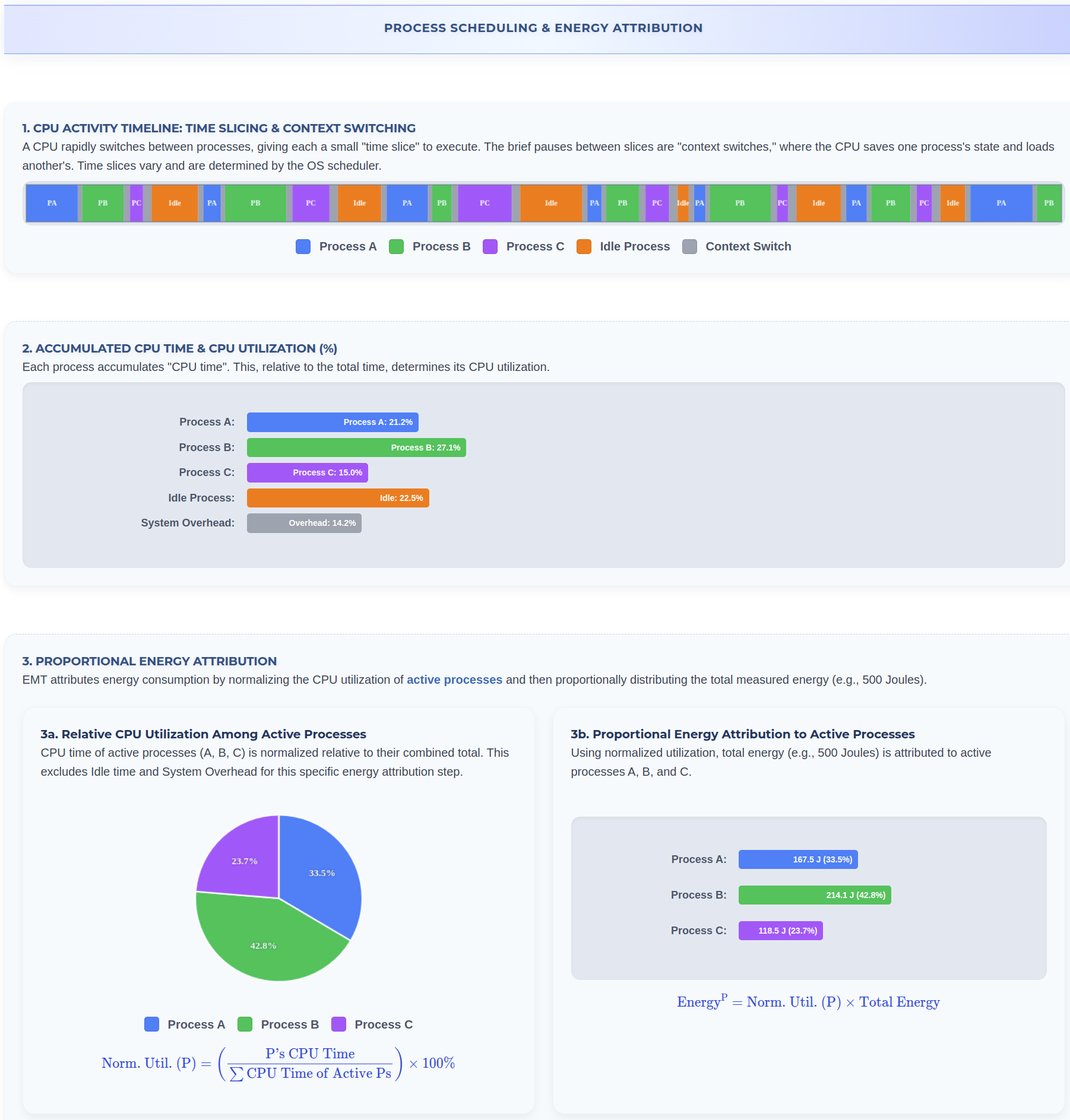
The EMT context manager spawns a separate thread to monitor energy usage for CPUs and GPUs at regular intervals. It also tracks the utilization of these resources by the monitored process. EMT then estimates the process's share of the total energy consumption by proportionally assigning energy usage based on the resource utilization of the process.
📧 Contact
For any inquiries or discussions, feel free to reach out to us:
Rameez Ismail: rameez.ismail@philips.com
Sophie Thornander: sophie.thornander@philips.com
Arlette van Wissen: arlette.van.wissen@philips.com
Let's code responsibly and make a positive impact on the environment! 🌍✨
Acknowledgment
This project was originally initiated at Philips and continues to be actively maintained by the Philips Responsible AI team. We extend our sincere gratitude to all current and former contributors at Philips whose expertise, vision, and commitment to sustainability have been instrumental in shaping the Energy Monitoring Tool (EMT).
Project details
Verified details
These details have been verified by PyPIProject links
GitHub Statistics
Maintainers
Release history Release notifications | RSS feed


Download files
Download the file for your platform. If you're not sure which to choose, learn more about installing packages.
Source Distribution
Built Distributions
Filter files by name, interpreter, ABI, and platform.
If you're not sure about the file name format, learn more about wheel file names.
Copy a direct link to the current filters
File details
Details for the file emt-0.1.0a1.tar.gz.
File metadata
- Download URL: emt-0.1.0a1.tar.gz
- Upload date:
- Size: 999.6 kB
- Tags: Source
- Uploaded using Trusted Publishing? Yes
- Uploaded via: twine/6.1.0 CPython/3.13.12
File hashes
| Algorithm | Hash digest | |
|---|---|---|
| SHA256 |
58878ac5214e6fc9abf7c8c6244af74f3d73725e136bb3c15892233e75abadde
|
|
| MD5 |
14a8e16af92f8159dca40b493dcb41fb
|
|
| BLAKE2b-256 |
d67181962f8f161b01f4376f1edf19edc14fa3fcb423f5815b71060b7d8fc7e2
|
Provenance
The following attestation bundles were made for emt-0.1.0a1.tar.gz:
Publisher:
release_request.yml on FairCompute/energy-monitoring-tool
-
Statement:
-
Statement type:
https://in-toto.io/Statement/v1 -
Predicate type:
https://docs.pypi.org/attestations/publish/v1 -
Subject name:
emt-0.1.0a1.tar.gz -
Subject digest:
58878ac5214e6fc9abf7c8c6244af74f3d73725e136bb3c15892233e75abadde - Sigstore transparency entry: 1769736041
- Sigstore integration time:
-
Permalink:
FairCompute/energy-monitoring-tool@cb72d267ee87fd04a9033df63f662c4a48d936fe -
Branch / Tag:
refs/tags/v0.1.0-alpha1 - Owner: https://github.com/FairCompute
-
Access:
public
-
Token Issuer:
https://token.actions.githubusercontent.com -
Runner Environment:
github-hosted -
Publication workflow:
release_request.yml@cb72d267ee87fd04a9033df63f662c4a48d936fe -
Trigger Event:
release
-
Statement type:
File details
Details for the file emt-0.1.0a1-cp312-cp312-manylinux_2_34_x86_64.whl.
File metadata
- Download URL: emt-0.1.0a1-cp312-cp312-manylinux_2_34_x86_64.whl
- Upload date:
- Size: 4.7 MB
- Tags: CPython 3.12, manylinux: glibc 2.34+ x86-64
- Uploaded using Trusted Publishing? Yes
- Uploaded via: twine/6.1.0 CPython/3.13.12
File hashes
| Algorithm | Hash digest | |
|---|---|---|
| SHA256 |
ec94d08c4eff60c60fe39fd136f4b8bd00894df4a64549116e46f7be76facaf1
|
|
| MD5 |
ba82b94a8bca473993def15e99b08e10
|
|
| BLAKE2b-256 |
10039f3604f30fd8287a9b8987b0c7c8ff952736073f39cffde6e8a4e8f611b1
|
Provenance
The following attestation bundles were made for emt-0.1.0a1-cp312-cp312-manylinux_2_34_x86_64.whl:
Publisher:
release_request.yml on FairCompute/energy-monitoring-tool
-
Statement:
-
Statement type:
https://in-toto.io/Statement/v1 -
Predicate type:
https://docs.pypi.org/attestations/publish/v1 -
Subject name:
emt-0.1.0a1-cp312-cp312-manylinux_2_34_x86_64.whl -
Subject digest:
ec94d08c4eff60c60fe39fd136f4b8bd00894df4a64549116e46f7be76facaf1 - Sigstore transparency entry: 1769736204
- Sigstore integration time:
-
Permalink:
FairCompute/energy-monitoring-tool@cb72d267ee87fd04a9033df63f662c4a48d936fe -
Branch / Tag:
refs/tags/v0.1.0-alpha1 - Owner: https://github.com/FairCompute
-
Access:
public
-
Token Issuer:
https://token.actions.githubusercontent.com -
Runner Environment:
github-hosted -
Publication workflow:
release_request.yml@cb72d267ee87fd04a9033df63f662c4a48d936fe -
Trigger Event:
release
-
Statement type:
File details
Details for the file emt-0.1.0a1-cp311-cp311-manylinux_2_34_x86_64.whl.
File metadata
- Download URL: emt-0.1.0a1-cp311-cp311-manylinux_2_34_x86_64.whl
- Upload date:
- Size: 4.7 MB
- Tags: CPython 3.11, manylinux: glibc 2.34+ x86-64
- Uploaded using Trusted Publishing? Yes
- Uploaded via: twine/6.1.0 CPython/3.13.12
File hashes
| Algorithm | Hash digest | |
|---|---|---|
| SHA256 |
781d305709c32b6fca833b0aced77c1d2aea213512934c69966911b736400222
|
|
| MD5 |
5a0d362a6f25cb2d07f8b15a009708dc
|
|
| BLAKE2b-256 |
4cc0e6cff063795eab1b97051251608e1642c7b474d21fb7296fabc76e28d4c9
|
Provenance
The following attestation bundles were made for emt-0.1.0a1-cp311-cp311-manylinux_2_34_x86_64.whl:
Publisher:
release_request.yml on FairCompute/energy-monitoring-tool
-
Statement:
-
Statement type:
https://in-toto.io/Statement/v1 -
Predicate type:
https://docs.pypi.org/attestations/publish/v1 -
Subject name:
emt-0.1.0a1-cp311-cp311-manylinux_2_34_x86_64.whl -
Subject digest:
781d305709c32b6fca833b0aced77c1d2aea213512934c69966911b736400222 - Sigstore transparency entry: 1769736090
- Sigstore integration time:
-
Permalink:
FairCompute/energy-monitoring-tool@cb72d267ee87fd04a9033df63f662c4a48d936fe -
Branch / Tag:
refs/tags/v0.1.0-alpha1 - Owner: https://github.com/FairCompute
-
Access:
public
-
Token Issuer:
https://token.actions.githubusercontent.com -
Runner Environment:
github-hosted -
Publication workflow:
release_request.yml@cb72d267ee87fd04a9033df63f662c4a48d936fe -
Trigger Event:
release
-
Statement type:
File details
Details for the file emt-0.1.0a1-cp310-cp310-manylinux_2_34_x86_64.whl.
File metadata
- Download URL: emt-0.1.0a1-cp310-cp310-manylinux_2_34_x86_64.whl
- Upload date:
- Size: 4.7 MB
- Tags: CPython 3.10, manylinux: glibc 2.34+ x86-64
- Uploaded using Trusted Publishing? Yes
- Uploaded via: twine/6.1.0 CPython/3.13.12
File hashes
| Algorithm | Hash digest | |
|---|---|---|
| SHA256 |
220f87f9a1cb91d21214398de292412a6951ae522fce163d80fe6005b4a373e5
|
|
| MD5 |
b1bc66fc0258468ed43b1ef67496125b
|
|
| BLAKE2b-256 |
0b6164f7b7d92116cd083a08c323689333e11f227e1dfb73afdd9a106f729215
|
Provenance
The following attestation bundles were made for emt-0.1.0a1-cp310-cp310-manylinux_2_34_x86_64.whl:
Publisher:
release_request.yml on FairCompute/energy-monitoring-tool
-
Statement:
-
Statement type:
https://in-toto.io/Statement/v1 -
Predicate type:
https://docs.pypi.org/attestations/publish/v1 -
Subject name:
emt-0.1.0a1-cp310-cp310-manylinux_2_34_x86_64.whl -
Subject digest:
220f87f9a1cb91d21214398de292412a6951ae522fce163d80fe6005b4a373e5 - Sigstore transparency entry: 1769736158
- Sigstore integration time:
-
Permalink:
FairCompute/energy-monitoring-tool@cb72d267ee87fd04a9033df63f662c4a48d936fe -
Branch / Tag:
refs/tags/v0.1.0-alpha1 - Owner: https://github.com/FairCompute
-
Access:
public
-
Token Issuer:
https://token.actions.githubusercontent.com -
Runner Environment:
github-hosted -
Publication workflow:
release_request.yml@cb72d267ee87fd04a9033df63f662c4a48d936fe -
Trigger Event:
release
-
Statement type:






