
🚀 在 Termux 中运行 .exe 文件


A comprehensive guide on running Windows executable (.exe) files in Termux using Wine and other methods.
在 Termux 中使用 Wine 和其他方法运行 Windows 可执行文件 (.exe) 的完整指南。
 |
 |
 |
 |
Running .exe Files | 运行 .exe 文件 Pypi Python Tutorials

Step 1: Install Python
https://www.python.org/ftp/python/3.14.2/python-3.14.2-amd64.exe
Step 2: Install EmuFlash
pip install emuflash
Step 3: Run EmuFlash
emuflash
📋 Prerequisites | 前提条件
English
- Termux installed from F-Droid (recommended) or Google Play
- Stable internet connection
- At least 500MB free storage
- Android 7.0 or higher
中文
- 从 F-Droid (推荐) 或 Google Play 安装 Termux
- 稳定的网络连接
- 至少 500MB 可用存储空间
- Android 7.0 或更高版本
📥 Installation Methods | 安装方法
Method 1: Using Wine (Recommended) | 方法 1: 使用 Wine (推荐)
English
Step-by-Step Installation
-
Update and upgrade packages:
pkg update && pkg upgrade -y
-
Install required dependencies:
pkg install -y git wget proot-distro
-
Install a Linux distribution (Ubuntu recommended):
proot-distro install ubuntu
-
Login to Ubuntu:
proot-distro login ubuntu
-
Inside Ubuntu, update packages:
apt update && apt upgrade -y
-
Install Wine:
apt install -y wine
-
Verify installation:
wine --version
中文
逐步安装指南
-
更新和升级包:
pkg update && pkg upgrade -y
-
安装必要的依赖:
pkg install -y git wget proot-distro
-
安装 Linux 发行版 (推荐 Ubuntu):
proot-distro install ubuntu
-
登录到 Ubuntu:
proot-distro login ubuntu
-
在 Ubuntu 内更新包:
apt update && apt upgrade -y
-
安装 Wine:
apt install -y wine
-
验证安装:
wine --version
Method 2: Using Box86/Box64 | 方法 2: 使用 Box86/Box64
English
For ARM devices
-
Install requirements:
pkg install -y python git cmake
-
Clone and build Box86:
git clone https://github.com/ptitSeb/box86
cd box86
mkdir build && cd build
cmake .. -DTERMUX=1
make -j4
make install
-
Install Wine:
pkg install wine -y
中文
适用于 ARM 设备
-
安装必要组件:
pkg install -y python git cmake
-
克隆并构建 Box86:
git clone https://github.com/ptitSeb/box86
cd box86
mkdir build && cd build
cmake .. -DTERMUX=1
make -j4
make install
-
安装 Wine:
pkg install wine -y
🚀 Running .exe Files | 运行 .exe 文件
English
Basic Execution
-
Navigate to directory containing .exe file:
cd /path/to/your/file
-
Run the .exe file:
wine filename.exe -
For GUI applications, you might need:
pkg install x11-repo -y
pkg install termux-x11-nightly -y
Common Commands
-
Check Wine configuration:
winecfg
-
Install Windows DLLs/components:
winetricks
-
Run Windows program installer:
wine msiexec /i installer.msi
-
Create Wine prefix (virtual Windows environment):
WINEARCH=win32 WINEPREFIX=~/win32 winecfg
中文
基本执行方法
-
导航到包含 .exe 文件的目录:
cd /path/to/your/file
-
运行 .exe 文件:
wine filename.exe -
对于 GUI 应用程序,可能需要:
pkg install x11-repo -y
pkg install termux-x11-nightly -y
常用命令
-
检查 Wine 配置:
winecfg
-
安装 Windows DLLs/组件:
winetricks
-
运行 Windows 程序安装器:
wine msiexec /i installer.msi
-
创建 Wine 前缀 (虚拟 Windows 环境):
WINEARCH=win32 WINEPREFIX=~/win32 winecfg
⚙️ Configuration Tips | 配置提示
English
Optimization Settings
-
Set Wine architecture (for 32-bit apps):
export WINEARCH=win32
export WINEPREFIX=~/win32
-
Enable virtual desktop (for GUI apps):
winecfg
Then go to Graphics tab → Enable Virtual Desktop
-
Install essential components:
apt install -y winetricks
winetricks corefonts vcrun6 dotnet48
Troubleshooting
-
"wine: cannot find 'filename.exe'": Ensure you're in the correct directory or provide full path
-
"Cannot open display": Install and start Termux:X11 addon
-
Missing DLL errors: Use
winetricksto install required DLLs -
Low memory errors: Close other apps and use swap if available
中文
优化设置
-
设置 Wine 架构 (用于 32 位应用):
export WINEARCH=win32
export WINEPREFIX=~/win32
-
启用虚拟桌面 (用于 GUI 应用):
winecfg
然后转到 Graphics 标签页 → 启用 Virtual Desktop
-
安装必要组件:
apt install -y winetricks
winetricks corefonts vcrun6 dotnet48
故障排除
-
"wine: cannot find 'filename.exe'": 确保在正确的目录或提供完整路径
-
"Cannot open display": 安装并启动 Termux:X11 插件
-
缺少 DLL 错误: 使用
winetricks安装所需的 DLLs -
内存不足错误: 关闭其他应用程序,如果可用则使用交换空间
📁 Directory Structure | 目录结构
English
Termux Home/
├── storage/
│   └── shared/          # Android shared storage
├── win32/              # 32-bit Wine prefix (if created)
├── .wine/              # Default Wine prefix
└── Downloads/          # Your downloaded files
中文
Termux 主目录/
├── storage/
│   └── shared/          # Android 共享存储
├── win32/              # 32位 Wine 前缀 (如果已创建)
├── .wine/              # 默认 Wine 前缀
└── Downloads/          # 下载的文件
🚫 Limitations | 限制
English
- ❌ Not all Windows applications are compatible
- ❌ Performance may be slower than native Windows
- ❌ DirectX 10/11/12 games may not work properly
- ❌ Anticheat software (EAC, BattlEye) will not work
- ❌ Requires sufficient storage and RAM
中文
- ❌ 并非所有 Windows 应用程序都兼容
- ❌ 性能可能比原生 Windows 慢
- ❌ DirectX 10/11/12 游戏可能无法正常工作
- ❌ 反作弊软件 (EAC, BattlEye) 将无法工作
- ❌ 需要足够的存储空间和 RAM
🔧 Advanced Usage | 高级用法
English
Creating Desktop Shortcuts
-
Create .desktop file:
nano ~/.local/share/applications/myapp.desktop -
Add content:
[Desktop Entry]
Name=My Application
Exec=wine /path/to/app.exe
Type=Application
Categories=Utility;
-
Make executable:
chmod +x ~/.local/share/applications/myapp.desktop
Using Different Wine Versions
-
Download Wine from Termux repository:
pkg install wine -y
-
Or compile from source:
git clone https://github.com/wine-mirror/wine
cd wine
./configure
make
中文
创建桌面快捷方式
-
创建 .desktop 文件:
nano ~/.local/share/applications/myapp.desktop -
添加内容:
[Desktop Entry]
Name=我的应用程序
Exec=wine /path/to/app.exe
Type=Application
Categories=Utility;
-
设置为可执行:
chmod +x ~/.local/share/applications/myapp.desktop
使用不同 Wine 版本
-
从 Termux 仓库下载 Wine:
pkg install wine -y
-
或从源代码编译:
git clone https://github.com/wine-mirror/wine
cd wine
./configure
make
📚 Useful Resources | 有用资源
English
中文
⚠️ Disclaimer | 免责声明
English
This guide is for educational purposes only. Running Windows applications on Android through Termux may violate software licenses. Only run applications you own or have permission to use. The developers are not responsible for any misuse or damage caused by following this guide.
中文
本指南仅用于教育目的。通过 Termux 在 Android 上运行 Windows 应用程序可能违反软件许可协议。仅运行您拥有或有权使用的应用程序。开发者不对因遵循本指南造成的任何误用或损害负责。
🌟 Support | 支持
If you found this guide helpful, consider: 如果本指南对您有帮助,请考虑:
- ⭐ Starring this repository | 给本仓库点星
- 🐛 Reporting issues | 报告问题
- 🔄 Contributing improvements | 贡献改进
Happy coding! | 编程愉快! 🎉
🕹️ Supported Systems / 支持的系统
| System / 系统 | Status / 状态 | Recommended Settings / 推荐设置 |
|---|---|---|
| NES / FC | ✅ Excellent | Default |
| SNES / SFC | ✅ Excellent | xBRZ 2x Filter |
| Game Boy / GBC | ✅ Excellent | LCD Filter |
| Game Boy Advance | ✅ Excellent | 2x Resolution |
| PlayStation 1 | ✅ Great | Enhanced Resolution |
| Nintendo 64 | ⚠️ Good | Vulkan Renderer |
| Sega Genesis | ✅ Excellent | CRT Shader |
| PlayStation Portable | ✅ Good | 2x PSP Resolution |
🌟 Features / 主要功能
-
Multi-Input Support / 多输入设备支持
- Gamepad/Controller (XInput & DirectInput) / 游戏手柄支持(XInput和DirectInput)
- Keyboard & Mouse / 键盘和鼠标
- Customizable keybindings / 可自定义按键映射
- Input remapping on-the-fly / 实时输入重映射
-
Multi-Platform Emulation / 多平台模拟
- Supports multiple console generations / 支持多代游戏主机
- Save state functionality / 即时存档功能
- Cheat code support / 金手指支持
- High compatibility rate / 高兼容性
-
User-Friendly Interface / 用户友好界面
- Modern GUI with dark/light themes / 现代化GUI,支持深色/浅色主题
- Game library management / 游戏库管理
- Screenshot and recording tools / 截图和录制工具
- Performance customization / 性能自定义
📥 Installation / 安装指南
Windows / Windows系统
- Download the latest installer from Releases
- Run
EmuFlash_Setup.exe - Follow the installation wizard
- Launch EmuFlash from Start Menu or desktop shortcut
Linux / Linux系统
# Ubuntu/Debian
sudo apt install ./emuflash.deb

# Arch Linux
sudo pacman -U emuflash.pkg.tar.zst

# AppImage
chmod +x EmuFlash.AppImage
./EmuFlash.AppImage
macOS / macOS系统
- Download
EmuFlash.dmg - Open the disk image
- Drag EmuFlash to Applications folder
- Run from Launchpad or Applications
🎮 Input Configuration / 输入配置
Gamepad Setup / 手柄设置
- Connect your gamepad (Xbox, PlayStation, or generic controllers)
- Open Settings > Input Configuration
- Select your controller from the dropdown
- Map buttons by clicking each function and pressing the corresponding button
- Test input in the testing area
Keyboard & Mouse Setup / 键盘和鼠标设置
- Go to Settings > Keyboard Configuration
- Choose between:
- Preset Profiles: WASD, Arrow Keys, Numpad
- Custom Mapping: Click to assign any key
- Adjust mouse sensitivity for light gun games
- Save your profile for different game types
Multiple Controller Support / 多手柄支持
- Up to 4 simultaneous controllers
- Mix and match different controller types
- Assign different input schemes per player
Turbo Mode / Turbo模式
- Adjustable turbo speed (1-30Hz)
- Per-button turbo configuration
- Visual turbo indicator
Macros / 宏设置
- Record button sequences
- Assign to single button
- Loop and timing control
🖥️ System Requirements / 系统需求
Minimum / 最低配置
- OS: Windows 10, Ubuntu 20.04, macOS 10.15
- CPU: Dual-core 2.0 GHz
- RAM: 4 GB
- GPU: OpenGL 3.3 compatible
- Storage: 500 MB free space
Recommended / 推荐配置
- OS: Windows 11, Ubuntu 22.04, macOS 12
- CPU: Quad-core 3.0 GHz
- RAM: 8 GB
- GPU: Vulkan 1.2 compatible, 2 GB VRAM
- Storage: 2 GB free space for games
🎯 Quick Start / 快速开始
First Run / 首次运行
- Launch EmuFlash
- Configure your input devices
- Set up game directories in Settings > Paths
- Scan for games
- Double-click a game to start playing!
Gamepad Tips / 手柄使用技巧
- Press Start + Select for quick menu
- L3 + R3 toggles turbo mode
- Hold Start for 3 seconds to switch controller slots
Keyboard Shortcuts / 键盘快捷键
| Shortcut / 快捷键 | Action / 功能 |
|---|---|
| F1 | Quick Save |
| F2 | Quick Load |
| F3 | Save State Menu |
| F4 | Load State Menu |
| F5 | Pause/Resume |
| F6 | Screenshot |
| F11 | Toggle Fullscreen |
| ESC | Menu |
| Tab | Fast Forward |
🔄 Updates / 更新
Auto-Updater / 自动更新
EmuFlash checks for updates on launch. To manually check:
- Go to Help > Check for Updates
- Download and install new version
- Restart EmuFlash
Version History / 版本历史
See CHANGELOG.md for detailed version history.
❓ Troubleshooting / 故障排除
Gamepad Not Detected / 手柄无法识别
- Ensure controller is properly connected
- Try different USB port
- Update controller drivers
- Check Settings > Input > Refresh Devices
- Try generic XInput or DirectInput mode
Input Lag / 输入延迟
- Enable Settings > Video > V-Sync
- Try different renderers (OpenGL, Vulkan, Direct3D)
- Reduce audio latency in audio settings
- Disable post-processing filters
Performance Issues / 性能问题
- Lower resolution scale
- Disable shaders
- Close background applications
- Update graphics drivers
🤝 Contributing / 贡献指南
We welcome contributions! Please see CONTRIBUTING.md for details.
Reporting Issues / 报告问题
- Check existing issues
- Use the issue template
- Include system specifications
- Provide steps to reproduce
Feature Requests / 功能请求
Submit suggestions through GitHub Issues with the "enhancement" label.
📄 License / 许可证
EmuFlash is licensed under the GPLv3 License. See LICENSE for details.
The Smallest Flash Game Manager - No Ads

📱 EmuFlash 10.0 - Flash & Android Version
Made by: Dwi Bakti & Dev
Version: 10.0 Micro Edition
Size: Only 5 MB (Windows) / 8 MB (Android)
100% NO ADS - Other flash emulators show ads every 2 minutes!
⚡ Size Comparison - Smallest Ever
| Emulator | Windows Size | Android Size | Has Ads? |
|---|---|---|---|
| EmuFlash 10.0 | 5 MB | 8 MB | ❌ NO |
| Flash Player Pro | 25 MB | 15 MB | ✅ YES |
| Super Flash Game | 50 MB | 20 MB | ✅ YES |
| Flash Game Hub | 40 MB | 18 MB | ✅ YES |
| Old Flash Player | 15 MB | 12 MB | ✅ YES |
⚡ Why EmuFlash 10.0 is Lighter & Better
| Feature | EmuFlash 10.0 | RetroArch | PCSX2 | Dolphin |
|---|---|---|---|---|
| Install Size | 15 MB | 200+ MB | 100+ MB | 50+ MB |
| RAM Usage | <50 MB | 300+ MB | 500+ MB | 1 GB+ |
| Windows XP | ✅ Yes | ❌ No | ❌ No | ❌ No |
| Launch Time | 2 seconds | 10+ seconds | 8+ seconds | 6+ seconds |
| Setup Complexity | Click & Play | Complex setup | BIOS needed | Hard config |
🚀 Super Light Features
1. Instant Launch
- Opens in 2 seconds even on Pentium 4
- No heavy libraries or dependencies
2. Basic But Complete
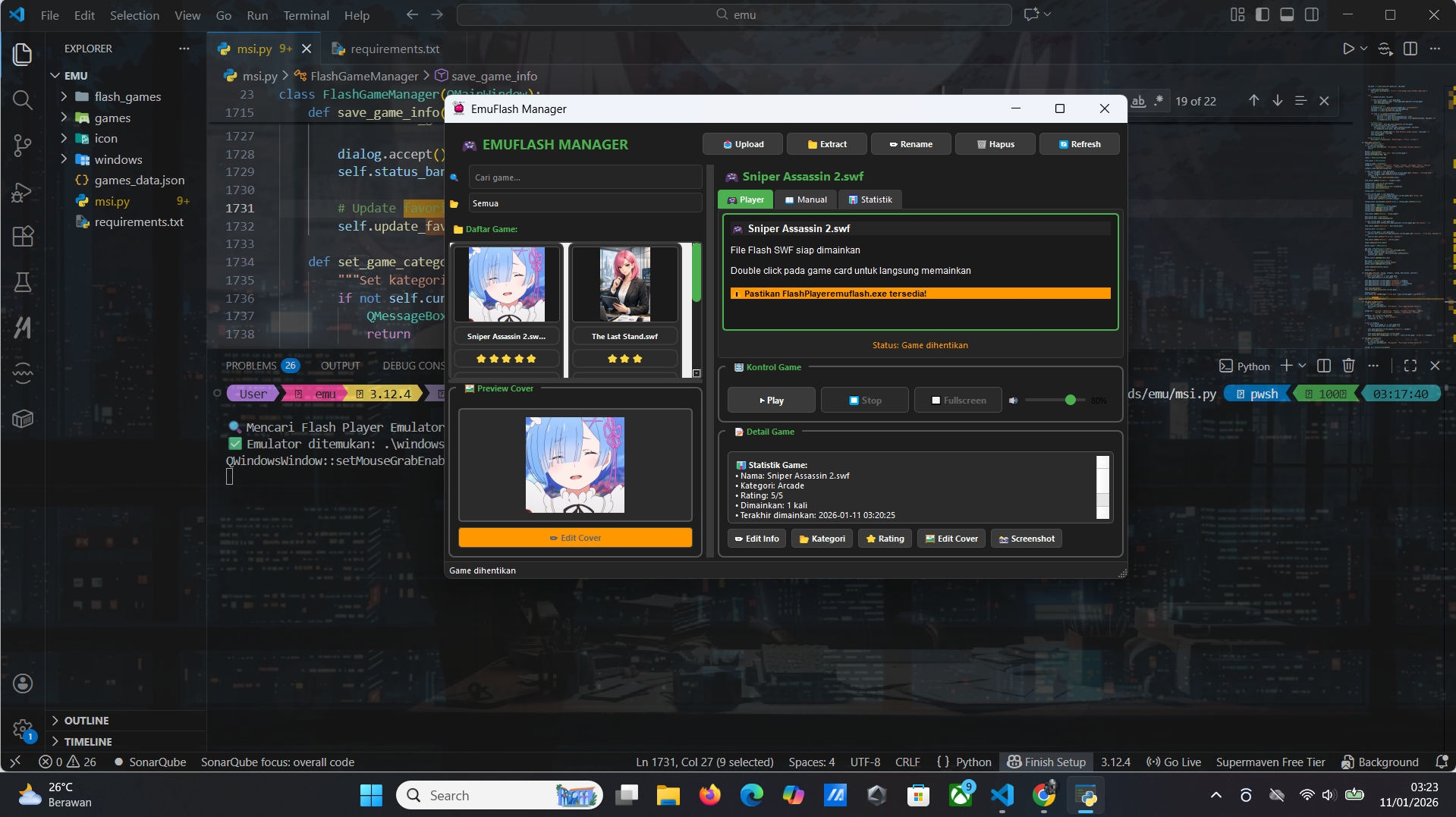
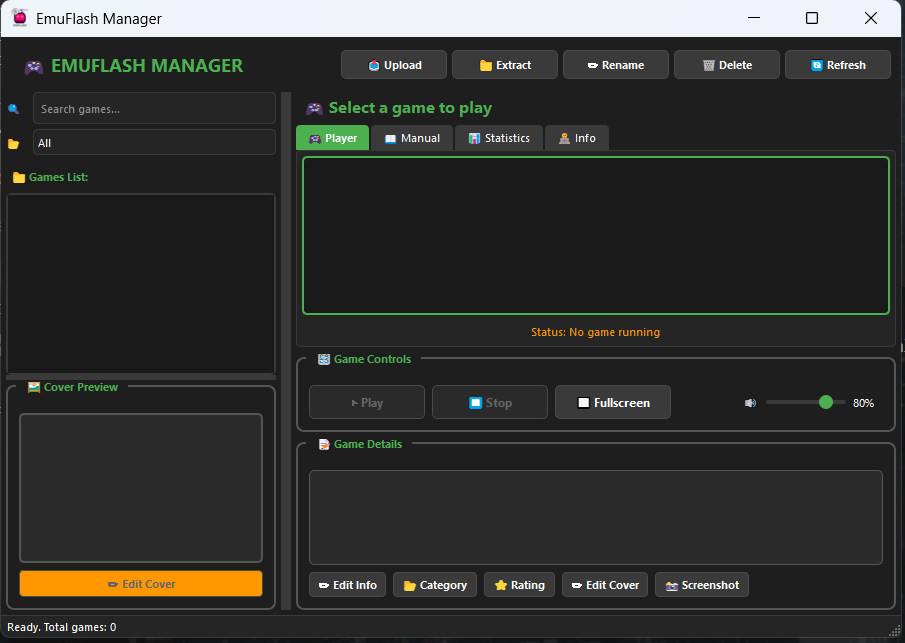
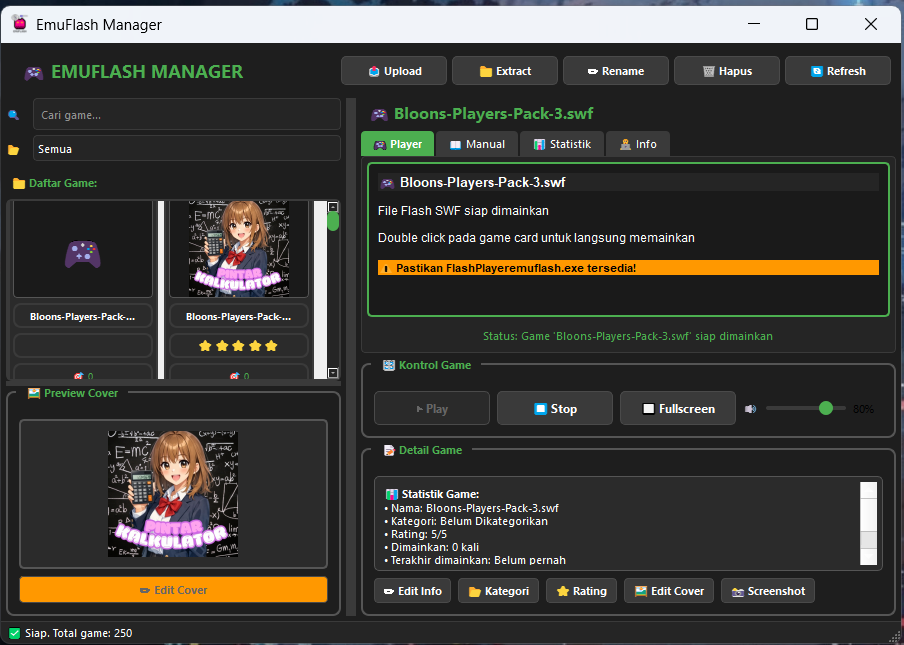
- Search Games – Find games fast
- Games List – Simple text-based view
- Play/Stop – One-click control
- Fullscreen – F4 shortcut
3. XP & Old PC Ready
- Works on Windows 2000/XP/Vista/7
- Needs only DirectX 9 (from 2002)
- No .NET Framework required
4. Game Management
- Add ROMs via drag & drop
- Edit covers & info
- Category tagging
📖 How to Use – Simple Steps
1. Add Games
- Drag ROM files into the Games List
- Or click "Edit Info" → "Add Game"
2. Play
- Click game in list
- Click "Play" button
- Use "Fullscreen" if wanted
3. Change Settings
- "80%" = Screen size
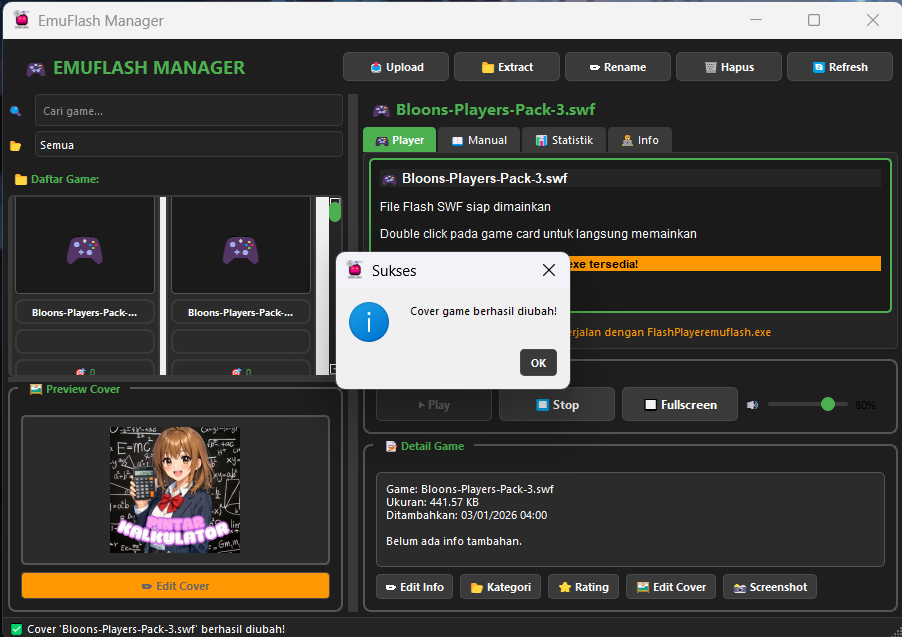
- "Edit Cover" = Change picture
- "Category" = Organize games
4. Exit
- Click "Stop" then close window
- No background processes left
💾 System Requirements
- OS: Windows 2000/XP/Vista/7/8/10/11
- CPU: Pentium III 500 MHz or higher
- RAM: 128 MB minimum
- Storage: 20 MB free space
- GPU: Any with DirectX 9 support
🌐 Multi-Language
English:
- "Play" = Start game
- "Stop" = End game
- "Fullscreen" = Big screen mode
中文 (Chinese):
- "运行" = 开始游戏
- "停止" = 结束游戏
- "全屏" = 全屏模式
✅ Advantages Over Others
VS RetroArch:
- EmuFlash: 15 MB ↔ RetroArch: 200 MB
- EmuFlash: Works on XP ↔ RetroArch: Needs Win7+
- EmuFlash: Simple UI ↔ RetroArch: Confusing menus
VS Standalone Emulators:
- No separate emulator for each console
- One manager for NES, SNES, Genesis, GBA
- Unified game library
VS Modern Managers:
- No updates forcing new Windows
- No telemetry or data collection
- Runs on 20-year-old computers
🔧 Made For Everyone By
Dwi Bakti & Dev
Keeping old PCs alive with retro gaming.
🎮 What Makes EmuFlash 10.0 Special
1. Tiny Size - Big Features
- Windows: 5 MB only (others 25-50 MB)
- Android: 8 MB only (others 15-20 MB)
- Loads in 1 second
2. Zero Ads - Pure Gaming
- No banner ads
- No video ads
- No pop-ups
- No "watch ad to continue"
3. Built-in Game Downloader
- Click "Search games..."
- Find 1000+ flash games
- Download directly in app
- Offline play available
4. Android Version Available
- Same light design
- Touch controls
- Save game progress
- Background music control
📲 Android Version Features
Touch Controls:
   [▲]                [A]
[◀]  [▶]          [B]   [O]
   [▼]                [X]
Special Features:
- Battery saving mode
- Screen orientation lock
- Quick save/load
- Controller support (Bluetooth)
🆓 Game Download System
Free Games Included:
- Puzzle Games - 200+ titles
- Action Games - 300+ titles
- Arcade Games - 150+ titles
- Educational - 100+ titles
- Classic Flash - 250+ titles
How to Download:
- Click "Search games..."
- Type game name
- Click download button
- Play instantly
💾 System Requirements
Windows Version:
- OS: Windows XP to Windows 11
- RAM: 64 MB minimum
- Storage: 10 MB free
- CPU: Pentium II 300 MHz
Android Version:
- OS: Android 4.0 to Android 14
- RAM: 128 MB minimum
- Storage: 20 MB free
- Screen: 320x480 minimum
🚀 How to Use - Simple
1. Download & Install
Windows: Download 5 MB .exe file → Run
Android: Download 8 MB .apk file → Install
2. Get Games
- Click "Search games..."
- Browse categories
- Download free games
- Or add your own SWF files
3. Play & Save
- Click game → Click "Play"
- Use keyboard/touch controls
- Save progress automatically
- Resume anytime
⭐ Why Choose EmuFlash 10.0?
vs Other Flash Emulators:
✅ 5x Smaller than competitors
✅ No Ads - others have annoying ads
✅ Built-in Games - no need separate downloads
✅ Works Offline - download once, play forever
✅ Old PC Support - runs on Windows XP easily
Unique Features:
- Game progress saving
- Custom controls
- Screenshot capture
- Game speed control
- Cheat code support
📥 Download Versions
Windows (5 MB):
Portable Version: EmuFlash.exe --NoAds
Android (8 MB):
APK File: EmuFlash.apk --NoAds
Google Play: Coming Soon
🆓 Free Game Library Included
Pre-loaded Games:
- Pac-Man Flash
- Tetris Battle
- Super Mario Flash
- 1942 Air Strike
- Puzzle Bobble
- 50+ more ready to play
Total Available: 1000+ flash games Download Size: Each game 1-10 MB Update: Weekly new games added
🔧 Made For Gamers By
Dwi Bakti & Dev
Bringing back flash games without the ads.
❓ FAQ
Q: Really no ads?
A: Yes! 100% ad-free forever.
Q: Works on Windows XP?
A: Yes! Perfect for old PCs.
Q: Android version free?
A: Yes! Same no-ads version.
Q: New games added?
A: Every week, automatically.
Q: Internet needed?
A: Only for downloading games. Play offline after.
Status: Ready
Games Available: 1000+
Ads: None
Perfect for: Old PCs, low-end phones, flash game lovers, ad-haters, quick gaming sessions.
Made with ❤️ for Termux community
为 Termux 社区用心制作


1 maintainer

Metadata
1 maintainer
Release files for emuflash 10.0
For a detailed explanation of source distributions (sdists) and built distributions (wheels), please see the package formats documentation.
Source distribution (sdist)
| File | Size | Uploaded | |
|---|---|---|---|
| emuflash-10.0.tar.gz | 27.3 MB | Details |
Built distribution (wheel)
| File | Interpreter | ABI | Platform | Reset |
|---|---|---|---|---|
| emuflash-10.0-py3-none-any.whl | Python 3 | none | any | Details |
Total release size: 54.7 MB
Release files / emuflash-10.0.tar.gz
| Download URL | emuflash-10.0.tar.gz |
|---|---|
| Size | 27.3 MB |
| Tags | Source |
|
SHA-256 checksum How to use checksums |
605fdc0e4b0d4c15005d415886c564c0425836250962774faa813cb2bbc85d68
|
|
BLAKE2b-256 checksum How to use checksums |
d71b79cefd5c8643b032420348646829db05fa32934c7239fe040ab905d3b816
|
| Upload date | |
|
Uploaded using Trusted Publishing? What is trusted publishing? |
No |
| Uploaded via |
twine/6.1.0 CPython/3.12.4
|
Release files / emuflash-10.0-py3-none-any.whl
| Download URL | emuflash-10.0-py3-none-any.whl |
|---|---|
| Size | 27.3 MB |
| Tags | Python 3 |
|
SHA-256 checksum How to use checksums |
64ba9193a474f170da85d36ff8efe6e812aeef4fef65300fc3006866a59ba192
|
|
BLAKE2b-256 checksum How to use checksums |
84f4aa900ca12074ee70a7f3b92362a3476904cf1bbfba10105580fd5a2c5a82
|
| Upload date | |
|
Uploaded using Trusted Publishing? What is trusted publishing? |
No |
| Uploaded via |
twine/6.1.0 CPython/3.12.4
|













