
enchase
Calibration and flare analysis for CHASE/HIS solar spectroscopy. Install one package, point it at data, get aligned cubes, animations, contrast profiles, and temperature maps.



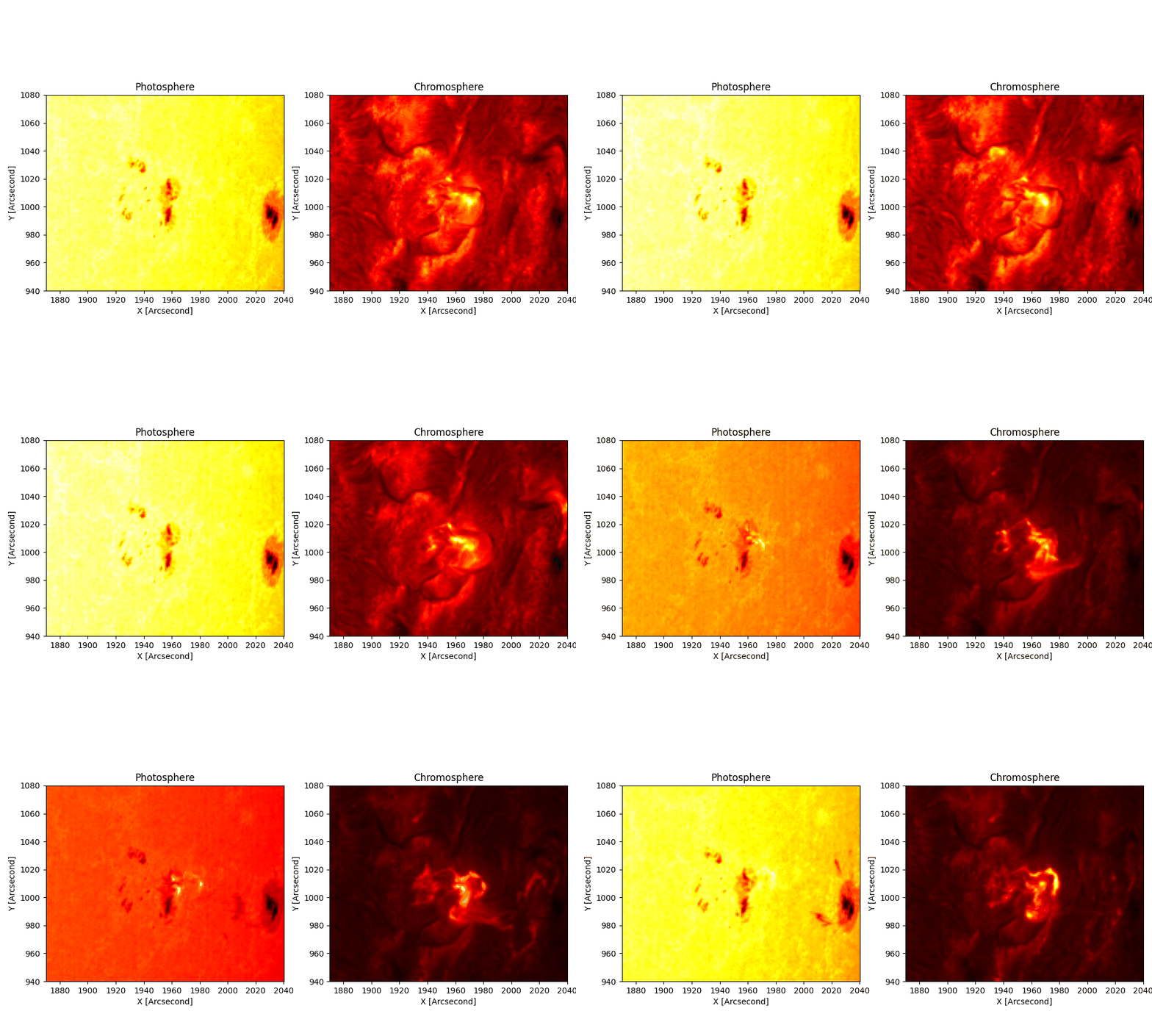
The 2023-03-29 X2.1 flare, stabilised by this pipeline. Photosphere left, chromosphere right.
Install
pip install enchase
That gives you the chase module, the chase command, and the chase-tui interactive app. Extras: pip install 'enchase[tui]' (TUI), 'enchase[atlas]' (absolute Fe I calibration), 'enchase[all]' (everything).
Get data
Two ways.
Option 1: our hosted dataset. We host ready-to-use CHASE observations on an S3 server, including the 2026-07-04 M3.2 flare (48 files, 8.65 GiB). No portal account, no expiring links:
import boto3
s3 = boto3.client("s3", endpoint_url="https://s3.preservemy.world",
                  aws_access_key_id=ACCESS_KEY, aws_secret_access_key=SECRET_KEY,
                  region_name="garage")
s3.download_file("chase-data",
                 "events/2026/07/04/M3.2/raw/HA/RSM20260704T132940_0000_HA.fits",
                 "data/RSM20260704T132940_0000_HA.fits")
Read credentials are free for research use: see docs/S3_DATA.md for the full guide (bucket layout, Colab setup, s3fs) and how to get keys.
Option 2: the CHASE portal. The portal (ssdc.nju.edu.cn) has a captcha, so you log in once in a real browser; after that everything is command line:
pip install enchase[portal] && playwright install chromium

chase-portal login          # opens the portal once; log in, close the window
chase-portal search --start "2023-03-29 02:00" --end "2023-03-29 03:00"
chase-portal urls   --start "2023-03-29 02:00" --end "2023-03-29 03:00" -o links.txt
chase links.txt             # downloads the files and runs the pipeline
urls writes one signed link per line (they expire in ~24h, so mint right before downloading). chase also accepts a single URL or a folder of already-downloaded *.fits. Walkthrough: docs/DATA_ACQUISITION.md.
Run it
Run this:
chase ./data --patch 940 1080 1870 2040 --contrast --temperature halpha
What happens: loads every scan, tracks the patch across frames, resamples wavelengths onto one grid, stabilises with optical flow, then writes results to ./chase_out/:
| You get | What it is |
|---|---|
quicklook.gif |
photosphere / chromosphere animation |
contrast_profile.gif + .npy |
wavelength-vs-time flare contrast |
ha_temp_maps.npy + temperature.gif |
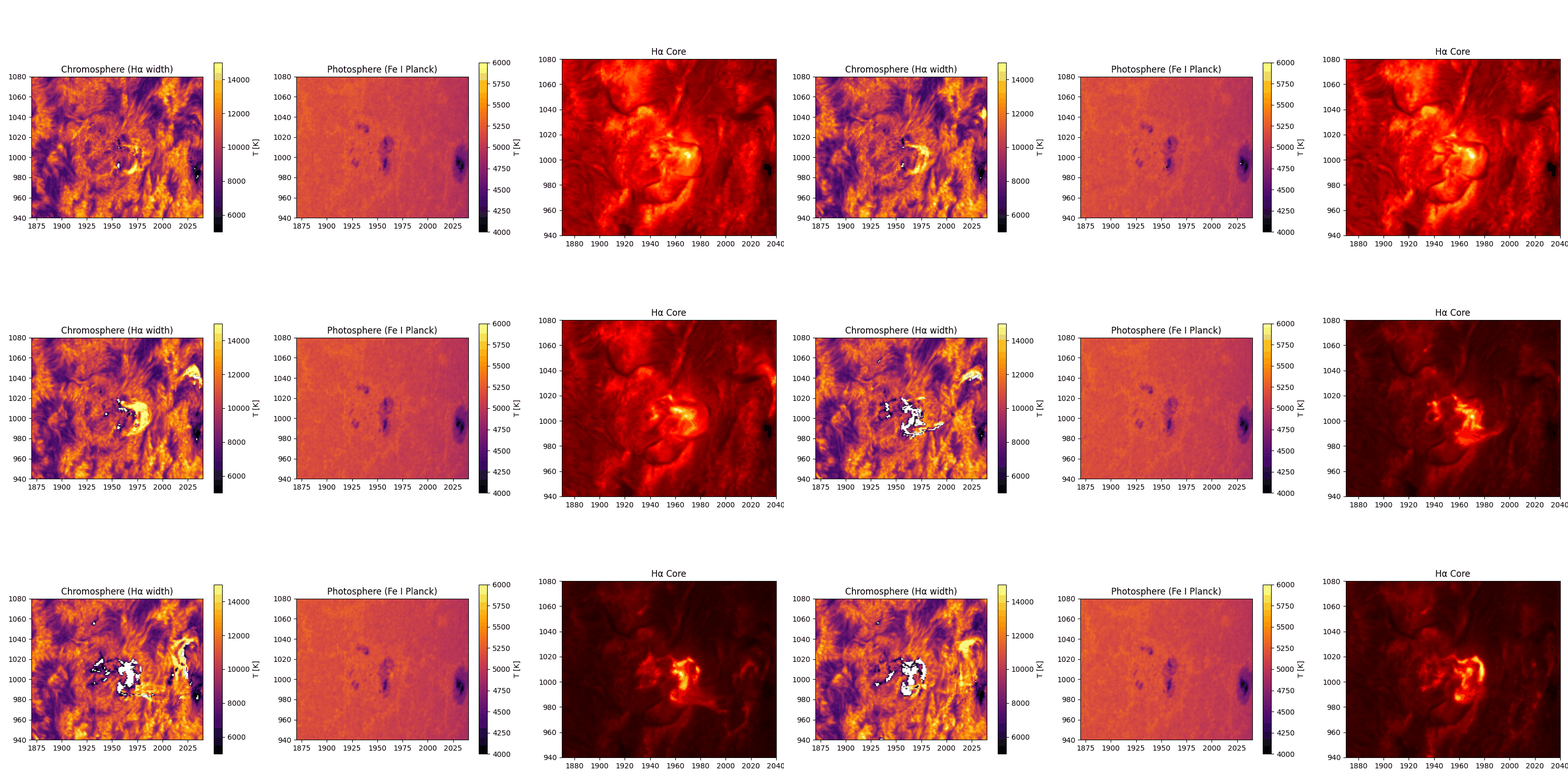
chromospheric temperature maps |
aligned_data.npz |
the aligned cubes (also the resume checkpoint) |
diag_*.png |
patch overlay, quiet-Sun spectrum |
No patch coordinates yet? Run with --full-fov --no-optical-flow --no-track first, look at diag_qs_spectrum.png and the GIF, then pick a [y0 y1 x0 x1] box.
Rerun just one thing
The first run saved a checkpoint, so reruns skip the slow loading and alignment:
chase ./data --out ./chase_out --only gif           # re-render the animation. Takes seconds
chase ./data --out ./chase_out --only contrast      # recompute contrast only
chase ./data --out ./chase_out --only temperature --temperature fe_voigt
Turn things off
Every stage has a switch. Mix freely:
| Flag | What it disables |
|---|---|
--no-track |
cross-correlation patch tracking |
--no-resample |
per-frame wavelength resampling |
--no-drift |
spectral drift correction in the contrast stage |
--no-optical-flow |
optical-flow stabilisation |
--no-gif, --no-npz, --no-diagnostics |
those outputs |
--no-resample --no-drift together = completely untouched wavelength axis.
The same thing in Python
from chase import Config, run_pipeline

results = run_pipeline(Config(fits_dir="./data", patch=[940, 1080, 1870, 2040],
                              contrast=True, temperature="halpha"))

results["aligned"]["ha"].shape    # (nframes, 118, H, W) stabilised float32
results["contrast"].shape         # (nframes, 118)
results["gif"]                    # './chase_out/quicklook.gif'
Rerun one step from the checkpoint: add resume=True and only the toggles you want.
Or skip the pipeline and call single functions:
import chase

cube, hdr, wav = chase.load_cube("RSM..._HA.fits")          # one cube: (118, H, W) + wavelengths
seq = chase.load_flare_sequence("./data", patch=[...])      # tracked + resampled sequence
ha_al = chase.optical_flow_align(seq["ha_cubes"], reference=seq["align_ref"])
contrast, _ = chase.contrast_profile(ha_al, background=seq["ha_bg"])
T, width = chase.halpha_width_temperature(ha_al[12], seq["wavelength_ha"])
Each line works on its own. Full list with snippets: docs/SDK.md.
Prefer clicking to typing?
chase-tui
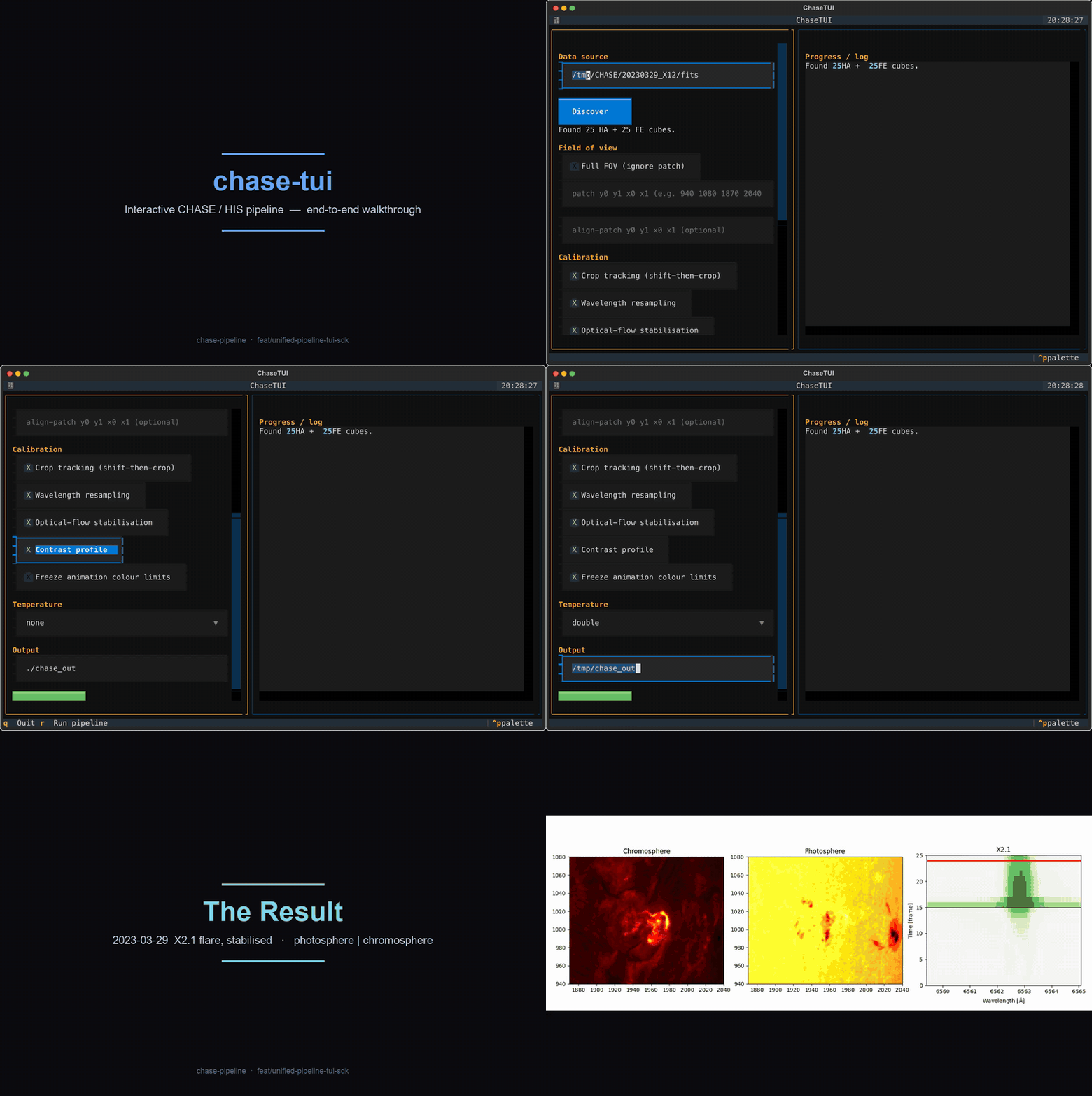
Every checkbox is one of the switches above. There is also a one-file config workflow: chase --config my.toml, keys mirror the flags (examples/config.toml).
Why this exists (statement of need)
CHASE (the Chinese Hα Solar Explorer) scans the full solar disk in Hα (118 wavelengths, 6559.4 to 6565.1 Å) and Fe I (46 wavelengths near 6569 Å). The portal ships full-disk cubes with no co-alignment and a wavelength zero-point that drifts by ~0.8 channels per frame. Getting a science-ready region out of that takes real calibration work, which is why the data is under-used. Earlier scripts (the original chase-pipeline, Finlay Davis's satprocess) each solved part of the problem. This package merges them into one installable tool that preserves the physics: shift-then-crop tracking, per-frame wavelength resampling, alignment on a flare-free channel, absolute atlas calibration, and the correct temperature inversion per line. The reasoning behind each rule is in docs/CALIBRATION.md.
What lives where
| Subpackage | Does | |
|---|---|---|
chase.io |
resumable download, FITS discovery, cube + sequence loading |  |
chase.calib.spatial / .align |
shift-then-crop tracking, optical-flow stabilisation |  |
chase.calib.wavelength |
per-frame resampling onto a common grid, spectral-drift xcorr |  |
chase.calib.intensity |
quiet-Sun norm, integral scaling, FTS-atlas absolute calibration |  |
chase.analysis.contrast |
wavelength-vs-time flare contrast |  |
chase.analysis.temperature |
Hα width to T (Molnar), Fe I to T (Planck / EB / Voigt) |  |
Double temperature map: chromosphere from Hα width (~10⁴ K), photosphere from Fe I Planck inversion (~5100 K).
Documentation
- docs/S3_DATA.md: use our hosted CHASE datasets from anywhere (incl. Google Colab)
- docs/DATA_ACQUISITION.md: CHASE portal to processed cube, end to end
- docs/SDK.md: every function, with snippets
- docs/TUI.md: TUI walkthrough
- docs/CALIBRATION.md: the science behind each calibration step
- docs/CONTRIBUTING.md: dev setup, tests, style
Development
git clone https://github.com/Majboor/enchase.git
cd enchase
pip install -e '.[all]'
pytest -q            # 27 tests, synthetic FITS fixtures, no big data needed
Acknowledgements
Built with the guidance and corrections of Dr. Alexander Pietrow (AIP) and Dr. Malcolm Druett. The Hough-circle limb centring, spectral cross-correlation, integral intensity scaling, and CSV shift-cache are adapted from Finlay Davis's satprocess (BSD-3-Clause; see NOTICE). Affiliation support from Prof. Dr. Sayed Amer Mahmood (University of the Punjab). Data courtesy of the CHASE/HIS mission and the Solar Science Data Center, Nanjing University.
Citing
Author: Waleed Ajmal, ORCID 0009-0006-8222-1983. Software citation metadata is in CITATION.cff.
If you use this pipeline, cite the methods it builds on:
- Molnar et al. 2019, ApJ 881, 99. Hα width to temperature (10.3847/1538-4357/ab2ba3)
- The Eddington-Barbier photospheric inversion (A&A 2013, aa21259-13)
- The ISPy FTS solar-atlas calibration (ISP-SST/ISPy)
License
MIT. Ported satprocess code stays BSD-3-Clause, listed in NOTICE.
1 maintainer

Metadata
1 maintainer
Release files for enchase 2.1.0
For a detailed explanation of source distributions (sdists) and built distributions (wheels), please see the package formats documentation.
Source distribution (sdist)
| File | Size | Uploaded | Provenance | |
|---|---|---|---|---|
| enchase-2.1.0.tar.gz | 68.3 kB | Without provenance | Details |
Built distribution (wheel)
| File | Interpreter | ABI | Platform | Reset |
|---|---|---|---|---|
| enchase-2.1.0-py3-none-any.whl | Python 3 | none | any | Details |
Total release size: 137.4 kB
Release files / enchase-2.1.0.tar.gz
| Download URL | enchase-2.1.0.tar.gz |
|---|---|
| Size | 68.3 kB |
| Tags | Source |
|
SHA-256 checksum How to use checksums |
28b96755735bdac4327024e932fa9154fba1f62282051800d4b9fd387edbcaa0
|
|
BLAKE2b-256 checksum How to use checksums |
c6389aed2af84c1ad970fb7456a708a25f9cb8d53ae2d505831ae5a9bb6cd321
|
| Upload date | |
|
Uploaded using Trusted Publishing? What is trusted publishing? |
No |
| Uploaded via |
twine/7.0.0 CPython/3.11.9
|
Release files / enchase-2.1.0-py3-none-any.whl
| Download URL | enchase-2.1.0-py3-none-any.whl |
|---|---|
| Size | 69.0 kB |
| Tags | Python 3 |
|
SHA-256 checksum How to use checksums |
d79c6638dcc85cd35498a6b740c8f039ed4ac763e1ab159c3962dd6bfc6702e6
|
|
BLAKE2b-256 checksum How to use checksums |
f34060a920238b0f7ddeb09a1525db46a5829b3299e23f6a4e3cfccf521d4ef0
|
| Upload date | |
|
Uploaded using Trusted Publishing? What is trusted publishing? |
No |
| Uploaded via |
twine/7.0.0 CPython/3.11.9
|
Security for enchase 2.1.0
Provenance
Provenance describes where a file came from. On PyPI, provenance is shared via attestations, which provide a verifiable record of the build or publishing details. View details, limitations and caveats.
No provenance found
None of the files in this release were uploaded with provenance metadata.
A note on package security
PyPI is a repository for distributing packages, not a service for auditing them. While third-party security researchers and our staff do their best to detect and remove malicious packages, PyPI cannot guarantee the quality, security or suitability of any given package.













