
Metadata encoding and extraction for AI-generated content

Project description

EncypherAI Core



A Python package for embedding and extracting metadata in text using Unicode variation selectors without affecting readability.
Overview
EncypherAI Core provides tools for invisibly encoding metadata (such as model information, timestamps, and custom data) into text generated by AI models. This enables:
- Provenance tracking: Identify which AI model generated a piece of text
- Timestamp verification: Know when text was generated
- Custom metadata: Embed any additional information you need
- Streaming support: Works with both streaming and non-streaming LLM outputs
The encoding is done using Unicode variation selectors, which are designed to specify alternative forms of characters without affecting text appearance or readability.
Demo Video
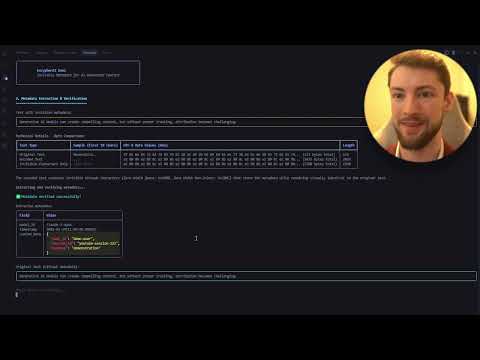
Watch our demo video to see EncypherAI in action, demonstrating how to embed and verify metadata in AI-generated content.
Installation
uv pip install encypher-ai
Quick Start
Basic Encoding and Decoding
from encypher.core.unicode_metadata import UnicodeMetadata
import time

# Encode metadata into text
encoded_text = UnicodeMetadata.embed_metadata(
    text="This is a sample text generated by an AI model.",
    model_id="gpt-4",
    timestamp=int(time.time()),  # Current Unix timestamp
    target="whitespace",  # Embed in whitespace characters
    hmac_secret_key="your-secret-key"  # Optional: Only needed for HMAC verification
)

# Extract metadata from text
metadata = UnicodeMetadata.extract_metadata(encoded_text)

# If you need to verify the integrity of the metadata with HMAC
from encypher.core.metadata_encoder import MetadataEncoder
encoder = MetadataEncoder(hmac_secret_key="your-secret-key")
metadata_dict, is_verified = encoder.extract_verified_metadata(encoded_text)
print(f"Metadata verified: {is_verified}")
Using MetadataEncoder (Alternative Method)
from encypher.core.metadata_encoder import MetadataEncoder
import time

# Initialize encoder with optional HMAC secret key
encoder = MetadataEncoder(secret_key="your-secret-key")

# Encode metadata
metadata = {
    "model_id": "gpt-4",
    "timestamp": int(time.time()),  # Current Unix timestamp
    "custom_field": "custom value"
}
encoded_text = encoder.encode_metadata(
    text="This is a sample text generated by an AI model.",
    metadata=metadata
)

# Decode and verify metadata
is_valid, extracted_metadata, clean_text = encoder.verify_text(encoded_text)
if is_valid:
    print(f"Model: {extracted_metadata.get('model_id')}")
    print(f"Timestamp: {extracted_metadata.get('timestamp')}")
    print(f"Custom field: {extracted_metadata.get('custom_field')}")
Streaming Support
from encypher.streaming.handlers import StreamingHandler

# Initialize streaming handler
handler = StreamingHandler(
    metadata={
        "model_id": "gpt-4",
        "custom_field": "custom value"
    },
    target="whitespace",
    encode_first_chunk_only=True  # Only encode the first non-empty chunk
)

# Process streaming chunks
chunks = [
    "This is ",
    "a sample ",
    "text generated ",
    "by an AI model."
]

for chunk in chunks:
    processed_chunk = handler.process_chunk(chunk)
    print(processed_chunk)  # Use in your streaming response
Configuration
from encypher.config.settings import Settings

# Load settings from environment variables and/or config file
settings = Settings(
    config_file="config.json",  # Optional
    env_prefix="ENCYPHER_"  # Environment variable prefix
)

# Get configuration values
metadata_target = settings.get_metadata_target()
hmac_secret_key = settings.get_hmac_secret_key()
encode_first_chunk_only = settings.get_encode_first_chunk_only()
Including Custom Metadata
from encypher.core.unicode_metadata import UnicodeMetadata
import time

# Include custom metadata along with required fields
encoded_text = UnicodeMetadata.embed_metadata(
    text="This is a sample text generated by an AI model.",
    model_id="gpt-4",
    timestamp=int(time.time()),  # Current Unix timestamp
    custom_metadata={
        "user_id": "user123",
        "session_id": "abc456",
        "context": {
            "source": "knowledge_base",
            "reference_id": "doc789"
        }
    }
)

# Later extract and use all metadata
is_valid, metadata = UnicodeMetadata.extract_metadata(encoded_text)
if is_valid:
    model = metadata["model_id"]  # "gpt-4"
    timestamp = metadata["timestamp"]  # Timestamp

    # Access custom metadata
    if "custom" in metadata:
        user_id = metadata["custom"]["user_id"]  # "user123"
        context = metadata["custom"]["context"]  # Nested object
Features
- Invisible Embedding: Metadata is embedded using Unicode variation selectors that don't affect text appearance
- Flexible Targets: Choose where to embed metadata (whitespace, punctuation, etc.)
- Streaming Support: Works with both streaming and non-streaming LLM outputs
- HMAC Verification: Optionally verify the integrity of embedded metadata
- Customizable: Embed any JSON-serializable data
- LLM Integration: Ready-to-use integrations with popular LLM providers
Metadata Target Options
You can specify where to embed metadata using the target parameter:
whitespace: Embed in whitespace characters (default, least noticeable)punctuation: Embed in punctuation marksfirst_letter: Embed in the first letter of each wordlast_letter: Embed in the last letter of each wordall_characters: Embed in all characters (not recommended)none: Don't embed metadata (for testing/debugging)
Security Features
HMAC Authentication
EncypherAI uses HMAC (Hash-based Message Authentication Code) to ensure the security and integrity of embedded metadata:
- Tamper Detection: Cryptographically verifies that metadata hasn't been modified
- Authentication: Confirms metadata was created by an authorized source
- Integrity Protection: Ensures the relationship between content and metadata remains intact
# Example of verifying metadata with HMAC
from encypher.core.unicode_metadata import UnicodeMetadata

encoder = UnicodeMetadata()  # Uses secret key from environment variable
encoded_text = "AI-generated text with embedded metadata..."

# Returns (is_valid, metadata)
is_valid, metadata = encoder.extract_metadata(encoded_text)

if is_valid:
    print(f"Verified metadata: {metadata}")
else:
    print("Warning: Metadata has been tampered with!")
For production use, set your HMAC secret key via the ENCYPHER_SECRET_KEY environment variable or pass it directly to the constructor.
FastAPI Integration
See the examples/fastapi_example.py for a complete example of integrating EncypherAI with FastAPI, including:
- Encoding endpoint
- Decoding endpoint
- Streaming support
CLI Usage
The package includes a comprehensive command-line interface:
# Encode metadata into text
python -m encypher.examples.cli_example encode --text "This is a test" --model-id "gpt-4" --target "whitespace"

# Encode with custom metadata
python -m encypher.examples.cli_example encode --input-file input.txt --output-file output.txt --model-id "gpt-4" --custom-metadata '{"source": "test", "user_id": 123}'

# Decode metadata from text
python -m encypher.examples.cli_example decode --input-file encoded.txt --show-clean

# Decode with debug information
python -m encypher.examples.cli_example decode --text "Your encoded text here" --debug
Development and Contributing
We welcome contributions to EncypherAI! Please see CONTRIBUTING.md for detailed guidelines.
Code Style
EncypherAI follows PEP 8 style guidelines with Black as our code formatter. All code must pass Black formatting checks before being merged. We use pre-commit hooks to automate code formatting and quality checks.
To set up the development environment:
# Clone the repository
git clone https://github.com/encypherai/encypher-ai.git
cd encypher-ai

# Install development dependencies
uv pip install -e ".[dev]"

# Set up pre-commit hooks
pre-commit install
The pre-commit hooks will automatically:
- Format your code with Black (including Jupyter notebooks)
- Sort imports with isort
- Check for common issues with flake8 and ruff
- Perform type checking with mypy
You can also run the formatting tools manually:
# Format all Python files
black encypher

# Format Python files including Jupyter notebooks
black --jupyter encypher
Running Tests
# Run all tests
pytest

# Run tests with coverage
pytest --cov=encypher
License
EncypherAI is provided under a dual licensing model:
Open Source License (AGPL-3.0)
The core EncypherAI package is released under the GNU Affero General Public License v3.0 (AGPL-3.0). This license allows you to use, modify, and distribute the software freely, provided that:
- You disclose the source code when you distribute the software
- Any modifications you make are also licensed under AGPL-3.0
- If you run a modified version of the software as a service (e.g., over a network), you must make the complete source code available to users of that service
Commercial License
For organizations that wish to incorporate EncypherAI into proprietary applications without the source code disclosure requirements of AGPL-3.0, we offer a commercial licensing option.
Benefits of the commercial license include:
- Proprietary Integration: Use EncypherAI in closed-source applications without AGPL obligations
- Legal Certainty: Clear licensing terms for commercial use
- Support & Indemnification: Access to professional support and IP indemnification
For commercial licensing inquiries, please contact enterprise@encypherai.com.
See the LICENSE file for details of the AGPL-3.0 license.
Acknowledgments
- Thanks to all contributors who have helped shape this project
- Special thanks to the open-source community for their invaluable tools and libraries
Contact
For questions, feedback, or support, please open an issue on our GitHub repository.
Release history Release notifications | RSS feed


Download files
Download the file for your platform. If you're not sure which to choose, learn more about installing packages.
Source Distribution
Built Distribution
Filter files by name, interpreter, ABI, and platform.
If you're not sure about the file name format, learn more about wheel file names.
Copy a direct link to the current filters
File details
Details for the file encypher_ai-1.1.0.tar.gz.
File metadata
- Download URL: encypher_ai-1.1.0.tar.gz
- Upload date:
- Size: 54.7 kB
- Tags: Source
- Uploaded using Trusted Publishing? No
- Uploaded via: twine/6.1.0 CPython/3.12.9
File hashes
| Algorithm | Hash digest | |
|---|---|---|
| SHA256 |
74c1d8746ec980e0370fc39e67ee64c6681eacb2679fe0f63cde173a25ca33d0
|
|
| MD5 |
6ab92247cabbd5949435ddab6103b2ec
|
|
| BLAKE2b-256 |
a18f3440d22f5d7a92f8453caabce107acd563abdc8f23a0fe1e30957c47d3c6
|
File details
Details for the file encypher_ai-1.1.0-py3-none-any.whl.
File metadata
- Download URL: encypher_ai-1.1.0-py3-none-any.whl
- Upload date:
- Size: 45.8 kB
- Tags: Python 3
- Uploaded using Trusted Publishing? No
- Uploaded via: twine/6.1.0 CPython/3.12.9
File hashes
| Algorithm | Hash digest | |
|---|---|---|
| SHA256 |
a04bcae0f76d7deded98f1a2b333844dde1e7a204867852f548a54b53822e0cb
|
|
| MD5 |
d812aa712dce7f04f49f3c3492461ff9
|
|
| BLAKE2b-256 |
52dddd274c49f0028cf79d6a503f16bfeef34da009a1ec05b7303585529af841
|






