
A simple plugin for Endstone that sends a welcome message to players when they join. The message can be shown in chat, tip, popup, toast, title, or form format.
Verified details
These details have been verified by PyPIProject links
GitHub Statistics
Maintainers

Project description
endstone-welcome-message
A simple plugin for Endstone that sends a welcome message to players when they join. The message can be shown in chat, tip, popup, toast, title, or form format.
Message types
1 - Chat message:
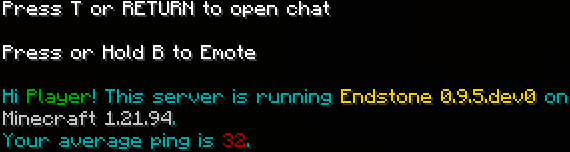
2 - Tip message:

3 - Popup message:
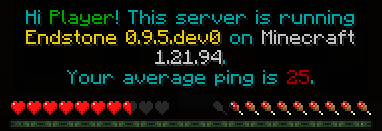
4 - Toast message:

5 - Title message:
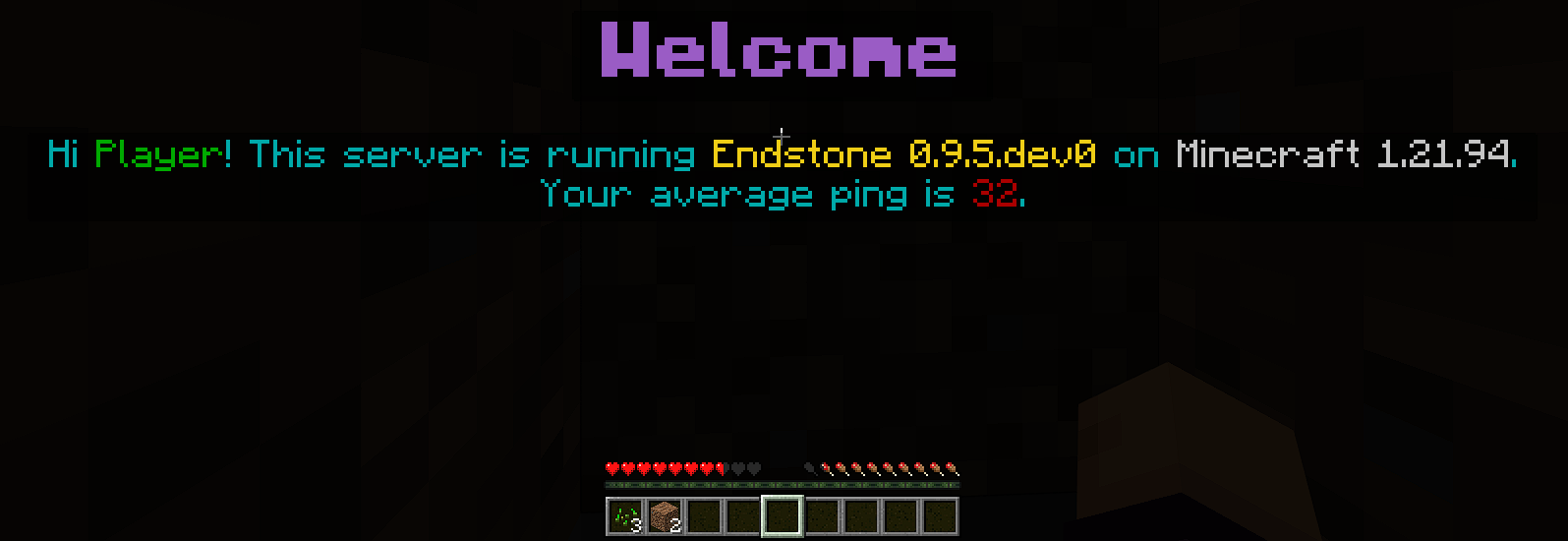
6 - Form message:
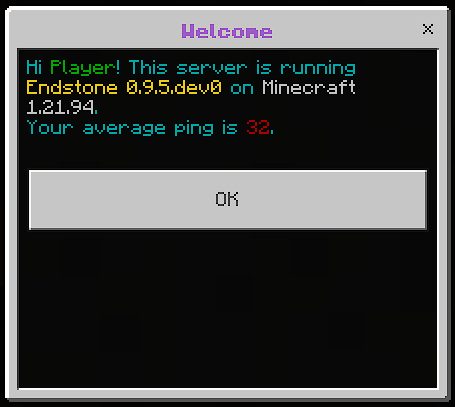
Available Commands
All configuration is done via in-game commands:
/wmset <key> <value>
Used to update specific configuration options for the welcome message.
/wmset type <value>- Sets the message type.
- Valid values:
chat,tip,popup,toast,title,form - Example:
/wmset type title
/wmset header <value>- Sets the message header.
- Supports placeholders and Minecraft color codes.
- Only used for
toast,title, andformtypes. - Example:
/wmset header Welcome {player_name}!
/wmset body <value>- Sets the message body.
- Supports placeholders and Minecraft color codes.
- Use
\nfor new lines. - Example:
/wmset body Hi {player_name}\nWelcome to our server
/wmset button <value>- Sets the form button text.
- Only used for form type.
- Example:
/wmset button Close
/wmset wait <0-5>- Delays message for 0–5 seconds after player joins.
- Example:
/wmset wait 2
/wmopts
Displays the current configuration for the welcome message.
/wmopts
/wmtest [value]
Used to manually preview the welcome message for testing before enabling it server-wide.
/wmtest- Sends a test message using the currently active type.
/wmtest [value]- Sends a test message using the specified type.
- Valid values:
chat,tip,popup,toast,title,form - Example:
/wmtest popup
/wmenable or /wmon
Enables the welcome message system with the current configuration options.
/wmenableor/wmon
/wmdisable or /wmoff
Disables the welcome message system.
/wmdisableor/wmoff
Placeholders
You can use the following placeholders in your welcome message.
| Placeholder | Description |
|---|---|
| {player_name} | Player's name |
| {player_locale} | Player's current locale |
| {player_device_os} | Player's operation system |
| {player_device_id} | Player's current device id |
| {player_hostname} | Player's hostname |
| {player_port} | Player's port number |
| {player_game_mode} | Player's current game mode |
| {player_game_version} | Player's current game version |
| {player_exp_level} | Player's current experience level |
| {player_total_exp} | Player's total experience points |
| {player_exp_progress} | Player's current experience progress towards the next level |
| {player_ping} | Player's average ping |
| {player_dimension_name} | Player's current dimension name |
| {player_dimension_id} | Player's current dimension id |
| {player_coordinate_x} | Player's current x coordinate |
| {player_coordinate_y} | Player's current y coordinate |
| {player_coordinate_z} | Player's current z coordinate |
| {player_health} | Player's health |
| {player_max_health} | Player's max health |
| {player_xuid} | Player's XUID |
| {player_uuid} | Player's UUID |
| {server_level_name} | Server's level name |
| {server_max_players} | The maximum amount of player's which can login to this server |
| {server_online_players} | Current online players count |
| {server_start_time} | Start time of the server |
| {server_locale} | Server's current locale |
| {server_endstone_version} | Server's Endstone version |
| {server_minecraft_version} | Server's Minecraft version |
| {server_port} | Server's IPv4 port |
| {server_port_v6} | Server's IPv6 port |
Installation
- Download the latest
.whlfile from GitHub Releases and place it into yourplugins/folder. - Restart or reload the server.
Project details
Verified details
These details have been verified by PyPIProject links
GitHub Statistics
Maintainers
Release history Release notifications | RSS feed


Download files
Download the file for your platform. If you're not sure which to choose, learn more about installing packages.
Source Distribution
Built Distribution
Filter files by name, interpreter, ABI, and platform.
If you're not sure about the file name format, learn more about wheel file names.
Copy a direct link to the current filters
File details
Details for the file endstone_welcome_message-0.2.0.tar.gz.
File metadata
- Download URL: endstone_welcome_message-0.2.0.tar.gz
- Upload date:
- Size: 6.4 kB
- Tags: Source
- Uploaded using Trusted Publishing? Yes
- Uploaded via: twine/6.1.0 CPython/3.12.9
File hashes
| Algorithm | Hash digest | |
|---|---|---|
| SHA256 |
ff40b5d77227a32600ba5e67510fa53043ac1ba062de4aa0c3153c52b199a7b5
|
|
| MD5 |
d8cb25dfe19dc3574852be8dc29014bc
|
|
| BLAKE2b-256 |
76fe3f77142bdb71b1775b74df3c9ccd28c394484d2ce9f3eca39ef6b8ef9819
|
Provenance
The following attestation bundles were made for endstone_welcome_message-0.2.0.tar.gz:
Publisher:
release-and-publish.yml on cenk/endstone-welcome-message
-
Statement:
-
Statement type:
https://in-toto.io/Statement/v1 -
Predicate type:
https://docs.pypi.org/attestations/publish/v1 -
Subject name:
endstone_welcome_message-0.2.0.tar.gz -
Subject digest:
ff40b5d77227a32600ba5e67510fa53043ac1ba062de4aa0c3153c52b199a7b5 - Sigstore transparency entry: 345901086
- Sigstore integration time:
-
Permalink:
cenk/endstone-welcome-message@3d629585b92a6f53c8e8b22638ac4a45d63b8486 -
Branch / Tag:
refs/tags/0.2.0 - Owner: https://github.com/cenk
-
Access:
public
-
Token Issuer:
https://token.actions.githubusercontent.com -
Runner Environment:
github-hosted -
Publication workflow:
release-and-publish.yml@3d629585b92a6f53c8e8b22638ac4a45d63b8486 -
Trigger Event:
push
-
Statement type:
File details
Details for the file endstone_welcome_message-0.2.0-py2.py3-none-any.whl.
File metadata
- Download URL: endstone_welcome_message-0.2.0-py2.py3-none-any.whl
- Upload date:
- Size: 7.3 kB
- Tags: Python 2, Python 3
- Uploaded using Trusted Publishing? Yes
- Uploaded via: twine/6.1.0 CPython/3.12.9
File hashes
| Algorithm | Hash digest | |
|---|---|---|
| SHA256 |
cac8878ab0135af2628a6a42049ca0588df9edec42e43adbd64356544d6025d7
|
|
| MD5 |
d44dd11ae73c0916ff1b2c8fa3cc8651
|
|
| BLAKE2b-256 |
eb6dd438b25772179c60facb8d3c7270907bb278eb9b82a4625d9835db468764
|
Provenance
The following attestation bundles were made for endstone_welcome_message-0.2.0-py2.py3-none-any.whl:
Publisher:
release-and-publish.yml on cenk/endstone-welcome-message
-
Statement:
-
Statement type:
https://in-toto.io/Statement/v1 -
Predicate type:
https://docs.pypi.org/attestations/publish/v1 -
Subject name:
endstone_welcome_message-0.2.0-py2.py3-none-any.whl -
Subject digest:
cac8878ab0135af2628a6a42049ca0588df9edec42e43adbd64356544d6025d7 - Sigstore transparency entry: 345901087
- Sigstore integration time:
-
Permalink:
cenk/endstone-welcome-message@3d629585b92a6f53c8e8b22638ac4a45d63b8486 -
Branch / Tag:
refs/tags/0.2.0 - Owner: https://github.com/cenk
-
Access:
public
-
Token Issuer:
https://token.actions.githubusercontent.com -
Runner Environment:
github-hosted -
Publication workflow:
release-and-publish.yml@3d629585b92a6f53c8e8b22638ac4a45d63b8486 -
Trigger Event:
push
-
Statement type:






