
PyEnergyDiagrams

energydiagram Python module for plotting energy profile diagrams using Matplotlib.
Installation
If you are new to Python, the easiest way to get started is to use a distribution like Anaconda. Then you can use the terminal to install the module using pip:
pip install energydiagram
For installing the development version:
pip install git+https://github.com/giacomomarchioro/PyEnergyDiagrams
The only requirement is matplotlib, which is installed by default using Anaconda.
How to use it?
from energydiagram import ED
diagram = ED()
diagram.round_energies_at_digit = 2
diagram.bottom_text_fontsize = 'small'
diagram.top_text_fontsize = 'small'
diagram.offset = 2
diagram.add_level(0, 'Separated\nReactants')
diagram.add_level(-5.4, 'mlC1')
diagram.add_level(-15.6, 'mlC2', 'last',)  #Using 'last'  or 'l' it will be together with the previous level
diagram.add_level(28.5, 'mTS1', color='g')
diagram.add_level(-9.7, 'mCARB1')
diagram.add_level(-19.8, 'mCARB2', 'last')
diagram.add_level(20, 'mCARBX', 'last')
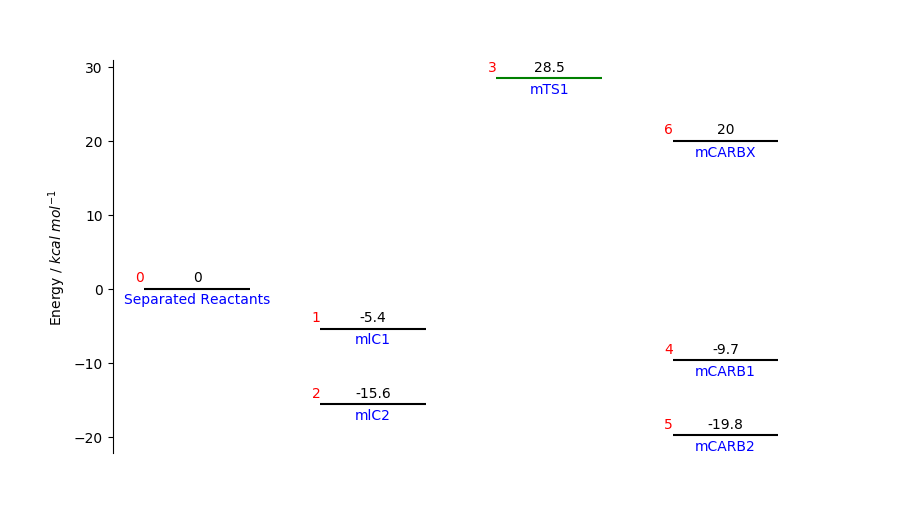
Show the IDs (red numbers) to understand how to link the levels:
diagram.plot(show_IDs=True)
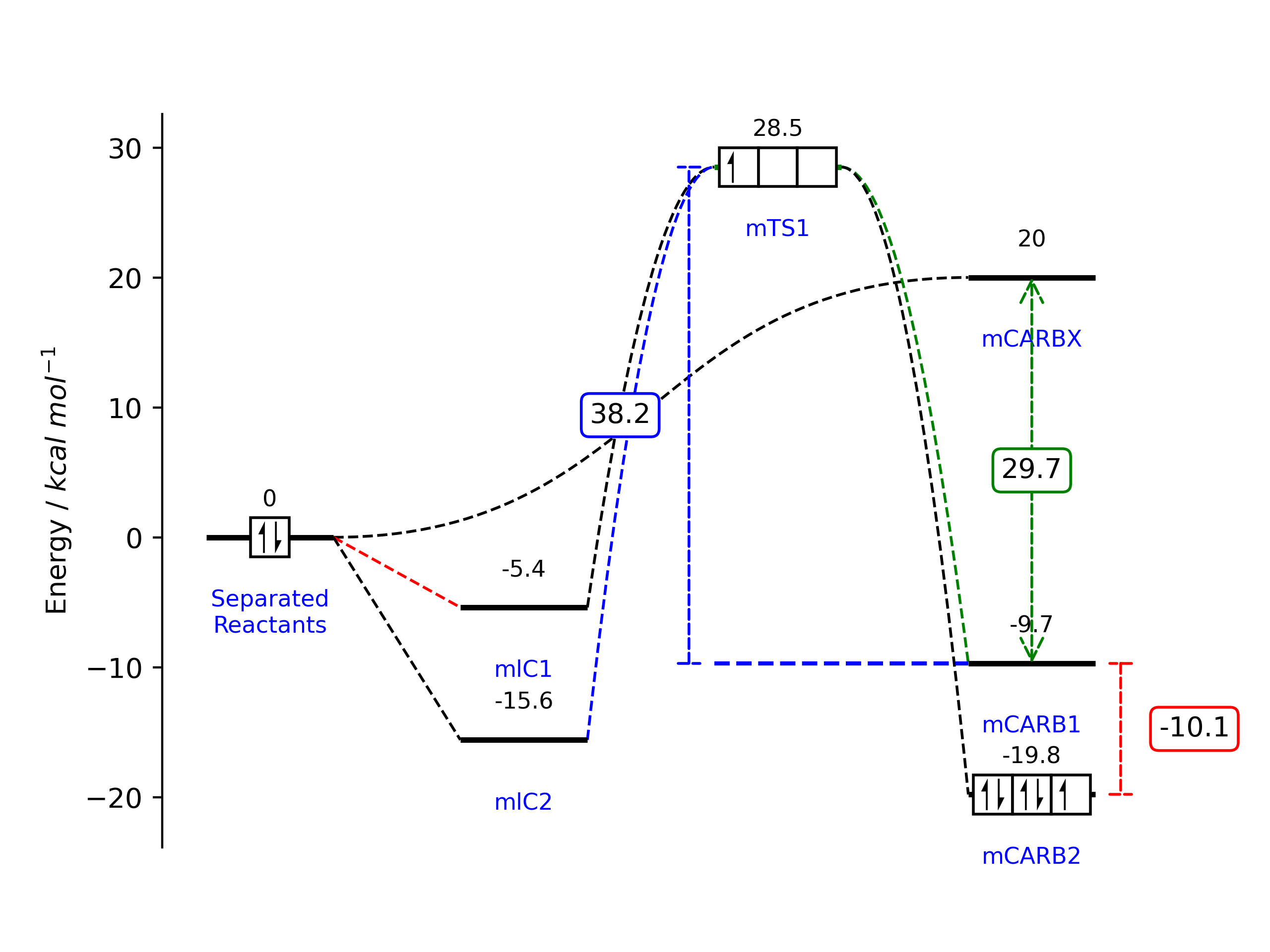
Add the links using diagram.add_link(starting_level_ID,ending_level_ID):
diagram.add_link(0, 1, color='r')
diagram.add_link(0, 2)
diagram.add_link(2, 3, color='b', line_order=2)  # change line order to make a curved link
diagram.add_link(1, 3, line_order=2)
diagram.add_link(3, 4, color='g', line_order=2)
diagram.add_link(3, 5, line_order=2)
diagram.add_link(0, 6, line_order=3)
# now we create the plot, this will update the figure
diagram.plot(ylabel="Energy / $kcal$ $mol^{-1}$") # this is the default ylabel
To show it you can use diagram.fig.show() while for saving it use diagram.fig.savefig('myEnergyDiagra.pdf').
Electron boxes
The electron boxes can be added using:
diagram.add_electronbox(level_id=0, boxes=1, electrons=2, side=3, spacing_f=3)
diagram.add_electronbox(3, 3, 1, 3, 3)
diagram.add_electronbox(5, 3, 5, 3, 3)
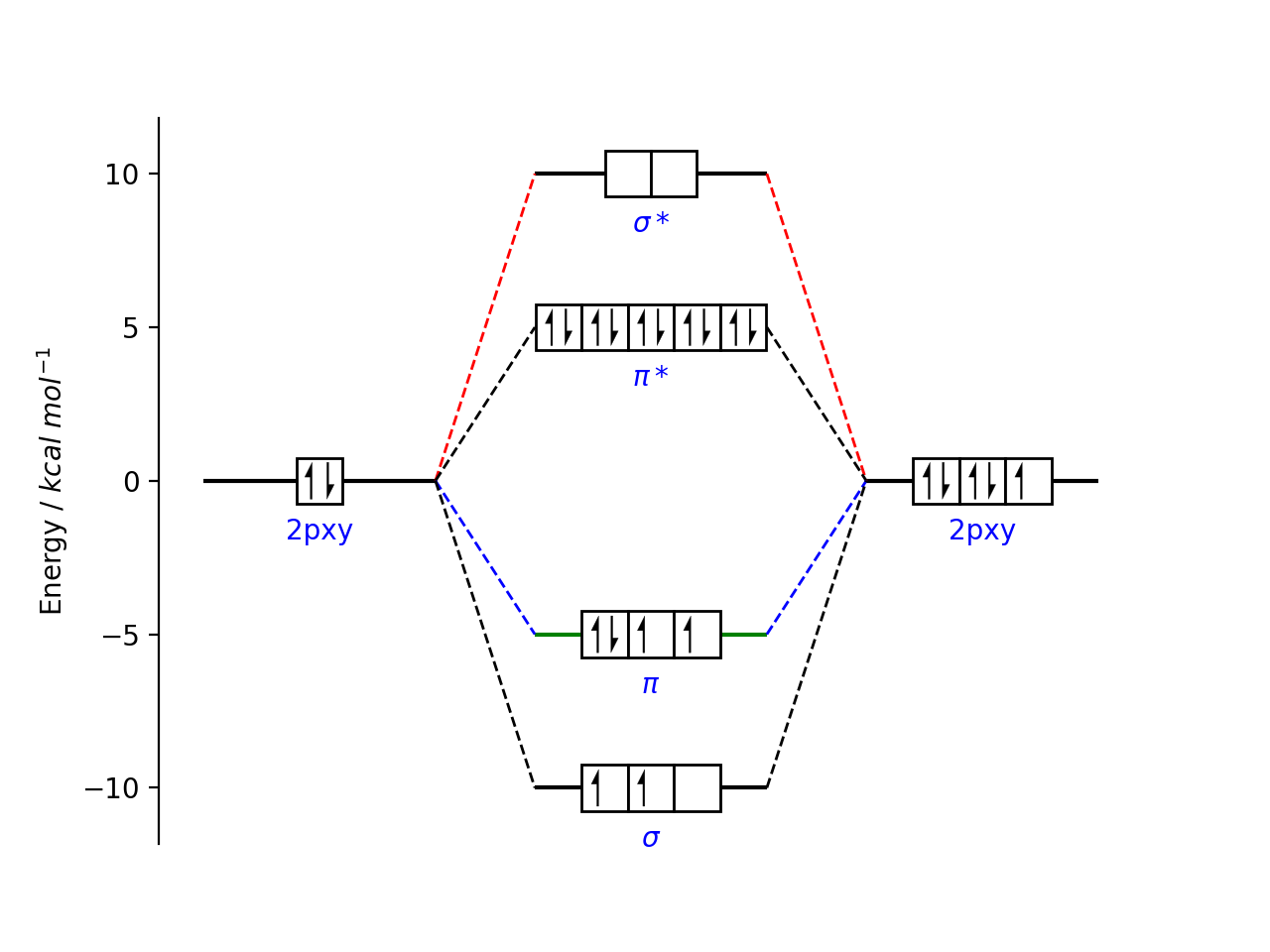
The electron spin is automatically changed following the aufbau principle.
from energydiagram import ED
diagram2 = ED()
diagram2.add_level(0,'2pxy',top_text='')
diagram2.add_level(10,r'$\sigma*$',top_text='')
diagram2.add_level(5,r'$\pi*$','last',top_text='')
diagram2.add_level(-5,r'$\pi$','last',color='g',top_text='')
diagram2.add_level(-10,r'$\sigma$',top_text='',position='l')
diagram2.add_level(0,'2pxy',top_text='')
for i in range(1,5):
    diagram2.add_link(0,i,color='g')
    diagram2.add_link(i,5,color='b')
diagram2.add_electronbox(level_id=0, boxes=1, electrons=2, side=1.5, spacing_f=2.5)
diagram2.add_electronbox(1,2,0,1.5,3)
diagram2.add_electronbox(2,5,10,1.5,3)
diagram2.add_electronbox(3,3,4,1.5,3)
diagram2.add_electronbox(4,3,2,1.5,3)
diagram2.add_electronbox(5,3,5,1.5,3)
diagram2.offset *= 1.5
diagram2.plot()
Arrows between levels
You can caluclate the energy betwen two layers and show arrows using:
diagram.add_arrow(3, 4, position='left', color='blue')
diagram.add_arrow(6, 4, position='center')
diagram.add_arrow(5, 4, position='right', color='r')
Troubleshooting and fine-tuning
Most of the time, there could be a problem with text padding. Some parameters can be changed in this way.
diagram.offset = 10
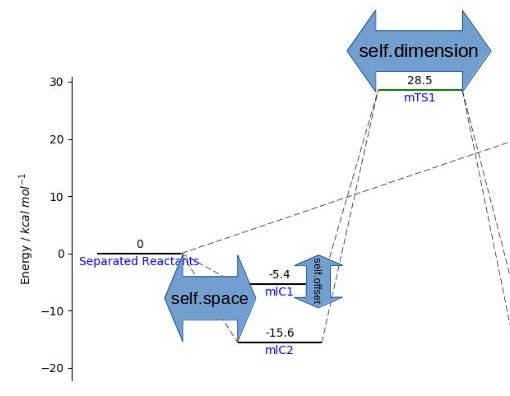
To make the change effective, you must use the command diagram.plot() again. Remember that once you have made a first attempt at plotting. You can adjust the plot as every matplotlib plot. For convenience you can access ax and fig from the instance of the class.
# we adjust some parameters
diagram.ax.set_ylabel('My label')
diagram.fig.set_figwidth(10)
# don't want tikcs on the y label
diagram.ax.set_yticks([])
# I want to show on the x axis instead
diagram.ax.axes.get_xaxis().set_visible(True)
diagram.ax.spines['bottom'].set_visible(True)
diagram.ax.set_xlabel("My x label")
# we replot the figure (sometimes we have to resize with the mouse the figure so we force to refresh)
# diagram.fig.show()
If you use the command diagram.plot() now all the changes will be overwritten, so these minor adjustment must be done after.
Testing
python3.12 -m unittest tests/test_energydiagram.py
Contributors
Thanks to Kalyan Jyoti Kalita for the arrow functionality and O2-AC, agrass15268 for bug fixing.
1 maintainer

Metadata
1 maintainer
Release files for energydiagram 1.0.0
For a detailed explanation of source distributions (sdists) and built distributions (wheels), please see the package formats documentation.
Source distribution (sdist)
| File | Size | Uploaded | Provenance | Actions |
|---|---|---|---|---|
| energydiagram-1.0.0.tar.gz | 11.3 kB | Without provenance | Details for energydiagram-1.0.0.tar.gz |
Built distribution (wheel)
| File | Interpreter | ABI | Platform | Actions Reset |
|---|---|---|---|---|
| energydiagram-1.0.0-py3-none-any.whl | Python 3 | none | any | Details for energydiagram-1.0.0-py3-none-any.whl |
Total release size: 21.1 kB
Release files / energydiagram-1.0.0.tar.gz
| Download URL | energydiagram-1.0.0.tar.gz |
|---|---|
| Size | 11.3 kB |
| Tags | Source |
|
SHA-256 checksum How to use checksums |
b9f4c5fad83221a15a51ce740ff9271e8125fb00e54eaf3c7d42ea58b3201d11
|
|
BLAKE2b-256 checksum How to use checksums |
c160d83f99d524988b378eb9bbb9086e5789b30473e20f37da2ae2b1b0911372
|
| Upload date | |
|
Uploaded using Trusted Publishing? What is trusted publishing? |
No |
| Uploaded via |
twine/6.1.0 CPython/3.12.9
|
Release files / energydiagram-1.0.0-py3-none-any.whl
| Download URL | energydiagram-1.0.0-py3-none-any.whl |
|---|---|
| Size | 9.8 kB |
| Tags | Python 3 |
|
SHA-256 checksum How to use checksums |
c8900ee9e149f75ce649f2c2a6aff6ca43766987d06e6bc55706e5435a169b49
|
|
BLAKE2b-256 checksum How to use checksums |
c3288d6f14a288197050bb603e3e9ba6067bf580d50d371562b5db3679cefab9
|
| Upload date | |
|
Uploaded using Trusted Publishing? What is trusted publishing? |
No |
| Uploaded via |
twine/6.1.0 CPython/3.12.9
|
Security for energydiagram 1.0.0
Provenance
Provenance describes where a file came from. On PyPI, provenance is shared via attestations, which provide a verifiable record of the build or publishing details. View details, limitations and caveats.
No provenance found
None of the files in this release were uploaded with provenance metadata.
A note on package security
PyPI is a repository for distributing packages, not a service for auditing them. While third-party security researchers and our staff do their best to detect and remove malicious packages, PyPI cannot guarantee the quality, security or suitability of any given package.
To learn more about protecting yourself from malicious actors, visit our package security documentation.













