
Intelligent UPS Monitoring & Shutdown Orchestration for NUT
Verified details
These details have been verified by PyPIProject links
GitHub Statistics
Maintainers

Project description
⚡ Eneru
UPS monitoring and shutdown orchestration for NUT






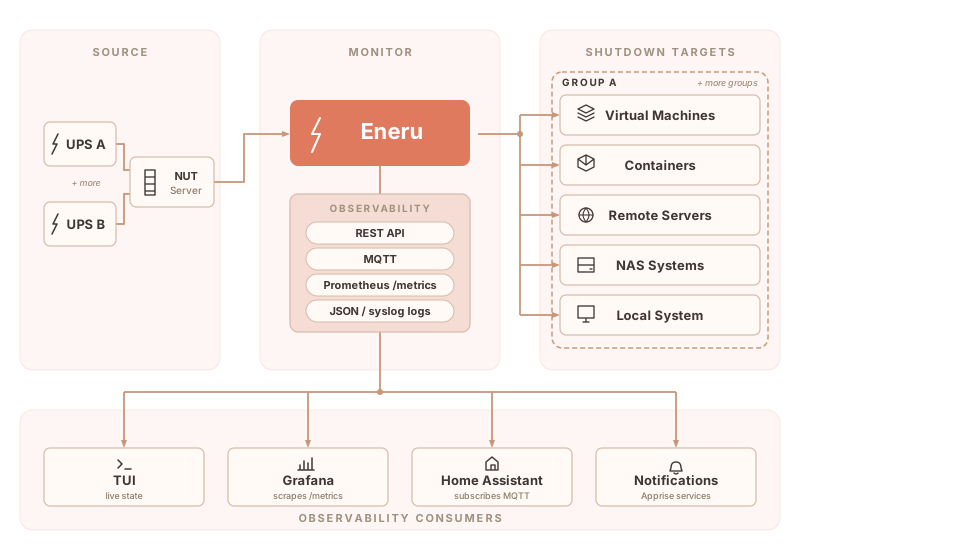
A Python-based UPS monitoring daemon for Network UPS Tools (NUT). Monitors one or more UPSes, orchestrates shutdown of VMs, containers, and remote servers during power events, and exposes read-only API, Prometheus, MQTT, and Grafana observability.
Documentation • Getting Started • Configuration • Changelog • Roadmap

Why Eneru?
Most UPS shutdown tools handle one machine. If you have more than one, things get complicated fast:
| Challenge | Eneru Solution |
|---|---|
| Multiple UPSes powering different servers | ✅ Multi-UPS monitoring from a single instance |
| Multiple servers need coordinated shutdown | ✅ Orchestrated multi-server shutdown via SSH |
| VMs and containers need graceful stop | ✅ Libvirt VM and Docker/Podman container handling |
| Network mounts hang during power loss | ✅ Timeout-protected unmounting |
| No visibility during power events | ✅ Real-time TUI dashboard + notifications via 100+ services |
| Different systems need different commands | ✅ Per-server custom shutdown commands |
| Hypervisors need VM shutdown before host | ✅ Pre-shutdown actions (Proxmox, ESXi, XCP-ng, libvirt) |
| Battery estimates are unreliable | ✅ Multi-vector shutdown triggers |
| Network down during outage | ✅ Non-blocking notifications with persistent retry |
| Firmware recalibrates battery silently | ✅ Battery anomaly detection and alerts |
| Need power-quality telemetry | ✅ API, Prometheus, MQTT, Grafana, JSON logs, and SQLite events |
How Eneru is different
NUT's upsmon shuts down one machine with two triggers (low battery, forced shutdown). apcupsd does the same for APC hardware. PeaNUT and NUTCase provide dashboards but no shutdown logic. Enterprise tools (Eaton IPM, PowerChute) add virtualization support but are vendor-locked and proprietary.
Eneru sits on top of NUT and adds what these tools lack:
- Orchestrated multi-resource shutdown, VMs, compose stacks, containers, remote servers, filesystems, and local system in a coordinated sequence
- 6 independent shutdown triggers, including depletion rate (computed from observed battery data, not UPS estimates) and extended time on battery. NUT's 2 triggers miss these failure modes
- Multi-UPS coordination, monitor multiple UPSes with per-group triggers and shutdown policies, each with independent failure handling
- Battery anomaly detection, catches firmware recalibrations and battery degradation with vendor-specific jitter filtering (APC, CyberPower, Ubiquiti)
See the full comparison in the documentation.
Use cases
Homelabs, virtualization hosts (Proxmox, ESXi, libvirt), Docker/Podman container hosts, NAS systems (Synology, QNAP, TrueNAS), multi-UPS environments with multiple server groups, and mixed physical/virtual setups.
Quick start
Installation
Docker / Podman:
docker pull ghcr.io/m4r1k/eneru:latest

docker run -d --name eneru \
  --restart unless-stopped \
  -p 9191:9191 \
  -v /srv/eneru/config.yaml:/etc/ups-monitor/config.yaml:ro \
  -v /srv/eneru/state:/var/lib/eneru \
  -v /srv/eneru/run:/var/run/eneru \
  -v /srv/eneru/ssh:/var/lib/eneru/ssh:ro \
  ghcr.io/m4r1k/eneru:latest \
  run --config /etc/ups-monitor/config.yaml \
  --api --api-bind 0.0.0.0 --api-port 9191
Use ghcr.io/m4r1k/eneru:testing for pre-release builds. v5.5+ makes the OCI image first-class for both remote-only and local-host deployments — for full local-host ownership from a container (host poweroff, VM teardown, container stop, filesystem unmount), add --network host, -v /etc/machine-id:/etc/machine-id:ro, and a loopback SSH key. See Choose your install for the three deployment profiles and Migrate to container for the step-by-step.
PyPI:
pip install eneru[notifications]
Debian/Ubuntu:
curl -fsSL https://m4r1k.github.io/Eneru/KEY.gpg | sudo gpg --dearmor -o /usr/share/keyrings/eneru.gpg
echo "deb [arch=all signed-by=/usr/share/keyrings/eneru.gpg] https://m4r1k.github.io/Eneru/deb stable main" | sudo tee /etc/apt/sources.list.d/eneru.list
sudo apt update && sudo apt install eneru
RHEL/Fedora:
sudo dnf install -y epel-release
sudo curl -o /etc/yum.repos.d/eneru.repo https://m4r1k.github.io/Eneru/rpm/eneru.repo
sudo dnf install eneru
Configuration
# Edit configuration
sudo nano /etc/ups-monitor/config.yaml

# Validate and start
eneru validate --config /etc/ups-monitor/config.yaml
sudo systemctl enable --now eneru.service

# Monitor in real time
eneru monitor --config /etc/ups-monitor/config.yaml
Single UPS
ups:
  name: "UPS@192.168.1.100"
  display_name: "Main UPS"

triggers:
  low_battery_threshold: 20
  critical_runtime_threshold: 600

local_shutdown:
  enabled: true
Multiple UPSes
ups:
  - name: "UPS1@192.168.1.10"
    display_name: "Rack A UPS"
    is_local: true
    remote_servers:
      - name: "Proxmox Node"
        enabled: true
        host: "192.168.1.20"
        user: "root"

  - name: "UPS2@192.168.1.11"
    display_name: "Rack B UPS"
    remote_servers:
      - name: "NAS"
        enabled: true
        host: "192.168.1.30"
        user: "admin"
See the full documentation for complete configuration options.
Features
- Monitor one or more UPSes from a single instance, each with its own shutdown group
- Real-time TUI dashboard (
eneru monitor) with color-coded status - Shutdown triggers: battery %, runtime, depletion rate, time on battery, FSD flag
- Battery anomaly alerts for unexpected charge drops while on line power, with jitter filtering for APC, CyberPower, and Ubiquiti UniFi UPS units
- Shuts down VMs, containers, remote servers, filesystems, and the local system in order
- Notifications to 100+ services (Discord, Slack, Telegram, ntfy, email) via Apprise
- Power quality monitoring: voltage, AVR, bypass, overload
- Read-only API, Prometheus metrics, outbound MQTT, JSON/syslog logs, and Grafana dashboard
- Official OCI image — first-class for both remote-only deployments AND full local-host ownership via SSH loopback delegate (v5.5+)
- Dry-run mode for safe testing
- Comprehensive test suite across multiple Linux distros, with E2E tests against real NUT, SSH, Docker, and libvirt on every commit
Three deployment profiles
| Install path | Local-host ownership | Remote systems | Recommended for |
|---|---|---|---|
| pip / deb / rpm (native) | First-class via systemd | Yes | Homelab, single-host professional, end-user-managed enterprise |
| OCI image (Docker / Podman) | First-class via SSH loopback delegate (v5.5+) | Yes | Homelab, professional, enterprise — the v5.5 default for containerized local-host |
| Kubernetes | Not recommended | Yes | Enterprise multi-site fleet monitoring of remote systems |
v5.5 made the OCI image first-class for the local-host case: the container SSHes to the host it runs on so the namespace barrier doesn't block the host-poweroff contract. Pick by deployment preference, not capability.
See Choose your install for the full feature × install matrix and Containers and Kubernetes for Docker, Podman, SELinux/AppArmor, Kubernetes, and the SSH walkthrough.
The name

Named after Eneru (エネル) from One Piece, the self-proclaimed God of Skypiea who ate the Goro Goro no Mi (Rumble-Rumble Fruit) and can control electricity. When the power from the grid fails, this tool takes over and shuts everything down safely. Unlimited power... management!
Documentation
Full documentation at eneru.readthedocs.io:
- Getting Started - installation and basic setup
- Configuration - full config reference
- Shutdown Triggers - how shutdown decisions work
- Notifications - Discord, Slack, Telegram, etc.
- Remote Servers - SSH setup for NAS and other servers
- Testing - testing strategy and coverage
- Troubleshooting - common issues and solutions
Support the project
Eneru is free and MIT-licensed and will stay that way. If it has saved your homelab or rack from a dirty shutdown and you'd like to chip in toward UPS hardware, NUT testing, and the maintainer's coffee budget, Buy Me a Coffee — always optional, much appreciated.
License
MIT License - See LICENSE file for details.
Project details
Verified details
These details have been verified by PyPIProject links
GitHub Statistics
Maintainers
Release history Release notifications | RSS feed


Download files
Download the file for your platform. If you're not sure which to choose, learn more about installing packages.
Source Distribution
Built Distribution
Filter files by name, interpreter, ABI, and platform.
If you're not sure about the file name format, learn more about wheel file names.
Copy a direct link to the current filters
File details
Details for the file eneru-5.5.1.tar.gz.
File metadata
- Download URL: eneru-5.5.1.tar.gz
- Upload date:
- Size: 451.5 kB
- Tags: Source
- Uploaded using Trusted Publishing? Yes
- Uploaded via: twine/6.1.0 CPython/3.13.13
File hashes
| Algorithm | Hash digest | |
|---|---|---|
| SHA256 |
6620c78e3bbf533ee4174fe0c9b6e20591c3757f44edefe3ab9391072e586a0c
|
|
| MD5 |
9505f259628a1c1ec9f9a6a8786951ae
|
|
| BLAKE2b-256 |
d1c75bd994214ddb3a37ae2eb8089ef5b4a494002bd94ff5920fbcd9b87b78e5
|
Provenance
The following attestation bundles were made for eneru-5.5.1.tar.gz:
Publisher:
pypi.yml on m4r1k/Eneru
-
Statement:
-
Statement type:
https://in-toto.io/Statement/v1 -
Predicate type:
https://docs.pypi.org/attestations/publish/v1 -
Subject name:
eneru-5.5.1.tar.gz -
Subject digest:
6620c78e3bbf533ee4174fe0c9b6e20591c3757f44edefe3ab9391072e586a0c - Sigstore transparency entry: 1573435340
- Sigstore integration time:
-
Permalink:
m4r1k/Eneru@7f3881689bd7b7cc990ec76d5e00587021b8e121 -
Branch / Tag:
refs/tags/v5.5.1 - Owner: https://github.com/m4r1k
-
Access:
public
-
Token Issuer:
https://token.actions.githubusercontent.com -
Runner Environment:
github-hosted -
Publication workflow:
pypi.yml@7f3881689bd7b7cc990ec76d5e00587021b8e121 -
Trigger Event:
release
-
Statement type:
File details
Details for the file eneru-5.5.1-py3-none-any.whl.
File metadata
- Download URL: eneru-5.5.1-py3-none-any.whl
- Upload date:
- Size: 217.6 kB
- Tags: Python 3
- Uploaded using Trusted Publishing? Yes
- Uploaded via: twine/6.1.0 CPython/3.13.13
File hashes
| Algorithm | Hash digest | |
|---|---|---|
| SHA256 |
129567169b1330a3b56fe66344259cb534751a933bc6d5d412bfab308ef266cd
|
|
| MD5 |
8598c6e2d8bd96e2bfefbcaa0196a4a9
|
|
| BLAKE2b-256 |
bef52d01c7b5848310ec0511ec04336f599f30a3f251b24591afefc2452062fd
|
Provenance
The following attestation bundles were made for eneru-5.5.1-py3-none-any.whl:
Publisher:
pypi.yml on m4r1k/Eneru
-
Statement:
-
Statement type:
https://in-toto.io/Statement/v1 -
Predicate type:
https://docs.pypi.org/attestations/publish/v1 -
Subject name:
eneru-5.5.1-py3-none-any.whl -
Subject digest:
129567169b1330a3b56fe66344259cb534751a933bc6d5d412bfab308ef266cd - Sigstore transparency entry: 1573435374
- Sigstore integration time:
-
Permalink:
m4r1k/Eneru@7f3881689bd7b7cc990ec76d5e00587021b8e121 -
Branch / Tag:
refs/tags/v5.5.1 - Owner: https://github.com/m4r1k
-
Access:
public
-
Token Issuer:
https://token.actions.githubusercontent.com -
Runner Environment:
github-hosted -
Publication workflow:
pypi.yml@7f3881689bd7b7cc990ec76d5e00587021b8e121 -
Trigger Event:
release
-
Statement type:






