
engmech



Rigid-body statics, dynamics and mass properties for engineers.
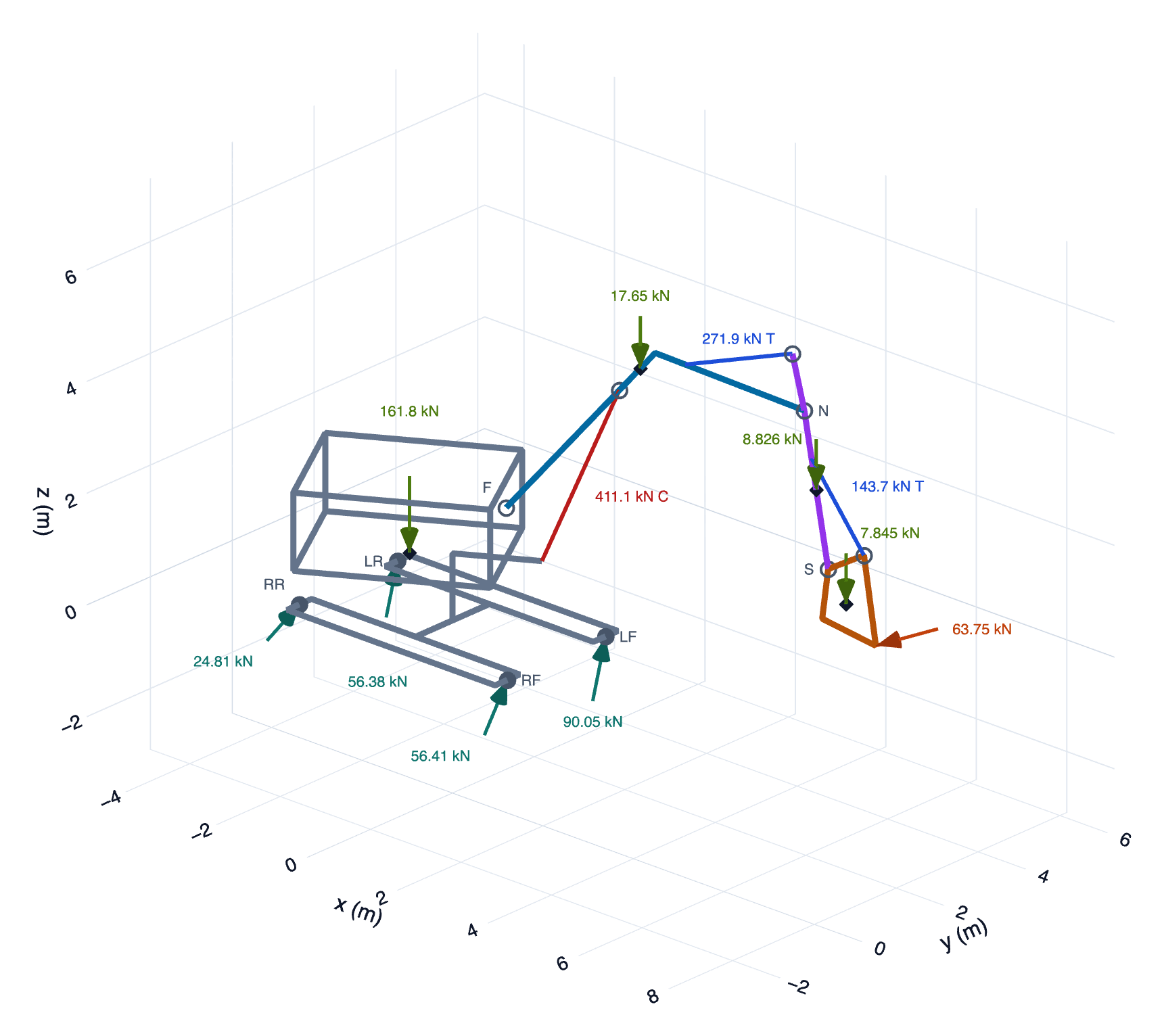
Describe a problem in a short YAML file with real units, solve it from the command line, and get support reactions, joint forces, member forces and actuator torques, each one verified against equilibrium, plus an interactive HTML report with free-body diagrams.
Quick start
pip install engmech
engmech examples copy excavator        # start from a bundled example
engmech report excavator.yaml --open   # its report, with the diagram above
A model is a short YAML file:
# beam.yaml
name: Simply supported beam
analysis: planar
units: {length: m, force: kN}

supports:
  A: {type: pin, at: [0, 0]}
  B: {type: roller, at: [6, 0], normal: +y}

loads:
  - {force: [0, -12], at: [2, 0]}
  - {distributed: {start: [3, 0], end: [6, 0], intensity: 4 kN/m, direction: -y}}
$ engmech solve beam.yaml
╭─────────────────────────────────────────────────────────────────╮
│ Simply supported beam                                           │
│ planar · statics · 1 body · 2 supports · units: m, kN, kN⋅m, kg │
╰─────────────────────────────────────────────────────────────────╯

✓ Equilibrium verified (max relative residual 1e-16)
Support reactions  kN
Support   Type     Fx   Fy   Resultant    N
━━━━━━━━━━━━━━━━━━━━━━━━━━━━━━━━━━━━━━━━━━━
A         pin       0   11          11
B         roller    –   13          13   13
Force and moment on the body from the ground, at the support point. A dash means
that connection cannot carry that component. N is the normal force, positive
when pushing on the body.
What it does
- Single-body and multi-body statics. Beams, frames, machines, trusses, linkages and 3D structures. Every body's equilibrium is written into one global system and solved at once.
- Inverse dynamics. Give each body's angular velocity and acceleration (and the acceleration of its centre of gravity, or a pivot) and get the joint forces and motor torques that motion requires, including the gyroscopic terms (Newton-Euler).
- Mass properties. Build bodies from rods, boxes, cylinders, tubes, spheres, cones, point masses and CAD values, with holes as subtracted shapes. You get mass, centre of gravity, inertia about any point, and principal axes. Weights are applied automatically.
- Units everywhere. Write
10 kN,250 mm,45 deg,300 rpmor7850 kg/m^3; bare numbers use the file's unit system. Every value is checked for the right dimension, and output can use any unit system (SI, SI-kN, SI-mm, US-in, US-ft or custom). - Honest diagnostics. Before solving, the equations are scaled so the diagnosis does not depend on your units. If the supports cannot hold the loads, it tells you which free motion the loads drive (for example "beam rotates about the point (0, 0)"). If some reactions cannot be found from equilibrium alone, they are marked indeterminate instead of guessed. Give joints a stiffness and redundant forces are shared by least work, which gives the elastic method for bolt groups and similar problems.
- Verification built in. Each result is checked by summing every force
and moment on each body directly, independently of the solver. Files can
also carry
checks:(hand calculations or design limits) that are reported as pass or fail, andengmech validateconfirms that an installation reproduces the documented benchmark results. - Engineering conveniences. Named points and parameters with
expressions (
[L*cos(theta), L*sin(theta)]), load cases and combinations, solved-for loads ("what force P holds this?"), actuated joints, cables and contacts that warn when they go slack or lift off, parameter sweeps, JSON/CSV export, and a JSON Schema for editor autocompletion.
Reports
engmech report model.yaml writes one self-contained HTML file: it opens
offline, prints as a calculation document, and can be filed with the
calculation it records. A report leads with the results:
- Summary: whether each load case is balanced and determinate, how many of the file's checks pass, and any warning, with what to do about it.
- Load cases compared, when there is more than one, side by side with the maximum and minimum of each reaction and joint force.
- Results for each load case and combination, then an interactive free-body diagram, in 2D or 3D, of the whole model and of each part. Members are coloured by tension and compression.
- Checks, notes from the model's description (hand calculations, assumptions), and the model itself: determinacy, units, points, parameters and mass properties.
- Provenance: the versions, platform, parameter overrides and input file (with its SHA-256) that produced the results.
Reports walks through every section with a screenshot, and covers printing and adding a company logo.
Install
pip install engmech
# or as an isolated command-line tool:
uv tool install engmech      # or: pipx install engmech
Requires Python 3.11 or newer, on Linux, macOS or Windows.
Command line
engmech examples list                      # bundled, hand-verified examples
engmech examples copy frame my-frame.yaml  # start from one

engmech solve my-frame.yaml                # reactions, joint forces, checks
engmech solve my-frame.yaml -v             # plus loads, mass, verification tables
engmech solve my-frame.yaml --set "P=15 kN" --units SI-mm
engmech solve my-frame.yaml --json -       # machine-readable results

engmech report my-frame.yaml --open        # HTML report with interactive diagrams
engmech check my-frame.yaml                # is it stable? determinate? which DOF are free?
engmech mass bracket.yaml --about A        # mass, cog, inertia tensors, principal axes
engmech sweep beam.yaml --param "P=0 kN:20 kN:11" --output A.Fy,B.N --csv out.csv
engmech validate --report validation.html  # qualify this installation
engmech config                             # config file location and the report logo in use
engmech schema -o engmech.schema.json      # JSON Schema for editor autocompletion
engmech solve exits with status 0 when everything is in equilibrium and
all checks pass, 1 for input errors, and 2 when a check fails or the loads
cannot be balanced. Add --strict to also fail on indeterminate results.
That makes model files usable as regression tests in CI.
Input errors point at the line in the file:
error: frame.yaml:10:28: supports.B.roller: unknown field 'nromal' (did you mean 'normal'?)
error: frame.yaml:7:3: points.C: ['3 N', 4] mixes bare numbers with explicit units; give every non-zero component a unit, or put one unit after the brackets
Python
The same model can be built in Python. Values accept the same forms as the file: numbers in the model's units, strings with units, or named points.
import engmech as em

m = em.Model("Three-hinged frame", planar=True, units={"length": "m", "force": "kN"})
m.point("A", [0, 0])
m.point("B", [6, 0])
m.point("C", [3, 4])
m.body("left")
m.body("right")
m.support("A", em.Pin(at="A"), body="left")
m.support("B", em.Pin(at="B"), body="right")
m.joint("C", em.Pin(at="C"), bodies=("left", "right"))
m.load(em.Force([0, -12], at=[1.5, 2]), body="left")

result = m.solve()
result.show()                      # terminal tables
result.primary["B"].force          # numpy array in SI (N)
result.primary["C"].component("Fx")
result.report("frame.html")        # HTML report
model = em.load("frame.yaml")      # or load a file
How to read the results
- Support reactions are the force and moment on the body from the ground, at the support point, in global axes.
- Joint forces are reported on the "On" body from the "From" body. For
bodies: [a, b]that is the force onbfroma;areceives the opposite. - N is a normal (roller/contact) force, positive when pushing on the body. T is the axial force in a link or cable, positive in tension. Drive is the torque or force an actuated joint must supply.
- A dash (–) means that connection cannot carry that component;
indet.means equilibrium alone cannot determine it.
Examples
Every example states its hand calculation in its description, and its
checks: hold the hand-derived answers. The test suite runs them all.
| Example | Shows |
|---|---|
beam |
point, triangular and uniform loads, a couple |
cantilever |
3D fixed support, self-weight from rod shapes |
frame |
three-hinged frame, joint forces, free-body views |
truss |
method of joints with particles and links |
boom |
3D boom on a ball joint and two cables |
excavator |
3D machine: cylinder forces, and the load under each end of the tracks |
shaft |
shaft on bearings with a solved-for gear force |
slider-crank |
mechanism held by an actuated crank |
robot-arm |
holding torques of a two-link arm |
bolt-group |
eccentric bolt group by the elastic method (stiffness) |
load-combinations |
dead/live cases, ULS/SLS combinations, capacity checks |
motor-arm |
motor torque for an accelerating arm (dynamics) |
gyroscope |
gyroscopic precession of a spinning disc (dynamics) |
Verification
engmech is verified against hand calculations and against independent, established software. The verification and validation document has the full evidence, the assumptions and limitations, and a procedure for using engmech inside a quality system. In brief:
- Hand calculations: 23 benchmark models reproduce 129 hand-derived values. Ten of them were written and solved by a reviewer who never saw the solver code.
- Independent solvers:
- statics agrees with the PyNite finite-element solver to 10⁻¹² on 200 random frames and trusses;
- inverse dynamics agrees with MuJoCo to 10⁻¹⁴ on 120 random 3D mechanisms;
- mass properties agree with trimesh mesh integration to 10⁻¹³, with curved shapes converging at the expected rate.
- Randomised tests: property-based tests check physical invariants (units, rigid motions, the elastic method, the parallel-axis theorem), and input fuzzing checks that malformed and degenerate models fail cleanly.
- Your own installation:
engmech validate --report validation.htmlre-runs the benchmark suite on your machine and writes a pass/fail report. Every release also carries the validation reports of its wheel on Linux, macOS and Windows.
Documentation
- Input file reference: every section, joint type, load type and unit rule.
- Reports: every section of the HTML report, printing, and the company logo.
- Theory manual: equations, conventions, algorithms and numerical tolerances.
- Verification and validation: evidence, limitations and quality-system use.
Development
uv sync
uv run pytest
uv run ruff check src tests scripts && uv run ruff format --check src tests scripts
uv run engmech schema -o schema/engmech.schema.json   # after changing the file format
uv run --with pillow --with pymupdf python scripts/make_screenshots.py  # after changing the report's look
Releasing describes how versions are published to PyPI and GitHub.
License
MIT
1 maintainer

Metadata
1 maintainer
Release files for engmech 0.7.0
For a detailed explanation of source distributions (sdists) and built distributions (wheels), please see the package formats documentation.
Source distribution (sdist)
| File | Size | Uploaded | |
|---|---|---|---|
| engmech-0.7.0.tar.gz | 1.1 MB | Details |
Built distribution (wheel)
| File | Interpreter | ABI | Platform | Reset |
|---|---|---|---|---|
| engmech-0.7.0-py3-none-any.whl | Python 3 | none | any | Details |
Total release size: 1.2 MB
Release files / engmech-0.7.0.tar.gz
| Download URL | engmech-0.7.0.tar.gz |
|---|---|
| Size | 1.1 MB |
| Tags | Source |
|
SHA-256 checksum How to use checksums |
d1f42fb025aa8d3e1a4408ade5681647b787704a7fd298055c3fa931b8bdd493
|
|
BLAKE2b-256 checksum How to use checksums |
124fd45ca47c67c0552e44fe8e682b2921b284aac73df22fc2cfb34f0d2eec9b
|
| Upload date | |
|
Uploaded using Trusted Publishing? What is trusted publishing? |
Yes |
| Uploaded via |
twine/7.0.0 CPython/3.13.14
|
Provenance
Provenance describes where a file came from. On PyPI, provenance is shared via attestations, which provide a verifiable record of the build or publishing details. View details, limitations and caveats.


PyPI Publish Attestation
PyPI verified that this artifact, at this checksum, originated from the publisher listed below.
Signed by GitHub Actions, verified by PyPI on Sep 30, 2026.
Transparency logRelease files / engmech-0.7.0-py3-none-any.whl
| Download URL | engmech-0.7.0-py3-none-any.whl |
|---|---|
| Size | 148.1 kB |
| Tags | Python 3 |
|
SHA-256 checksum How to use checksums |
8d3c2fd3fde1a26defaa9075ce3cbff6ed76c689c9e33cf663a3713f69853479
|
|
BLAKE2b-256 checksum How to use checksums |
4a71b4748108a2cf5af34c8eca5bd9cbbe08d13108ecd0b29371e4b3b2ef3d4f
|
| Upload date | |
|
Uploaded using Trusted Publishing? What is trusted publishing? |
Yes |
| Uploaded via |
twine/7.0.0 CPython/3.13.14
|
Provenance
Provenance describes where a file came from. On PyPI, provenance is shared via attestations, which provide a verifiable record of the build or publishing details. View details, limitations and caveats.
PyPI Publish Attestation
PyPI verified that this artifact, at this checksum, originated from the publisher listed below.
Signed by GitHub Actions, verified by PyPI on Sep 30, 2026.
Transparency log













