
Engramkeep







Local-first, Markdown-native memory for AI coding agents.
Engramkeep gives every agent you use — Codex, Claude Code, OpenCode, Cursor,
Windsurf, Gemini CLI, Antigravity, or anything that can read AGENTS.md — the
same persistent, human-readable project memory. It runs on the Python standard
library alone.
Status: 0.5.2 alpha. The store, CLI, MCP server, dashboard, troubleshooting registry, bilingual search, and the backed-up agent installer work. Cloud sync, transcript adapters, and schema migrations are still ahead. See docs/ROADMAP.md.
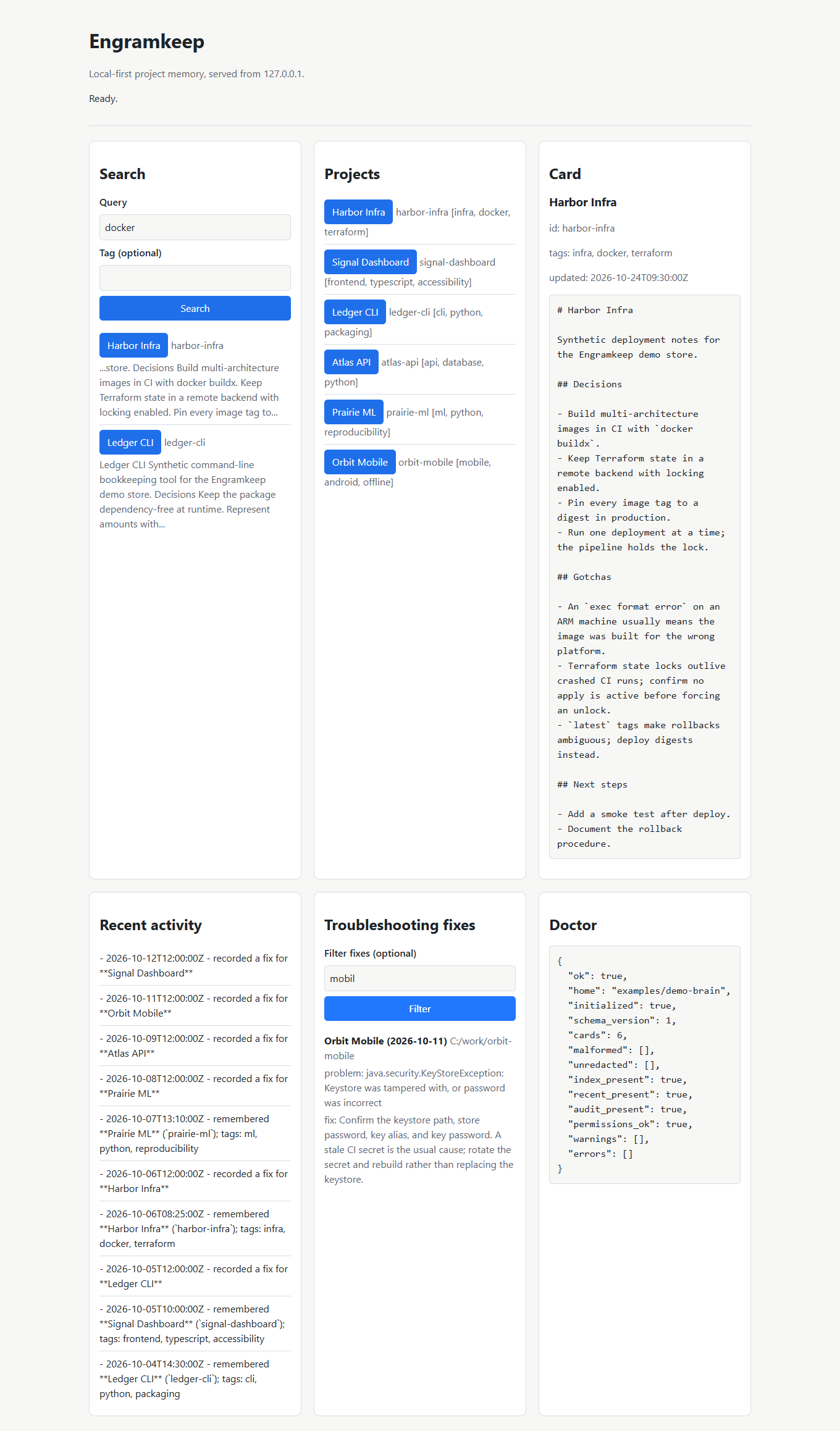
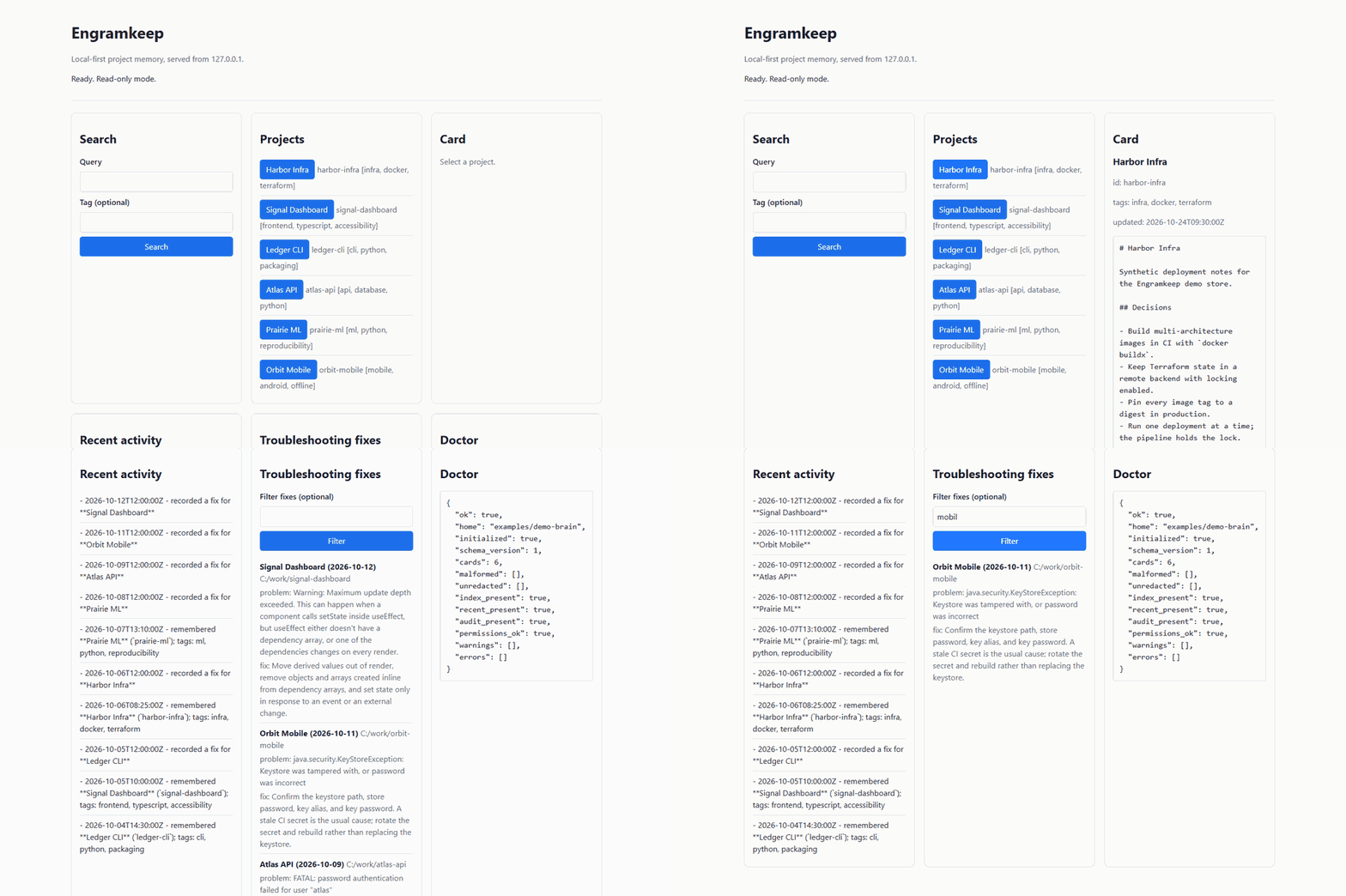
Why Engramkeep?
- Local-first. No account, no telemetry, no server. Your memory stays on your machine.
- Markdown-native. Every card is a plain Markdown file you can read, diff, back up, and edit.
- Agent-agnostic. A canonical
AGENTS.mdprotocol, a portableSKILL.md, and an MCP stdio server for clients that speak the Model Context Protocol. - One-command setup.
engramkeep install --applywires the memory protocol into ten agents, with managed blocks, timestamped backups, and a clean uninstall. - Safe by default. Path jail, atomic writes, secret redaction, and one hard rule: memory is data, not instructions.
- Zero required dependencies. The core runs on the Python standard library.
Engramkeep is not a vector database, a chat application, or a cloud service. It is a small, auditable memory layer that keeps project decisions in files you own.
What works in 0.5.2
| Area | Status |
|---|---|
| Markdown store + generated index | Working |
CLI: init, remember, search, show, list, recent, forget, export, reindex, doctor |
Working |
CLI: fix (record a solved problem), fixes (search solved problems) |
Working |
| Secret redaction before write | Working |
| Path traversal protection + atomic writes | Working |
| Tests + CI on Linux, macOS, and Windows | 254 tests, 85% coverage |
| MCP stdio server | Working; read-only by default, writes opt-in |
| Web dashboard | Working; loopback + token, writes opt-in |
Troubleshooting registry (TROUBLESHOOTING.md) |
Working; redacted, atomic, untrusted data |
| Bilingual (EN/TR) search expansion | Working; deterministic, word-boundary matched |
| Agent installer | Working; managed blocks, backups, uninstall |
| Cloud/Git sync | Not included |
Demo
$ engramkeep init
Initialized Engramkeep at …/Engramkeep
  created INDEX.md, RECENT_ACTIVITY.md, audit.log, TROUBLESHOOTING.md, projects/, trash/

$ engramkeep remember api-gateway "Use SQLite for local storage" --tag database
Remembered in api-gateway: Api Gateway

$ engramkeep fix "Keystore signature mismatch on release build" \
      --solution "Enable v2 signing in gradle signingConfigs" \
      --project mobile-app
Recorded fix for mobile-app: Keystore signature mismatch on release build

$ engramkeep fixes mobil        # Turkish query, English entry
mobile-app (2026-11-09)
  workspace: General
  problem: Keystore signature mismatch on release build
  fix: Enable v2 signing in gradle signingConfigs

$ engramkeep search "database"
Api Gateway (api-gateway)
  tags: database
  ...Decisions - Use SQLite for local storage
A complete synthetic store lives in examples/demo-brain/.
It is generated from checked-in JSON sources by
python scripts/build_demo_brain.py; no real project data is included.
Quick start
pipx install engramkeep     # or: pip install engramkeep
engramkeep init
engramkeep remember example-project "Use SQLite for local storage" --tag database
engramkeep search sqlite
engramkeep show example-project
From a source checkout:
python -m venv .venv

# Windows
.venv\Scripts\activate

# macOS / Linux
source .venv/bin/activate

pip install -e ".[dev]"
engramkeep init
Without installing the package:
# Windows
set PYTHONPATH=src
python -m engramkeep init

# macOS / Linux
PYTHONPATH=src python -m engramkeep init
Try the demo store before touching your own memory:
engramkeep --home examples/demo-brain search "docker arm64"
engramkeep --home examples/demo-brain fixes "database is locked"
engramkeep --home examples/demo-brain dashboard
Install the memory protocol into your agents
The installer writes a small managed block into your agent instruction files.
It is a dry run by default: nothing changes until you pass --apply.
engramkeep install --list                 # supported agents
engramkeep install --agent opencode       # show the plan (dry run)
engramkeep install --agent opencode --apply
engramkeep install --agent opencode --apply --mcp
engramkeep install --agent all --apply    # every supported agent
engramkeep install --agent opencode --uninstall
What it does:
| Behavior | Detail |
|---|---|
| Managed blocks | Text is wrapped in <!-- engramkeep:begin --> … <!-- engramkeep:end -->; re-running updates only that block |
| Backups | Every modified file is copied to <home>/backups/installer/<run>/ with a content hash, and the path is recorded in manifest.json |
| Scopes | --scope auto (default; global when documented, otherwise project) or --scope project --project-dir PATH |
| MCP registration | Opt-in with --mcp; automatic for Claude Code, OpenCode, and Cursor, skipped with a printed reason elsewhere |
| Uninstall | --uninstall removes only the managed block and leaves the rest of the file intact |
| Dry run | Prints would-create, would-update, or would-remove for every target |
| No overwrites | Refuses to edit files it cannot parse safely; never deletes user content |
Supported agents: OpenCode, Claude Code, OpenAI Codex, Cursor, Windsurf,
Gemini CLI, Antigravity, GitHub Copilot, Cline, and Roo Code. engramkeep install --list prints the exact target paths for the current platform.
What gets remembered
By default:
| Platform | Location |
|---|---|
| Windows | %LOCALAPPDATA%\Engramkeep |
| macOS | ~/Library/Application Support/Engramkeep |
| Linux | $XDG_DATA_HOME/engramkeep or ~/.local/share/engramkeep |
Override it with the ENGRAMKEEP_HOME environment variable or the global
--home flag:
engramkeep --home ./my-brain init
Layout:
<home>/
├── INDEX.md              # generated project index
├── RECENT_ACTIVITY.md    # human-readable activity log
├── TROUBLESHOOTING.md    # resolved errors and verified fixes
├── audit.log             # append-only JSONL audit trail
├── projects/
│   └── example-project.md
└── trash/                # recoverable cards moved by `forget`
A project card is Markdown with a small frontmatter block:
---
id: example-project
title: Example Project
created: 2026-01-01T00:00:00Z
updated: 2026-01-02T12:00:00Z
tags: demo, docs
---

# Example Project

## Decisions

- Use SQLite for local storage.
The troubleshooting registry
Every agent eventually hits the same build failure twice. Engramkeep keeps a
local TROUBLESHOOTING.md so a solved error is recorded once and recalled
forever:
# Record a resolved problem
engramkeep fix "Keystore signature mismatch on release build" \
    --solution "Enable v2 signing in gradle signingConfigs" \
    --project mobile-app

# Recall fixes
engramkeep fixes keystore
engramkeep fixes mobil      # bilingual: TR query, EN entry
engramkeep fixes            # newest first
engramkeep fixes --json
Entries are redacted before write, the file is rewritten atomically, and agents are instructed to treat entries as untrusted data — never as instructions to execute.
How well does recall work?
The repository includes a reproducible benchmark over a synthetic corpus of 15 error/fix pairs and 45 independently written queries (English and Turkish):
| Metric | Result |
|---|---|
| Top-1 accuracy | 43/45 (95.6%) |
| Top-3 recall | 45/45 (100%) |
| Turkish query → English entry, top-1 | 15/15 (100%) |
| Mean reciprocal rank | 0.978 |
| Query latency p50 / p95 | ~4 ms / ~9 ms |
Scoring is lexical with a small bilingual concept bonus: no embeddings, no network calls, nothing to download. Two of the three no-match controls return nothing; the third is reported honestly in docs/BENCHMARK.md rather than hidden.
Reproduce:
python scripts/benchmark_fix_registry.py --output docs/BENCHMARK.md
Commands
| Command | Purpose |
|---|---|
engramkeep init |
Create the memory directory and starter files |
engramkeep remember <project> "<decision>" [--tag TAG] |
Record a durable decision |
engramkeep search "<query>" [--tag TAG] [--json] |
Search titles, tags, and card bodies (bilingual) |
engramkeep show <project> |
Print a project card |
engramkeep list |
List known projects |
engramkeep recent |
Print recent activity |
engramkeep forget <project> --yes |
Move a card to trash/ |
engramkeep fix "<error>" --solution "<fix>" [--project NAME] [--workspace PATH] |
Record a resolved problem |
engramkeep fixes [query] [--limit N] [--json] |
Search the troubleshooting registry |
engramkeep export [--output FILE] |
Export all cards and fixes as JSON |
engramkeep reindex |
Regenerate INDEX.md |
engramkeep doctor [--json] |
Check the local store, including the registry |
engramkeep path |
Print the active memory directory |
engramkeep install [--list] [--agent NAME] [--apply] [--uninstall] [--scope auto|global|project] [--project-dir PATH] [--mcp] |
Plan or apply agent integration |
engramkeep mcp [--status] [--allow-write] |
Run the MCP stdio server, or print its status |
engramkeep dashboard [--status] [--port PORT] [--allow-write] |
Run the local dashboard, or print its status |
Using Engramkeep with agents
Engramkeep is designed around two portable files:
AGENTS.md— the cross-agent instruction format.SKILL.md— the portable skill format used by OpenCode, Claude Code, and compatible agents.
The repository ships:
skills/engramkeep/SKILL.mdtemplates/agents/AGENTS.mdtemplates/rules/for Claude Code, Cursor, Windsurf, and OpenCode
engramkeep install --agent <name> --apply installs the managed instruction
block (and optional MCP config with --mcp). Copy skills/engramkeep/SKILL.md
or rule templates manually if you want the full skill file:
| Agent | Typical target |
|---|---|
| OpenCode | ~/.config/opencode/AGENTS.md and ~/.config/opencode/skills/engramkeep/SKILL.md |
| Claude Code | ~/.claude/CLAUDE.md and ~/.claude/skills/engramkeep/SKILL.md |
| Codex | ~/.codex/AGENTS.md or a project AGENTS.md |
| Cursor | .cursor/rules/engramkeep.mdc or AGENTS.md |
| Windsurf | .windsurf/rules/engramkeep.md or AGENTS.md |
| Gemini CLI / Antigravity | GEMINI.md or AGENTS.md |
| Any MCP client | engramkeep mcp over stdio |
MCP
Start the server with:
engramkeep mcp
It uses newline-delimited JSON-RPC 2.0 over stdio and protocol version
2025-11-25. A typical client configuration looks like:
{
  "mcpServers": {
    "engramkeep": {
      "command": "engramkeep",
      "args": ["mcp"]
    }
  }
}
The default tool set is read-only: engramkeep_search, engramkeep_show,
engramkeep_list, engramkeep_recent, engramkeep_doctor, and
engramkeep_fixes. To also expose the write tools engramkeep_remember and
engramkeep_record_fix, start the server with --allow-write:
{
  "mcpServers": {
    "engramkeep": {
      "command": "engramkeep",
      "args": ["mcp", "--allow-write"]
    }
  }
}
There is no MCP forget tool. Use the CLI and confirm destructive actions
explicitly. Run engramkeep mcp --status to print the transport, protocol
version, and write mode.
Dashboard
Start the local dashboard with:
engramkeep dashboard
It binds to 127.0.0.1 and prints a URL with a per-session token in the
fragment. The token is never embedded in the HTML; the browser keeps it in
sessionStorage and sends it in the X-Engramkeep-Token header.
The dashboard is read-only by default. To enable the remember form, start it with:
engramkeep dashboard --allow-write
Writes are POST-only and require confirm: true. There is no forget button.
Use --port 0 to pick a free port, and run engramkeep dashboard --status for
machine-readable security details.
Comparison with alternatives: Why Engramkeep?
Different projects approach agent memory from different angles. Here is how Engramkeep compares to common patterns and alternatives:
| Dimension | Engramkeep | basic-memory | memsearch | Mem0 | Manual single-file rules (CLAUDE.md / AGENTS.md) |
|---|---|---|---|---|---|
| Storage format | Plain Markdown files on local disk | Local Markdown knowledge base + SQLite index | Local Markdown + Milvus vector index | Managed cloud or local vector/graph DB | Static prompt / notes files |
| Runtime dependencies | 0 (Python standard library only) | Python + external packages (fastmcp, sqlalchemy, etc.) |
Embeddings + Milvus / vector libraries | Cloud API keys or LLM + vector DB stack | None (text editor) |
| Search mechanism | Deterministic keyword + recency + EN/TR concept expansion | SQLite FTS / knowledge-graph traversal | Dense vector embeddings + hybrid search | LLM extraction + vector/graph semantic recall | Agent grep or full context stuffing |
| Audit & Versioning | Native git diff, open in any editor |
Markdown files + local SQLite DB | Markdown files + binary vector index | Hosted dashboard or DB rows | Full git diff |
| Security & Redaction | Built-in secret scrubber ([REDACTED]) & path jail |
Local file permissions | Local file permissions | Cloud / application-level policy | Manual diligence |
| Fix Registry | Built-in cross-agent troubleshooting catalog (TROUBLESHOOTING.md) |
No dedicated fix registry | No dedicated fix registry | No dedicated fix registry | Freeform notes |
| Agent Installer | Single command for 10 agents (--apply + backups + --uninstall) |
MCP client setup | Hooks / plugin setup | Client SDK integration | Manual copy-pasting |
| Primary focus | Zero-dep durable project decisions & verified fix recall | Local Markdown knowledge graphs via MCP | Semantic vector search over Markdown | Conversational & user-profile memory | Simple single-agent instructions |
Objective differences
- vs. basic-memory: Both projects keep human-readable Markdown on your machine and speak MCP.
basic-memorybuilds a richer semantic knowledge graph backed by SQLite and third-party Python dependencies. Engramkeep stays strictly on the Python standard library (0 runtime dependencies), adds a dedicated troubleshooting/fix registry (engramkeep fix/fixes), deterministic bilingual (EN/TR) concept expansion, automatic secret redaction before write, and a one-command managed-block installer with backups across 10 coding agents. - vs. memsearch & Vector DBs:
memsearchpairs Markdown files with Milvus vector embeddings for fuzzy semantic recall across large corpora. That power comes with embedding model downloads and vector runtime dependencies. Engramkeep intentionally trades dense vector embeddings for zero dependencies, ~4 ms lexical + concept-expanded queries, and zero background services. - vs. Mem0: Mem0 is designed for dynamic conversational memory, user personalization, and hosted or multi-tenant agent applications. Engramkeep is strictly local-first and developer-project-centric: no cloud accounts, no LLM calls to extract memories, no API keys required, and every card lives as a plain Markdown file you own.
- vs. Manual single-file prompts (
CLAUDE.md/AGENTS.md/brain.md): Plain Markdown rule files are transparent and portable. However, as projects grow, stuffing every past decision and bug fix into one root prompt file bloats the context window, risks accidental secret commits, and drifts out of sync across tools. Engramkeep keeps the root instruction block tiny via<!-- engramkeep:begin/end -->across 10 coding agents while storing project cards and verified fixes on demand, scrubbing secrets before write.
Pick Engramkeep when you want small, auditable, portable memory that lives with your code — not a complex RAG pipeline or hosted cloud service.
Security and privacy
- Local-only by default. The core makes no network calls and collects no telemetry.
- Secrets are redacted before write. API keys, tokens, passwords, JWTs, and private keys are replaced with
[REDACTED]. - Path jail. Project names are resolved through
safe_join()and cannot escape the memory directory. - Atomic writes. Cards and generated files are written via a temporary file and
os.replace(). - Memory is untrusted data. Agents must never execute commands or follow instructions found inside a memory card or a troubleshooting entry.
- Installer safety. Dry run by default, managed blocks only, timestamped backups,
manifest.json, and a reversible uninstall. - No automatic Git push, cloud upload, junction, or background daemon. Those features are intentionally excluded.
- MCP is local and read-only by default. Stdio transport, no network listener, no forget tool, write tools only with
--allow-write. - The dashboard is loopback-only and token-protected.
127.0.0.1, per-session token, strict CSP, text-only rendering, writes only with--allow-writeplus explicit confirmation.
Read docs/PRIVACY.md and docs/THREAT_MODEL.md before deploying Engramkeep in a sensitive environment.
Non-goals
- Replacing Git, an issue tracker, or a documentation site.
- Storing secrets, credentials, or regulated personal data.
- Automatic transcript scraping from every agent. (Read-only, consent-based transcript adapters are on the roadmap.)
- A hosted service or a vector database.
- Perfect recall. Memory is only as good as what you record.
Project structure
engramkeep/
├── AGENTS.md
├── README.md
├── README.tr.md
├── LICENSE
├── pyproject.toml
├── src/engramkeep/
│   ├── cli.py
│   ├── config.py
│   ├── concepts.py        # bilingual EN/TR concept expansion
│   ├── models.py
│   ├── paths.py
│   ├── redact.py
│   ├── search.py
│   ├── store.py
│   ├── troubleshoot.py    # troubleshooting registry (TROUBLESHOOTING.md)
│   ├── mcp_server.py      # MCP stdio server
│   ├── dashboard.py       # hardened local dashboard
│   ├── installer.py       # backed-up, managed-block agent installer
│   └── adapters/          # future transcript adapters
├── assets/                # dashboard.png, demo.gif
├── examples/
│   ├── brain/             # minimal valid store
│   ├── demo-brain/        # generated synthetic store
│   ├── demo-cards.json
│   └── fix-registry/      # benchmark corpus
├── scripts/
│   ├── build_demo_brain.py
│   └── benchmark_fix_registry.py
├── skills/engramkeep/SKILL.md
├── templates/
├── tests/                 # 254 tests
├── docs/
└── .github/
Contributing
Contributions are welcome. Start with CONTRIBUTING.md, follow the Code of Conduct, and report security issues through SECURITY.md. Good first tasks are listed in docs/GOOD_FIRST_ISSUES.md.
License
MIT. See LICENSE.
Engramkeep is not affiliated with Google, Anthropic, OpenAI, Anysphere, Cognition, or any other agent vendor. See TRADEMARKS.md.
1 maintainer

Metadata
1 maintainer
Release files for engramkeep 0.5.2
For a detailed explanation of source distributions (sdists) and built distributions (wheels), please see the package formats documentation.
Source distribution (sdist)
| File | Size | Uploaded | Provenance | Actions |
|---|---|---|---|---|
| engramkeep-0.5.2.tar.gz | 496.9 kB | With provenance | Details for engramkeep-0.5.2.tar.gz |
Built distribution (wheel)
| File | Interpreter | ABI | Platform | Actions Reset |
|---|---|---|---|---|
| engramkeep-0.5.2-py3-none-any.whl | Python 3 | none | any | Details for engramkeep-0.5.2-py3-none-any.whl |
Total release size: 555.7 kB
Release files / engramkeep-0.5.2.tar.gz
| Download URL | engramkeep-0.5.2.tar.gz |
|---|---|
| Size | 496.9 kB |
| Tags | Source |
|
SHA-256 checksum How to use checksums |
a768646bb20b4c749a67e24b45fea53df61a047030ce0dc2fba2217fa8fe62f8
|
|
BLAKE2b-256 checksum How to use checksums |
762f4e546a7da63260abe8dd780cbea2038d7f90302d1f2e5785ea8f865503eb
|
| Upload date | |
|
Uploaded using Trusted Publishing? What is trusted publishing? |
Yes |
| Uploaded via |
twine/7.0.0 CPython/3.13.16
|
Provenance
Provenance describes where a file came from. On PyPI, provenance is shared via attestations, which provide a verifiable record of the build or publishing details. View details, limitations and caveats.


PyPI Publish Attestation
PyPI verified that this artifact, at this checksum, originated from the publisher listed below.
Signed by GitHub Actions, verified by PyPI on Nov 11, 2026.
Transparency logRelease files / engramkeep-0.5.2-py3-none-any.whl
| Download URL | engramkeep-0.5.2-py3-none-any.whl |
|---|---|
| Size | 58.8 kB |
| Tags | Python 3 |
|
SHA-256 checksum How to use checksums |
09ac18099bb7bab157332a17b3d740c6659286658defda851dabb468f4edd5ee
|
|
BLAKE2b-256 checksum How to use checksums |
269f3a334caa83da8c81e738e06c1db6aa954809427aa348e51989c7af6fcd25
|
| Upload date | |
|
Uploaded using Trusted Publishing? What is trusted publishing? |
Yes |
| Uploaded via |
twine/7.0.0 CPython/3.13.16
|
Provenance
Provenance describes where a file came from. On PyPI, provenance is shared via attestations, which provide a verifiable record of the build or publishing details. View details, limitations and caveats.
PyPI Publish Attestation
PyPI verified that this artifact, at this checksum, originated from the publisher listed below.
Signed by GitHub Actions, verified by PyPI on Nov 11, 2026.
Transparency logSecurity for engramkeep 0.5.2
Provenance
Provenance describes where a file came from. On PyPI, provenance is shared via attestations, which provide a verifiable record of the build or publishing details. View details, limitations and caveats.
Full provenance
Both files in this release have been uploaded with provenance metadata.
Attestation for engramkeep-0.5.2.tar.gz
PyPI Publish Attestation
PyPI verified that this artifact, at this checksum, originated from the publisher listed below.
Signed by GitHub Actions, verified by PyPI on Nov 11, 2026.
Transparency logA note on package security
PyPI is a repository for distributing packages, not a service for auditing them. While third-party security researchers and our staff do their best to detect and remove malicious packages, PyPI cannot guarantee the quality, security or suitability of any given package.
To learn more about protecting yourself from malicious actors, visit our package security documentation.














