
MCP server for historically accurate Enigma machine emulators

Project description
Enigma Python MCP Server
An MCP (Model Context Protocol) server that brings the capabilities of the enigmapython library to LLMs, allowing them to encrypt and decrypt messages using historically accurate Enigma machine emulators.





Features
- Exposes all known Enigma machine models: Enigma M3, Enigma M4, Enigma I, Enigma K, Enigma Z, Enigma D, and more.
- Dynamic Configuration: LLMs can specify rotors, initial positions, ring settings, reflectors, and plugboard pairs for the encryption.
- Local and Network Mode: Supports both
stdiotransport for local MCP integrations (like Claude Desktop) andssetransport to expose the tools over a network. - Dockerized: Easy portability and execution across platforms.
Exposed Tools
encrypt_message
Encrypt or decrypt a message using a configured Enigma machine.
Arguments:
machine_model(str): Model name. Supported:'M3','M4','I','I_Norway','I_Sondermaschine','K','K_Swiss','D','Z','B_A133'.message(str): The plaintext or ciphertext to process.rotors(list[object]): List ofRotorConfigobjects. Each object specifiesrotor_type(str),ring_setting(int, default=0), andinitial_position(int | str, default=0). IMPORTANT: The list MUST be ordered exactly as:[Fastest/Rightmost, Middle, Slowest/Leftmost, Greek (if M4)].reflector(object): AReflectorConfigobject specifyingreflector_type(str), and optionallyring_setting(int) andinitial_position(int | str) for rotating reflectors.plugboard_pairs(dict, optional): Dictionary mapping plugboard connections (e.g.,{"A": "B", "C": "D"}).
Running the Server
Using Python
Requires Python 3.11+.
-
Install the package from PyPI:
pip install enigmapython-mcp
(Alternatively, you can just run
uvx enigmapython-mcpif you haveuvinstalled!) -
Run via stdio (for local MCP client):
enigmapython-mcp --transport stdio
-
Run via SSE (exposing over network):
enigmapython-mcp --transport sse --host 0.0.0.0 --port 8000
Using Docker
-
Build the container:
docker build -t enigmapython-mcp .
-
Run via stdio (default):
docker run -i enigmapython-mcp
-
Run via SSE:
docker run -p 8000:8000 enigmapython-mcp --transport sse --host 0.0.0.0 --port 8000
Client Configuration (Claude Desktop)
We provide two distinct mcpb bundles for 1-click installation on Claude Desktop. Simply download your preferred bundle from the GitHub Releases page and drag-and-drop it into Claude Desktop's Extensions menu:
enigmapython-mcp-docker.mcpb: Extremely lightweight, relies on your local Docker daemon to run the server in an isolated container. (Recommended)enigmapython-mcp-python.mcpb: Contains the full Python source. Claude Desktop will natively build a virtual environment and run the server without needing Docker.
If you prefer manual configuration via claude_desktop_config.json, use the settings below:
Using Python (uvx recommended)
{
  "mcpServers": {
    "enigma": {
      "command": "uvx",
      "args": ["enigmapython-mcp", "--transport", "stdio"]
    }
  }
}
Using Docker
(Note: Make sure you have built the Docker image first: docker build -t enigmapython-mcp .)
{
  "mcpServers": {
    "enigma": {
      "command": "docker",
      "args": ["run", "-i", "--rm", "enigmapython-mcp"]
    }
  }
}
Client Configuration (OpenCode)
To use this server with OpenCode, add the following to your ~/.config/opencode/opencode.json (global) or opencode.json (project-level) under the mcp section:
Using Python (uvx recommended)
{
  "mcp": {
    "enigma": {
      "type": "local",
      "command": [
        "uvx",
        "enigmapython-mcp",
        "--transport",
        "stdio"
      ],
      "enabled": true
    }
  }
}
Using Docker
(Note: Make sure you have built the Docker image first: docker build -t enigmapython-mcp .)
{
  "mcp": {
    "enigma": {
      "type": "local",
      "command": [
        "docker",
        "run",
        "-i",
        "--rm",
        "enigmapython-mcp"
      ],
      "enabled": true
    }
  }
}
Example Prompts
Once the server is configured, you can test it by sending the following prompts to your LLM:
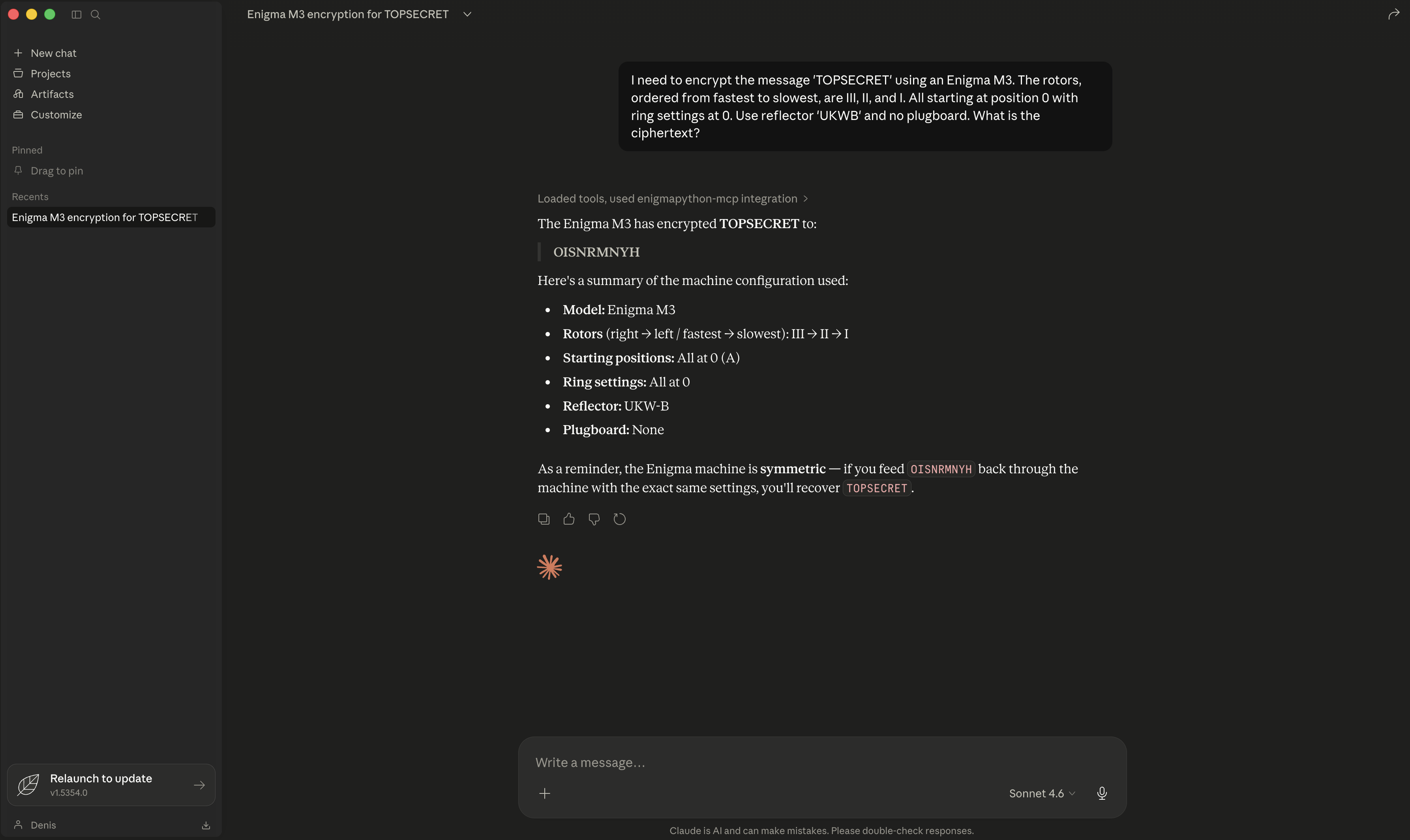
Example 1: Basic Encryption (Enigma M3)
"I need to encrypt the message 'TOPSECRET' using an Enigma M3. The rotors, ordered from fastest to slowest, are III, II, and I. All starting at position 0 with ring settings at 0. Use reflector 'UKWB' and no plugboard. What is the ciphertext?"
Example 2: Historical Decryption (Enigma I)
"Decrypt this 1930 Enigma I message. The ciphertext is 'GCDSEAHUGWTQGRK'. The machine settings, strictly ordered from Fastest to Slowest, are: Rotors III, I, and II. Their respective ring settings are 21, 12, and 23. Their initial positions are 11, 1, and 0. The reflector is 'UKWA'. The plugboard swaps are: A/M, F/I, N/V, P/S, T/U, W/Z."
Example 3: Complex M4 Configuration
"Use the Enigma M4 to encrypt the message 'DIVE DIVE DIVE'. The machine uses the 'UKWBThin' reflector. The rotors, explicitly ordered as [Fastest, Middle, Slowest, Greek], are: VIII (pos 2), III (pos 6), IV (pos 12), and Gamma (pos 21). All ring settings are 0. Please process this."
Testing
A comprehensive test suite is included in tests/test_server.py. It tests the encryption and decryption reversibility for all 10 supported Enigma models.
To run the tests:
# Activate your virtual environment first
source .venv/bin/activate

pip install pytest
export PYTHONPATH=$PYTHONPATH:$(pwd)/src/enigmapython_mcp && pytest tests/*
Testing the SSE Server interactively
Because the Model Context Protocol requires a stateful initialization handshake before any tools can be called, manually testing the SSE endpoint with curl is quite complex.
The easiest and officially recommended way to test the server is using the MCP Inspector:
- Ensure your server is running in SSE mode:
uv run enigmapython-mcp --transport sse --host 0.0.0.0 --port 8000
- In a second terminal, launch the Inspector:
npx @modelcontextprotocol/inspector - A web interface will open in your browser (usually at
http://localhost:5173). - Change the Transport Type to SSE.
- Enter
http://localhost:8000/sseas the URL and click Connect. - You can now visually configure and execute the
encrypt_messagetool!


Download files
Download the file for your platform. If you're not sure which to choose, learn more about installing packages.
Source Distribution
Built Distribution
Filter files by name, interpreter, ABI, and platform.
If you're not sure about the file name format, learn more about wheel file names.
Copy a direct link to the current filters
File details
Details for the file enigmapython_mcp-0.1.3.tar.gz.
File metadata
- Download URL: enigmapython_mcp-0.1.3.tar.gz
- Upload date:
- Size: 409.1 kB
- Tags: Source
- Uploaded using Trusted Publishing? Yes
- Uploaded via: twine/6.1.0 CPython/3.13.12
File hashes
| Algorithm | Hash digest | |
|---|---|---|
| SHA256 |
96419df4874e202e033a195ac01e874861418294fd825946ebebde0841159ffb
|
|
| MD5 |
22cd2f6d40f4a94eb5c9b67325cbb700
|
|
| BLAKE2b-256 |
2bdda68a221506b1950167a4e3052df6cd096ed5482ff0d88edfc5ce436af8f9
|
Provenance
The following attestation bundles were made for enigmapython_mcp-0.1.3.tar.gz:
Publisher:
publish.yml on denismaggior8/enigma-python-mcp
-
Statement:
-
Statement type:
https://in-toto.io/Statement/v1 -
Predicate type:
https://docs.pypi.org/attestations/publish/v1 -
Subject name:
enigmapython_mcp-0.1.3.tar.gz -
Subject digest:
96419df4874e202e033a195ac01e874861418294fd825946ebebde0841159ffb - Sigstore transparency entry: 1439628863
- Sigstore integration time:
-
Permalink:
denismaggior8/enigma-python-mcp@6079d4adcab54621ea8d0cd9868361b18dce38f5 -
Branch / Tag:
refs/tags/v0.1.3 - Owner: https://github.com/denismaggior8
-
Access:
public
-
Token Issuer:
https://token.actions.githubusercontent.com -
Runner Environment:
github-hosted -
Publication workflow:
publish.yml@6079d4adcab54621ea8d0cd9868361b18dce38f5 -
Trigger Event:
push
-
Statement type:
File details
Details for the file enigmapython_mcp-0.1.3-py3-none-any.whl.
File metadata
- Download URL: enigmapython_mcp-0.1.3-py3-none-any.whl
- Upload date:
- Size: 8.1 kB
- Tags: Python 3
- Uploaded using Trusted Publishing? Yes
- Uploaded via: twine/6.1.0 CPython/3.13.12
File hashes
| Algorithm | Hash digest | |
|---|---|---|
| SHA256 |
f0a44aa8a3899d51f755b96f1def069dd12fbea6774b8f70951bb5ebf61235ee
|
|
| MD5 |
5fad01e31039b9fa16349ac42f2c563e
|
|
| BLAKE2b-256 |
6530bbf487ff3a4da1bef88b9e9bf5eaa161eb0ce9537f1adc478b4643540444
|
Provenance
The following attestation bundles were made for enigmapython_mcp-0.1.3-py3-none-any.whl:
Publisher:
publish.yml on denismaggior8/enigma-python-mcp
-
Statement:
-
Statement type:
https://in-toto.io/Statement/v1 -
Predicate type:
https://docs.pypi.org/attestations/publish/v1 -
Subject name:
enigmapython_mcp-0.1.3-py3-none-any.whl -
Subject digest:
f0a44aa8a3899d51f755b96f1def069dd12fbea6774b8f70951bb5ebf61235ee - Sigstore transparency entry: 1439628869
- Sigstore integration time:
-
Permalink:
denismaggior8/enigma-python-mcp@6079d4adcab54621ea8d0cd9868361b18dce38f5 -
Branch / Tag:
refs/tags/v0.1.3 - Owner: https://github.com/denismaggior8
-
Access:
public
-
Token Issuer:
https://token.actions.githubusercontent.com -
Runner Environment:
github-hosted -
Publication workflow:
publish.yml@6079d4adcab54621ea8d0cd9868361b18dce38f5 -
Trigger Event:
push
-
Statement type:






