
A secure password generator with high entropy, compliant with Proton and NIST standards

Project description
EntroPy Password Generator - A secure and customizable password generator written in Python (v0.5.9)







EntroPy Password Generator is a secure and customizable password generator developed in Python, enabling users to generate strong passwords on both Linux and Windows systems. It creates robust passwords with configurable character sets and calculates their entropy to evaluate strength. The project provides 20+ modes for secure password generation, ranging from 15 to 128 characters, with entropies between 97.62 bits and 833.00 bits, exceeding the Proton© recommended minimum of 75 bits and the cryptographic strength best practices outlined in NIST SP 800-63B and NIST SP 800-132.
Disclaimer
Do not attempt to memorize the passwords generated by this tool. Instead, use a reliable password manager, such as Bitwarden©, which I personally recommend. The only password you should memorize is the master password for your password manager's vault, created with a strong combination of uppercase and lowercase letters, numbers, and special characters. Enable two-factor authentication (2FA) whenever possible to enhance security.
Features
- Generates passwords with lengths between 15 and 128 characters.
- Supports uppercase letters (A-Z), lowercase letters (a-z), digits (0-9), and special characters (!@#$%^&*()_+-=[]{}|;:,.<>?~\).
- Option to exclude visually ambiguous characters (e.g., 'I', 'L', 'O', '0') for better readability.
- Calculates password entropy (in bits) to evaluate strength.
- Displays a warning if the generated password's entropy is below 75 bits (Proton© standard), with suggestions to improve security.
- Command-line interface (CLI) for flexible usage.
- Uses Python's
secretsmodule for cryptographically secure random generation.
Requirements
- Python 3.8 or higher.
- No external dependencies (uses only standard Python libraries:
secrets,string,math,argparse).
Installation
- Ensure you have Python 3.8 or higher installed.
- Clone the repository:
git clone https://github.com/gerivanc/entropy-password-generator.git
cd entropy-password-generator
- No additional dependencies are required, as the project uses only Python standard libraries.
Installation Options for use in virtual environments on Test PyPI and PyPI (Stable Version)
To avoid conflicts with the system, install it in a virtual environment, such as Kali Linux and/or Parrot.
The EntroPy Password Generator can be installed from the Python Package Index (PyPI) for the stable release or from the Test Python Package Index (Test PyPI) to test the latest development version. Follow the instructions below based on your needs.
🔧Installation from PyPI (Stable Version)
To install the latest stable version of the EntroPy Password Generator (version 0.5.9) from PyPI, run the following command:
python3 -m venv venv-stablepypi
source venv-stablepypi/bin/activate
pip install entropy-password-generator
pip list
This command installs the package globally or in your active Python environment. After installation, you can run the generator using the following commands:
Generate a custom length password of 15 ambiguous characters:
entropy-password-generator --length 15 --with-ambiguous
or
Generate a password with default mode 20:
entropy-password-generator --mode 20
When finished, deactivate the virtual environment.:
deactivate
Visit the PyPI project page for additional details about the stable release.
🔧Installation from Test PyPI (Development Version)
To test the latest development version of the EntroPy Password Generator, install it from the Test Python Package Index (Test PyPI):
python3 -m venv venv-testpypi
source venv-testpypi/bin/activate
pip install -i https://test.pypi.org/simple/ --trusted-host test.pypi.org entropy-password-generator
pip list
This command installs the package globally or in your active Python environment. After installation, you can run the generator using the following commands:
Generate a custom length password of 42 ambiguous characters:
entropy-password-generator --length 42 --with-ambiguous
or
Generate a password with default mode 11:
entropy-password-generator --mode 11
When finished, deactivate the virtual environment.:
deactivate
Visit the Test PyPI project page for additional details about the development version.
Note: the execution of the
--modeand--lengthscripts, as demonstrated in the previous options such as:entropy-password-generator --mode 11andentropy-password-generator --length 42 --with-ambiguous, are specific for use in the active virtual environment. Do not use > > them after cloning the repository via CLI directly without the active virtual environment, if you use them you will receive an error message such as:entropy-password-generator: command not found.To use the
--modeand--lengthscripts used via CLI directly after cloning the repository without activating the virtual environment, use the scripts such as:python3 entropy_password_generator/password_generator.py --mode 11(mode 1 to 20) and custom modepython3 entropy_password_generator/password_generator.py --length 42 --with-ambiguous(using custom 15 to 128 characters).
Getting Started on Windows
For Windows users, a dedicated guide is available to help you install and use the EntroPy Password Generator via PowerShell. This step-by-step tutorial covers installation, configuration, and password generation with clear examples tailored for the Windows environment, including detailed instructions for setting up Git and running the generator. Check out the GETTING_STARTED_WINDOWS.md for comprehensive guidance.
Password Modes
The generator offers 20+ modes for secure password generation, divided into three blocks:
- Block I (Modes 1–10): Fixed length of 24 characters, including ambiguous characters (e.g., 'I', 'O', '0'), with varying character sets to balance readability and security. Ideal for general-purpose passwords, such as website logins or application credentials.
- Block II (Modes 11–20): Varying lengths (15 to 128 characters), mostly excluding ambiguous characters for enhanced readability. These modes cater to sensitive applications, from personal accounts to cryptographic keys and enterprise-grade security.
- Block III (Using Custom Configuration): Custom passwords with lengths between 15 and 128 characters, specified using the --length option followed by the desired length (15-128), including ambiguous characters. These passwords achieve entropies ranging from 97.62 to 833.00 bits, making them suitable for a wide range of applications, from personal use to high-security environments requiring robust cryptographic strength.
Password Modes Summary
The table below summarizes the 20 password generation modes, ordered by increasing entropy, highlighting their configurations, character set sizes (( R )), and recommended use cases:
| Mode | Length | Character Set | R (Charset Size) | Entropy (bits) | Security Level | Use Case |
|---|---|---|---|---|---|---|
| 11 | 15 | Full (uppercase, lowercase, digits, symbols, no ambiguous) | 95 | 95.10 | Strong | Personal accounts (email, social media) |
| 13 | 20 | Lowercase + Digits (no ambiguous) | 36 | 99.08 | Strong | Basic application logins |
| 14 | 20 | Uppercase + Digits (no ambiguous) | 36 | 99.08 | Strong | Device authentication |
| 12 | 18 | Full (uppercase, lowercase, digits, symbols, with ambiguous) | 95 | 117.14 | Very Strong | Professional accounts (work email, VPN) |
| 4 | 24 | Uppercase + Digits (with ambiguous) | 36 | 124.08 | Very Strong | Legacy systems requiring uppercase |
| 5 | 24 | Lowercase + Digits (with ambiguous) | 36 | 124.08 | Very Strong | Readable passwords for manual entry |
| 6 | 24 | Digits + Special (with ambiguous) | 43 | 126.85 | Very Strong | API tokens with limited character sets |
| 3 | 24 | Uppercase + Lowercase (with ambiguous) | 52 | 136.81 | Very Strong | General-purpose website logins |
| 1 | 24 | Lowercase + Special (with ambiguous) | 59 | 138.75 | Very Strong | Secure notes or backup codes |
| 2 | 24 | Uppercase + Special (with ambiguous) | 59 | 138.75 | Very Strong | Administrative console access |
| 7 | 24 | Uppercase + Lowercase + Digits (with ambiguous) | 62 | 142.90 | Very Strong | Multi-user system credentials |
| 9 | 24 | Uppercase + Digits + Special (with ambiguous) | 69 | 144.54 | Very Strong | Database access keys |
| 10 | 24 | Lowercase + Digits + Special (with ambiguous) | 69 | 144.54 | Very Strong | Secure file encryption |
| 8 | 24 | Uppercase + Lowercase + Special (with ambiguous) | 85 | 151.16 | Extremely Strong | High-security application logins |
| 15 | 24 | Full (uppercase, lowercase, digits, symbols, no ambiguous) | 94 | 152.16 | Extremely Strong | Enterprise-grade passwords |
| 16 | 32 | Full (uppercase, lowercase, digits, symbols, no ambiguous) | 94 | 202.88 | Cryptographic Grade | API keys for sensitive services |
| 17 | 42 | Full (uppercase, lowercase, digits, symbols, no ambiguous) | 94 | 266.27 | Cryptographic Grade | Server authentication tokens |
| 18 | 60 | Full (uppercase, lowercase, digits, symbols, no ambiguous) | 94 | 380.39 | Ultra Secure | Financial system credentials |
| 19 | 75 | Full (uppercase, lowercase, digits, symbols, no ambiguous) | 94 | 475.49 | Ultra Secure | Master keys for password managers |
| 20 | 128 | Full (uppercase, lowercase, digits, symbols, no ambiguous) | 94 | 811.50 | Ultra Secure (Theoretical Maximum) | Cryptographic keys, blockchain wallets |
Note: Search Space Depth defines the variety of characters in a password, influencing its resistance to brute-force attacks. Expanding it with letters, numbers, and symbols increases possible combinations, making the password harder to crack. Entropy reaches theoretical maximum values under uniform random selection, but requiring at least one character per type slightly reduces effective entropy in shorter passwords. This reduction is negligible, and all modes exceed Proton© and NIST standards.
CLI Options
--mode <number>: Select a predefined password generation mode (1 to 20). Overrides other configuration options.--length <length>: Set password length (15 to 128, default: 72). Ignored if--modeis specified.--no-uppercase: Exclude uppercase letters. Ignored if--modeis specified.--no-lowercase: Exclude lowercase letters. Ignored if--modeis specified.--no-digits: Exclude digits. Ignored if--modeis specified.--no-special: Exclude special characters. Ignored if--modeis specified.--with-ambiguous: Include ambiguous characters. Ignored if--modeis specified.
Usage
Run the generator from the command line interface, specifying a custom mode or configuration. After installing from Test PyPI in the virtual environment or locally, use:
Mode 1 to 20.
entropy-password-generator --mode <number>
else
Using Custom Configuration, (15-128 characters, all types, with ambiguous)
entropy-password-generator --length <number> --with-ambiguous
Alternatively, run directly from the repository:
Mode 1 to 20.
python3 entropy_password_generator/password_generator.py --mode <number>
else
Using Custom Configuration, (15-128 characters, all types, with ambiguous)
python3 entropy_password_generator/password_generator.py --length <number>
Screenshots
Below is an example of the CLI output for Mode 11 --mode 11:
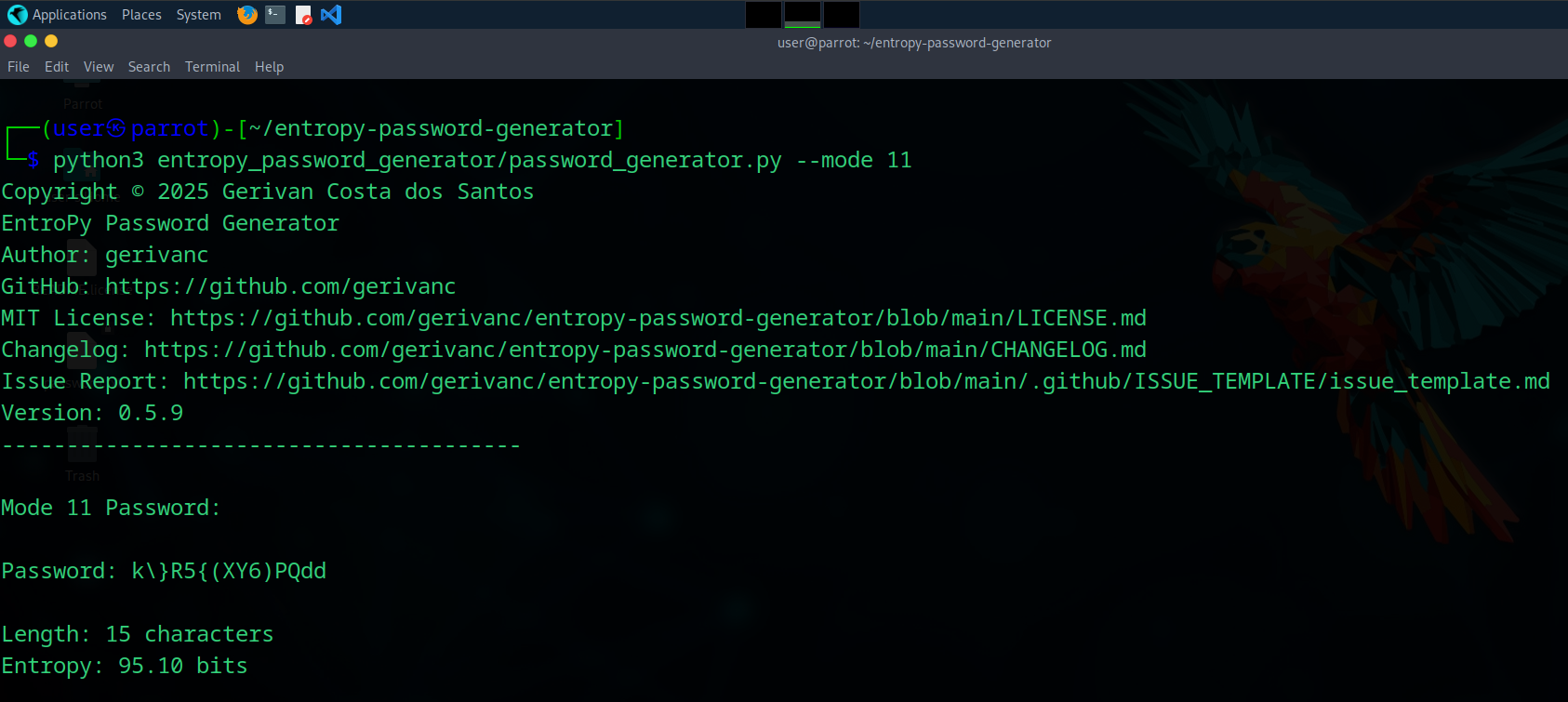
Note: Screenshot using the command:
python3 entropy_password_generator/password_generator.py --mode 11. Demonstration image of the output result of the function.
Below is an example of the CLI output for --length --length 15 --with-ambiguous:
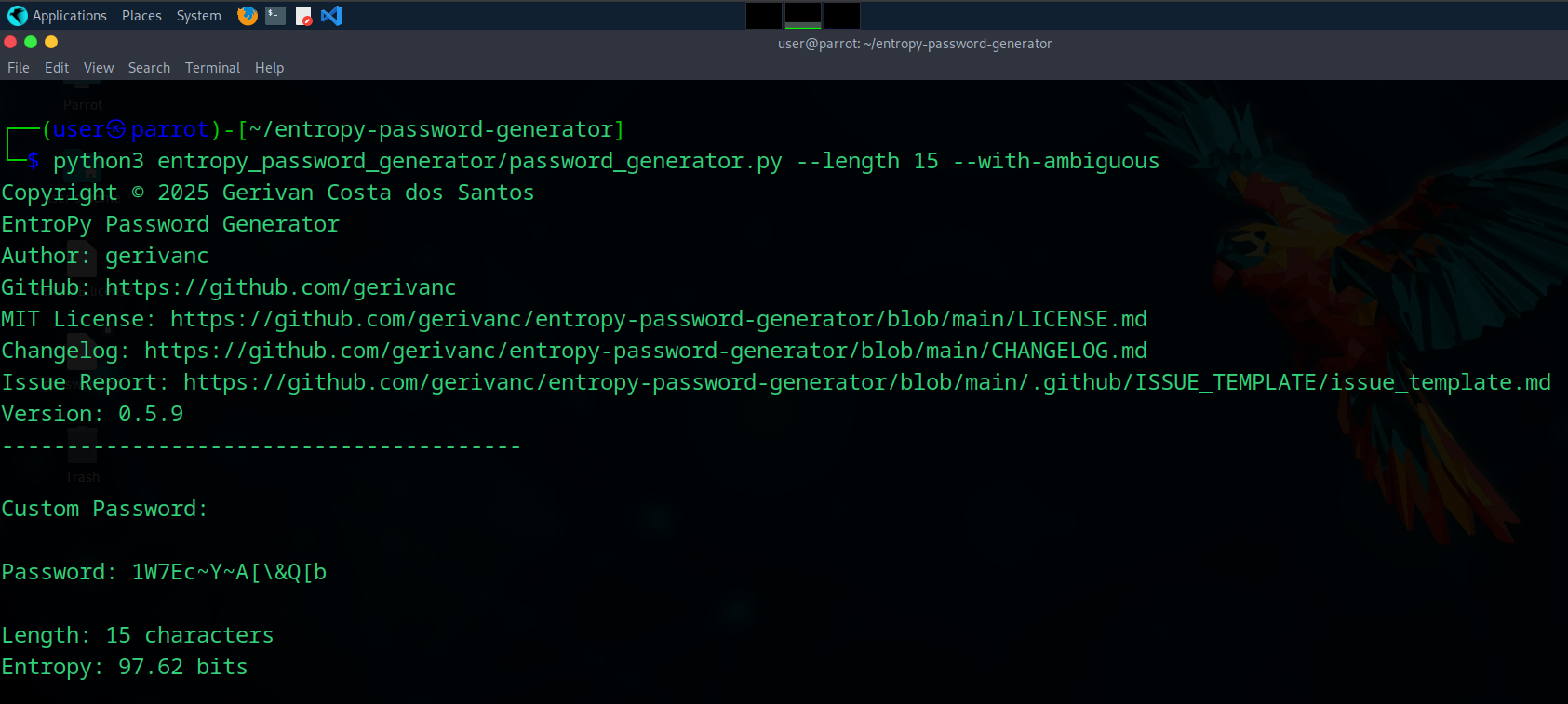
Note: Screenshot using the command:
python3 entropy_password_generator/password_generator.py --length 15 --with-ambiguous. Demonstration image of the output result of the function.
Using Predefined Modes
The generator offers over 20+ modes for secure password generation, divided into three blocks. Below are examples of each of the 20+ predefined modes, showing their settings and entropy:
Block I (All with ambiguous characters, length 24)
Mode 1: Lowercase + Special characters
python3 entropy_password_generator/password_generator.py --mode 1
Generated password: &\]*y>fhqs*e<.+fl=~ijy-i
Entropy: 138.75 bits
Mode 2: Uppercase + Special characters
python3 entropy_password_generator/password_generator.py --mode 2
Generated password: JRYAHHASE[|&`M`B)!!EQ$RD
Entropy: 138.75 bits
Mode 3: Uppercase + Lowercase
python3 entropy_password_generator/password_generator.py --mode 3
Generated password: CWdoNFcWbvwbEOItFvAdcLmo
Entropy: 136.81 bits
Mode 4: Uppercase + Digits
python3 entropy_password_generator/password_generator.py --mode 4
Generated password: 13P994RI91LP9UY7WRINH6TQ
Entropy: 124.08 bits
Mode 5: Lowercase + Digits
python3 entropy_password_generator/password_generator.py --mode 5
Generated password: opzqnqb52amopnbfyduo74dl
Entropy: 124.08 bits
Mode 6: Digits + Special characters
python3 entropy_password_generator/password_generator.py --mode 6
Generated password: :\\{%27!3)[_~35%@!`\\],#
Entropy: 126.85 bits
Mode 7: Uppercase + Lowercase + Digits
python3 entropy_password_generator/password_generator.py --mode 7
Generated password: YMuUq6P0U6CPtoeuuqDZ7Kku
Entropy: 142.90 bits
Mode 8: Uppercase + Lowercase + Special characters
python3 entropy_password_generator/password_generator.py --mode 8
Generated password: NmP<ToUHnm*:m\u:Rhspj=:w
Entropy: 151.16 bits
Mode 9: Uppercase + Digits + Special characters
python3 entropy_password_generator/password_generator.py --mode 9
Generated password: 0O*>@T,W&Z<99?U%MW1}XPP5
Entropy: 144.54 bits
Mode 10: Lowercase + Digits + Special characters
python3 entropy_password_generator/password_generator.py --mode 10
Generated password: =7~@]pv@%>al=@ibp?+}j0d#
Entropy: 144.54 bits
Block II (Mixed configurations)
Mode 11: All character types, no ambiguous characters (length 15)
python3 entropy_password_generator/password_generator.py --mode 11
Generated password: ?*WjM\MR-.JkQr5
Entropy: 95.10 bits
Mode 12: All character types, with ambiguous characters (length 18)
python3 entropy_password_generator/password_generator.py --mode 12
Generated password: \?2lcM]Kb^m]a:LD)L
Entropy: 117.14 bits
Mode 13: Lowercase + Digits, no ambiguous characters (length 20)
python3 entropy_password_generator/password_generator.py --mode 13
Generated password: 9mfe5vcjv9trnf9xg58k
Entropy: 99.08 bits
Mode 14: Uppercase + Digits, no ambiguous characters (length 20)
python3 entropy_password_generator/password_generator.py --mode 14
Generated password: SS54DGAYSSK3XJ4ACUTD
Entropy: 99.08 bits
Mode 15: All character types, no ambiguous characters (length 24)
python3 entropy_password_generator/password_generator.py --mode 15
Generated password: #Cxn8S$G8q&PrGF*9F$}(UDd
Entropy: 152.16 bits
Mode 16: All character types, no ambiguous characters (length 32)
python3 entropy_password_generator/password_generator.py --mode 16
Generated password: @MXFzQ^6-cm\G=>{>Mm,-ZCZ#%XvB{vS
Entropy: 202.88 bits
Mode 17: All character types, no ambiguous characters (length 42)
python3 entropy_password_generator/password_generator.py --mode 17
Generated password: %-NeH2q7@mq<9C_uJ{jPv;qQ59Z8)D=sEpYgQ6wj}4
Entropy: 266.27 bits
Mode 18: All character types, no ambiguous characters (length 60)
python3 entropy_password_generator/password_generator.py --mode 18
Generated password: P<2qmg?sj~3M2}CFQvJU>G%7[>mM<@,fGS58*&U2-2*.WS+fC(u2ret*t~we
Entropy: 380.39 bits
Mode 19: All character types, no ambiguous characters (length 75)
python3 entropy_password_generator/password_generator.py --mode 19
Generated password: _GN6YxM8,4xw:;@g2*_hkW&~n4XA%:,(X=s~U;G)r@<_9NfYXVtJZar9N%ZCTM=+}h!USG>JN#K
Entropy: 475.49 bits
Mode 20: All character types, no ambiguous characters (length 128)
python3 entropy_password_generator/password_generator.py --mode 20
Generated password: _N$q6xm,jE2Yt=7P{GAg?XS6~-RMn=]T}~?Qt_;k)5eW[k?UZH^6$Su*a7ARaNyj)X>^*FVtMw7;t\yNK.^_@DZpQ\\K,B}qKRZ}3&}Tp&QP^H>M]<4Fb(*Wn7%U42t%
Entropy: 811.50 bits
Block III (Using Custom Configuration)
Combine CLI options to create passwords tailored to specific needs. Here you can set the password length between 15-128 characters. Below are examples for common scenarios, ensuring a balance between security and usability:
Wi-Fi Password (15chars, all types, with ambiguous)
python3 entropy_password_generator/password_generator.py --length 15 --with-ambiguous
Generated password: P#Zm+e;7Lv{iI9W
Entropy: 97.62 bits
Cloud Storage Services (32 chars, all types, no ambiguous)
python3 entropy_password_generator/password_generator.py --length 32
Generated password: g%63AF(D42}SCB[FpJ2XjC79q64;SE6j
Entropy: 202.88 bits
Simple Readable Password (15 chars, lowercase + digits, no ambiguous)
python3 entropy_password_generator/password_generator.py --length 15 --no-uppercase --no-special
Generated password: 49j68nquq4ng2nm
Entropy: 74.31 bits (Warning: Below Proton© standard)
Note: Warning: Password entropy (74.31 bits) is below the recommended 75 bits (Proton© standard). To improve security, increase the password length (e.g., use --length 24 or higher) and include more character types (e.g., use uppercase, lowercase, digits, and special characters).
API Token (24 chars, uppercase + digits + special, with ambiguous)
python3 entropy_password_generator/password_generator.py --length 24 --no-lowercase --with-ambiguous
Generated password: ::VM(IR[T;C!D>6MDASD&X-Z
Entropy: 144.54 bits
Cryptographic Key (128 chars, all types, with ambiguous)
python3 entropy_password_generator/password_generator.py --length 128 --with-ambiguous
Generated password: Yoj|F6j~A8SJ%izZ|)#mhi6`oR~75|.;*$9xS7GIF8R[UE1?,OQD7ak\Nf-MKJx]a6nbf3A*SQXlq{xNeWGIs&;}N.G;6ldKoEZS)nTWht68A^3vz;9JpFol[-OQ`1Y^
Entropy: 833.00 bits
Explore these options to create passwords tailored to your specific requirements, ensuring optimal security.
Suggestions for Password Types
The table below suggests six of the strongest password modes for daily use, covering a range of online services:
| Mode (Entropy) | Recommended Service |
|---|---|
Mode 8 (151.16 bits) |
High-security website logins (e.g., cloud storage, VPNs) |
Mode 9 (144.54 bits) |
Database or API access (e.g., developer tools, server management) |
Mode 10 (144.54 bits) |
Secure file encryption (e.g., encrypted backups, sensitive documents) |
Mode 15 (152.16 bits) |
Enterprise accounts (e.g., corporate email, project management tools) |
Mode 19 (475.49 bits) |
Password manager master keys (e.g., Bitwarden, 1Password) |
Mode 20 (811.50 bits) |
Cryptographic keys (e.g., blockchain wallets, SSH keys) |
These modes ensure robust protection for critical accounts, balancing entropy and usability.
Password Entropy Calculation
Secure by Design
With Python'ssecretsmodule, the EntroPy Password Generator ensures cryptographically secure randomization, delivering passwords that exceed Proton© (75 bits) and NIST (80+ bits) entropy standards.
The generator calculates password entropy using the formula: ( E(R) = \log_2(R^L) ), where:
- ( R ): Size of the character set.
- ( L ): Password length.
- ( E(R) ): Entropy in bits (higher is stronger).
All 20 modes produce passwords with entropies from 95.70 to 830.98 bits, surpassing Proton© (75 bits) and NIST (80+ bits) standards. For example:
- Mode 11 (15 chars, full no ambiguous, ( R=90 )): ( \log_2(90) \times 15 \approx 95.70 ) bits.
- Mode 20 (128 chars, full no ambiguous, ( R=90 )): ( \log_2(90) \times 128 \approx 830.98 ) bits.
Using custom configuration, modes produce passwords with entropies from 97.62 to 833.00 bits, surpassing Proton© (75 bits) and NIST (80+ bits) standards. For example:
- Using
--length 15 --with-ambiguous(15 chars, all types, with ambiguous, ( R=90 )): ( \log_2(90) \times 15 \approx 97.62 ) bits. - Using
--length 128 --with-ambiguous(128 chars, all types, with ambiguous, ( R=90 )): ( \log_2(90) \times 128 \approx 833.00 ) bits.
Note: Entropy values assume ideal randomness, achieved via the
secretsmodule. The requirement of at least one character per selected type slightly reduces effective entropy for shorter passwords, but all modes remain compliant with security standards.
For a detailed analysis, including entropy for each mode and comparisons with mobile authentication methods, see Password Entropy Calculation.
Development
To contribute to the EntroPy Password Generator, follow the guidelines in CONTRIBUTING.md. Set up a development environment with:
python3 -m venv .venv
source .venv/bin/activate
pip install flake8 black isort pytest
Reporting Issues
Help us improve EntroPy Password Generator by reporting bugs or suggesting enhancements to project. To report a bug, suggest a feature, or ask a question:
-
Go to the Issues tab.
-
Click New issue.
-
View the available options and select to: Report Bug and/or Report Issue. For security vulnerabilities, please follow our Security Policy.
Reporting Bugs
If you encounter a bug in the EntroPy Password Generator, please report it using our dedicated Bug Report template. This template ensures that your report includes essential details, such as steps to reproduce, environment information, and logs, enabling us to address issues efficiently. For other types of contributions or inquiries, refer to our CONTRIBUTING.md.
Security - Reporting a Vulnerability
If you discover a security vulnerability in EntroPy Password Generator, please report it immediately to ensure the safety of all users. See the Security for more details.
Contributing
Want to contribute? Check out our Contributing Guidelines to get started!
Release Notes
See the RELEASE.md for detailed release notes for each version.
Changelog
See the Changelog for a detailed history of changes to this project.
Support This Project
If you find EntroPy Password Generator useful, consider supporting its development with a donation:

Contact
For questions or feedback, please contact: dean-grumbly-plop@duck.com.
Visitors

License
This project is licensed under the MIT License. See the License for details.
Copyright © 2025 Gerivan Costa dos Santos
Release history Release notifications | RSS feed


Download files
Download the file for your platform. If you're not sure which to choose, learn more about installing packages.
Source Distribution
Built Distribution
Filter files by name, interpreter, ABI, and platform.
If you're not sure about the file name format, learn more about wheel file names.
Copy a direct link to the current filters
File details
Details for the file entropy_password_generator-0.5.9.tar.gz.
File metadata
- Download URL: entropy_password_generator-0.5.9.tar.gz
- Upload date:
- Size: 747.5 kB
- Tags: Source
- Uploaded using Trusted Publishing? No
- Uploaded via: twine/6.1.0 CPython/3.12.2
File hashes
| Algorithm | Hash digest | |
|---|---|---|
| SHA256 |
773c5cb5e544c55c4707ff32ecfa17ae9295012bccb0213f5a5511cd67830137
|
|
| MD5 |
5f25761c27652e10bde705780c540ab7
|
|
| BLAKE2b-256 |
9ae022fb4b18b3c77434627202a07c618f4e6749d12885bb6b1dd0e8d266094b
|
File details
Details for the file entropy_password_generator-0.5.9-py3-none-any.whl.
File metadata
- Download URL: entropy_password_generator-0.5.9-py3-none-any.whl
- Upload date:
- Size: 724.8 kB
- Tags: Python 3
- Uploaded using Trusted Publishing? No
- Uploaded via: twine/6.1.0 CPython/3.12.2
File hashes
| Algorithm | Hash digest | |
|---|---|---|
| SHA256 |
c89a881d9ed38c7948f46595f686f8705ba0e5464a19466fb0a9bed096cc62fe
|
|
| MD5 |
8f0eb24f8006d794675cb93bf2f935e1
|
|
| BLAKE2b-256 |
49ddc0557ac6b790241d6a32d5be49bd1d705af5cb8c735e43069ddc3b776fdb
|






