


Your speech model. Your vocabulary. Corrections that consider the context.
Entune is an open-source, cross-platform dictation app. Record in your browser, choose a cloud or local speech model, and keep your recordings on your computer. On macOS, you can also dictate into other apps with a global shortcut. Its personal dictionary learns from your dictation; a decision model chooses when a dictionary replacement actually fits the sentence.
Install
Before the first PyPI release is published, use the source-install option below. The standard commands install the published version:
With uv:
uv tool install entune
entune
Or use pip in a Python 3.12+ environment:
python -m pip install entune
entune
Install from source before the first release, or try development changes
This option requires Git:
uv tool install "git+https://github.com/eandualem/entune.git@develop"
entune
With pip, use python -m pip install "git+https://github.com/eandualem/entune.git@develop".
Start dictating:
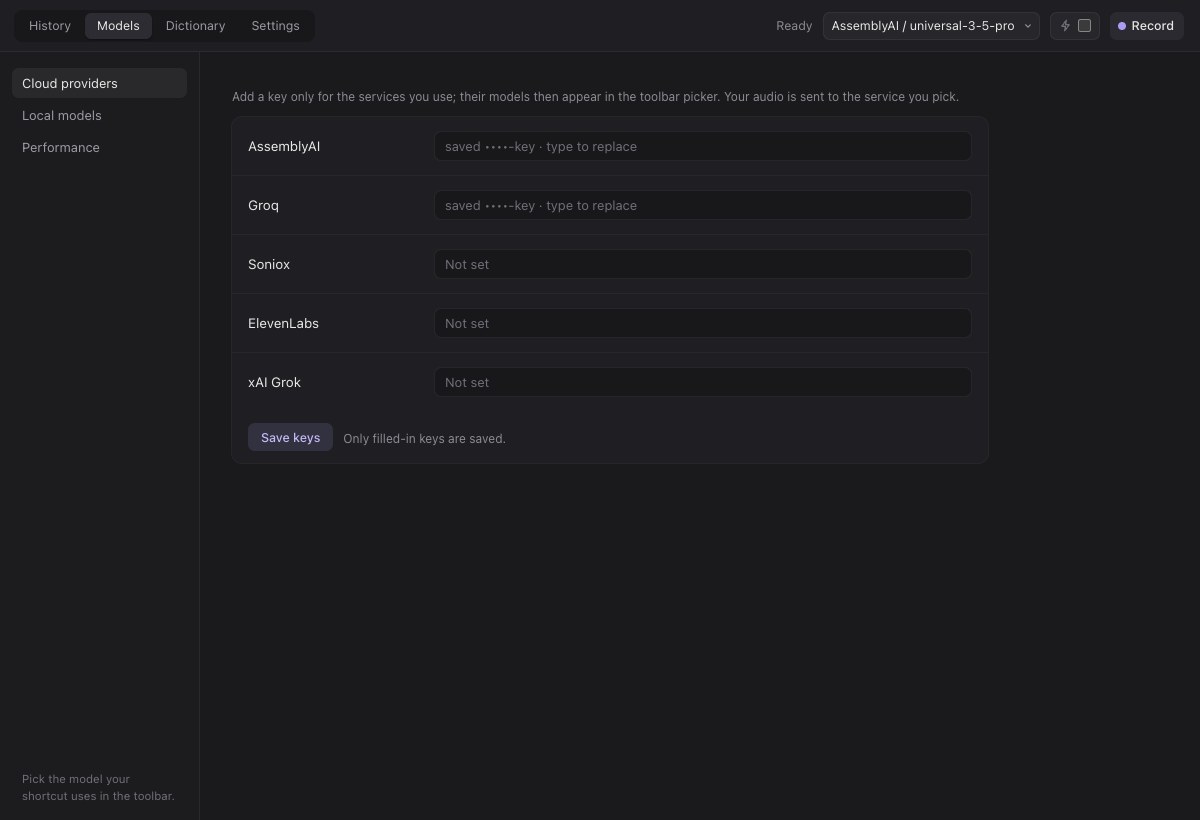
- In Models, add a speech provider's API key, or install a local model. Choose it as your default. AssemblyAI is a straightforward cloud starting point; Parakeet is our local recommendation on Apple Silicon.
- Click Record and allow microphone access. Speak, then stop recording to transcribe. Your audio and transcript are saved in History.
- Copy the transcript into any app. On macOS, you can also enable Microphone, Input Monitoring and Accessibility in Settings, set a shortcut, and dictate directly into the focused text field.
You can start without a dictionary or decision model and add them later.
macOS permissions: when launched from a terminal, permission entries may
belong to the terminal or Python. For a named Entune.app, use the
standalone app installation.
It requires a source build; a notarized app download is not available.
The permission guide
covers missing shortcuts, “1 of 3 allowed,” and keeping permissions across updates.
Entune uses browser mode on Windows and Linux; on macOS, use
entune --no-menu to open it in your browser. Windows and Linux have not yet
been tested end to end. Global shortcuts and automatic paste currently
require macOS.
A dictionary match should not always become a replacement
A recognizer might write “cloud” when you meant “Claude.” But replacing every “cloud” would also damage a sentence about cloud storage. Entune stores both meanings and asks a decision model which fits the surrounding words.
The decision model selects from your dictionary. It does not generate or rewrite your dictation. Entune applies the stored spelling you can inspect and edit.
95% fewer incorrect replacements with Jev in our test
We tested a fixed learned dictionary on 56 new Parakeet recordings, in three consecutive batches. These recordings were not used to build the dictionary. Here are the combined results:
| Method | Replacements made | Correct | Incorrect | Uncertain |
|---|---|---|---|---|
| Replace every dictionary match | 93 | 31 | 61 | 1 |
| Choose with Jev | 34 | 30 | 3 | 1 |
| Choose with Laya, locally | 42 | 22 | 20 | 0 |
- Jev prevented 58 of 61 wrong replacements (95%), while keeping 30 of the 31 correct replacements.
- Laya prevented 41 of 61 wrong replacements (67%), while keeping 22 of the 31 correct replacements.
Both reduced wrong replacements in every batch. Jev retained more valid corrections; Laya keeps decision processing on your computer.
This is a small, single-user test, judged from text context before the models ran—not an overall transcription-accuracy claim. Repeated contractions contributed substantially to the result. The comparison applies the first available replacement unconditionally; it is not the app's decision-model-off setting. Read the per-batch results and method for the denominators, limitations and current Laya input constraints.
Choose the models that suit you
Entune separates three jobs, so you can choose each independently:
| Job | Our starting recommendation | When it runs |
|---|---|---|
| Turn audio into text | Parakeet on Apple Silicon, or AssemblyAI in the cloud | After each recording |
| Build your dictionary | GPT-6.1 Sol, medium effort, 24,000-character batches | When you request suggestions |
| Choose dictionary replacements | Jev for the stronger result in our test; Laya for local processing | After transcription, when enabled |
Speech options also include Groq, Soniox, ElevenLabs, xAI and local Whisper.cpp. Cloud services use your own provider accounts and keys; Entune does not sell inference credits.
Use your ChatGPT subscription to build the dictionary. Choose OpenAI → ChatGPT subscription → Sign in with ChatGPT in dictionary setup. This access option does not require an OpenAI API key; your plan's model access and usage limits apply. An OpenAI API key is also available as a separate access option. ChatGPT sign-in is currently experimental; see the access details. It covers dictionary generation, not cloud speech recognition or Jev.
The model guide covers exact model IDs, local-engine installation, account access, and the limits of our recommendations.
Teach Entune your vocabulary
Use Dictionary → Suggest new entries to learn from the selected speech model's history. Or choose Learn from audio to import recordings from another dictation app or an audio folder. Entune transcribes imported audio with your chosen speech model, then proposes entries for review.
Dictionary generation takes time. It runs sequentially in batches, with the growing dictionary included in each request. Large histories can take minutes to hours; our 540-transcript Sol build took about 2 hours 15 minutes, including recovery from a failed request. Importing audio adds transcription time. The audio selector shows a rough estimate as you choose recordings: allow about 10–20 minutes per audio hour with Sol, plus transcription. This is separate from the fast decision step on each new dictation.
Review the proposed entries before applying them. You can stop a build and review completed batches, or retry from its checkpoint. Entune pauses dictation and separate dictionary editing while learning or proposal review is active.
Learned entries belong to their speech model: a Parakeet dictionary is not automatically an AssemblyAI dictionary. Pin entries you deliberately want to share. Suggest improvements can revise learned entries later; more refinement does not guarantee a better dictionary.
Keep control of your recordings
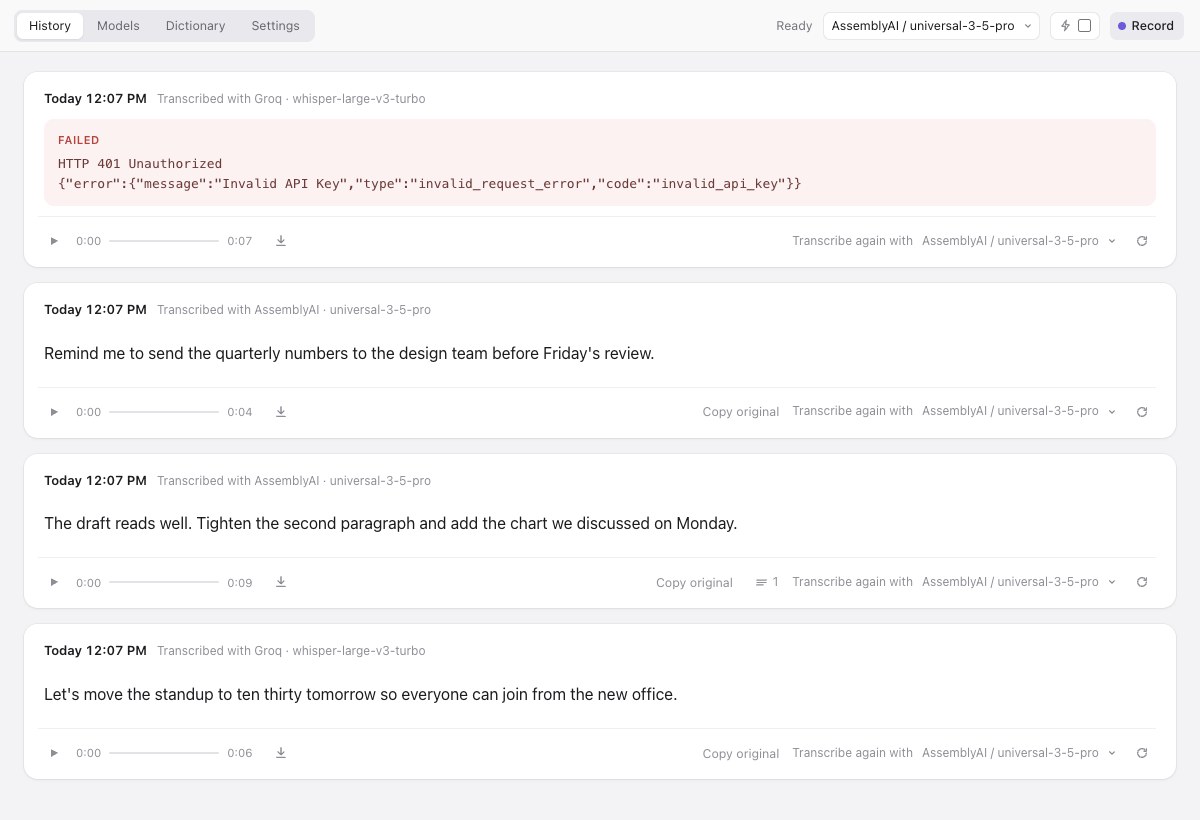
- History: replay audio, copy text, inspect processing changes, and retry a recording with another speech model. Provider failures remain visible.
- macOS shortcuts: hold to talk or toggle hands-free recording. Cancel without pasting; usable captured audio stays available for retry.
- Local data: audio, transcripts, settings and keys stay in Entune's data folder. Export or delete them in Settings → Data & Privacy.
- Optional processing: dictionary correction, repeated-filler reduction, and paragraph/bullet formatting have separate controls.
There is no Entune account, telemetry or hosted history. Cloud speech sends audio to your chosen provider; dictionary generation sends its selected transcripts and dictionary to the chosen language-model provider. Jev sends matched context to TypeSafe even when speech recognition is local. Laya keeps that step local. See data and privacy.
Entune is for a trusted, single-user machine. Its loopback API has no authentication: other local processes can read or change data through it. Do not expose its port to a network or tunnel.
Guides and contributing
- Using Entune: permissions, shortcuts, imports, updates and troubleshooting.
- Choosing models: cloud and local setup, recommendations and generation time.
- Decision-model results: what changed, how it was measured, and limitations.
- Dictionary reference: meanings, matching, learning and the file format.
- Building Entune.app, local API, and architecture.
To work on Entune, clone the repository and run uv sync, then uv run entune.
Run uv run ruff check ., uv run ruff format --check ., uv run mypy and
uv run pytest before contributing. Pull requests target develop;
main receives reviewed releases. See CONTRIBUTING.md.
1 maintainer

Metadata
1 maintainer
Release files for entune 0.1.0
For a detailed explanation of source distributions (sdists) and built distributions (wheels), please see the package formats documentation.
Source distribution (sdist)
| File | Size | Uploaded | |
|---|---|---|---|
| entune-0.1.0.tar.gz | 509.7 kB | Details |
Built distribution (wheel)
| File | Interpreter | ABI | Platform | Reset |
|---|---|---|---|---|
| entune-0.1.0-py3-none-any.whl | Python 3 | none | any | Details |
Total release size: 1.1 MB
Release files / entune-0.1.0.tar.gz
| Download URL | entune-0.1.0.tar.gz |
|---|---|
| Size | 509.7 kB |
| Tags | Source |
|
SHA-256 checksum How to use checksums |
6ecc9d08d2c7f79c58da98e5a12cae90b3a951c0c061138ff52b62ca76f50b3d
|
|
BLAKE2b-256 checksum How to use checksums |
0e684f8cd031fbd372b5c805d75ac12daae1bb5bf0fe274154413d369070767b
|
| Upload date | |
|
Uploaded using Trusted Publishing? What is trusted publishing? |
No |
| Uploaded via |
uv/0.12.6 {"installer":{"name":"uv","version":"0.12.6","subcommand":["publish"]},"python":null,"implementation":{"name":null,"version":null},"distro":{"name":"Ubuntu","version":"24.04","id":"noble","libc":null},"system":{"name":null,"release":null},"cpu":null,"openssl_version":null,"setuptools_version":null,"rustc_version":null,"ci":true}
|
Release files / entune-0.1.0-py3-none-any.whl
| Download URL | entune-0.1.0-py3-none-any.whl |
|---|---|
| Size | 562.6 kB |
| Tags | Python 3 |
|
SHA-256 checksum How to use checksums |
32ac3b9cfac4eb8c6762e7ad5ceb5a75c0295938c0688a4ab1c0e82e3470f867
|
|
BLAKE2b-256 checksum How to use checksums |
e7be8edb58473f8e95632925c35ad368edee46b99f5e50f6f2f8157a740777a8
|
| Upload date | |
|
Uploaded using Trusted Publishing? What is trusted publishing? |
No |
| Uploaded via |
uv/0.12.6 {"installer":{"name":"uv","version":"0.12.6","subcommand":["publish"]},"python":null,"implementation":{"name":null,"version":null},"distro":{"name":"Ubuntu","version":"24.04","id":"noble","libc":null},"system":{"name":null,"release":null},"cpu":null,"openssl_version":null,"setuptools_version":null,"rustc_version":null,"ci":true}
|













