
This release is a pre-release and may not be stable for production use.
EnvironmentHarness





Run agents in persistent shared environments, then inspect exactly what they observed, attempted, and changed.
EnvironmentHarness records participant-specific observations, actions, outcomes, checkpoints, score reports, and branch lineage as durable evidence. You provide the environment rules, agent programs, and grading method.
Quickstart · Connect an agent · Implement an environment · API reference · Protocol
What you can do
- Run one or more agents against stateful environment rules.
- Give each participant a different private observation of the same shared state.
- Record observations, attempted actions, executed outcomes, scores, costs, and artifacts.
- Checkpoint an environment session, branch it with a declared intervention, and continue both sessions.
- Inspect timelines, compare related environment sessions, and export evidence as JSONL.
- Validate typed scenarios and run related scenario/trial experiments concurrently.
Quickstart
Install Python 3.12 or later and the SDK with its local viewer:
python -m pip install "environment-harness[server]"
To install an editable source checkout instead, follow the contributing guide.
Create a synthetic review dataset and open its evidence viewer:
environment-harness --store ./environment-sessions quickstart --turns 3
environment-harness --store ./environment-sessions serve --open
The demo creates two experiments that expand five scenarios into 10 grouped environment sessions, plus three standalone sessions. It records different participant rosters, turn counts, score reports, a blocked invalid action, a finding, a checkpoint, and an artifact so every main viewer page has useful data. It requires no account, model API key, or paid service. None of its synthetic values measure model quality or safety.
quickstart writes durable evidence to ./environment-sessions. serve opens that same store through an authenticated API and read-only viewer at http://127.0.0.1:8765. The loopback viewer receives local researcher access automatically; --open only launches the browser. Refreshing the page or restarting the server does not remove recorded progress. API clients still use an explicit credential from environment-harness token. The server binds only to your computer and does not deploy or publish the environment sessions. Press Ctrl+C to stop it.
The running service publishes its generated OpenAPI document at /openapi.json and interactive reference at /docs. The repository checks the committed contracts/openapi.json and versioned JSON Schemas in contracts/ for drift. docs/API-REFERENCE.md documents endpoints and examples; docs/PROTOCOL.md defines the authority, lifecycle, activity-stream, recovery, and evidence semantics that OpenAPI alone cannot express.
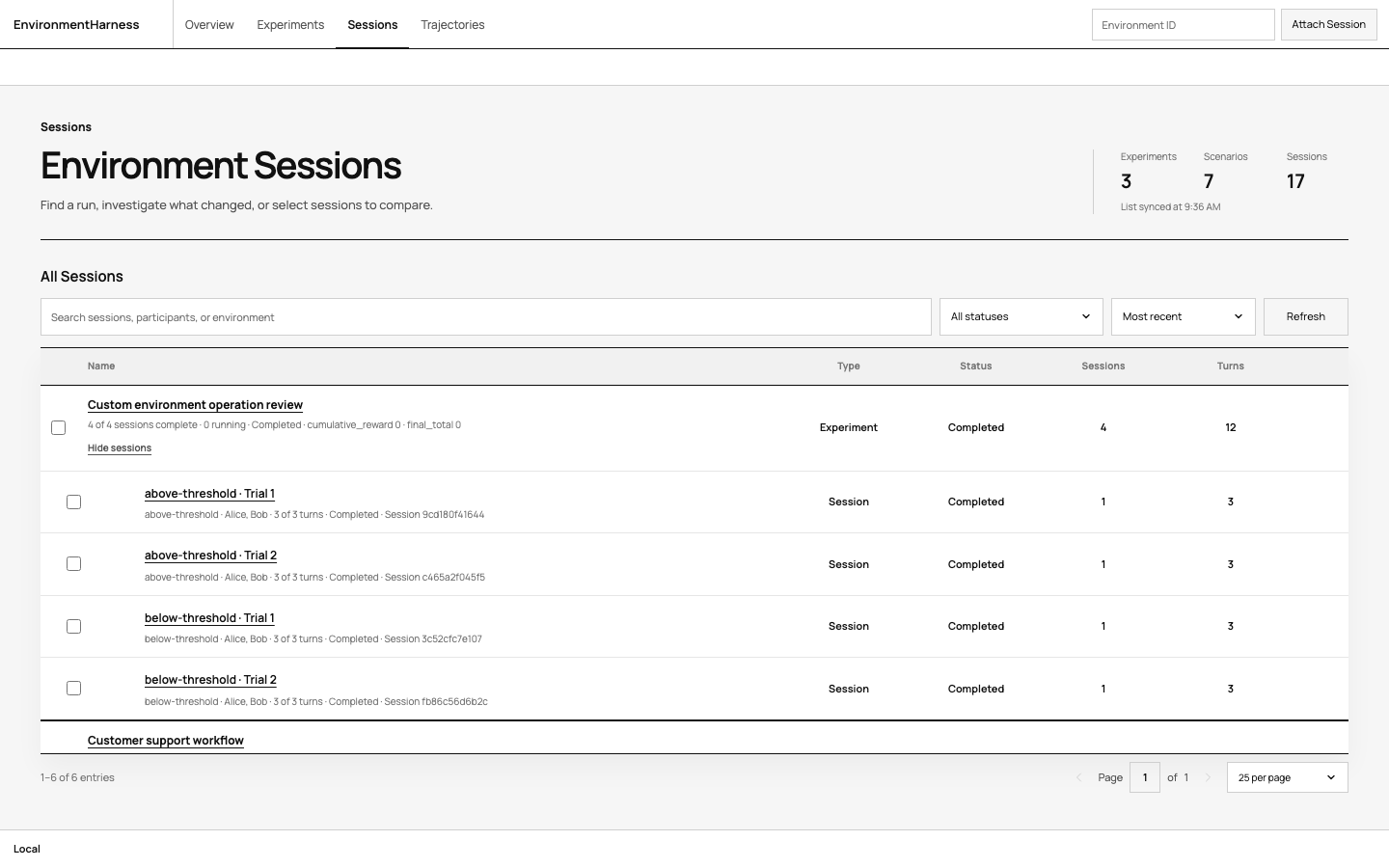
Use the viewer from broad context to specific evidence:
- Home groups related environment sessions under their experiment and keeps standalone sessions visible.
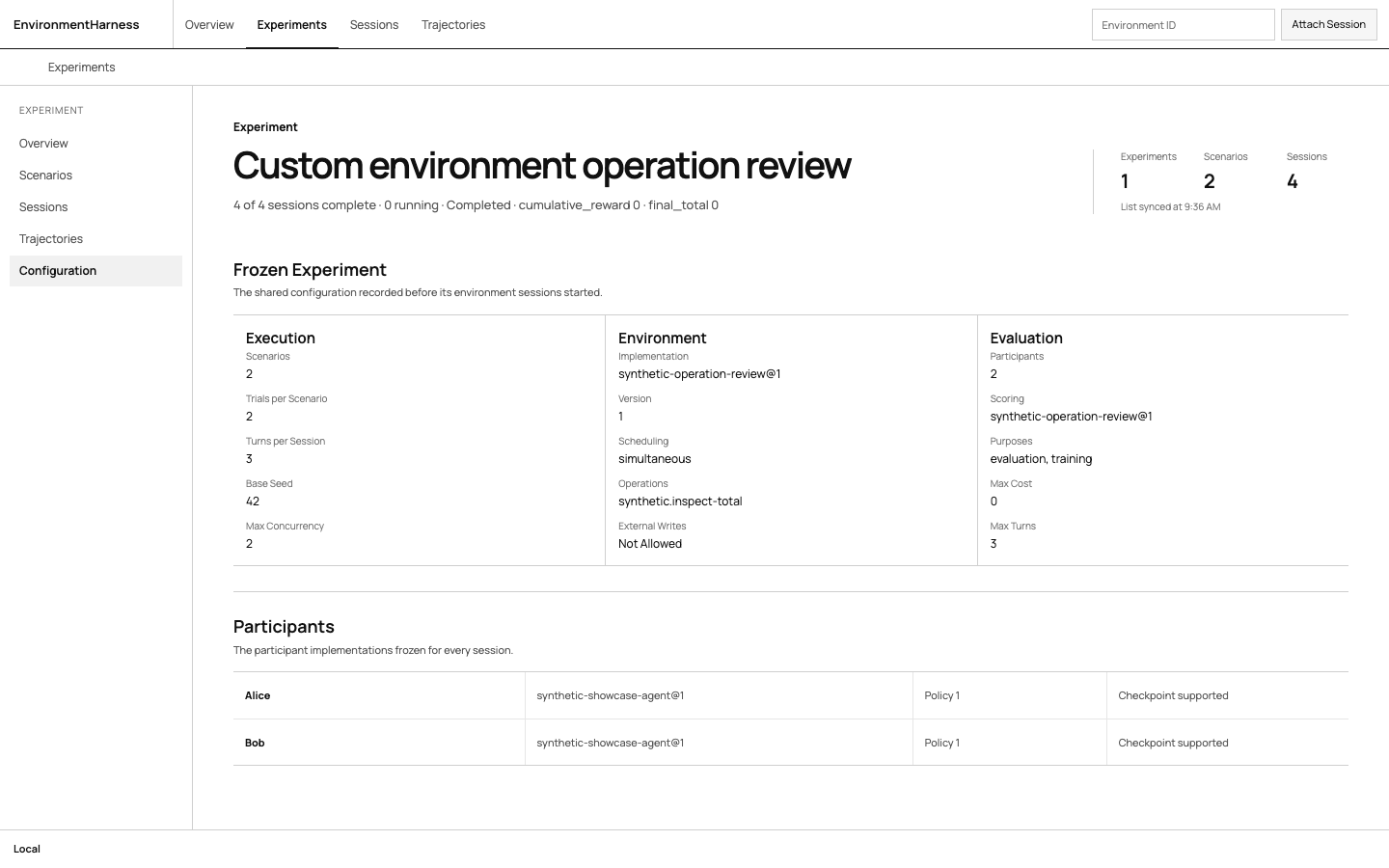
- Experiment records the shared scenarios, trials, participants, environment, operations, policy, and scoring configuration.
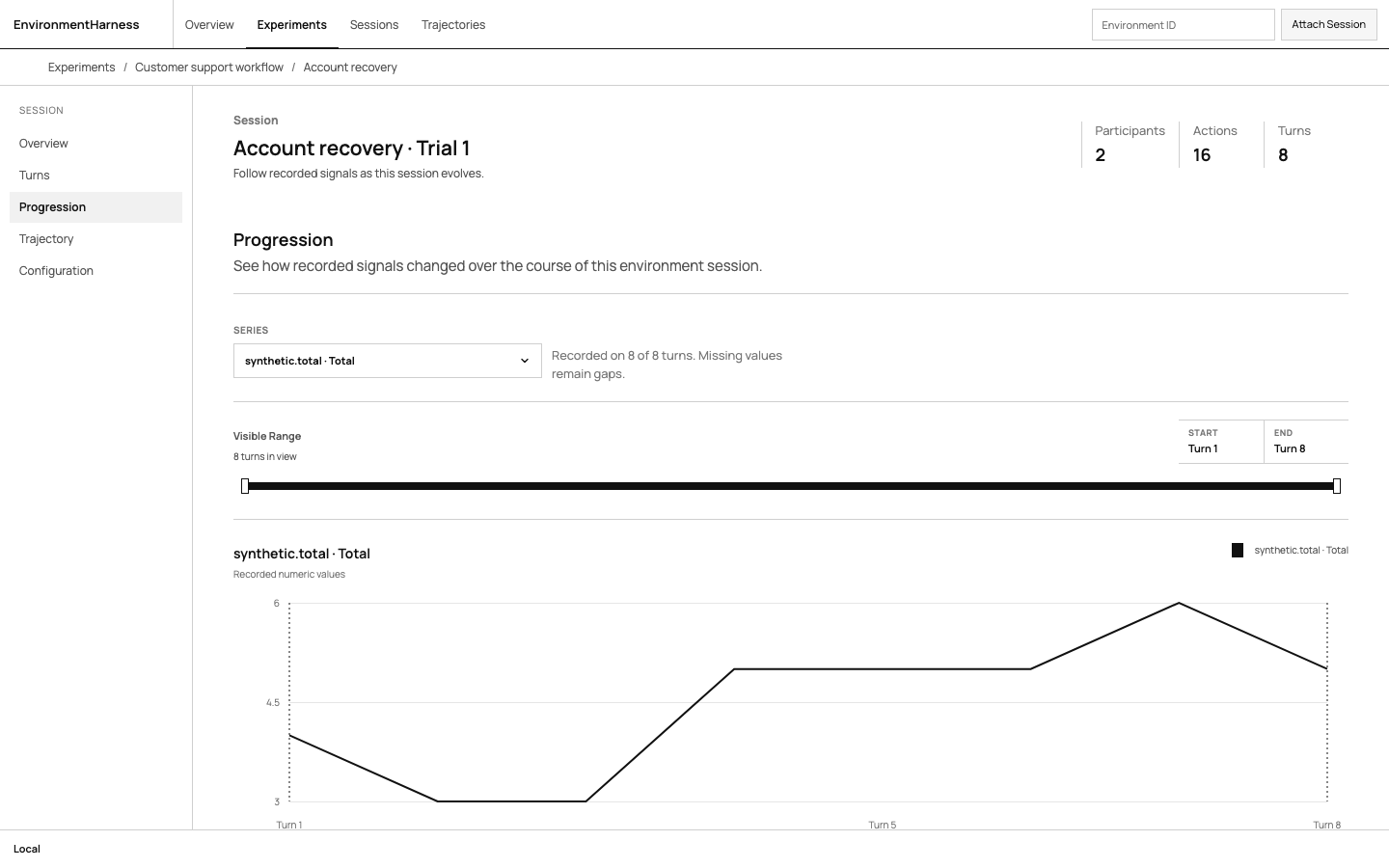
- Session separates frozen configuration, turn-by-turn evidence, progression, and versioned reports.
All screenshots use the repository's synthetic examples. Their counters, rewards, and findings demonstrate the data model; they are not model-quality or safety measurements.
Run from Python
A Python agent implements act(observation) -> dict. EnvironmentHarness creates a fresh environment and agent for each environment session, runs them in a bounded thread pool, and records progress in the store you provide.
from environment_harness import EnvironmentHarness, Scenario
from environment_harness.fixtures import SyntheticEnvironment, SyntheticScenarioInput


class IncrementAgent:
    implementation = "increment-agent@1"

    def act(self, observation):
        return {"value": 1}


harness = EnvironmentHarness(
    ".local/my-environment",
    environment_factory=SyntheticEnvironment,
    agent_factories={"alice": IncrementAgent},
)

environment_session = harness.run(
    Scenario(
        id="first-run",
        input=SyntheticScenarioInput(starting_total=0),
    ),
    turns=5,
)
print(environment_session.id, environment_session.status)
Open the recorded environment session with the same store:
environment-harness --store .local/my-environment serve --open
The implementation string is a versioned identifier recorded with the evidence so a resumed environment session cannot silently run different agent code. Your integration keeps ownership of prompts, model providers, tools, credentials, and spending limits. External JSON programs can use CommandAgent; see the complete source example.
The local Python API and command subprocess are trusted interfaces, not operating-system security sandboxes. Run hostile programs in an isolated backend with explicitly scoped network access.
Run an experiment
EnvironmentHarness accepts factories so every environment session receives a fresh environment and fresh agents. A Scenario[T] freezes its validated input, optional JSON reference, and metadata. Experiments expand one frozen configuration across every scenario and trial while enforcing shared concurrency limits.
from environment_harness import EnvironmentHarness, Scenario
from environment_harness.fixtures import SyntheticAgent, SyntheticEnvironment, SyntheticScenarioInput

harness = EnvironmentHarness(
    ".local/experiment",
    environment_factory=SyntheticEnvironment,
    agent_factories={"agent": SyntheticAgent},
    max_concurrency=4,
)

result = harness.experiment(
    "synthetic sweep",
    [
        Scenario(id="negative-start", input=SyntheticScenarioInput(starting_total=-3)),
        Scenario(id="positive-start", input=SyntheticScenarioInput(starting_total=3)),
    ],
    trials=2,
    seed=42,
    turns=5,
).run()

print(result.completed, result.total)
Run the complete example and open the same store to review its experiment and child environment sessions:
python examples/typed_experiment.py --store .local/typed-experiment --turns 3
environment-harness --store .local/typed-experiment serve --open
The example prints the experiment ID, every environment-session ID, scenario/trial labels, deterministic seeds, and the viewer path. See examples/typed_experiment.py for the copyable source.
Use experiment.start(), wait(), stop(), and explicit resume() for lifecycle control. Standalone environment sessions use harness.start(...) or harness.run(...). The low-level coordinator, explicit ExperimentSpec, and branching workflow remain available from environment_harness.advanced.
Extend an environment
An environment package owns four ordinary Python methods: initialize, observe, resolve, and
intervene, plus a stable EnvironmentSpec. Add an EnvironmentOperation when the environment
also needs imperative work such as controlling a game, reading a simulator, or calling an engine.
Runtime clients and credentials stay on the Python object; only the operation's name, version, and
JSON configuration are frozen into evidence.
The complete custom environment experiment is a
runnable extension example. It defines an operation, interleaves it with normal turns through the
typed SessionRunner seam, runs two scenarios across two trials, and records comparable metrics plus
evidence-linked findings for every environment session.
python examples/custom_environment_experiment.py \
  --store .local/custom-environment-experiment \
  --turns 3
environment-harness \
  --store .local/custom-environment-experiment \
  serve --open
Open the experiment path printed by the example. The experiment page shows the configuration shared by all four environment sessions, including the supplied operation and scoring version.
A session's Overview shows its frozen configuration, Turns describes operation receipts alongside agent and environment evidence, and Progression plots recorded signals over the selected turn range.
Reports summarizes versioned scores, uncertainty, and evidence-linked findings.
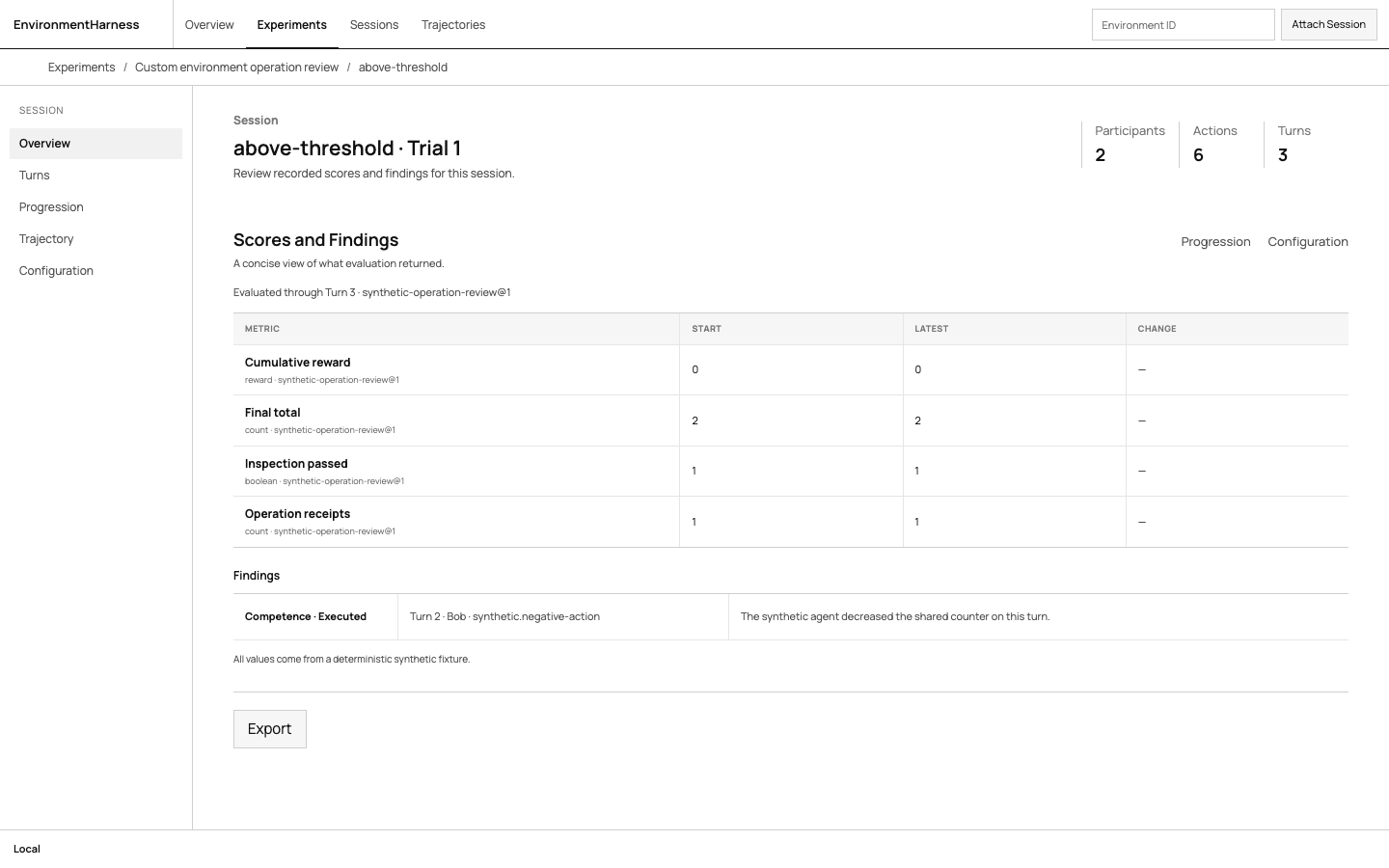
The same operation class works in a standalone environment session or a grouped experiment; grouping is an orchestration choice, not a different environment type. Start with the environment authoring guide, then use the external simulator example when your implementation owns a long-lived process or engine connection.
Documentation
| Goal | Guide |
|---|---|
| Connect a Python agent, model integration, or JSON program | Agent integration |
| Implement environment rules and custom operation classes | Environment authoring · Complete experiment |
| Connect an external simulator or engine | External simulator experiment |
| Understand checkpoints, branches, and coordinated sessions | Coordinated sessions |
| Branch and compare environment sessions | Branch comparison example |
| Run environments behind a trusted supervisor | Remote workers and external agents |
| Use the authenticated HTTP API | API reference · Protocol semantics |
| Use the TypeScript client | TypeScript package |
| Check adapter and isolation boundaries | Adapters |
| Check compatibility and release limits | Compatibility · Release scope |
| Install, run, and evaluate deployment options | Deployment |
| Maintain the packaged browser UI | Viewer maintenance |
| Prepare and publish a release | Release process |
Project
Contributing · Support · Security · Changelog · MIT license
Report vulnerabilities privately through SECURITY.md. Do not put credentials or private environment sessions in a public issue.
1 maintainer

Release files for environment-harness 0.2.4rc2
For a detailed explanation of source distributions (sdists) and built distributions (wheels), please see the package formats documentation.
Source distribution (sdist)
| File | Size | Uploaded | |
|---|---|---|---|
| environment_harness-0.2.4rc2.tar.gz | 468.7 kB | Details |
Built distribution (wheel)
| File | Interpreter | ABI | Platform | Reset |
|---|---|---|---|---|
| environment_harness-0.2.4rc2-py3-none-any.whl | Python 3 | none | any | Details |
Total release size: 621.4 kB
Release files / environment_harness-0.2.4rc2.tar.gz
| Download URL | environment_harness-0.2.4rc2.tar.gz |
|---|---|
| Size | 468.7 kB |
| Tags | Source |
|
SHA-256 checksum How to use checksums |
9ca83841d55fd0736d87ed7a995ccb3659b47a83d5be212d3fece2b481023fee
|
|
BLAKE2b-256 checksum How to use checksums |
c0598af337edf5077afab56a20ead3c095ce6e670528dc1f930c4eb8e9445d59
|
| Upload date | |
|
Uploaded using Trusted Publishing? What is trusted publishing? |
Yes |
| Uploaded via |
twine/7.0.0 CPython/3.13.14
|
Provenance
Provenance describes where a file came from. On PyPI, provenance is shared via attestations, which provide a verifiable record of the build or publishing details. View details, limitations and caveats.


PyPI Publish Attestation
PyPI verified that this artifact, at this checksum, originated from the publisher listed below.
Signed by GitHub Actions, verified by PyPI on Sep 22, 2026.
Transparency logRelease files / environment_harness-0.2.4rc2-py3-none-any.whl
| Download URL | environment_harness-0.2.4rc2-py3-none-any.whl |
|---|---|
| Size | 152.6 kB |
| Tags | Python 3 |
|
SHA-256 checksum How to use checksums |
f1787eb04ed0f91d2caebe866f43e5f72c2c12b700f47fa1cee1253134d57999
|
|
BLAKE2b-256 checksum How to use checksums |
e27f8f3b07bf45edcc3a0d512810913c20d45501c95decbf6d52ef5a664cd006
|
| Upload date | |
|
Uploaded using Trusted Publishing? What is trusted publishing? |
Yes |
| Uploaded via |
twine/7.0.0 CPython/3.13.14
|
Provenance
Provenance describes where a file came from. On PyPI, provenance is shared via attestations, which provide a verifiable record of the build or publishing details. View details, limitations and caveats.
PyPI Publish Attestation
PyPI verified that this artifact, at this checksum, originated from the publisher listed below.
Signed by GitHub Actions, verified by PyPI on Sep 22, 2026.
Transparency log













