
🔐 EnvLockr CLI



Secure your environment variables — locally, encrypted, and stream-safe.
EnvLockr CLI is a tool for developers, streamers, and indie hackers who want full control of their secrets without relying on cloud services.
✨ Features
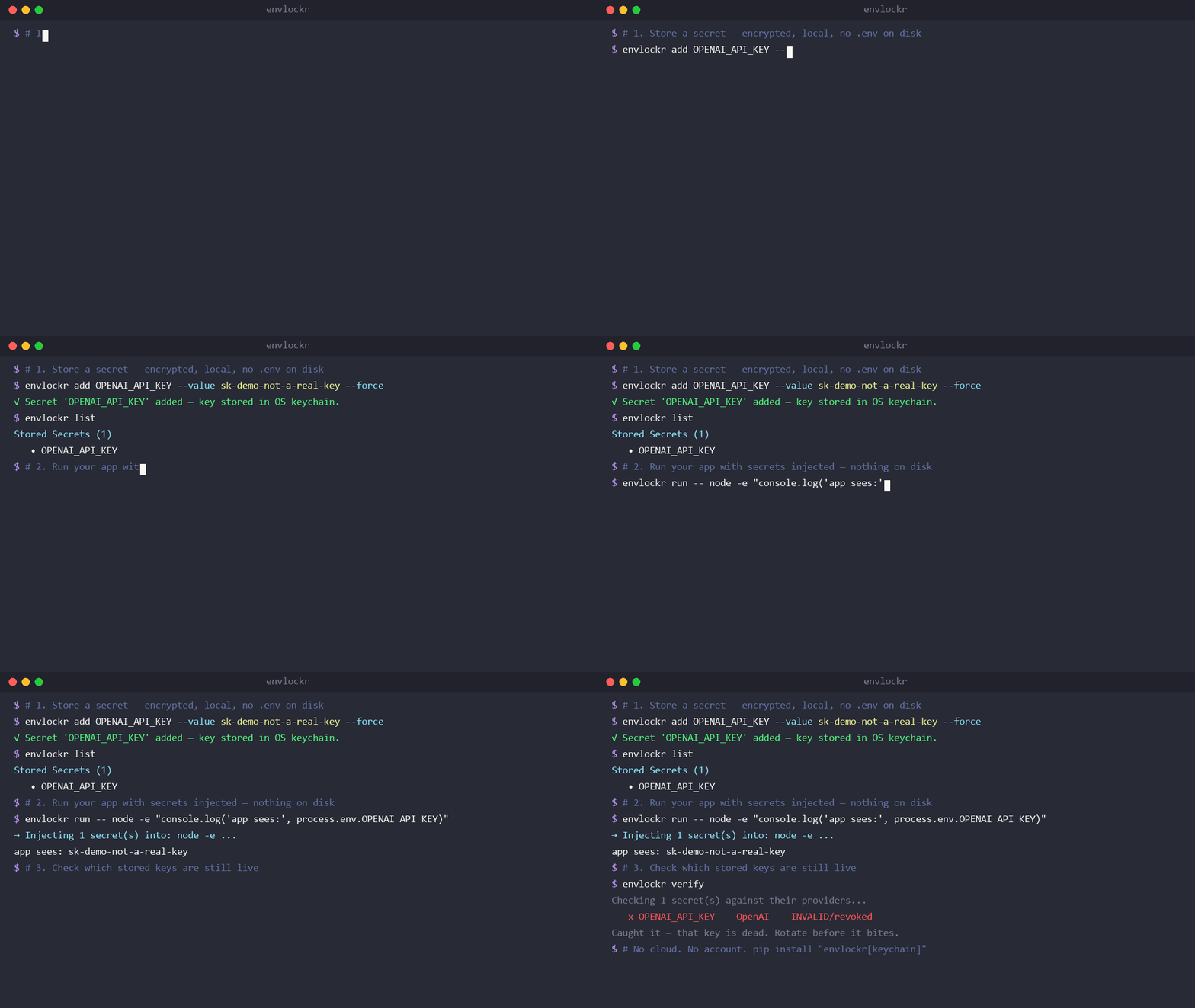
- Local-first: All secrets stored encrypted on your machine — no cloud, no account
- Keychain-backed key: The master key lives in your OS keychain (Windows Credential Manager / macOS Keychain / libsecret), not a plaintext file beside the vault — real protection if your disk is compromised
runinjection:envlockr run -- npm run devinjects secrets straight into the process — no.envever written to disk- Liveness
verify:envlockr verifychecks whether your stored keys are still live (Stripe, OpenAI, Anthropic, GitHub, Slack) — catch revoked/rotated keys - Profiles:
--env prodfor isolated per-environment vaults - Offline Mode: Core commands need no internet
- Stream-Safe: No
.envon screen while coding or streaming - Cross-Project Friendly: Works with React, Node.js, Python, and more
- GitHub Action: Scan commits for exposed secrets (Learn more)
🚀 Quick Start
1. Install
# Install from PyPI (recommended)
pip install envlockr

# Recommended: keychain-backed key + clipboard support
pip install "envlockr[keychain,clipboard]"
Using an npm-centric workflow? There's an npm wrapper
so envlockr works in package.json scripts and with npx (it proxies to the
Python CLI above):
npm install -g envlockr # wrapper — still needs the pip package installed
💡 Without the
keychainextra, the master key falls back to a0600file on disk and EnvLockr warns you. Install the extra for real disk-compromise protection, then runenvlockr secure-keyto migrate an existing key.
Alternative: Install from source
git clone https://github.com/RohanRatwani/envlockr-cli.git
cd envlockr-cli
pip install -e .
2. Commands
| Command | Example | What it Does |
|---|---|---|
| add | envlockr add STRIPE_KEY |
Add a new secret |
| get | envlockr get STRIPE_KEY |
Retrieve a secret |
| list | envlockr list |
List all stored secrets |
| copy | envlockr copy STRIPE_KEY |
Copy secret to clipboard |
| update | envlockr update STRIPE_KEY |
Update an existing secret |
| delete | envlockr delete STRIPE_KEY |
Delete a secret |
| export | envlockr export --output .env |
Export all secrets to .env file |
| import | envlockr import .env |
Import secrets from .env file |
| run | envlockr run -- npm run dev |
Run a command with secrets injected (no .env) |
| verify | envlockr verify |
Check whether stored keys are still live |
| secure-key | envlockr secure-key |
Move the master key into your OS keychain |
| encrypt-vault | envlockr encrypt-vault |
Password-protect your vault for backup |
| decrypt-vault | envlockr decrypt-vault |
Restore a password-protected vault |
| export-vault | envlockr export-vault |
Export vault for team sharing |
| import-vault | envlockr import-vault |
Import a shared vault file |
| --env | envlockr --env prod list |
Use an isolated named profile |
| --version | envlockr --version |
Show version number |
By default
addprompts securely (hidden input). For scripts and CI, pass the value non-interactively:envlockr add API_KEY --value "$API_KEY" --force # from a variable printf '%s' "$API_KEY" | envlockr add API_KEY --stdin # from stdin (no shell history)
⚡ How to Use in Your Projects
🖥 Node.js / React / Vite / Next.js
Option 1 (recommended): run — inject secrets, no file on disk
envlockr run -- npm run dev
All your secrets are injected into the process environment. Nothing is written
to disk, so there is no .env to accidentally commit or leak on stream.
Option 2: Export to .env file
envlockr export --output .env
npm run dev
Option 3: Inline Injection of a single value
export STRIPE_KEY=$(envlockr get STRIPE_KEY)
npm run dev
Option 3: Import existing .env file
# Migrate your existing .env to encrypted storage
envlockr import .env
rm .env  # Delete the unencrypted file
🛠 Compatible with
- create-react-app
- Next.js
- Vite
- Remix
- Express
- NestJS
- and more!
👉 See framework-specific examples - React, Next.js, Python, Docker, and more!
📦 Local Storage & Security Model
Your secret values are encrypted with Fernet (AES-128-CBC + HMAC) and stored in:
~/.envlockr/vault.json # encrypted secret values
The master key is stored in one of two places:
- OS keychain (when
envlockr[keychain]is installed) — the key never touches the filesystem, so readingvault.jsonalone is useless to an attacker. ~/.envlockr/key.key(0600) as a fallback when no keychain is available. In this mode the key sits next to the vault, so disk access = full access — EnvLockr warns you and you can upgrade withenvlockr secure-key.
For backups and team sharing, encrypt-vault bundles the vault + key behind a
password using PBKDF2-HMAC-SHA256 (600k iterations) with a random per-file salt.
- ✅ No external cloud or server dependency
- ✅ Honest about where the key lives — no false "uncrackable" claims
🔍 GitHub Action - Prevent Secret Leaks
EnvLockr includes a GitHub Action that automatically scans your repository for exposed secrets!
Quick Setup
Add this to .github/workflows/envlockr-scan.yml:
name: EnvLockr Secret Scan
on: [pull_request, push]

jobs:
  scan:
    runs-on: ubuntu-latest
    steps:
      - uses: actions/checkout@v4
      - name: Scan for secrets
        run: |
          curl -sSL https://raw.githubusercontent.com/RohanRatwani/envlockr-cli/main/.github/scripts/scan-secrets.sh | bash
What it does:
- ✅ Scans commits for API keys, tokens, and passwords
- ✅ Blocks PRs if secrets are detected
- ✅ Posts helpful comments with fix instructions
- ✅ Detects AWS, Stripe, GitHub, Google, OpenAI, and more
👉 Full GitHub Action Documentation
🆚 How EnvLockr is different
There are great tools in this space — EnvLockr fills the gaps they leave:
| EnvLockr | dotenvx | SOPS | gitleaks | |
|---|---|---|---|---|
| Key off-disk (OS keychain) | ✅ | ❌ (.env.keys on disk) |
⚠️ external KMS/age setup | n/a |
Run cmd with no .env written |
✅ run -- |
⚠️ decrypts to env, needs config | ❌ | n/a |
| Check if stored keys are still live | ✅ verify |
❌ | ❌ | ❌ |
| Zero-config, single command | ✅ | ⚠️ multi-step workflow | ❌ steep | ✅ (scan only) |
| Manages secrets and scans for leaks | ✅ | ❌ (manager only) | ❌ | ❌ (scanner only) |
- vs dotenvx — dotenvx keeps the decryption key in a
.env.keysfile on disk; EnvLockr puts it in your OS keychain and can run your app with nothing written to disk. - vs gitleaks/trufflehog — those are scanners, not managers. trufflehog can
verify secrets it finds by scanning; EnvLockr's
verifydoes that for the vault you actively manage — plus it gives you a place to put the secrets (and wraps gitleaks for scanning when present). - vs SOPS/Vault — no KMS, no server, no YAML — one
pip installand you're running.
💬 Why EnvLockr?
- 🔒 Protect your keys without trusting the cloud
- 🎥 Stream coding sessions without leaking environment secrets
- ⚡ Speed up local development with simple, fast secret management
📚 Documentation
- Quick Reference Guide - Common commands and workflows
- Framework Examples - React, Next.js, Python, Node.js, Docker
- GitHub Action Setup - Prevent secret leaks in CI/CD
- Contributing Guide - Help improve EnvLockr
- Changelog - Version history
📥 What's Next?
We're exploring new features for EnvLockr, including:
- Advanced environment injection (
envlockr inject -- npm run dev) - Desktop UI app
- IDE integrations (VS Code, JetBrains)
👉 Join the Waitlist and share your thoughts!
💡 We Want Your Feedback!
Which features would you love to see in EnvLockr?
🛡️ License
This project is licensed under the MIT License.
Made with ❤️ by Rohan Ratwani
Website ·
GitHub ·
Twitter
1 maintainer

Metadata
1 maintainer
Release files for envlockr 2.0.0.post1
For a detailed explanation of source distributions (sdists) and built distributions (wheels), please see the package formats documentation.
Source distribution (sdist)
| File | Size | Uploaded | Provenance | Actions |
|---|---|---|---|---|
| envlockr-2.0.0.post1.tar.gz | 20.9 kB | Without provenance | Details for envlockr-2.0.0.post1.tar.gz |
Built distribution (wheel)
| File | Interpreter | ABI | Platform | Actions Reset |
|---|---|---|---|---|
| envlockr-2.0.0.post1-py3-none-any.whl | Python 3 | none | any | Details for envlockr-2.0.0.post1-py3-none-any.whl |
Total release size: 37.6 kB
Release files / envlockr-2.0.0.post1.tar.gz
| Download URL | envlockr-2.0.0.post1.tar.gz |
|---|---|
| Size | 20.9 kB |
| Tags | Source |
|
SHA-256 checksum How to use checksums |
ee331c58e650ebac12b6c7a9742a88f60c4694bde6bc20fca2049c18477bd39c
|
|
BLAKE2b-256 checksum How to use checksums |
0a67ef6866952fae74042404ac3cb74e4af155407235c27d6fccc0668dcede9c
|
| Upload date | |
|
Uploaded using Trusted Publishing? What is trusted publishing? |
No |
| Uploaded via |
twine/6.2.0 CPython/3.13.2
|
Release files / envlockr-2.0.0.post1-py3-none-any.whl
| Download URL | envlockr-2.0.0.post1-py3-none-any.whl |
|---|---|
| Size | 16.6 kB |
| Tags | Python 3 |
|
SHA-256 checksum How to use checksums |
2555afefa7f03ea54a3fa1a3132ea3d26a210231d9fe4ed2da2475362d9831b5
|
|
BLAKE2b-256 checksum How to use checksums |
2d0c471d54ba476943d645dcec0a1e4532ef678ad87bb589351c590dd46109f8
|
| Upload date | |
|
Uploaded using Trusted Publishing? What is trusted publishing? |
No |
| Uploaded via |
twine/6.2.0 CPython/3.13.2
|
Security for envlockr 2.0.0.post1
Provenance
Provenance describes where a file came from. On PyPI, provenance is shared via attestations, which provide a verifiable record of the build or publishing details. View details, limitations and caveats.
No provenance found
None of the files in this release were uploaded with provenance metadata.
A note on package security
PyPI is a repository for distributing packages, not a service for auditing them. While third-party security researchers and our staff do their best to detect and remove malicious packages, PyPI cannot guarantee the quality, security or suitability of any given package.
To learn more about protecting yourself from malicious actors, visit our package security documentation.














