
Scan directories to find Python virtual environments

Project description
Directory Structure Visualizer
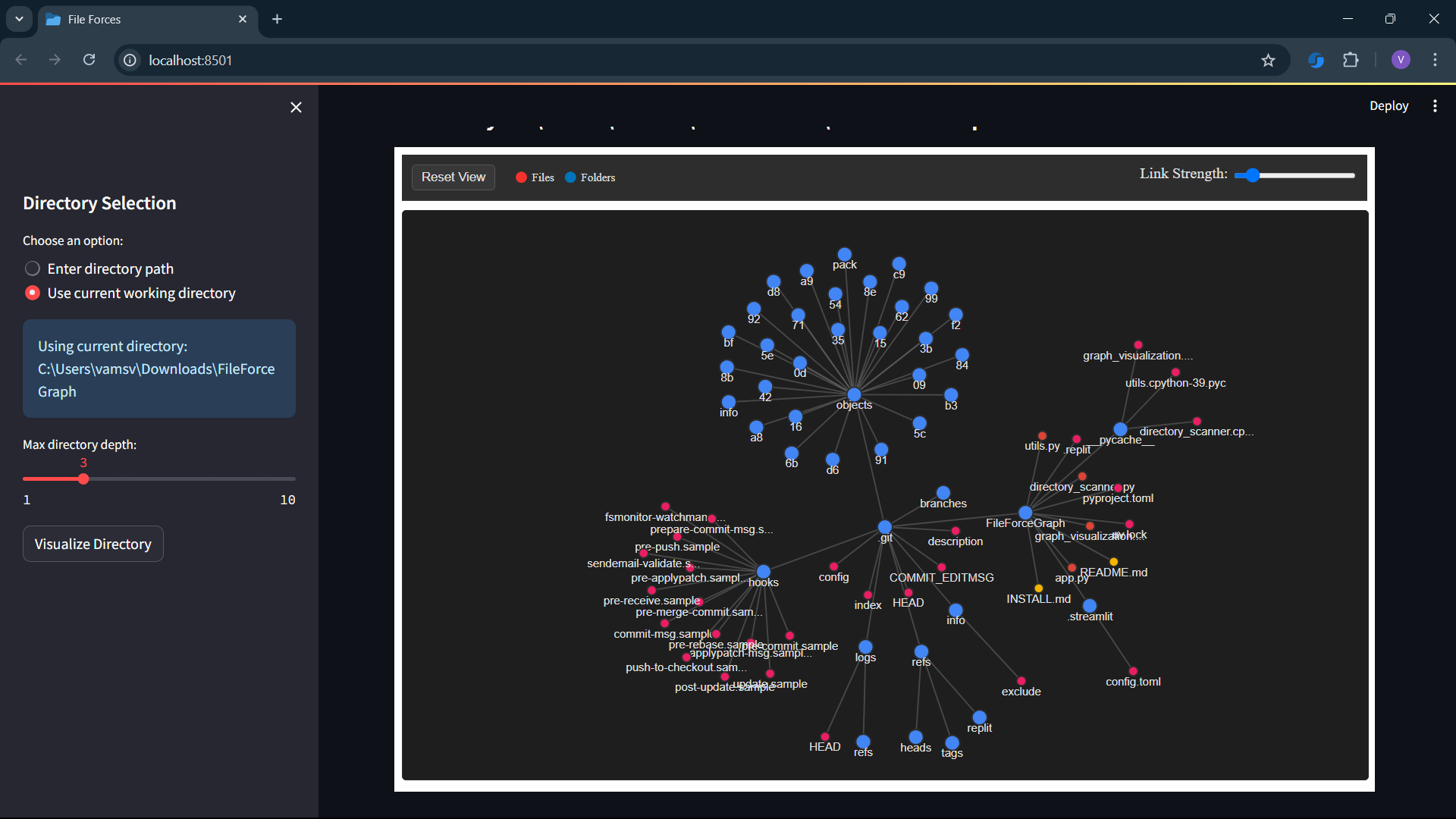
A Streamlit web application that visualizes folder directory structures as interactive D3.js force-directed graphs.
Features
- Interactive Visualization: View your directory structure as an interactive force-directed graph
- Dark Mode Interface: Clean, modern dark theme for comfortable viewing
- File Type Categorization: Files are color-coded by type for easy identification
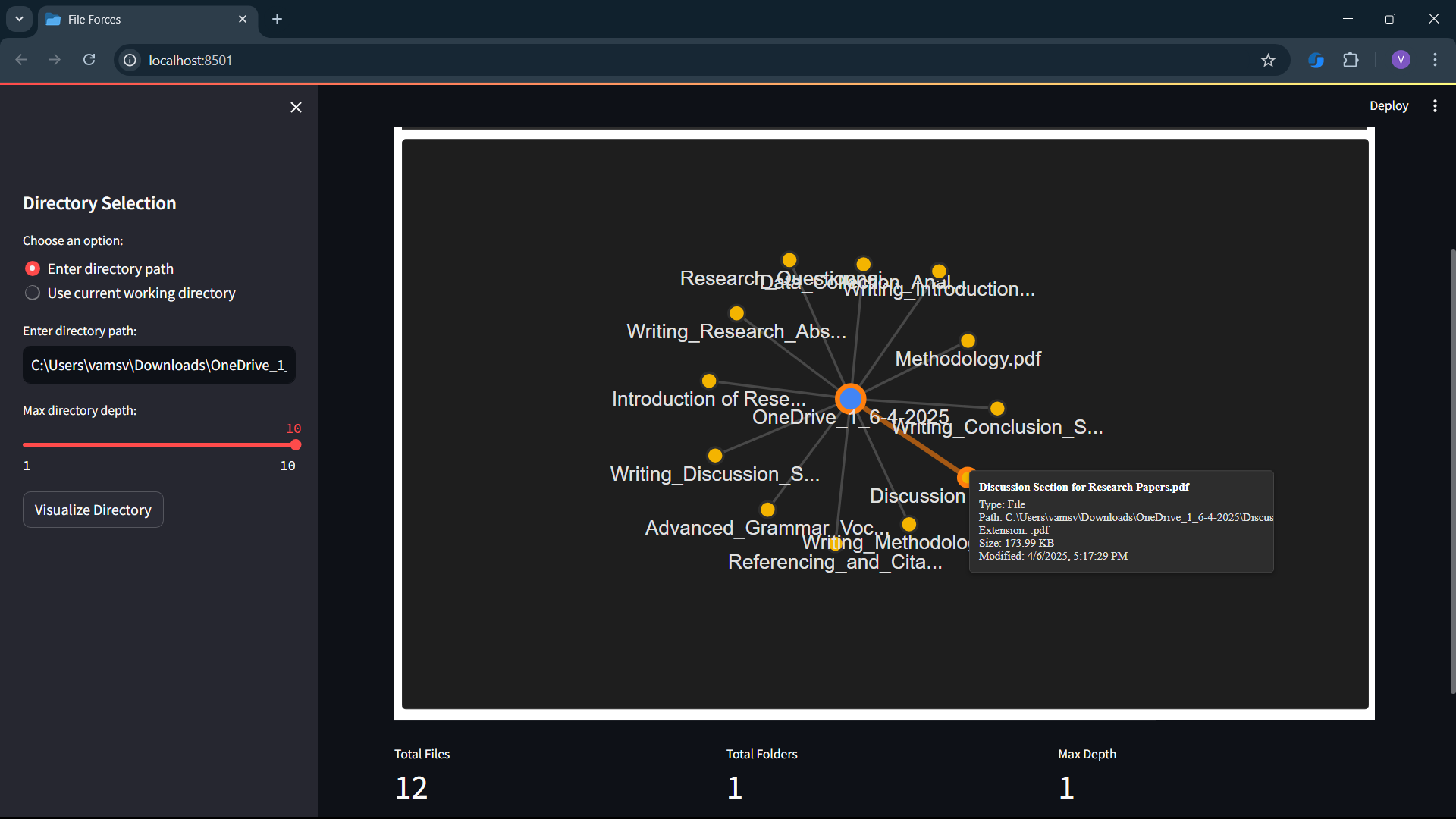
- Detailed Information: Hover over nodes to see detailed file/folder information
- Customizable Depth: Control how deep the directory scanning goes
- Connection Highlighting: Click on nodes to highlight their connections
- Progress Indicators: Visual feedback during directory scanning and processing
Installation
Prerequisites
- Python 3.7 or higher
- Git (for cloning the repository)
Quick Start
-
Clone the repository
git clone https://github.com/yourusername/directory-visualizer.git
cd directory-visualizer
-
Set up a virtual environment (recommended)
# On Windows
python -m venv venv
venv\Scripts\activate

# On macOS/Linux
python -m venv venv
source venv/bin/activate
-
Install dependencies
pip install -r requirements.txt
Or install directly:
pip install streamlit
-
Run the application
streamlit run app.py
-
Open in your browser
The application should automatically open in your default web browser. If not, navigate to:
http://localhost:8501
Usage
-
Select a directory to visualize
- Choose between entering a custom directory path or using the current working directory
- Adjust the maximum directory scanning depth using the slider
-
Click "Visualize Directory"
- Wait for the directory to be scanned and processed
- The visualization will appear in the main area
-
Interact with the visualization
- Drag nodes to rearrange the graph
- Hover over nodes to see file/folder details
- Click on nodes to highlight connections
- Use the scroll wheel to zoom in/out
- Drag the background to pan around
- Adjust the link strength using the slider
- Click "Reset View" to reset the visualization
CLI: envscan (new)
envscan is a CLI tool that scans a directory for Python environments and reports them in the terminal.
Basic usage:
# Scan current directory and print text results (default)
envscan

# Scan a specific path and print JSON
envscan --path ./project --format json

# Write JSON output to a file
envscan --path ./project --format json --json-file results.json

# Probe environments to get their Python version (optional)
envscan --probe --verbose

# Show installed version of envscan
envscan --version
Options:
--path, -p: Path to scan (default.)--depth, -d: Max recursion depth (default3)--format, -f: Output formattextorjson(defaulttext)--include-hidden: Include hidden directories and files--follow-symlinks: Follow symbolic links--probe: Probe discovered environments to get Python version (optional, time-limited)- Note: if probing fails for any environment, run with
--verboseto see informational logs explaining the failure.
- Note: if probing fails for any environment, run with
--json-file: Write JSON output to the given file--verbose: Verbose output
The CLI is implemented using click and the detection heuristics look for common markers (e.g., pyvenv.cfg, conda-meta, Pipfile, .python-version).
Publishing to PyPI
To publish on PyPI:
- Verify the package name is available (we checked
envscanis currently available). - Create an account on PyPI if you don't have one.
- Create a PyPI API token ("Programmatic API token") and add it as
PYPI_API_TOKENin your repository's Secrets (Settings → Secrets → Actions). - Tag a release and push the tag, e.g.:
git add -A ; git commit -m "Release v0.1.0" ; git tag v0.1.0 ; git push origin main --tags
- The GitHub Actions
release.ymlworkflow will build and publish the package to PyPI when it sees av*.*.*tag.
Local publish (alternative):
python -m pip install --upgrade build twine
python -m build
python -m twine upload dist/*
Notes:
- Ensure
pyproject.tomlcontains accurate metadata (authors, license, README, homepage). Thestreamlitdependency is optional inwebextras. - We recommend a small test release (0.1.0) and then iterating.
File Structure
directory-visualizer/
├── .streamlit/
│   └── config.toml       # Streamlit configuration
├── app.py                # Main Streamlit application
├── directory_scanner.py  # Directory scanning functionality
├── graph_visualization.py # D3.js visualization code
├── utils.py              # Utility functions
└── README.md             # This documentation
Extending Functionality
To add more features:
- File type categorization: Extend the
get_file_type_groupfunction indirectory_scanner.py - Additional statistics: Modify the
calculate_directory_statsfunction inapp.py - UI improvements: Add more Streamlit components in
app.py
License
This project is open-source and available under the MIT License.


Download files
Download the file for your platform. If you're not sure which to choose, learn more about installing packages.
Source Distribution
Built Distribution
Filter files by name, interpreter, ABI, and platform.
If you're not sure about the file name format, learn more about wheel file names.
Copy a direct link to the current filters
File details
Details for the file envscan-0.1.0.tar.gz.
File metadata
- Download URL: envscan-0.1.0.tar.gz
- Upload date:
- Size: 8.6 kB
- Tags: Source
- Uploaded using Trusted Publishing? No
- Uploaded via: twine/6.2.0 CPython/3.9.25
File hashes
| Algorithm | Hash digest | |
|---|---|---|
| SHA256 |
5d00ca9e44cd6d3a04d369de0c9982fd11159e0986e4cd5fa31d852c22d29b95
|
|
| MD5 |
55a25c322144c12742ad7a1823c66e7f
|
|
| BLAKE2b-256 |
dea02b141706a5f664301c24ebfd66a5f264777b634719a61fa2d0d5938c55fc
|
File details
Details for the file envscan-0.1.0-py3-none-any.whl.
File metadata
- Download URL: envscan-0.1.0-py3-none-any.whl
- Upload date:
- Size: 7.7 kB
- Tags: Python 3
- Uploaded using Trusted Publishing? No
- Uploaded via: twine/6.2.0 CPython/3.9.25
File hashes
| Algorithm | Hash digest | |
|---|---|---|
| SHA256 |
5023cd2ef70ee1e9e55657d5f7a2910e71edca6770d672d9b5a6487c538ad48e
|
|
| MD5 |
2c3df55282af859806d47c4ebfdf395f
|
|
| BLAKE2b-256 |
22d55c5b6904e920e4d63ce47121bd139e969145df88f0c9a51a8ffd70414b60
|






