
envsleuth





envsleuth parses Python source code with AST, finds environment reads through
the standard library, pydantic-settings, django-environ, and python-decouple,
then compares them with one or more .env files. It never imports or executes
the project being inspected.
Install
Python 3.10 or newer is required.
python -m pip install envsleuth
Usage
# scan current directory, check against ./.env
envsleuth scan

# specific directory, specific env file
envsleuth scan --path ./src --env .env.production

# check several independent deployment profiles with one source scan
envsleuth scan --env .env.development --env .env.production

# CI mode — exits 1 if anything is missing
envsleuth scan --strict

# choose exactly which findings fail CI
envsleuth scan --fail-on missing --fail-on dynamic

# generate a .env.example from your code
envsleuth generate

# machine-readable JSON or SARIF 2.1.0
envsleuth scan --json
envsleuth scan --output sarif > envsleuth.sarif
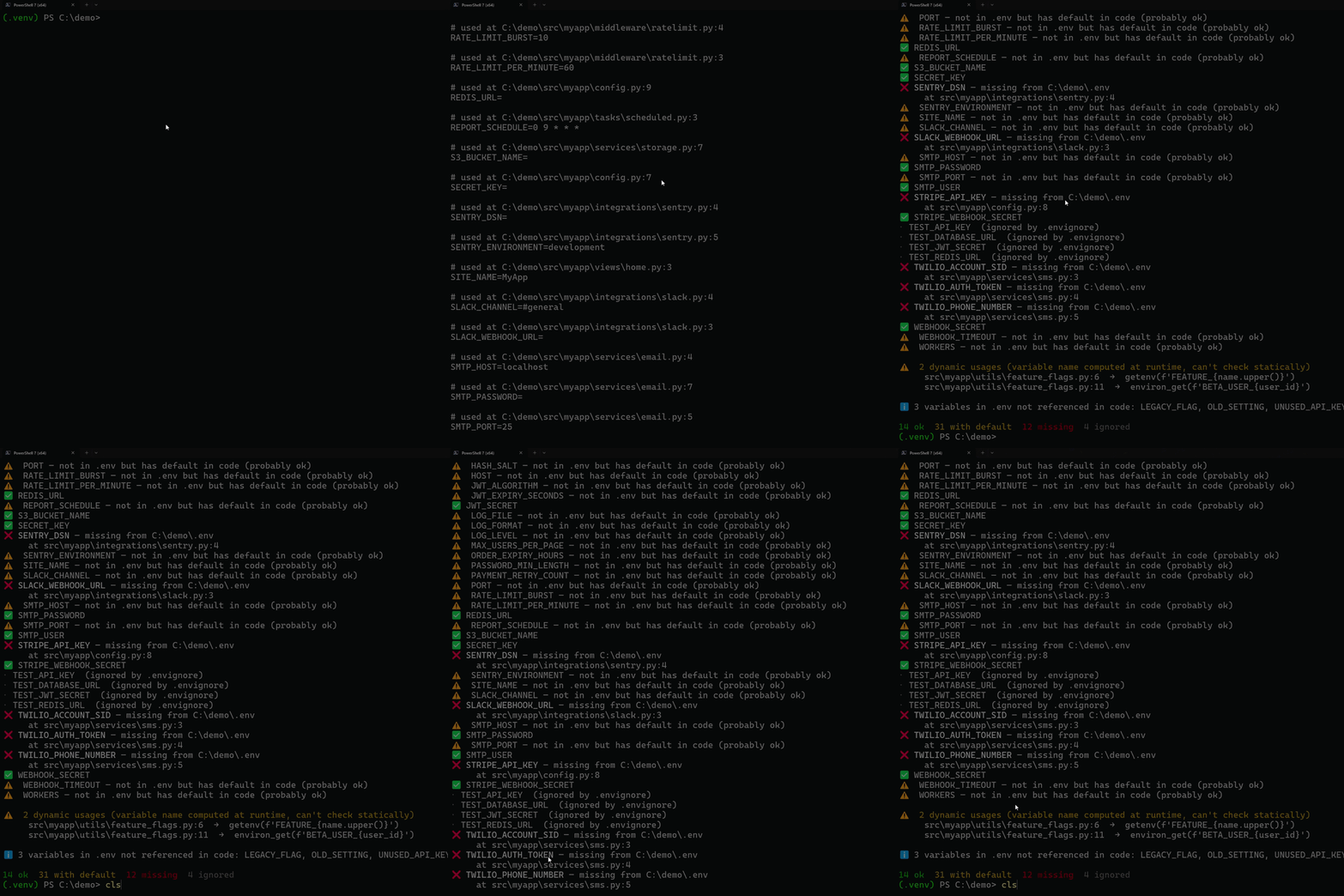
Example output
Found 6 variables in code
checking against .env

⚠️  AWS_SECRET — not in .env but has default in code (probably ok)
✅ DATABASE_URL
✅ DEBUG
❌ REDIS_URL — missing from .env
     at src/app.py:7
✅ SECRET_KEY
❌ STRIPE_API_KEY — missing from .env
     at src/app.py:6

⚠️  1 dynamic usage (variable name computed at runtime, can't check statically)
     src/app.py:12  →  getenv(name)

ℹ  1 variable in .env not referenced in code: UNUSED_VAR

3 ok  1 with default  2 missing
What it detects
Works with all three common patterns:
import os

a = os.getenv("A")              # required — must be in .env
b = os.getenv("B", "fallback")  # has default — warned but not required
c = os.environ["C"]             # required (would raise KeyError without)
d = os.environ.get("D")         # required
Also handles aliased imports:
from os import getenv, environ
import os as sys_os

a = getenv("A")
b = environ["B"]
c = sys_os.getenv("C")
Variables with names computed at runtime (e.g. os.getenv(f"PREFIX_{x}")) can't be checked statically — they're reported in a separate warning section so you know they exist.
Pydantic settings
BaseSettings declarations are analyzed without adding Pydantic as a runtime
dependency:
from pydantic import AliasChoices, Field
from pydantic_settings import BaseSettings, SettingsConfigDict

class Settings(BaseSettings):
    model_config = SettingsConfigDict(env_prefix="APP_")

    database_url: str
    timeout: int = 10
    token: str = Field(
        validation_alias=AliasChoices("TOKEN", "LEGACY_TOKEN")
    )
This finds APP_database_url, treats APP_timeout as defaulted, and accepts
either TOKEN or LEGACY_TOKEN for the final field. Literal prefixes,
env_prefix_target, alias, validation_alias, AliasChoices, defaults,
default_factory, and local settings-class inheritance are supported.
Computed config, unpacking, and alias generators are reported as dynamic
instead of guessed.
Custom settings sources, runtime _env_prefix/_case_sensitive overrides,
cross-module inheritance, and nested-delimiter expansion cannot be proven from
one module's AST. Review those dynamic or framework-specific cases manually.
Django and config libraries
envsleuth also understands the two most common third-party config patterns:
# django-environ
import environ
env = environ.Env()
SECRET_KEY = env('SECRET_KEY')
DEBUG = env.bool('DEBUG', default=False)
DATABASES = {'default': env.db('DATABASE_URL')}
ALLOWED_HOSTS = env.list('ALLOWED_HOSTS', default=[])

# python-decouple
from decouple import config
SECRET_KEY = config('SECRET_KEY')
DEBUG = config('DEBUG', default=False, cast=bool)
Calls through env(...), env.get_value(...), and the typed helpers are
detected: str, bytes, bool, int, float, json, list, tuple,
dict, url, db_url/db, cache_url/cache, email_url/email,
search_url, channels_url/channels, and path. FileAwareEnv and
Env.configured(...) are supported too, including defaults declared in their
schemas and statically known env.prefix settings. Aliased imports work as
well: from decouple import config as cfg.
CI: GitHub Actions annotations
Get missing env vars surfaced as PR annotations on the exact source lines:
# .github/workflows/env-check.yml
- name: Check env vars
  run: envsleuth scan --output github --strict
Each missing var becomes an ::error annotation; dynamic lookups become
::warning. The format follows GitHub's workflow command
spec.
For code-scanning upload workflows, use SARIF:
permissions:
  contents: read
  security-events: write

steps:
  - name: Analyze environment configuration
    run: envsleuth scan --output sarif --fail-on missing > envsleuth.sarif

  - uses: github/codeql-action/upload-sarif@v4
    if: always()
    with:
      sarif_file: envsleuth.sarif
SARIF output is deterministic, has stable rule IDs, and never embeds .env
values or source snippets.
pre-commit hook
Add envsleuth to your .pre-commit-config.yaml:
repos:
  - repo: https://github.com/k38f/envsleuth
    rev: v1.0.0
    hooks:
      - id: envsleuth
        # optional overrides
        # args: [--path, src, --env, .env]
Runs envsleuth scan --strict when Python, .env, .env.*, or .envignore
files change. There's also an opt-in envsleuth-generate hook for regenerating
.env.example manually via pre-commit run envsleuth-generate --hook-stage manual.
envsleuth generate
Scans your code and writes a .env.example with every variable found, a comment pointing at where it's used, and the default value from code if there is one:
$ envsleuth generate
Wrote 6 variables to .env.example

$ cat .env.example
# Generated by envsleuth — edit this file before committing.
# Each variable below is used somewhere in your code.

# used at src/app.py:8
AWS_SECRET=default-value

# used at src/app.py:3
DATABASE_URL=

# used at src/app.py:5
DEBUG=false
...
Use --force to overwrite an existing file, --output path/to/file to write elsewhere.
Generation is fail-closed: if a source file cannot be scanned or a variable
name cannot be written as a portable environment assignment, the command exits
with code 2 without creating or overwriting the target, even with --force.
Dynamic lookups are preserved as warning comments. Literal defaults are written
only when they can be represented consistently for both python-dotenv and a
POSIX shell; otherwise the value is left blank with a # default omitted note.
On Windows, generation also rejects names that differ only by case (for
example, FOO and foo) because the Windows environment cannot keep them
separate.
.envignore
Exclude variables from the "missing" check with glob patterns — one per line:
# .envignore
TEST_*
LEGACY_*
DEBUG_TOOL
Great for vars that come from CI, Docker, or your shell rc files rather than the local .env.
Project configuration
Put shared defaults in the nearest pyproject.toml:
[tool.envsleuth]
path = "src"
env = [".env.development", ".env.production"]
envignore = ".envignore"
fail-on = ["missing", "dynamic"]
exclude = ["vendor", "generated"]
extensions = [".pyi"]
Config paths are relative to pyproject.toml. For safety, paths in an
auto-discovered config must stay inside its directory; an explicitly selected
--config path/to/file.toml may opt in to external paths. Explicit CLI paths
are relative to the current directory and take precedence. A CLI --env list
or --fail-on list replaces the configured list; --exclude and --ext
extend it. Use --no-config to disable discovery. Unknown keys and invalid
types are errors rather than silently ignored typos.
--strict remains equivalent to adding missing to the fail policy.
--no-strict can override strict = true, while --no-fail-on clears only
the configured fail-on list. Use both flags to clear both policies.
CLI reference
envsleuth scan
| Flag | Description |
|---|---|
--path, -p |
Directory or file to scan. Default: config root or . |
--env |
Env file to check. Repeat for independent profiles |
--envignore |
Path to .envignore. Default: ./.envignore if present |
--strict, --no-strict |
Enable/disable failure on missing variables |
--fail-on CATEGORY |
Fail on missing, extra, or dynamic; repeatable |
--no-fail-on |
Clear the configured fail-on list |
--output, -o |
text, json, github, or sarif |
--json |
Alias for --output json (kept for backwards compat) |
--no-color |
Disable ANSI colors (also honours NO_COLOR env var) |
--exclude DIR |
Extra directory name to skip. Can be repeated |
--ext .EXT |
Extra file extension to scan (e.g. .pyi). Can be repeated |
--verbose, -v |
Show usage locations for every variable |
--no-update-check |
Skip the weekly PyPI version check |
--config FILE, --no-config |
Select or disable pyproject.toml config |
envsleuth generate
| Flag | Description |
|---|---|
--path, -p |
Directory or file to scan. Default: config path/root or . |
--output, -o |
Where to write. Default: ./.env.example |
--force, -f |
Overwrite existing output file |
--no-color |
Disable ANSI colors in the success message |
--exclude, --ext |
Same as in scan |
--no-update-check |
Skip the weekly PyPI version check |
--config FILE, --no-config |
Select or disable project config |
Exit codes
0— the command completed successfully.1— a category selected by--strictor--fail-onwas found.2— an operational failure, such as a missing.env, an incomplete scan, invalid config/path, or a read/write/generation error. JSON, GitHub, and SARIF output still emit one structured error document when possible.
Update notifications
envsleuth checks PyPI for new releases at most once per week. When a new version is available, it prints a single line to stderr:
ℹ envsleuth 1.0.1 is available (you have 1.0.0). Run: python -m pip install --upgrade envsleuth
The check is cached, runs with a short timeout, and stays silent on any error (offline, blocked network, etc). To disable it entirely:
# per-command
envsleuth scan --no-update-check

# globally for your shell
export ENVSLEUTH_NO_UPDATE_CHECK=1
The cache lives at ~/.cache/envsleuth/last_check.json (or $XDG_CACHE_HOME/envsleuth/...).
How it compares
| envsleuth | dotenv-linter | python-decouple | |
|---|---|---|---|
| Scans your code for env var usages | ✅ | ❌ | ❌ |
| Lints the .env file itself | ❌ | ✅ | ❌ |
| Runtime config reader with casting | ❌ | ❌ | ✅ |
Generates .env.example from code |
✅ | ❌ | ❌ |
| Language | Python | Rust | Python |
These tools solve different problems: envsleuth scans source code,
dotenv-linter inspects .env files, and python-decouple reads configuration at
runtime.
Dependencies
- click — CLI
- python-dotenv —
.envparsing - flashbar — progress bar used when scanning 20+ files
- packaging — PEP 440 version comparison for update checks
- tomli — consistent TOML parsing on every supported Python version
The scanner itself uses only the Python standard library (ast); Pydantic,
django-environ, and python-decouple are recognized statically and are not
installed by envsleuth.
License
MIT
1 maintainer

Metadata
1 maintainer
Release files for envsleuth 1.0.0
For a detailed explanation of source distributions (sdists) and built distributions (wheels), please see the package formats documentation.
Source distribution (sdist)
| File | Size | Uploaded | |
|---|---|---|---|
| envsleuth-1.0.0.tar.gz | 96.2 kB | Details |
Built distribution (wheel)
| File | Interpreter | ABI | Platform | Reset |
|---|---|---|---|---|
| envsleuth-1.0.0-py3-none-any.whl | Python 3 | none | any | Details |
Total release size: 155.3 kB
Release files / envsleuth-1.0.0.tar.gz
| Download URL | envsleuth-1.0.0.tar.gz |
|---|---|
| Size | 96.2 kB |
| Tags | Source |
|
SHA-256 checksum How to use checksums |
151b877758be4dfeaa4a6caea0b2ae6f7fc1ea4dc6691282152d3fcbfaa7aa56
|
|
BLAKE2b-256 checksum How to use checksums |
7f00fd0b71202fc7c6ae76688c0e3de1beadb63b7fd8ca761beac1713fade0cd
|
| Upload date | |
|
Uploaded using Trusted Publishing? What is trusted publishing? |
Yes |
| Uploaded via |
twine/6.1.0 CPython/3.13.14
|
Provenance
Provenance describes where a file came from. On PyPI, provenance is shared via attestations, which provide a verifiable record of the build or publishing details. View details, limitations and caveats.


PyPI Publish Attestation
PyPI verified that this artifact, at this checksum, originated from the publisher listed below.
Signed by GitHub Actions, verified by PyPI on Jul 26, 2026.
Transparency logRelease files / envsleuth-1.0.0-py3-none-any.whl
| Download URL | envsleuth-1.0.0-py3-none-any.whl |
|---|---|
| Size | 59.1 kB |
| Tags | Python 3 |
|
SHA-256 checksum How to use checksums |
fccd03a87b0e01b67bb4e05adaf6ba07019fc70aaee77812ce291273aa17545a
|
|
BLAKE2b-256 checksum How to use checksums |
6e097c3fda304b892a9bb3404f148bf084245d657f69558835f0ebc3c3f816fe
|
| Upload date | |
|
Uploaded using Trusted Publishing? What is trusted publishing? |
Yes |
| Uploaded via |
twine/6.1.0 CPython/3.13.14
|
Provenance
Provenance describes where a file came from. On PyPI, provenance is shared via attestations, which provide a verifiable record of the build or publishing details. View details, limitations and caveats.
PyPI Publish Attestation
PyPI verified that this artifact, at this checksum, originated from the publisher listed below.
Signed by GitHub Actions, verified by PyPI on Jul 26, 2026.
Transparency log













