
Swing Music

Project description

v2.0.9
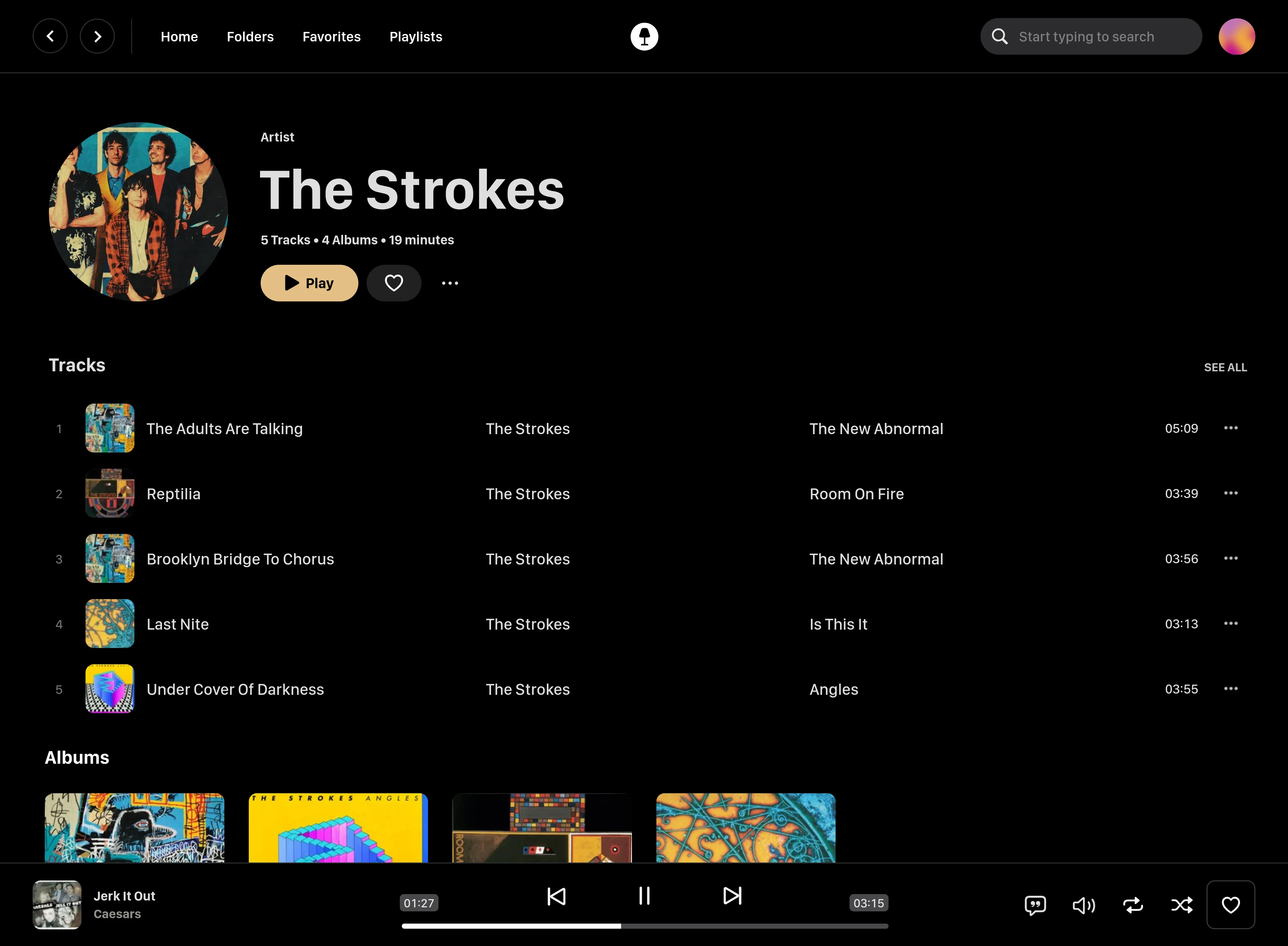
Swing Music is a fast and beautiful, self-hosted music player for your local audio files. Like a cooler Spotify ... but bring your own music. Just run the app and enjoy your music library in a web browser.
Features
- Daily Mixes - curated everyday based on your listening activity
- Metadata normalization - a clean and consistent library
- Album versioning - normalized albums and association with version labels (eg. Deluxe, Remaster, etc)
- Related artist and albums
- Folder view - Browse your music library by folders
- Playlist management
- Beautiful browser based UI
- Silence detection - Combine cross-fade with silence detection to create a seamless listening experience
- Collections - Group albums and artists based on your preferences
- Statistics - Get insights into your listening activity
- Lyrics view
- Android client
- Last.fm scrobbling
- Multi-user support
- Cross-platform - Windows, Linux, MacOS (coming soon), arm64, x86
- Blazingly fast
- Pure awesomeness
Installation
Swing Music is available as pre-compiled binaries for Windows and Linux. Just download the latest release from the downloads page and launch it.
FFmpeg is needed for the audio silence skip feature, so you need to install it first. On windows, you can follows this tutorial to install FFmpeg.
On Linux, you can install FFmpeg using:
sudo apt-get install ffmpeg libev-dev libavcodec-extra -y
The libev package is needed on Linux and MacOS. You can install it on other system as shown:
# Arch Linux
pacman -S libev

# Fedora, CentOS
dnf install libev-devel

# MacOS
brew install libev
Then make the file executable first.
chmod a+x ./swingmusic

./swingmusic
The app should start at http://localhost:1970 by default. Open it in your browser to configure and use Swing Music. You can change the default port by using the --port flag.
./swingmusic --port 1980
[!IMPORTANT] The default password for user
adminis "admin". Please change the password via the settings after first login.
To stream your music from your Android device, you can download the Android mobile client.
Options
Options flags can be passed when starting the app in the terminal to tweak runtime settings or perform tasks. You can use the -h flag to see all supported options.
[!TIP] You can read more about options in the docs.
Docker
Pull the latest Docker image and run it:
docker pull ghcr.io/swingmx/swingmusic:latest
docker run --name swingmusic -p 1970:1970 \
  -v /path/to/music:/music \
  -v /path/to/config:/config \
  --restart unless-stopped \
  ghcr.io/swingmx/swingmusic:latest
Don't forget to replace /path/to/music and /path/to/config with the appropriate values. In addition, specify the the /music directory as the root directory. Using the Home Directory option won't work.
[!TIP] For more info, see the Docker section on the docs.
Using Docker Compose
Here's a sample Docker compose file:
services:
  swingmusic:
    image: ghcr.io/swingmx/swingmusic:latest
    container_name: swingmusic
    volumes:
      - /path/to/music:/music
      - /path/to/config:/config
    ports:
      - "1970:1970"
    restart: unless-stopped
Contributing and Development
Swing Music is looking for contributors. If you're interested, please join us at the Swing Music Community group on Telegram. For more information, take a look at https://github.com/swing-opensource/swingmusic/issues/186.
[!TIP] This project runs on Python 3.11 or newer and uses uv to manage dependencies. Please install uv before continuing for an easy setup.
To set up this project on your computer follow the following steps:
# 1. Fork the project

git clone https://github.com/swingmx/swingmusic.git

# or via SSH

git clone git@github.com:swingmx/swingmusic.git
# 2. Install dependencies

uv sync
[!TIP] The
libevpackage is needed on Linux and MacOS. You can install it on other system as shown:# Arch Linux pacman -S libev # Fedora, CentOS dnf install libev-devel # MacOS brew install libev
# 4. Run the program

uv run python run.py
License
This software is provided to you with terms stated in the AGPLv3 License or any later version. Read the full text in the LICENSE file located at the root of this repository.
Contributors
Shout out to the following code contributors who have helped maintain and improve Swing Music:








Release history Release notifications | RSS feed

Download files
Download the file for your platform. If you're not sure which to choose, learn more about installing packages.
Source Distributions
Built Distribution
Filter files by name, interpreter, ABI, and platform.
If you're not sure about the file name format, learn more about wheel file names.
Copy a direct link to the current filters
File details
Details for the file enyelbmusic-1.0.0-py3-none-any.whl.
File metadata
- Download URL: enyelbmusic-1.0.0-py3-none-any.whl
- Upload date:
- Size: 239.8 kB
- Tags: Python 3
- Uploaded using Trusted Publishing? Yes
- Uploaded via: twine/6.1.0 CPython/3.13.7
File hashes
| Algorithm | Hash digest | |
|---|---|---|
| SHA256 |
149f721edf02d2535a78f4ac772e27abc73883a4736ede53cdc173cc14d4605a
|
|
| MD5 |
1ba8540550d8bf060d55eb0c87410868
|
|
| BLAKE2b-256 |
459cfdfe10bb9433df94da06e275587099268a4ff132d8005c01bc8044a2b040
|
Provenance
The following attestation bundles were made for enyelbmusic-1.0.0-py3-none-any.whl:
Publisher:
build.yml on enyelb-os/swingmusic
-
Statement:
-
Statement type:
https://in-toto.io/Statement/v1 -
Predicate type:
https://docs.pypi.org/attestations/publish/v1 -
Subject name:
enyelbmusic-1.0.0-py3-none-any.whl -
Subject digest:
149f721edf02d2535a78f4ac772e27abc73883a4736ede53cdc173cc14d4605a - Sigstore transparency entry: 525501987
- Sigstore integration time:
-
Permalink:
enyelb-os/swingmusic@1a51479d1d451b518a956cd4cda88df2b839a846 -
Branch / Tag:
refs/heads/master - Owner: https://github.com/enyelb-os
-
Access:
public
-
Token Issuer:
https://token.actions.githubusercontent.com -
Runner Environment:
github-hosted -
Publication workflow:
build.yml@1a51479d1d451b518a956cd4cda88df2b839a846 -
Trigger Event:
workflow_dispatch
-
Statement type:






