











Checkout EODAG Jupyterlab extension: eodag-labextension! This will bring a friendly UI to your notebook and help you search and browse for EO products using eodag.
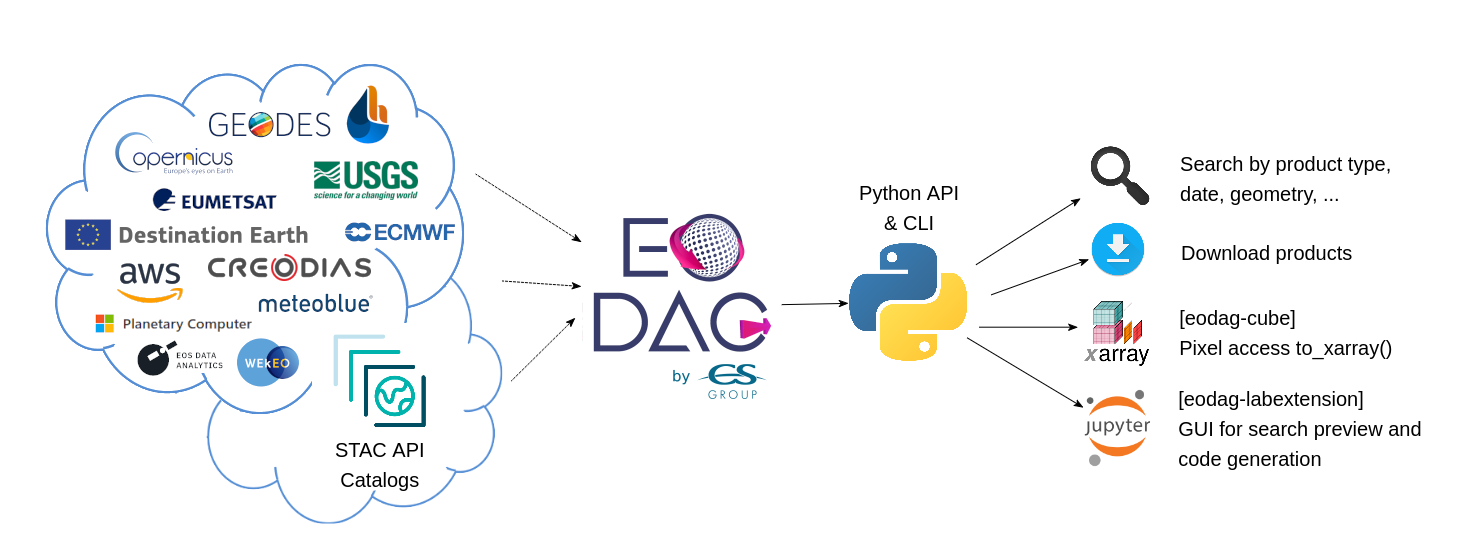
EODAG (Earth Observation Data Access Gateway) is a command line tool and a plugin-oriented Python framework for searching, aggregating results and downloading remote sensed images while offering a unified API for data access regardless of the data provider. The EODAG SDK is structured around three functions:
List collections: list of supported products and their description
Search products (by collection or uid): searches products according to the search criteria provided
Download products: download product “as is”
EODAG is developed in Python. It is structured according to a modular plugin architecture, easily extensible and able to integrate new data providers. Three types of plugins compose the tool:
Catalog search plugins, responsible for searching data (STAC, OpenSearch, OData, …), building paths, retrieving quicklook, combining results
Download plugins, allowing to download and retrieve data locally (via HTTP, S3, …), always with the same directory organization
Authentication plugins, which are used to authenticate the user on the external services used (JSON Token, Basic Auth, OIDC, …).
Read the documentation for more insights.
Installation
EODAG is available on PyPI:
pip install eodagAnd with conda from the conda-forge channel:
conda install -c conda-forge eodagEODAG is also published as a container image on GitHub Container Registry:
docker pull ghcr.io/cs-si/eodag:<version>
docker run --rm ghcr.io/cs-si/eodag:<version> --help
Replace <version> with the EODAG release tag you want to run. See the Docker quickstart for configuration and examples.
[!NOTE]
Please note that EODAG comes with a minimal set of dependencies. If you want more features, please install using one of the available extras.
Usage
For downloading you will need to fill your credentials for the desired providers in your eodag user configuration file. The file will automatically be created with empty values on the first run.
Python API
Example usage for interacting with the api in your Python code:
from eodag import EODataAccessGateway

dag = EODataAccessGateway()

search_results = dag.search(
    collection='S2_MSI_L1C',
    geom={'lonmin': 1, 'latmin': 43.5, 'lonmax': 2, 'latmax': 44}, # accepts WKT polygons, shapely.geometry, ...
    start='2021-01-01',
    end='2021-01-15'
)

product_paths = dag.download_all(search_results)
This will search for Sentinel 2 level-1C products on the default provider and return the found products first page and an estimated total number of products matching the search criteria. And then it will download these products. Please check the Python API User Guide for more details.
Command line interface
Start playing with the CLI:
To search for some products:
eodag search --collection S2_MSI_L1C --box 1 43 2 44 --start 2021-03-01 --end 2021-03-31
The request above searches for S2_MSI_L1C collections in a given bounding box, in March 2021. It saves the results in a GeoJSON file (search_results.geojson by default).
Results are paginated, you may want to get all pages at once with --all, or search products having 20% of maximum coud cover with --cloud-cover 20. For more information on available options:
eodag search --help
To download the result of the previous call to search:
eodag download --search-results search_results.geojson
To download only the result quicklooks of the previous call to search:
eodag download --quicklooks --search-results search_results.geojson
To list all available collections and supported providers:
eodag list
To list available collections on a specified supported provider:
eodag list -p creodias
To see all the available options and commands:
eodag --help
To print log messages, add -v to eodag master command. e.g. eodag -v list. The more v given (up to 3), the more verbose the tool is. For a full verbose output, do for example: eodag -vvv list
Contribute
Have you spotted a typo in our documentation? Have you observed a bug while running EODAG? Do you have a suggestion for a new feature?
Don’t hesitate and open an issue or submit a pull request, contributions are most welcome!
For guidance on setting up a development environment and how to make a contribution to eodag, see the contributing guidelines.
License
EODAG is licensed under Apache License v2.0. See LICENSE file for details.
Credits
EODAG is built on top of amazingly useful open source projects. See NOTICE file for details about those projects and their licenses. Thank you to all the authors of these projects!
3 maintainers


Metadata
3 maintainers
Release files for eodag 4.10.3
For a detailed explanation of source distributions (sdists) and built distributions (wheels), please see the package formats documentation.
Source distribution (sdist)
| File | Size | Uploaded | Provenance | Actions |
|---|---|---|---|---|
| eodag-4.10.3.tar.gz | 11.1 MB | Without provenance | Details for eodag-4.10.3.tar.gz |
Built distribution (wheel)
| File | Interpreter | ABI | Platform | Actions Reset |
|---|---|---|---|---|
| eodag-4.10.3-py3-none-any.whl | Python 3 | none | any | Details for eodag-4.10.3-py3-none-any.whl |
Total release size: 13.1 MB
Release files / eodag-4.10.3.tar.gz
| Download URL | eodag-4.10.3.tar.gz |
|---|---|
| Size | 11.1 MB |
| Tags | Source |
|
SHA-256 checksum How to use checksums |
f5dd078b59f86d751ff1328f5bedd209ddb619247aa371176f566ac7b1f22664
|
|
BLAKE2b-256 checksum How to use checksums |
853d50e538d6b44ef6f13a4e485554711bec72b1803a07e0a04c711dad9b8974
|
| Upload date | |
|
Uploaded using Trusted Publishing? What is trusted publishing? |
No |
| Uploaded via |
twine/7.0.0 CPython/3.13.16
|
Release files / eodag-4.10.3-py3-none-any.whl
| Download URL | eodag-4.10.3-py3-none-any.whl |
|---|---|
| Size | 2.0 MB |
| Tags | Python 3 |
|
SHA-256 checksum How to use checksums |
ebd0c7c8f98a42b9fe8e77a9763a5ed52bca0423eaef07ee2c0d9f6dea2f0a49
|
|
BLAKE2b-256 checksum How to use checksums |
6f5ee6a4eeb56bff0fa4e9b6a1efb4841b0d47f1682dfb6629748aaa5db60afd
|
| Upload date | |
|
Uploaded using Trusted Publishing? What is trusted publishing? |
No |
| Uploaded via |
twine/7.0.0 CPython/3.13.16
|
Security for eodag 4.10.3
Provenance
Provenance describes where a file came from. On PyPI, provenance is shared via attestations, which provide a verifiable record of the build or publishing details. View details, limitations and caveats.
No provenance found
None of the files in this release were uploaded with provenance metadata.
A note on package security
PyPI is a repository for distributing packages, not a service for auditing them. While third-party security researchers and our staff do their best to detect and remove malicious packages, PyPI cannot guarantee the quality, security or suitability of any given package.
To learn more about protecting yourself from malicious actors, visit our package security documentation.














