
eping.py 4.85
Continuous ICMP reachability monitor built on fping. Scans a host list in a loop,
reports each host UP/DOWN/NO-DNS, counts state changes. CLI (curses) or web GUI.
Written by Ewald Jeitler — https://www.jeitler.cc
Screenshots
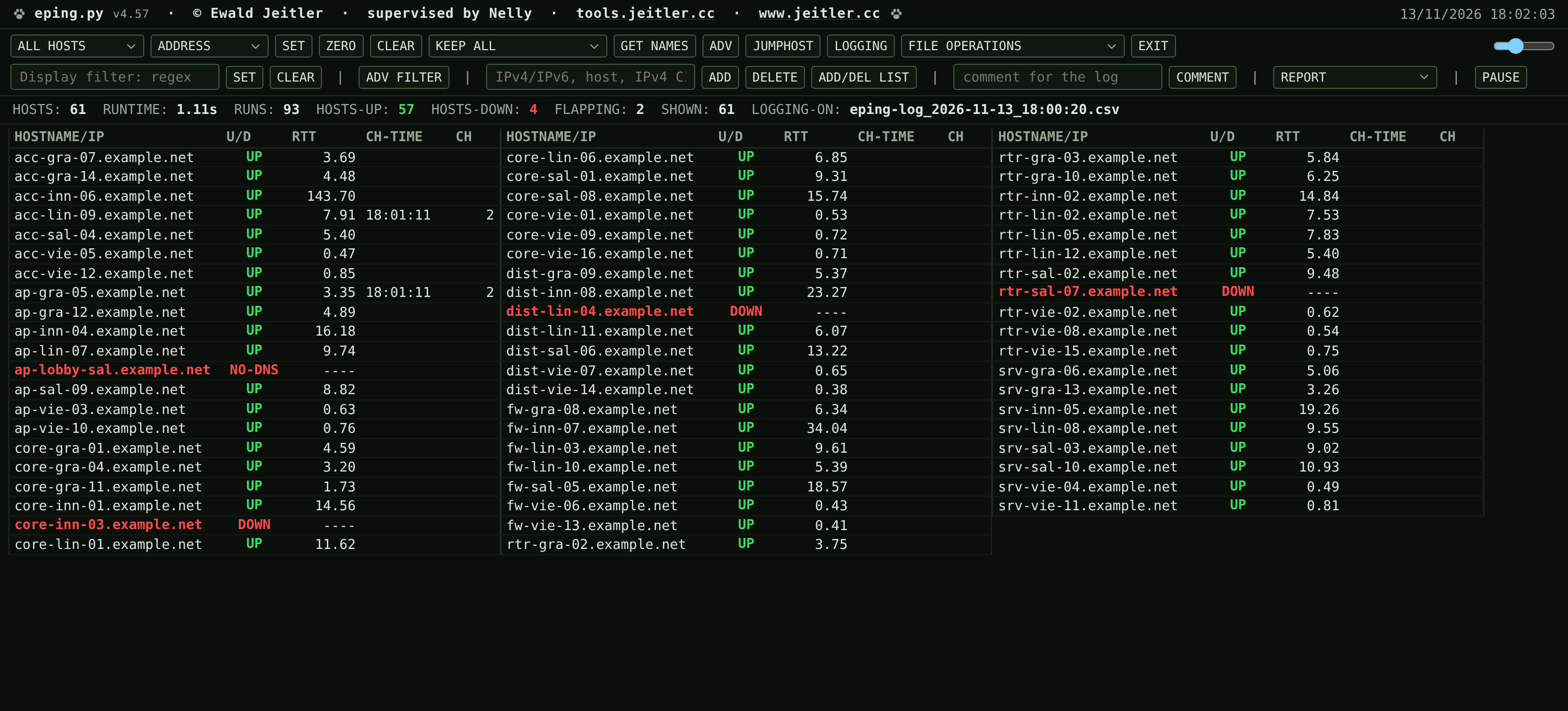
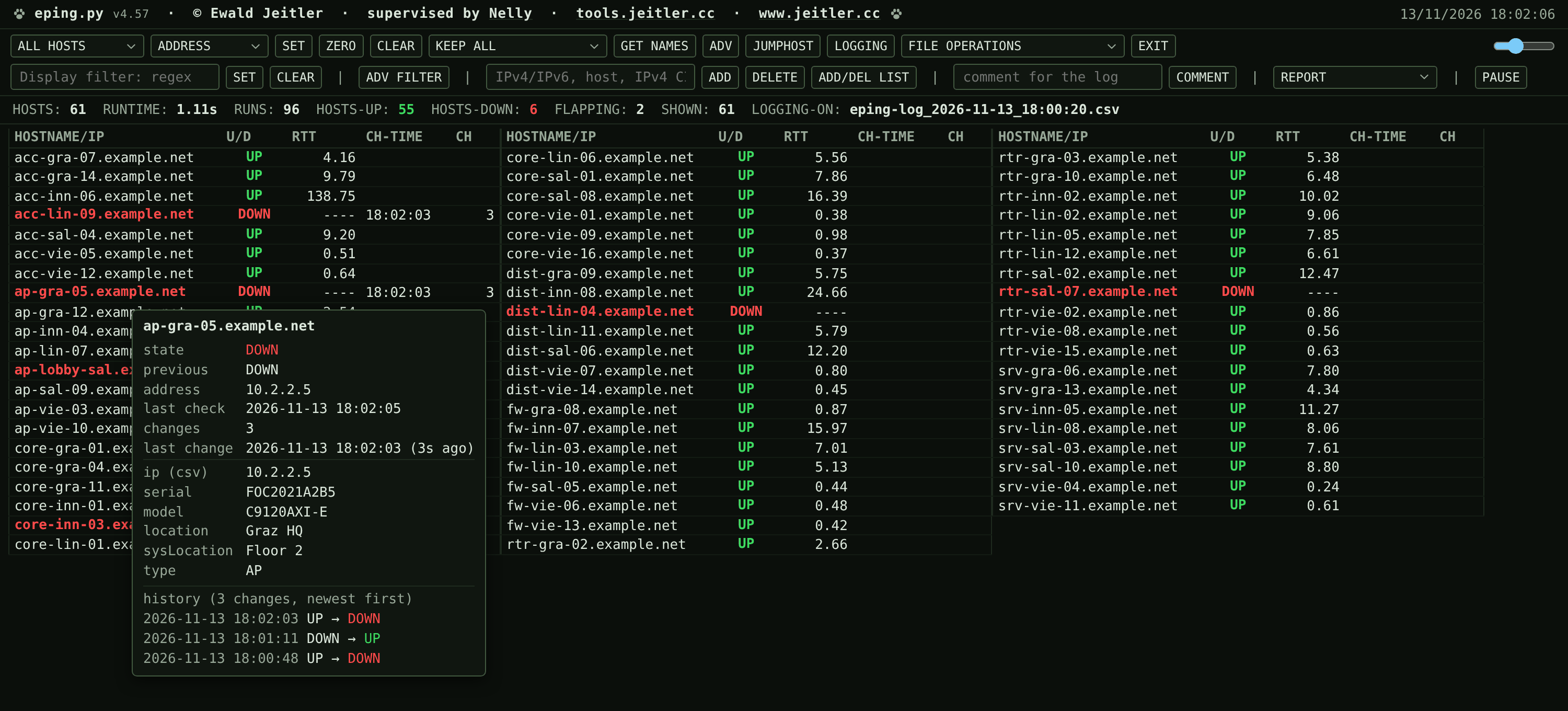
Web GUI (-web) - 61 demo hosts, mouse-over shows the host details and its state history:
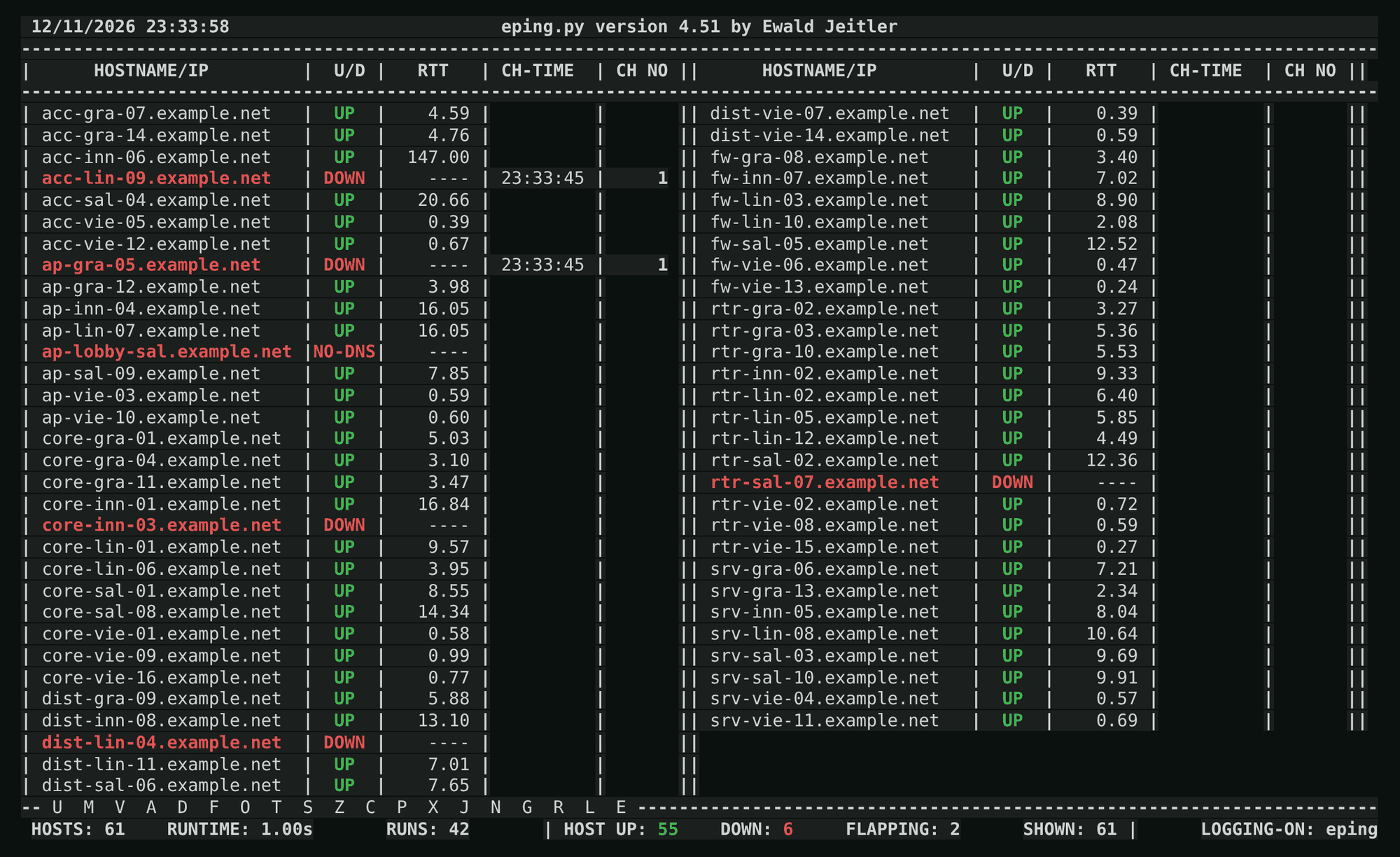
Terminal (curses) mode:
Requirements
- Python 3.6+ (eping.py and epinga.py)
fpingin$PATH- A terminal supporting
curs_set()for CLI mode --check-sourceused automatically if fping supports it (5.0+)- Non-UTF-8 terminal locale (e.g.
LANG=C): works, but box-drawing characters are shown as ASCII/?;LC_ALL=C.UTF-8gives the full look
Installation / Update
Via pip (installs eping and epinga as commands, fping still required separately):
pip install eping
Standalone scripts (installs/updates eping.py, epinga.py):
/bin/bash -c "$(curl -fsSL https://raw.githubusercontent.com/ewaldj/eping/refs/heads/main/e-install.sh)"
Windows
Portable Windows version (web GUI only, no installation): download and unpack
eping-windows.zip
(folder), then start eping.exe.
- Contains
eping.exe(small launcher window: web port, Start / Stop / Restart, open web GUI, Disable autostart / logging / file, CLI options, Check updates),eping.py,epinga.py,fping.exe+cygwin1.dll(fping for Windows) and an embedded Python. - The web GUI opens in the browser (default
http://127.0.0.1:8080). The port is read from the hosts file (opt: -port 9000); a port already in use is reported and can be changed in the launcher window. - No terminal (curses) mode and no
-wv/-wvcon Windows; log file names use-instead of:. - Extra options: CLI options field or
eping-args.txtin the working folder. Working folder:<home>/eping(%USERPROFILE%\epingon Windows) - hosts file, logs, reports,eping-console.log,eping-args.txtandeping-launcher.cfglive there, so the program folder needs no write access. Change it with the Working dir field (paste a path, Enter confirms) or the Change... button (folder dialog); applied with Start / Restart, or with-wd DIRin the CLI options field (wins over the button) (hosts file, logs, reports and console log then use DIR). Aneping-args.txt/eping-launcher.cfgfound next to the program (older versions) is read until the first save; copy an existingeping-hosts.txtto the working folder once. Details:README-WINDOWS.txtin the zip.
Quick start
pip install: use eping/epinga instead of ./eping.py/./epinga.py below.
./eping.py                             # CLI, uses/creates eping-hosts.txt
./eping.py -n 172.17.16.0/20           # scan a network
./eping.py -web                        # web GUI on http://<host>:8080
./eping.py -web -port 9000 -bind 127.0.0.1
./eping.py -wv                         # CLI + read-only web view
./eping.py -wvc                        # CLI + controllable web view
No args: creates a sample eping-hosts.txt and eping-hosts-sample.csv (same hosts with invented inventory values, a template for the Inventory CSV import; never loaded by eping). -df: start with no hosts, add at runtime.
Running unattended (screen / tmux)
CLI mode needs a live terminal — run inside screen/tmux and detach:
https://github.com/ewaldj/microups/blob/main/SCREEN_AND_TMUX-QUICK_GUIDE.md
Host sources
Combinable:
| Source | Option |
|---|---|
| Host file | -f FILE[,FILE...], comma/space separated, disable with -df; .txt host list or inventory .csv (see Inventory CSV import) |
| CIDR network | -n (mask /13 … /32), comma separated |
| IP range | -r, start-end, comma separated |
-n 172.17.17.0/24,10.0.0.0/30 · -r 10.0.0.0-10.0.0.10,172.19.0.0-1.13,172.20.2.0-15
(range end may shorten to its last 1-3 octets: 172.19.0.0-1.13 = 172.19.0.0-172.19.1.13).
Limits: 512000 hosts total, 524288 addresses per range. Duplicates removed. CIDR
expansion includes network/broadcast. Several -f files are combined before dedup.
Host file format
Same parser for -f, F/ADD FILE (CLI), and web GUI ADD HOSTS FILE:
# comment to end of line
127.0.0.1                 # IPv4
192.168.99.0/29           # CIDR - expanded
10.131.0.0/19             # 8192 addresses
www.google.com            # hostname/FQDN
8.8.8.8, 9.9.9.9; 1.1.1.1 # comma/semicolon = blank
2606:4700:4700::1111      # IPv6
2606:4700:4700::1111/128  # IPv6 with /128 - single host
Network mask range /13…/32 everywhere (host file, ADD HOSTS FILE, web upload, ADD/DELETE
host input); out of range is rejected (message names the allowed range; -f warns and
ignores). IPv6: only /128 accepted, any other mask rejected. Anything else is ignored.
opt: / OPT: lines
A line starting with opt:/OPT: carries CLI options instead of a host:
opt: -ph -du -w 2
opt: -web -port 9000
1.1.1.1
8.8.8.8
Multiple opt: lines join in file order. # comments out the rest of the line (or
the whole line at the start). Quote values with spaces: opt: -f "my hosts.txt". A
flag typed on the command line wins over the same flag from a file. Only applies to
the initial -f read at startup — F/ADD FILE (CLI) and ADD HOSTS FILE (web)
never parse opt: lines, they're just text.
opt: lines also work at the top of an inventory .csv. SAVE HOSTS writes every option that differs from the default there (start-up flags and live ADV OPTIONS changes; not -f -df -n -r -o -up -setref -gn -cl).
The default eping-hosts.txt: sample hosts, this section, then every CLI option as a
commented-out opt: line with its default (remove # to activate).
Inventory CSV import
A .csv inventory export (one device per row) can be used as host file: -f FILE.csv,
F/ADD FILE (CLI), web GUI FILE OPERATIONS > ADD HOSTS FILE (FROM CLIENT, FROM SERVER, drag and drop). Files
named *.txt are never treated as CSV - they keep the plain host file format above.
- Detection: first line that is not blank, a
#comment or anopt:line is a header with the columnsIP AddressandHostname(case-insensitive); the delimiter (;,,or tab) is detected. - Columns used:
IP Address,Hostname,Serial Number,Model,Location,sysLocation,Type,Comment. All other columns are ignored. - Host entry: the
Hostname(default; rows without an IP are pinged by name too, NO-DNS if it does not resolve). A name without DNS record is pinged by the row's IP instead (marked in the host popup,-ncfturns this off). A name that is not a valid hostname falls back to the IP; rows without a usable entry are ignored. In the IP modes (-ipo, PREFER IP ADDRESS, also when active while the file is added) the entry is the IP address instead and rows without a valid IP are ignored.-phis not needed for a CSV. - Duplicates: one host per entry, the first row wins. The count of ignored and duplicate rows is reported when the file is added (startup message / web footer).
- Log: the six inventory values and the CSV hostname are written with every row
of that host, see Logging. A
Hostnamethat is not the host entry (IP mode) is only kept there as information. - Filters:
Mmatches the inventory values as text,V/ ADV FILTER selects them (see ADV FILTER). - Save: if the displayed hosts carry inventory values,
SAVE HOSTSoffers an inventory.csv(default for such hosts, see Web GUI) or a plain.txt.
Example (; delimited, extra columns are ignored):
Hostname;IP Address;Serial Number;Model;Location;sysLocation;Type;Comment
sw-core-01;10.0.0.1;FOC1234A1BC;C9300-48P;Vienna DC1;Rack A3;Switch;spare PSU missing
sw-core-02;10.0.0.2;FOC1234A1BD;C9300-48P;Vienna DC1;Rack A4;Switch;
ap-lobby-01;;FCW2528P5PSV;C9120AXI-E;Graz HQ;Lobby;AP;
rtr-edge-01;192.0.2.10;FTX9876B2CD;ISR4331;Linz POP;Rack B1;Router;uplink to ISP
sw-access-01;10.0.1.1;FOC5678C3DE;C9200L-24P;Vienna DC1;Rack C1;Switch;
fw-edge-01;192.0.2.1;JMX2345F6GH;ASA5516;Linz POP;Rack B2;Firewall;ASA 5516 - EoL 2027
This gives 6 hosts, named by Hostname. In an IP mode it gives 5 hosts (the IP
addresses); ap-lobby-01 has no IP and is ignored.
CLI mode
Sorted table (IPv4 numerically, then hostnames case-insensitively), 64-column blocks. Green = UP, red = DOWN. Columns: hostname/IP, state, RTT (ms), last-change timestamp, change count.
| Key | Action |
|---|---|
U |
view picker — all 9 views (see Views and sort orders) |
M |
match filter — regex on hostname/IP and inventory fields, display only (see Match filter) |
V |
ADV FILTER — check/uncheck Model/Location/sysLocation/Type/Comment values (show only / hide), display only (see ADV FILTER) |
A |
add host — IP, hostname, CIDR (/13…/32), or ip1-ip2 (max 524288) |
D |
delete host — same formats/limits as add |
F |
add hosts from a file |
O |
sort order picker — 5 orders (see Views and sort orders) |
T |
add comment — timestamped CSV row (logging on only) |
S |
set reference — shown list becomes new base list (hosts not shown are removed and no longer pinged) |
Z |
zero changes — reset CH-TIME/CH NO, states kept |
C |
clear all hosts and state |
P |
address mode picker — 4 modes (see Address modes) |
X |
ADV OPTIONS — live option editing (see ADV OPTIONS) |
J |
JUMPHOST — run fping on a jump host via ssh (see SSH source (JUMPHOST)) |
N |
ANALYSE NOW — run epinga.py against the active logfile in the background (see GENERATE REPORT) |
G |
GET NAMES — reverse-DNS raw IPs, one-shot, background |
R |
redraw screen |
L |
reset logging (logging on) / START LOG (logging off) |
E |
exit — os._exit() immediately |
U, O and P open a picker dialog (↑/↓ select, ENTER confirms, ESC cancels) -
same option set as the matching web GUI dropdown.
Dialogs: ENTER confirms, ESC/empty cancels. Key bar shortens on narrow terminals.
PLEASE WAIT box with elapsed counter shown until the first round has results.
Ping checks keep running while a dialog (A/D/F/M/V/T) is open — same
retry/state/logging logic as the main loop; screen repaints once the dialog closes.
Screen repaints ~7×/s independent of fping. UP, SET REFERENCE, DEL HOST, ZERO CHANGES apply immediately without waiting for the round. A list-changing key cuts the
round short (~0.15s reaction). Aborting is safe — no-output host keeps its prior state.
Read-only web view (-wv)
--web_view: CLI drives, browser mirrors over HTTP (--port/--bind). No controls —
POST /api/command and POST /api/upload answer 403. Client-side column sort still
works locally.
Controllable web view (-wvc)
--web_view_control: like -wv, but the browser can drive too (POST endpoints not
403). Same buttons/keys as Web GUI below, curses stays usable simultaneously. A CLI
keypress result (e.g. S, Z, O, U, A/D/F) also shows in the browser.
Web GUI (-web)
Single self-contained page, no external resources.
- Table: CLI-style columns, filled top-down then next column right. Horizontal scroll if needed ("SCROLL RIGHT FOR MORE" hint in the stats bar).
- Footer stats: HOSTS, RUNTIME, HOST UP/DOWN/FLAPPING always count all hosts; SHOWN is the
number of rows displayed after the view, the match filter and the ADV FILTER. The CLI footer counts the same way. RUNTIME shows
n/abriefly during a background round. - While a source switch (local / jump host) is under way the message line shows
switching to ... - please wait ..., thenswitched to ... - done. The JUMPHOST button is green while a jump host is active. - Adding many hosts (
ADD, ADD HOSTS FILE, upload) shows "added N host(s) - please wait, pinging ..." until they appear with a state, thendone. - Font size 6–28px (slider,
A−/A+,+/−keys), stored inlocalStorage. - Column headers sort the list (IPv4-aware).
- Toolbar, two rows (wraps if narrow):
- Row 1: view select (9 views), sort order select, SET REFERENCE, ZERO CHANGES, CLEAR ALL, address mode select, GET NAMES, ADV OPTIONS, LOGGING, FILE OPERATIONS select, STOP, font size.
- Row 2: match filter (SET/CLEAR), ADV FILTER, host field (ADD/DELETE), ADD/DEL LIST, comment field (COMMENT), GENERATE REPORT select, PAUSE/RESUME button.
- PAUSE / RESUME (last button of row 2):
PAUSEpauses the check - no pings are sent, the table, the counters and the log stay as they are (header showsPAUSED, the button turns red and readsRESUME). Commands (view, sort, filter, ADD/DELETE ...) keep working while paused; added hosts are pinged afterRESUME. A round that is running whenPAUSEis pressed is cut short. The log gets the comment rowsCHECK PAUSED/CHECK RESUMED; epinga.py shows the pause as a gap in the timeline (grey, like missing data) and does not count it as time in any state. Works in-weband-wvc(no CLI key); not in the read-only view (-wv). - View select, sort order select, address mode select and ADV OPTIONS all match the
CLI's
U/O/P/Xpickers exactly. FILE OPERATIONS (incl. ADD HOSTS FILE FROM CLIENT/ FROM SERVER) is web-gui-only (no CLI key - CLI already runs on the server's own filesystem).
- FILE OPERATIONS dropdown, in this order:
Entry Does ADD HOSTS FILE FROM SERVER picks one or more .txtfiles or inventory.csvfiles already on the server, adds their hosts; a.csvwithout the inventory header, e.g. an eping log, is refusedADD HOSTS FILE FROM CLIENT dialog with a file picker ( .txt/.csv; works in Safari), adds the hosts; a file can also be dropped anywhere on the pageSAVE HOSTS one dialog: ALL HOSTS(default, full reference list) orSHOWN HOSTS(current view/address mode/filter);ON SERVERorDOWNLOAD TO THIS COMPUTER; formatCSV(inventory;columns, preselected) orTXT(one host per line) is offered only if the list carries inventory values, otherwiseTXTis used without asking; checkboxinclude options (opt: lines)(default on). On the server a blank name overwrites the active-fhostfile (first one; extension follows the format) or, with none active, writeseping-hosts.csv/.txt; a typed name saves as that new file, active hostfile untouchedSERVER OPERATIONS one dialog with a file table (every .csv/.txt/.html/.zipin the working dir; name/size/date, sortable, extension filter, "select all") and the buttonsDOWNLOAD(more than one file = one ZIP; "no compression" checkbox for a single file),VIEW(only.txt/.csv, read-only, raw content, COPY/DOWNLOAD buttons - see VIEW (SERVER OPERATIONS) below),DELETE(red, confirms with file count, never the active logfile) andUPLOAD(picks a local.txt/.csv/.zip, saves as-is server-side, no host parsing; never overwrites, appends-1/-2/...) - Keyboard shortcuts (no modifier, only while no text field has focus; own quick
variants, not the CLI's picker keys of the same letter):
Ucycles the original 3 views (ALL HOSTS → CURRENTLY-UP → UP+FLAPPING → ALL HOSTS), the other 6 need the dropdown;Ocycles all 5 sort orders one at a time;P/Itoggle DEDUP: KEEP HOSTNAME / RESOLVE ALL TO IP directly, the address mode select reaches all 4 modes;G/S/Z/C/L/Eclick the matching button (E/C/Lconfirm);A/Dfocus host field;M/Tfocus their field;Vopens ADV FILTER;Fopens the ADD HOSTS FILE FROM CLIENT picker;Rforces a status refresh;+/−font size (works while typing). No keyboard shortcut forX/ADV OPTIONS or GENERATE REPORT - click required. - Host field feeds both ADD/DELETE; ENTER triggers the button used last, ESC clears.
- ADD/DEL LIST (button after DELETE; also Ctrl/Cmd+V on the page while no field has focus): paste a
host list - one per line or separated by comma/semicolon/blank,
#comment, CIDR expanded. A live preview shows found / new / already in list / ignored words / masks out of range; ADD and DELETE are enabled only if they would change something (DELETE over 20 hosts asks to confirm; exact name match only). A pasted inventory.csv(with theIP Address/Hostnameheader) also updates hosts already in the list: IP entries (e.g. from a.txt) are renamed to the CSV hostname, history kept, and the CSV values are attached. Works with-wvctoo. - Files can also be dropped anywhere on the page (max 16MB, see Host file format).
- Commands acknowledge immediately; a click aborts the running round.
- Host popup: hovering a hostname (after ~350 ms; only the hostname cell, not the rest of the row) shows everything known about it:
state, previous state, RTT, last check, changes, time in the current state, resolved/CSV
IP, inventory values (Model, Location, sysLocation, Type, Comment, serial) and its
history (last up to 50 state changes, newest first, merged with the log
COMMENTs by time). The data is fetched per host on demand (GET /api/host), the polled status stays small. A click on the hostname pins the popup: the text can be selected,COPYcopies all of it,DELETEremoves the host immediately (no confirmation; not shown in-wv),×/ESC/click elsewhere closes it. The history lives in memory only; it is cleared by ZERO CHANGES and CLEAR ALL.
Views and sort orders
Flapping: last state change within -fw minutes (default 72000 = 50 days, off
unless lowered). CH NO counts changes; Z resets it.
CLI U and web GUI's view select/U picker (see CLI mode) reach the same 9 views.
The web GUI's own U keyboard shortcut only cycles ALL HOSTS → CURRENTLY-UP →
UP+FLAPPING → ALL HOSTS (see Web GUI keyboard shortcuts). A view is a pure display
filter, evaluated live on every refresh: all hosts keep being pinged, a host that goes
DOWN leaves CURRENTLY-UP, a host that comes UP appears. Only SET REFERENCE removes the
hosts that are not shown from the host list (they are no longer pinged) and resets the
view to ALL HOSTS. A view with no matches is rejected, previous view stays active.
ALWAYS-UP/ALWAYS-DOWN: never changed state this run (CH NO = 0). NO-DNS counts
as DOWN for CURRENTLY-DOWN/ALWAYS-DOWN/DOWN+FLAPPING.
Picker/dropdown order: ALL HOSTS, CURRENTLY-UP, ALWAYS-UP, UP+FLAPPING, FLAPPING-ONLY, ALWAYS-DOWN, CURRENTLY-DOWN, DOWN+FLAPPING, NO-DNS.
| View | Contains |
|---|---|
| ALL HOSTS | everything |
| CURRENTLY-UP | UP now |
| ALWAYS-UP | UP, never changed this run |
| UP+FLAPPING | UP now + flapping |
| FLAPPING-ONLY | flapping, regardless of state |
| ALWAYS-DOWN | DOWN/NO-DNS, never changed this run |
| CURRENTLY-DOWN | DOWN or NO-DNS now |
| DOWN+FLAPPING | DOWN/NO-DNS now + flapping |
| NO-DNS | unresolvable now |
CLI O and web GUI's sort select/O picker reach the same 5 sort orders directly; the
web GUI's own O keyboard shortcut cycles them one at a time. ADDRESS (default),
UP/FLAP/DOWN, DOWN/FLAP/UP, FLAP/UP/DOWN, FLAP/DOWN/UP. FLAP group contains both
UP and DOWN flapping hosts; NO-DNS counts as DOWN. Inside FLAP: state first (direction
per mode), then change count (highest first), then address. Both view and order apply
immediately, order re-evaluated every round.
ADV OPTIONS
Web GUI (button) and CLI (X key). Web: modal, every option as slider + text field,
applied live; RESET TO DEFAULT restores startup values, APPLY re-sends every field. CLI:
same 16 options/ranges in a dialog - ↑/↓ select, +/- step, ENTER to type a value
directly, D resets the selected option to its default, R resets all, ESC/X closes.
| Option | Range | 0/-1 means |
|---|---|---|
| TIMEOUT | 10 – 5000 ms | — |
| RETRIES | 0 – 5 | — |
| INTERVAL | -1 – 250 ms | -1 = auto (use RATE), 0 = no pacing |
| THREADS | 0 – 32 | 0 = auto |
| WAIT TIME | 0 – 600 s | — |
| CONFIRM | 1 – 10 | — |
| NEW HOST GRACE | 0 – 60 s | — |
| SILENT LIMIT | 2 – 10 periods | — |
| RATE | 10 – 25000 pps | — |
| FLAP WINDOW | 1 – 72000 min | — |
| DNS TTL | 0 – 3600 s | — |
| IP FAMILY | AUTO / IPv4 / IPv6 | same as -4 / -6: A or AAAA record first for names; applies live (cached names are refreshed) |
| DNS SERVERS | up to 2 IPs, presets or custom | empty = SYSTEM (OS resolver); GET NAMES only. With a jump host the lookups run on it - probed at connect: python3, else dig, else its own resolver |
| TIMEZONE | -24 – +24 h | — |
| MAX LOG SIZE | 0, 10 – 2500 MB | default 500; 0 = no rotation |
| MAX LOG FILES | 0 – 500 | 0 = unlimited |
Same bounds as the matching CLI flags (-lms/-lmf for the last two - see Output).
HTTP API
| Method | Path | Body | Purpose |
|---|---|---|---|
| GET | / |
— | the page |
| GET | /api/status |
— | JSON: rows, counters, scan/phase info |
| GET | /api/host?name=... |
— | JSON: all known data and history of one host (mouse-over popup) |
| GET | /api/logfiles |
— | JSON list of .csv/.txt/.html files (FILE OPERATIONS > ADD HOSTS FILE FROM SERVER) |
| GET | /api/download/hosts_all |
— | full reference list, .txt |
| GET | /api/download/hosts_shown |
— | shown hosts, .txt |
| GET | /api/download/logfile |
— | active CSV log, zipped; 404 if logging off |
| GET | /api/download/choose_logfile?name=...&nozip=1 |
— | one or more files, ZIP (or raw for a single file with nozip=1) |
| GET | /api/view_file?name=...&queue=... |
— | server-rendered VIEW FILE viewer page for one .csv/.txt file; repeatable queue= params carry the rest of the selection for the page's own "OPEN NEXT FILE" link |
| POST | /api/delete_logfile |
{"names":[...]} |
delete files; active logfile refused |
| POST | /api/upload_server_file?name=... |
raw file content | save .txt/.csv as-is; never overwrites |
| POST | /api/add_from_server |
{"names":[...]} |
add hosts from listed .txt files |
| GET | /api/report |
— | last GENERATE REPORT HTML; 404 until done |
| POST | /api/reportupload?name=x.csv&first=1 |
raw .csv content |
UPLOAD FROM CLIENT: store one file (first=1 starts a new set); then run_report with "upload":true |
| POST | /api/command |
{"cmd":"...","value":"..."} |
control (see cmd list below) |
| POST | /api/advvalues |
{"filter":{...}} |
ADV FILTER: values still selectable for a draft selection (same format as adv_filter) |
| POST | /api/upload |
host list, text | add hosts |
| POST | /api/jumphost |
`{"action":"info | test |
cmd values: up_only, set_filter, addr_mode, get_names, match_filter,
adv_filter, sort, add, del, set_ref, zero, add_comment, reset_log, clear,
set_option, reset_options, run_report, pause (value 1 = PAUSE, 0 = RESUME), save_hosts_file, exit. adv_filter value: JSON object {"<field>":{"mode":"in|out","values":[...]}} with the fields model,
location, sysloc, type, comment; \u0001none as value = hosts without a value; {} = off
set_option
value: key=value. reset_log value: logging off - optional custom file name (blank =
auto-generated); logging on - y (clear) or new/new=<name> (new file, optional
custom name). run_report: value = empty (active logfile) or one .csv filename; or
JSON body field values: [...] to merge and analyse multiple .csv files as one
(max 25); optional body field sources: [...] restricts the analysis to these SOURCE values. save_hosts_csv/save_hosts_txt (+ _noopt, + _all for all hosts) value: optional target file name (blank
= active -f hostfile, or eping-hosts.csv/.txt if none); save_hosts_file = auto format.
-wv answers 403 to POST /api/command//api/upload; -wvc/-web allow both. No
authentication. Default bind 0.0.0.0 — use -bind 127.0.0.1 outside trusted networks.
How checking works (loop mode)
eping starts long-running fping -l processes and takes one snapshot of their latest results
per round. A process keeps one ICMP identifier for its whole life (few NAT / conntrack entries
on a router) and a jump host sees one command instead of one per round.
- Period: fping pings every host once per period =
-w(at least 200 ms), raised tohosts x interval + timeoutso one pass fits. A round ends when every host delivered a new result (at most one period + timeout). RUNS counts only rounds in which hosts were checked. - UP / DOWN: a reply = UP at once. DOWN after
-re+ 1 timeouts in a row (fewer when the ping period is long: the number is cut to what fits in 2 x-t, at least 2), or when fping delivered nothing for a host for-spperiods. fping drops replies later than-t, so-tis the longest a reply may take. With-cf> 1 a host leaves UP only after that many consecutive non-UP results (suppressed count in the log's TBD column). - New hosts: only an answer is reported during a grace period of (miss limit + 1) periods +
-ngs (1 s) - a slow first contact (new NAT / firewall state) must not show up as DOWN. - Names: resolved by background threads (32 parallel, cached
-dnsseconds, randomized; an expired entry stays in use until its refresh is done). A name without an address yet joins as soon as it resolves, a round waits at most 2 s for names never resolved before; unresolvable = NO-DNS.-dns 0= fping resolves. With a jump host the jump host resolves. - Add / delete: ADD starts one extra fping for the new hosts, running processes are not touched. DELETE only stops judging the hosts. Everything is restarted (results kept) when the source or a timing option changes, a process died, there are more than 16 processes or many hosts were removed.
- Stall guard: if at least 30 % (and 20) of the hosts of one fping process go silent at once, that is taken as a stall of fping or of this computer's network, not as hosts being down: their state is kept for up to 5 silent periods.
- Rate: one process sends one packet per
-ims,-rasets the packets/s. A pass over N hosts takes at least N /-ras: 32 000 hosts at-ra 1000= about 34 s per round. Raise-rafor big lists (mind the router / NAT / jump host).-ifloor is 1 ms;-i 0removes pacing. - PAUSE stops the processes, RESUME starts them again.
Options
Working directory
-wd DIR · hosts file, logs and reports live in DIR (created if missing, ~ expanded; default: current directory).
Relative -f / -sshkey paths stay relative to the invocation directory. Not read from opt: lines. The macOS / Windows
launchers pass -wd <home>/eping by default; change it with -wd DIR in the launcher's CLI options field.
Host selection
-f hostfile(s) (comma/space separated) · -df disable hostfile · -n CIDR (comma
separated) · -r IP range (comma separated, shortened end)
Probing
| Option | Range | Default | Meaning |
|---|---|---|---|
-t |
10 – 5000 | 1000 | ping timeout (ms): a reply later than this is lost |
-re |
0 – 5 | 3 | DOWN after up to -re + 1 timeouts in a row (see How checking works) |
-i |
-1 – 250 | auto | send interval (ms), overrides -ra; -1 auto, 0 unpaced |
-p |
0 – 32 | auto | fping processes per address family |
-w |
0 – 600 | 0.5 | ping period per host (s, at least 0.2) |
-cf |
1 – 10 | 2 | consecutive DOWN before leaving UP (1 = off) |
-ng |
0 – 60 | 1 | seconds added to the grace period of new hosts |
-sp |
2 – 10 | 3 | silent ping periods (no fping output) until DOWN |
-ra |
10 – 25000 | 1000 | ICMP packets/s |
-fw |
1 – 72000 | 72000 | minutes to count as flapping |
-dns |
0 – 3600 | 300 | hostname cache TTL (s, 0 off) |
-ds |
up to 2 IPs | system | DNS servers for GET NAMES, e.g. 1.1.1.1,1.0.0.1 (own DNS client, used in turn, the other is the fallback; a rate-limited cloud resolver is slow) |
-4 / -6 |
— | auto | prefer IPv4/IPv6, mutually exclusive |
-ph |
— | off | start with DEDUP: KEEP HOSTNAME |
-ipo |
— | off | start with IP ONLY |
-gn |
— | off | GET NAMES once at startup |
-ncs |
— | off | skip --check-source |
-ssh |
[USER@]HOST[:PORT] |
off | run fping on a jump host via ssh (see SSH source (JUMPHOST)) |
-sshkey |
file | agent | private key file for -ssh |
-sshhk |
accept-new/ask/off | accept-new | host key check for -ssh |
-sshnr |
— | off | with -ssh: do not resolve names on the jump host (use the local resolver) |
-ncf |
— | off | CSV: do not ping the CSV IP of a name without DNS record |
-up |
— | 0 | learning phase: after N rounds show only hosts seen UP (view CURRENTLY-UP; all hosts are still pinged until SET REFERENCE) |
-setref |
— | off | with -up: hosts seen UP become new reference list |
Hard-enforced at startup and live via ADV OPTIONS (-web only), same bounds.
Output
| Option | Range | Default | Meaning |
|---|---|---|---|
-o |
— | auto | CSV log file name |
-dl |
— | — | disable logging |
-cl |
— | — | delete all eping-* files and exit |
-tz |
-24 – +24 | 0 | timezone offset (h) |
-dg |
— | off | cycle time breakdown |
-debug |
— | off | write engine events (LOOP START / ADD / DOWN burst / STALL, SLOW ROUND) as #COMMENT# rows to the log |
-du |
— | — | disable online version check |
-lms |
0, 10 – 2500 | 500 | max CSV log size (MB) before rotating; 0 = no rotation |
-lmf |
0 – 500 | 0 | max eping-log_*.csv files kept, oldest deleted first; 0 = unlimited |
-lnz |
— | off | do not zip logfiles finished by size rotation (default: zipped in the background) |
-web |
— | off | web GUI instead of CLI |
-wv |
— | off | CLI + read-only web view |
-port |
— | 8080 | http port |
-bind |
— | 0.0.0.0 | bind address |
Logging
Unless -dl, every round appends to eping-log_YYYY-MM-DD_HH:MM:SS.csv (or -o FILE):
TIMESTAMP,HOSTNAME,PREVIOUS_STATE,CURRENT_STATE,RTT,NO_OF_CHANGES,CHANGE_TIMESTAMP,TBD,IP,INV_HOSTNAME,SERIAL_NUMBER,MODEL,LOCATION,SYSLOCATION,TYPE,INV_COMMENT,SOURCE
INV_HOSTNAME … INV_COMMENT: the inventory values of a host added from an inventory CSV (see
Inventory CSV import), empty for all other hosts. SOURCE: local or the ssh jump host that produced the row. Logs without these columns (older
versions) stay readable by epinga.py.
TBD: suppressed DOWN observations (-cf). IP: address actually pinged (empty for
NO-DNS). Log rotates to a new file once it reaches -lms MB; a single round's data is
always written in full to one file, rotation only starts the next round in a new file.
-lmf prunes the oldest files once exceeded. A size-rotated file reuses the chain's
original timestamp with an incrementing -1/-2/... suffix
(eping-log_<original-timestamp>-N.csv); starting a new file manually (RESET LOGGING/L) always gets the current time instead and begins a fresh chain.
By default a finished (rotated) file is zipped in the background to eping-log_<ts>-N.csv.zip (one csv inside, original
timestamp kept; the csv is removed only after the zip is complete); -lnz keeps plain csv. A *.zip (rotated file, or a
download - also name(1).zip) is handled like a *.csv everywhere: CHOOSE FILE / VIEW FILE / DELETE lists, UPLOAD FILE TO
SERVER / UPLOAD FROM CLIENT, GENERATE REPORT (a zip with several csv, e.g. a multi-file download, is read completely and
merged), -lmf pruning and epinga.py -f (one csv per zip). Downloading a zip sends it as is.
ZERO CHANGES/Z: resets NO_OF_CHANGES/CHANGE_TIMESTAMP for the running instance;
log file keeps everything already written.
ADD COMMENT/T: appends a timestamped row while logging is on, #COMMENT# sentinel
in HOSTNAME, text in IP. No-op with a notice if logging is off. epinga.py detects
these rows automatically.
LOGGING/L:
- Logging on: confirmation first (CLI keypress / web modal).
Yclears all entries, restarts logging into the same file.Nstarts a fresh file, old file untouched - optional custom name (blank = auto-generatedeping-log_<timestamp>.csv); a name that already exists is rejected, nothing is created.S(STOP LOGGING) stops logging, file kept;Lthen offers START LOGGING again.ESC/ENTERcancels. - Logging off: same dialog, no clear option -
START LOGGINGstarts a fresh file right away, same optional custom name.
SSH source (JUMPHOST)
Run fping on a jump host instead of locally (system ssh only). Any Linux host with a working fping
(e.g. a caretaker) will do; it resolves the names itself. Start: -ssh [USER@]HOST[:PORT] (+ -sshkey FILE, -sshhk MODE, -sshnr);
the password or key passphrase is asked on the terminal at startup. At runtime: J in the CLI,
JUMPHOST button in the web GUI (after ADV OPTIONS).
With a working resolver on the jump host (default, see -sshnr) the IP column of the log holds the address the jump host
resolved a hostname to - like a local run - so epinga shows host | IP for jump host rows as well. Without one it stays the hostname.
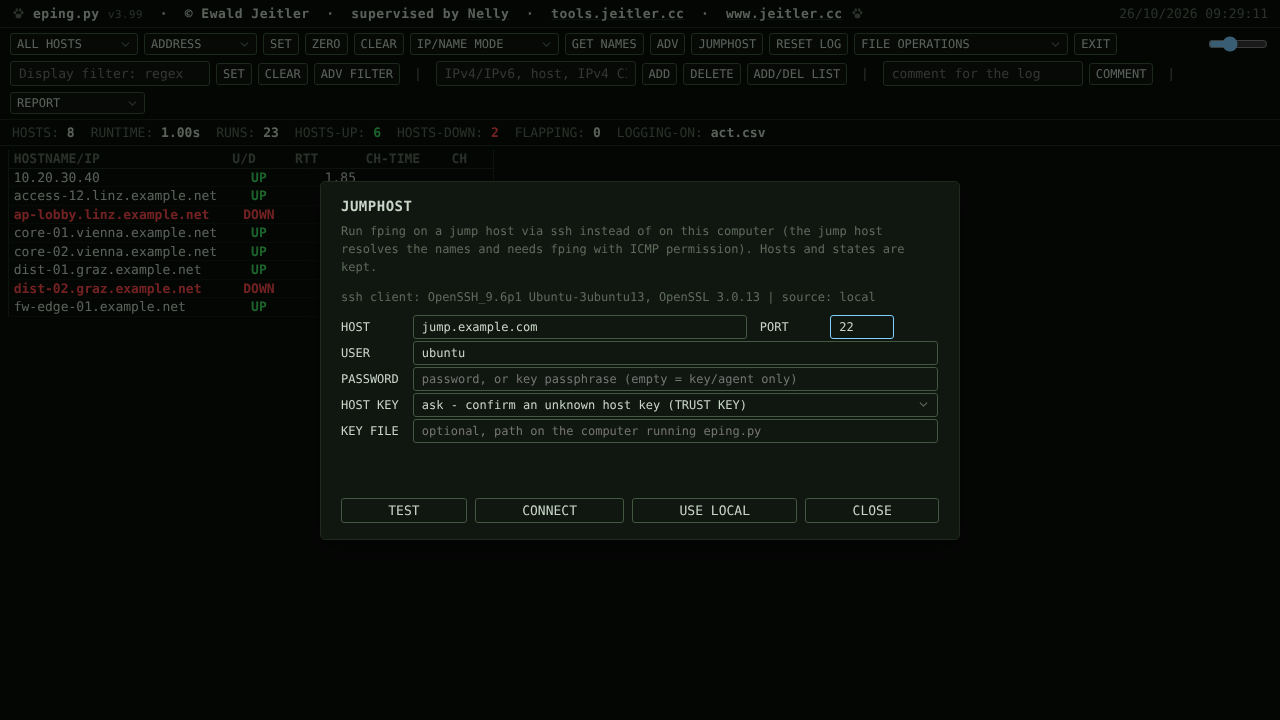
- Window: HOST, PORT, USER, PASSWORD (key passphrase), HOST KEY, NAMES, KEY FILE. TEST checks ssh, login and
fping on the jump host, CONNECT switches the scan source, USE LOCAL switches back. A missing local
sshis shown in the window. - HOST KEY:
accept-new(default) - hosts seen for the first time are trusted automatically, a changed key is still refused;ask- an unknown key is shown with its fingerprint and must be accepted with TRUST KEY;off- no check at all (insecure). - NAMES (default on): the DNS lookups eping does itself - GET NAMES, PREFER HOSTNAME / IP ADDRESS, IP ONLY -
run on the jump host over the same ssh connection (no second login), using
getent, elsedig,nslookuporhostthere; TEST/CONNECT report which tool works. One batch per call, names are validated and sent via stdin. Without a working tool, or with the option off (-sshnr), the local resolver is used and GET NAMES is not available. The DNS caches are cleared on every source switch. A name with only an AAAA record is pinged withfping -6there (A is preferred, as locally). Without a resolver on the jump host, a name that fping reports as NO-DNS is tried with-6in the next round, alternating with-4;-4/-6force one family. - The switch is applied at the start of the next round; hosts, states and counters are kept.
- Connection loss: results of the round are discarded, hosts keep their state, a banner is shown and
eping reconnects. Logged as
#COMMENT#rows (JUMPHOST ... OFFLINE: <reason>,JUMPHOST ... ONLINE again,SOURCE SWITCH <old> -> <new>), shown in the report's comment timeline. - Log column
SOURCE:localor the jump host of each row. - Limits: the CSV-IP fallback is not available over ssh; at most 4 ssh processes
(2 on Windows); the web password transfer is plain HTTP - use
-bind 127.0.0.1or a trusted network.
Web GUI header
Header: eping.py vX.XX · © Ewald Jeitler · supervised by Nelly · tools.jeitler.cc · www.jeitler.cc, paw icons, matching epinga.py's report footer/favicon. CLI header:
eping.py version X.XX by Ewald Jeitler (no SVG support).
Update notice (CLI)
If a newer version is available (see -du), a one-line hint shows in the top bar. On
exit, a full notice prints once:
  A new version of eping.py is available! (installed: vX.XX, latest: vY.YY)

  Install it with:
    /bin/bash -c "$(curl -fsSL https://raw.githubusercontent.com/ewaldj/eping/refs/heads/main/e-install.sh)"

  Or visit:
    https://www.jeitler.cc
    https://github.com/ewaldj/eping
Shown on any terminal-driven exit (CLI [E]/Ctrl-C, -web's STOP/Ctrl-C in its
terminal). The web GUI's in-browser banner is separate and shorter.
Run analysis on exit
On stop, with logging on and a non-empty logfile, eping.py asks:
Run an analysis of this logfile with epinga.py now? [y/N]:
y (case-insensitive) runs epinga.py -f <logfile> before exit; anything else skips
it. Only asked on a terminal-driven exit (CLI [E]/Ctrl-C, or -wv/-wvc's own
keyboard [E]/Ctrl-C); exiting via a browser's STOP button never asks. No prompt if
logging is off or the logfile is empty/missing.
GENERATE REPORT (web gui) / ANALYSE NOW (CLI N)
Runs epinga.py against one or more logfiles in the background while eping.py keeps
running - not just at exit. Web: GENERATE REPORT dropdown, four entries - ACTIVE LOGFILE analyses the active CSV log (needs logging on, non-empty logfile, else the tab
closes and a footer error is shown), CHOOSE LOGFILE picks one or more .csv files in
the working dir - table (name/size/date), "select all" checkbox, nothing preselected;
up to 25 files per report, checking a 26th is refused. If a log holds more than one source (local and jump hosts, log column SOURCE), the report contains all of them and a
source switch (see Source switch in the HTML report); no dialog.
The report tab opens right away; if the browser blocks it (e.g. after a long upload), a REPORT READY dialog with an OPEN REPORT button appears. While the report is generated the waiting tab shows a progress bar with the step (merging files / analysing / analysing source N of M / writing report), the percentage and an estimated remaining time (extrapolated from the elapsed time, shown after a few seconds); without a tab the same text is shown in the footer. The percentage covers all passes (the main analysis plus one per source, see Source switch).
UPLOAD FROM CLIENT picks one or more .csv logfiles on the computer running the browser (max 25, 1 GB each);
they are uploaded to a server temp dir, merged like CHOOSE LOGFILE and analysed as one report. Temp files and
report are removed when eping.py exits or on the next upload.
More than one selected file is merged chronologically (by the row timestamps, streamed) into one temporary
CSV, analysed as a single logfile, then the temp file is removed. Result opens in a new
tab; if a selected file was invalid or has meanwhile been removed (e.g. by log rotation
pruning it between picking and clicking GENERATE), the tab closes and a footer error is
shown instead of sitting on "please wait" forever. CLI: N always analyses the active
logfile only (needs logging on, non-empty logfile, else a notice is shown); result
path/error shown once done. Only one run at a time either way. See epinga.py below for
the report, and Called from eping.py under epinga.py for the invocation.
VIEW (SERVER OPERATIONS, web gui only)
Read-only viewer for one or more .csv/.txt files in the working dir - FILE
OPERATIONS > SERVER OPERATIONS > VIEW, table picker (name/size/date), "select all". Each
selected file opens in its own tab: raw content, COPY (clipboard) and DOWNLOAD buttons,
no editing. Selecting more than one file opens the first tab right away; that tab shows
a centered "N more file(s) selected / OPEN NEXT FILE" box to open the next one, and so
on (browsers only allow one new tab per click, so the rest open one click at a time).
Max 200MB per file - larger files are refused with a message pointing at DOWNLOAD
instead, and the picker greys those files out, labeled "TOO LARGE", with the current
limit shown in the modal text.
Address modes (DEDUP: KEEP HOSTNAME / RESOLVE ALL TO IP / GET NAMES)
DEDUP: KEEP HOSTNAME (-ph): drops a raw-IP host from pinging when another entry resolves
to the same address. Redundancy check cached -dns seconds. DEDUP: KEEP IP: the
mirror - drops a hostname entry once its resolved address is already covered by a
raw-IP entry. Both non-destructive, restored by switching to another mode. Starting
with -ph resolves every hostname first (in parallel): the CLI shows a PLEASE WAIT
box with an elapsed counter meanwhile, the web mode a line in the terminal.
RESOLVE ALL TO IP (-ipo): resolves every hostname to its address (v4/v6 per
-4/-6, A preferred by default) and renames it in place (history/uptime carry over).
CLI: a hostname whose address collides with another host is dropped and not restored.
Web GUI: colliding/unresolvable hosts are hidden (not pinged) while active, restored
automatically when switching away.
The web GUI mouse-over of a renamed host shows the hostname it had before (hostname row).
IP history: when a hostname resolves to a different address over time (DNS refresh), the web GUI mouse-over
shows ip changes and an ip history list (address + first-seen time, newest first, max 50). The log's IP
column already carries the pinged address every round; epinga.py marks such hosts in the report with ⇄N
after the address (tooltip: all addresses with first-seen time) and lists them in the host detail panel. A MULTI-IP summary card (before NO-DNS) counts them and
Show: MULTI-IP filters the host list to them. All summary cards are buttons: a click sets the matching
Show filter (incl. the new DUPLICATES), a second click clears it. The DUPLICATES card counts hostname/IP
pairs (each pair once); the filter lists both entries of every pair.
Large reports: the host table is windowed (virtual scrolling, only rows near the viewport exist in the DOM) and detail panels are built when a host is expanded, so filter/sort time and memory no longer grow with the host count. The report's Download button saves the page without the rendered rows/buckets (rebuilt on load), so the file stays the size of the generated report.
CLI P and the web GUI's address mode select/P picker reach the same 4 exclusive
modes: KEEP ALL (NO DEDUP) (default), DEDUP: KEEP HOSTNAME,
DEDUP: KEEP IP, RESOLVE ALL TO IP. The web GUI additionally has its own P/I keyboard shortcuts
that toggle DEDUP: KEEP HOSTNAME / RESOLVE ALL TO IP directly (see Web GUI). Leaving
RESOLVE ALL TO IP restores hostnames before applying the new mode.
GET NAMES/G (-gn): reverse-DNS every raw IP with no hostname counterpart, renames
on a PTR match (history/uptime carry over). Stays an IP if: no PTR record, name
collides with an existing host, PTR name shared by more than one candidate IP, or no
matching forward A/AAAA record back to the same IP. One-shot, not a toggle.
Runs on a background thread (only -gn at startup blocks). While running: CLI
header/web status line show "GET NAMES running in background (N host(s))..."; result
message shows for 3s after. Re-triggering while running shows "already running".
Match filter
M (CLI) / match filter field (web): case-insensitive regex, display only, matched
against shown name, resolved IP and the inventory fields (CSV hostname, serial
number, model, location, sysLocation, type, comment). Every host keeps being pinged regardless. Empty
value turns it off. CLI: replaces the version banner with MATCH FILTER '<regex>' active (N of M hosts shown, all still pinged). Invalid regex: error shown, previous
filter unchanged.
ADV FILTER
Excel-style display filter on the inventory values of a CSV import (Inventory CSV
import) for Model, Location, sysLocation, Type and Comment. Display only -
every host keeps being pinged. Needs hosts with inventory values; without them the
dialog says so.
- Open: CLI
V, web GUI buttonADV FILTERor keyV. A separate window; the filter only changes when applied. - Per field: check any number of values (with host count;
(empty)= hosts without a value) and choose the mode:SHOW ONLY CHECKED(include) orHIDE CHECKED(exclude). Nothing checked = field not filtered. - Combination: values within a field are ORed, fields are ANDed with each other, with
the match filter (
M) and the view. The lists narrow as you select: only values still possible with the other fields' selection are offered. - Web window: one list per field with search box,
ALL/NONE(act on the entries matching the search), the mode toggle, APPLY, RESET ALL, CLOSE. Lists show the first 500 entries, the rest via search. - CLI window:
↑/↓field, ENTER opens the value list (SPACEcheck,Ishow-only/hide,Aall,Nnone, ENTER ok, ESC cancel), thenAAPPLY,RRESET ALL, ESC CANCEL. No search in the CLI list. - Banner: while active the CLI banner shows e.g.
ADV Type not in (Firewall, Switch). - Reset: SET REFERENCE and CLEAR ALL turn the filter off. It is not saved
with
SAVE HOSTS.
IPv6
IPv4/IPv6 mixed freely. Resolution follows -4/-6 (preference, not restriction; A
preferred by default). IPv4-mapped IPv6 (::ffff:a.b.c.d) falls back to plain IPv4.
PREFER HOSTNAMES/PREFER IP ADDRESS/GET NAMES consider every resolved address.
fping runs one process per family when both are present (-dg shows a /v6 group).
CIDR/IP-range expansion IPv4-only; IPv6 needs /128 (e.g. 2001:db8::1/128), any
other mask rejected. IPv6 addresses are always stored in shortest form.
Diagnostics (-dg)
FPING 34.11 [loop restarts=1 adds=0 pend=0 dnspend=0 abort=0 silent=0 young=0 30000(-r 4miss,-i 1ms) 34.11s]
   || DNS 0.00 STATE 0.35 BUILD 0.01 WAIT 0.10 DRAW 0.11
FPING: wait for the snapshot, then engine counters: process restarts, added processes, hosts still without
a new result (pend), names being resolved (dnspend), cut short by a command (abort), hosts DOWN by
silence (silent), hosts in the grace period (young). Remaining phases: eping's own work.
With -debug a round longer than 10 s is also logged as a SLOW ROUND comment with these times.
Notes
- ICMP echo requests only. Use only on authorised networks.
-p> 1 and-i 0reduce accuracy (false DOWN) — defaults avoid both.- Needs an fping with
-land per-target sequence numbers (fping 4.3 or newer; the Windows / macOS packages have it).
epinga.py 2.52
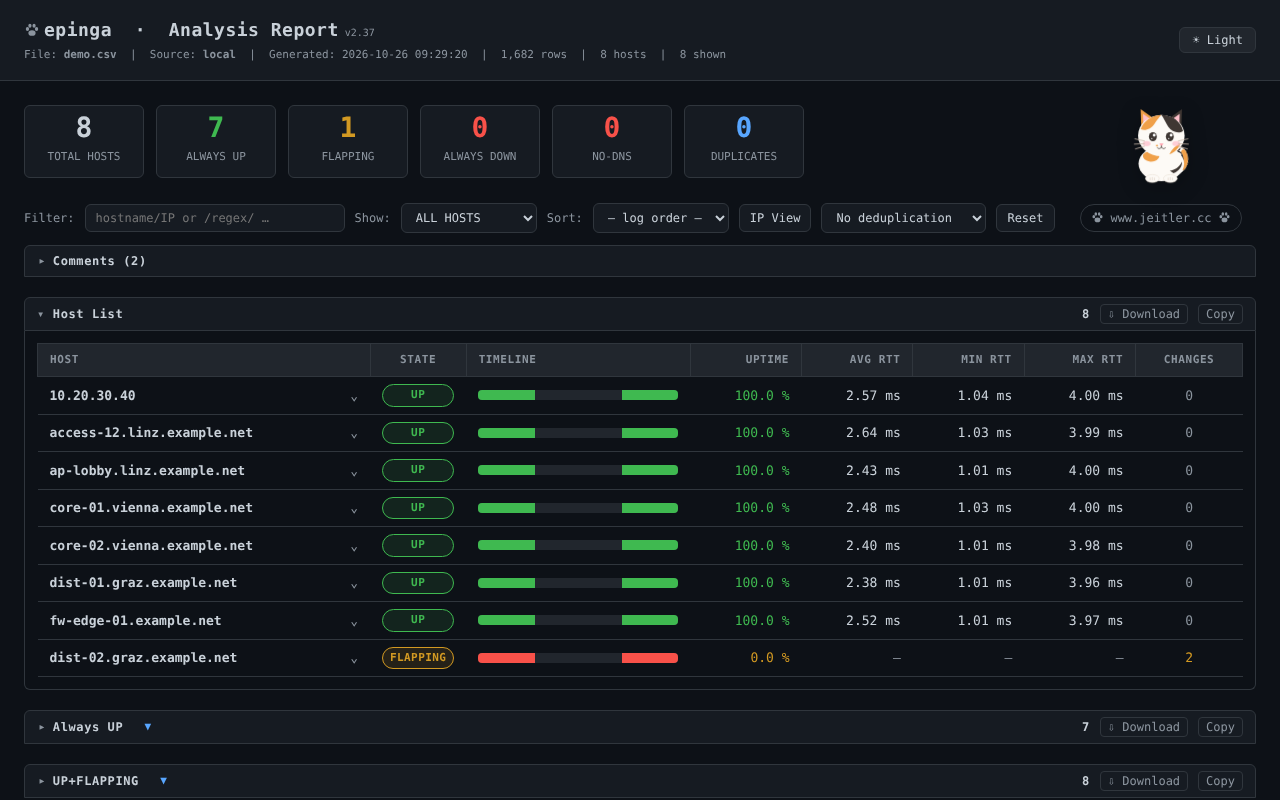
Analyses an eping.py CSV log: terminal summary + self-contained HTML report (no server, no external assets) with per-host detail, state-change timelines, and always-UP/flapping/always-DOWN/no-DNS buckets.
Quick start
./epinga.py                              # interactive menu - pick a *.csv
./epinga.py -f eping-log_2026-09-05.csv  # analyse a specific logfile
./epinga.py -f FILE --open               # analyse and open the report
./epinga.py -f eping-log_...csv.zip      # a zipped logfile (one csv inside) is read directly
Output: <base>_report.txt and <base>_report.html (--html FILE overrides).
Options
| Option | Effect |
|---|---|
-f FILE, --logfile FILE |
CSV logfile (omit for interactive picker) |
-H HOST, --host HOST |
only this host (repeatable) |
-s, --start YYYY-MM-DD HH:MM:SS |
rows from this timestamp on |
-e, --end YYYY-MM-DD HH:MM:SS |
rows up to this timestamp |
-S, --sort {name,flapping,uptime,rtt} |
summary sort order (default name) |
--source SOURCE |
only rows of this source - local or the jump host label from the log column SOURCE (repeatable; see Source filter) |
--progress-file FILE |
write the progress (percent, remaining seconds, phase) as JSON to FILE - used by eping.py's GENERATE REPORT |
--no-source-switch |
HTML report: do not embed one dataset per source (no source switch; faster on big multi-source logs) |
--no-detail |
summary only |
--no-changes |
omit state-change list |
--html FILE |
custom HTML filename |
--open |
open HTML report automatically |
-q, --quiet |
suppress progress bar |
--no-version-check |
skip online update check |
Source filter
Logs written while eping.py ran on a jump host carry a SOURCE column. With --source (or the
selection shown on a terminal when the log holds several sources; numbers like 1,3, ENTER = all)
only the periods of the selected sources are calculated: uptime, up/down time, RTT, changes and the
timeline. Periods of other sources are excluded and shown as a gap in the timeline; a state change that
happened during such a gap is not counted. Without --source everything is combined.
Logs without a SOURCE column are treated as local.
Source switch in the HTML report: if the (selected) sources are two or more, epinga analyses every source on
its own as well and embeds these datasets in the same HTML file. A drop-down in the toolbar (All sources (combined) / <label>) switches the whole report - cards, host table, timelines, filters - to that
source; the choice is kept in the URL (#src=<label>), a reload keeps it, sort/filter state is reset on a switch.
The text report and the terminal output stay combined. Cost: one extra pass over the log per source and a
correspondingly larger HTML file; --no-source-switch turns it off. A saved copy of the report (Download) opens
on All sources.
Called from eping.py
GENERATE REPORT (web gui) and N/ANALYSE NOW (CLI) both run epinga.py in a
background thread: stdin closed, --no-version-check -q --html <logfile-base>_report.html. Web: a blank tab opens right away, navigates to the report
once done (1s poll). CLI: result path/error shown via a notice once done. Either way,
one run at a time, never overwrites - repeat run for the same logfile gets
_report-1.html, _report-2.html, etc. Also used by Run analysis on exit
(epinga.py -f <logfile>, in-process, no thread).
HTML report
Everything inlined into one .html (CSS/JS/data as JSON) - portable, works offline.
Top bar: total/UP/flapping/DOWN/no-DNS/duplicate-host counts. Toolbar:
| Control | Does |
|---|---|
| Filter | text or regex (case-insensitive), hostname + IP + inventory fields (CSV hostname, serial, model, location, sysLocation, type, comment); invalid regex falls back to substring |
| Show | restrict to one state (flapping independent of UP/DOWN/NO-DNS) |
| Sort | name / uptime% / avg RTT / changes; click a header, shift+click adds a tie-breaker (①②③ badge), shift+click again flips direction |
| IP View | toggle primary label hostname↔IP (table + buckets); independent of dedup |
| Deduplication | No dedup / Prefer IP / Prefer hostname - hides the redundant side across table, buckets, top-bar cards; DUPLICATES card is 0 once a mode is active |
| Reset | clears Filter, Show and the inventory drop-downs (sort, IP View and deduplication stay) |
| Download | saves the report exactly as shown (theme/dedup/sort/filter/collapsed state) as a standalone .html, client-side; hidden on file:// |
Inventory filters (logs with inventory columns, see Inventory CSV import): to the
right of the top-bar counters, one drop-down each for Model, Location, sysLocation,
Type and Comment, listing the values found in the log with their host count ((empty) for hosts
without a value). They combine with each other and with Filter/Show and affect the
Host List only. A column without any value gets no drop-down; serial number and CSV
hostname are unique per device and searched via Filter instead. The drop-downs are
narrow; the one in use widens while it has focus and the others move aside. A host's detail shows
all inventory values, the Host List CSV download adds them as columns.
Comments: section above Host List from #COMMENT# rows, collapsed by default,
timestamp + text in log order. Also appear inline in a host's STATE CHANGES timeline
(orange, 💬 marker), HTML-escaped. Same merge in text output (PER-HOST DETAIL,
COMMENT: prefix, no emoji). Standalone COMMENTS (N) block before PER-HOST DETAIL
in text output.
Host List (filterable/sortable table) + six buckets (Always UP, UP+FLAPPING,
Flapping, Always DOWN, DOWN+FLAPPING, No-DNS), independently collapsible. Host List and
DOWN+FLAPPING start expanded, the rest collapsed; state survives IP View/Dedup changes.
Each bucket: Download (<base>-<up|down|flap|nodns>-hosts.txt) + Copy (clipboard, with
execCommand fallback). Host List itself: Download (CSV) + Copy.
Row click expands: state-change history with timestamps, per-host stats (IP, uptime, downtime, span, first/last seen, RTT min/avg/max). Uptime % is shown with two decimals; a host with state changes never shows more than 99.99 % (also when rounding would give 100.00).
1 maintainer

Metadata
1 maintainer
Release files for eping 4.85
For a detailed explanation of source distributions (sdists) and built distributions (wheels), please see the package formats documentation.
Source distribution (sdist)
| File | Size | Uploaded | Provenance | Actions |
|---|---|---|---|---|
| eping-4.85.tar.gz | 278.4 kB | Without provenance | Details for eping-4.85.tar.gz |
Built distribution (wheel)
| File | Interpreter | ABI | Platform | Actions Reset |
|---|---|---|---|---|
| eping-4.85-py3-none-any.whl | Python 3 | none | any | Details for eping-4.85-py3-none-any.whl |
Total release size: 518.1 kB
Release files / eping-4.85.tar.gz
| Download URL | eping-4.85.tar.gz |
|---|---|
| Size | 278.4 kB |
| Tags | Source |
|
SHA-256 checksum How to use checksums |
c4a3ad19f2270f46a2715d05b034a51a57ef5a40cffb53161937e1d504205b6c
|
|
BLAKE2b-256 checksum How to use checksums |
751ffe2bd2fba4c619c6d9027f2cdb7223c1848ae67fb11345e5ee3560244efc
|
| Upload date | |
|
Uploaded using Trusted Publishing? What is trusted publishing? |
No |
| Uploaded via |
twine/7.0.0 CPython/3.13.13
|
Release files / eping-4.85-py3-none-any.whl
| Download URL | eping-4.85-py3-none-any.whl |
|---|---|
| Size | 239.7 kB |
| Tags | Python 3 |
|
SHA-256 checksum How to use checksums |
08b075cb766e07feabe084d6b1c0a92fab6caca478795540303d57524ad33d24
|
|
BLAKE2b-256 checksum How to use checksums |
d47aa3b1dbea7bcf42201597cde608e22f01d6220963be39bd0529f2859c01d1
|
| Upload date | |
|
Uploaded using Trusted Publishing? What is trusted publishing? |
No |
| Uploaded via |
twine/7.0.0 CPython/3.13.13
|
Security for eping 4.85
Provenance
Provenance describes where a file came from. On PyPI, provenance is shared via attestations, which provide a verifiable record of the build or publishing details. View details, limitations and caveats.
No provenance found
None of the files in this release were uploaded with provenance metadata.
A note on package security
PyPI is a repository for distributing packages, not a service for auditing them. While third-party security researchers and our staff do their best to detect and remove malicious packages, PyPI cannot guarantee the quality, security or suitability of any given package.
To learn more about protecting yourself from malicious actors, visit our package security documentation.














