
episoder
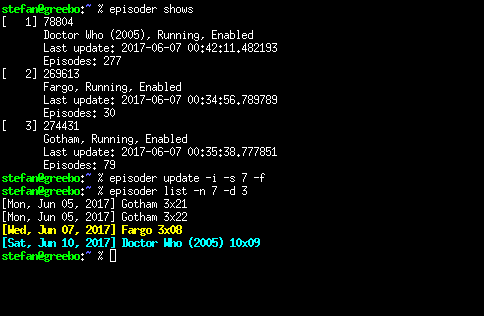
Episoder is a command-line tool that tells you about new episodes of your favourite TV shows. It gets its data from online TV episode guides such as epguides.com and TheTVDB.
There is also a web frontend for episoder, called webisoder.
Dependencies
In order to use episoder, you need to have Python installed on your system. In
addition to the default distribution, episoder uses the requests, argparse,
sqlalchemy and beautifulsoup4 packages.
Downloading
The official website, bug tracker etc. for episoder can be found at code.ott.net/episoder.
Installation
You can install episoder from PyPI by running pip install episoder or you can
download the tarball from the official website and install it manually using
pip install episoder-<version>.tar.gz.
Getting started
First, find a show you're interested in:
$ episoder search firefly
ID	Name
-------	--------------------
78874	Firefly
384248	Firefly Lane
329088	Firefly (2017)
Add that show to episoder:
$ episoder add 78874
Update your database:
$ episoder update
And finally show your episodes:
$ episoder list
The list may be empty, by default episoder deletes old episodes and will only
show you the next few days. The --nodate option to the update and list
command will change that, in case you care about days long gone and/or far in
the future.
Configuration
Episoder does not need any configuration, it should run fine out of the box.
Still, some of its behaviour can be tweaked through a config file at
~/.episoder, the man page has
all the details.
Using episoder
To use episoder you will typically:
- Create a cron job to update your database once a day using
episoder update - Add
episoder listto your~/.bashrc,~/.bash_profile,/etc/bash.bashrcor/etc/profileif you want to see your upcoming shows every time you start a shell. Consult your shell's documentation to find out which file to use. - Or run
episoder notifyat regular intervals to get notifications by e-mail.
More documentation
There is some documentation to help you get started:
1 maintainer

Metadata
1 maintainer
Release files for episoder 1.1.0
For a detailed explanation of source distributions (sdists) and built distributions (wheels), please see the package formats documentation.
Source distribution (sdist)
| File | Size | Uploaded | |
|---|---|---|---|
| episoder-1.1.0.tar.gz | 55.0 kB | Details |
Built distribution (wheel)
| File | Interpreter | ABI | Platform | Reset |
|---|---|---|---|---|
| episoder-1.1.0-py3-none-any.whl | Python 3 | none | any | Details |
Total release size: 96.5 kB
Release files / episoder-1.1.0.tar.gz
| Download URL | episoder-1.1.0.tar.gz |
|---|---|
| Size | 55.0 kB |
| Tags | Source |
|
SHA-256 checksum How to use checksums |
0ba0ab1180157445ba813847417ab934c81035156ae8a628472d653d5c173485
|
|
BLAKE2b-256 checksum How to use checksums |
a4dd83194dec07e8c0013b9075fc5e4624d49cbca31e8b0e2db9d85724c631f0
|
| Upload date | |
|
Uploaded using Trusted Publishing? What is trusted publishing? |
No |
| Uploaded via |
twine/7.0.0 CPython/3.14.7
|
Release files / episoder-1.1.0-py3-none-any.whl
| Download URL | episoder-1.1.0-py3-none-any.whl |
|---|---|
| Size | 41.5 kB |
| Tags | Python 3 |
|
SHA-256 checksum How to use checksums |
e6b2b0560dc53723858a41618a078cb88ab8d57f6b4e6ce2fae9c2c2de2f11f0
|
|
BLAKE2b-256 checksum How to use checksums |
7d7a42ff5f59a038454fca11132362d6b39d6d787d9a7757da55c014121488d3
|
| Upload date | |
|
Uploaded using Trusted Publishing? What is trusted publishing? |
No |
| Uploaded via |
twine/7.0.0 CPython/3.14.7
|














