

Epochix
Visual storytelling for deep learning training runs.





See what your model is actually doing — training logs become a plain-English story with a letter grade, live in VS Code.
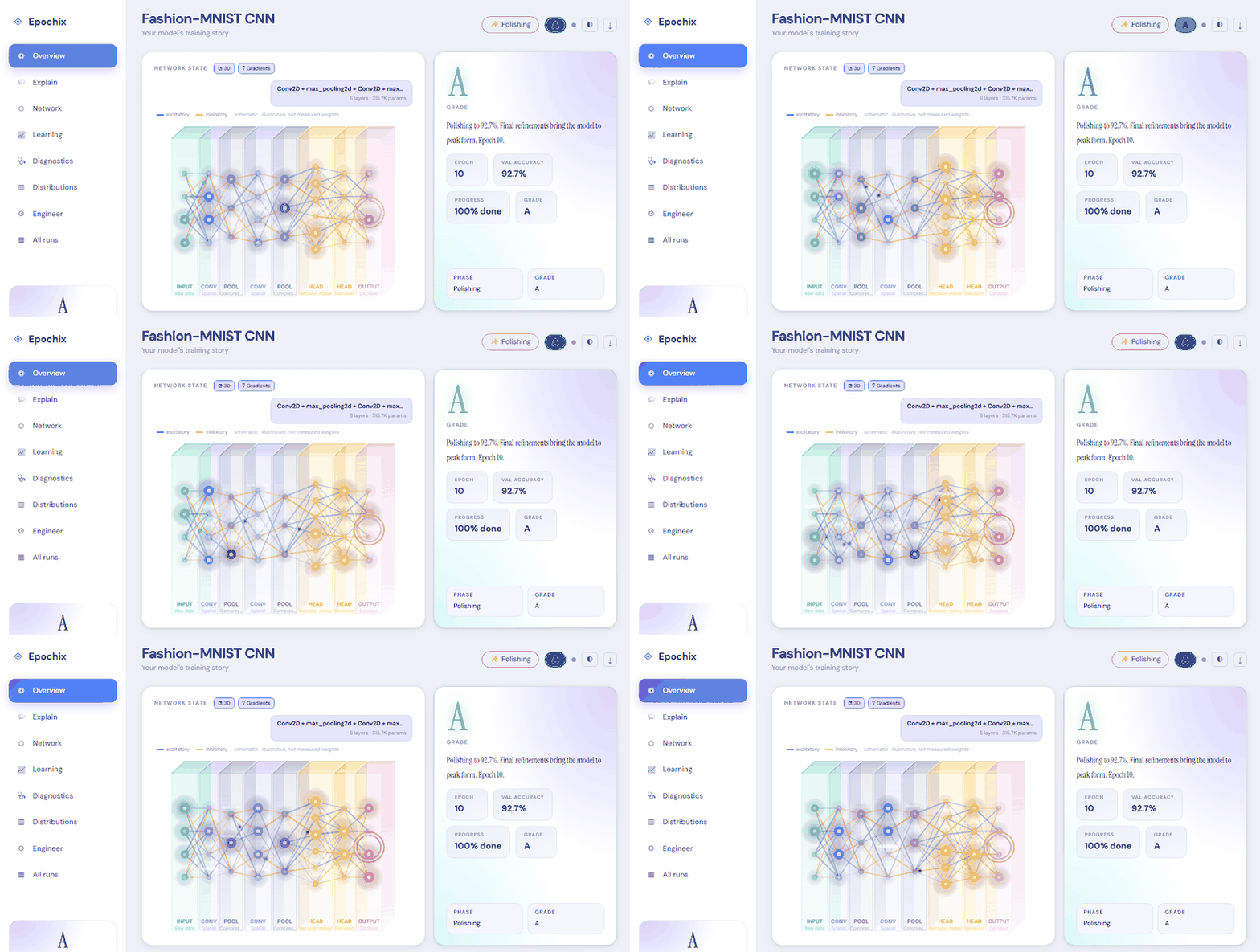
No code changes — it reads your training output as-is:
Epoch 7/20 ████████████░░░░ train_loss: 0.312 val_accuracy: 0.847
↓
⚡ Mastering phase — Grade B+

The model reaches a significant milestone at epoch 7. Val accuracy 84.7%
(Δ +3.1%) — the network has stopped memorising and started generalising.
Easiest start — VS Code, no setup at all
Not comfortable with terminals? Install the Epochix extension, click the E icon in the sidebar, and hit ▶ Try a Demo Run — an animated dashboard opens on a bundled training run. No Python, no data, nothing to configure.
From there it's automatic: run your training script in the integrated terminal
and the dashboard opens by itself when Epochix recognises training output
(Keras, PyTorch Lightning, YOLO, HuggingFace, fastai, or plain key=value
logs). A Get Started walkthrough inside the extension covers the rest.
Installing the Python package below is optional — it adds run history, run comparison and exports, and the extension picks it up automatically.
Install
pip install epochix
That is the whole install — every export format (HTML, PDF, Markdown, JSON, animated GIF) works from it, with no extras.
Optional extras exist only for the training-framework callbacks:
pip install "epochix[lightning]" # PyTorch Lightning callback
pip install "epochix[hf]"        # HuggingFace Trainer callback
pip install "epochix[all]"       # both of the above
Quick start
Try it instantly — no log of your own needed
epochix demo            # seq2seq + attention narrative
epochix demo yolov8     # YOLO object detection
epochix demo keras      # Keras image classifier
One-liner: pipe any training log
python train.py 2>&1 | epochix --live
Parse a saved log file
epochix training.log # any subcommand can be omitted — it's the default
Classical ML, not just deep learning
XGBoost, LightGBM and CatBoost are read round by round, with the training and validation curves kept apart — the gap between them is the overfitting signal:
python train_xgb.py 2>&1 | epochix --live
[0]  validation_0-logloss:0.51987  validation_1-logloss:0.52369
[1]  validation_0-logloss:0.40326  validation_1-logloss:0.41045
↓
Epoch 39: 0.0804, below the best of 0.0781 at epoch 32. The model has passed its peak — the earlier checkpoint is the better one.
scikit-learn works too. A loop printing whatever you already print is enough —
no delimiter required, and the estimator's own repr() is not mistaken for
results:
iter 18 rmse 12.2614 r2 0.9960
Train accuracy: 1.0000
Test accuracy: 0.9820
Train and test are kept as separate series, so two measurements of two different sets are never drawn as one declining line.
Stream a remote log over SSH
Training on a GPU box / cluster node, dashboard on your laptop:
# Direct: tail any remote log into the local dashboard
epochix --ssh kv@trainbox:/workspace/runs/train.log

# With extras (jump host, custom port, key)
epochix --ssh kv@trainbox:/workspace/train.log \
            --ssh-port 2222 \
            --ssh-identity ~/.ssh/id_ed25519 \
            --ssh-opt ProxyJump=bastion.example.com
We spawn ssh -o BatchMode=yes -o ServerAliveInterval=30 <host> 'tail -F …'
under the hood — your credentials, ~/.ssh/config, agent and keys are
inherited automatically. The remote path is shell-quoted before being sent so
exotic filenames are safe. Connection drops surface as a clear error rather
than hanging.
The classic Unix pipe still works too if you prefer:
ssh trainbox 'tail -F /workspace/runs/train.log' | epochix --live
Start the local dashboard server
epochix serve
# → opens http://127.0.0.1:7860 in your browser
Python SDK
from epochix import parse, LiveReporter

# Parse a finished log
result = parse("training.log")
print(result.final_grade, result.summary)

# Stream live during training (PyTorch Lightning)
from epochix.integrations.lightning import StoryCallback

trainer = pl.Trainer(callbacks=[StoryCallback()])
Features
| 8 log parsers | PyTorch Lightning · Keras/TF · HuggingFace · YOLO · FastAI · Accelerate · Gradient boosting (XGBoost/LightGBM/CatBoost) · Universal — plus an opt-in LLM fallback (Ollama/OpenAI) for formats none of them recognise |
| 7 task types | Classification · Detection · Regression · Biometric · Gaze · NLP · Generative |
| 5 training phases | Awakening → Learning → Understanding → Mastering → Polishing |
| 11 letter grades | A+ through F, task-specific thresholds, configurable via .epochix.yaml |
| Live streaming | WebSocket + SSE with ring-buffer replay on reconnect |
| Exports | JSON · Markdown · HTML (self-contained < 2 MB) · PDF |
| i18n | English · Farsi (RTL) · French — UI and story narratives |
| VS Code | Activity-bar panel · one-click demo · terminal auto-detect · run compare · Ctrl+Alt+M |
| Integrations | PyTorch Lightning · HuggingFace · Keras · Jupyter magics · TensorBoard · W&B |
| Plugin system | Custom parsers, metaphor packs, task types, exporters via entry_points |
Already using Weights & Biases or TensorBoard?
Keep them. Epochix answers a different question.
A tracker records what happened across many runs so you can compare them later. Epochix reads one run and tells you what it means — where the model peaked, whether it is overfitting, which epoch was actually best, and a grade with its reasoning attached.
| Experiment tracker | Epochix | |
|---|---|---|
| Setup | Add wandb.init() / wandb.log() to your code |
Nothing — it reads what you already print |
| Account | Required | None. Runs locally, uploads nothing |
| Works on someone else's log | No — no SDK call, no data | Yes, including logs from months ago |
| Answers | "What were the numbers?" | "What do the numbers mean?" |
| Sweeps, registry, team dashboards | Yes | No, and deliberately so |
Point it at runs you already have:
epochix import-tensorboard runs/experiment_1
Or the W&B runs already sitting on your disk — also no account, no network:
epochix import-wandb wandb/
Pass entity/project/run_id instead of a path and it fetches from the W&B API,
which does need a key. Both W&B forms need pip install wandb.
Full detail: Coming from W&B / TensorBoard
Hardware — and a gap you can help close
Nothing in epochix talks to a GPU vendor API. Reading a log needs no accelerator at all, and live activation capture — the per-layer activity in the Network State panel — uses PyTorch and Keras forward hooks, which are framework APIs, not CUDA ones. There is no device check anywhere in the SDK.
So it should work the same on Apple Silicon (MPS) and AMD (ROCm) as it does on NVIDIA. "Should" is doing real work in that sentence: we have run it on CUDA and CPU and nowhere else, and an untested path is not a supported one.
epochix doctor runs the real capturer on whatever device you have and prints
what came back:
torch          2.11.0+cu128
accelerator    cuda  NVIDIA GeForce RTX 5080 Laptop GPU
activations    working (2 of 2 layers captured)
If you are on an M-series Mac or an AMD card, that output is the single most useful thing you can send us — working or broken, it settles the question. Paste it into an issue: https://github.com/Epochix-dev/epochix/issues/new
Security & deployment
epochix is secure-by-default:
- the server binds to
127.0.0.1(loopback only), - read endpoints are open to any same-origin page on your machine,
- write/delete endpoints require either a Bearer token or a same-machine (loopback) caller — so a malicious tab on another site cannot delete runs or inject metric events,
- CORS is same-origin only (no
Access-Control-Allow-Originis emitted unless you configureEPOCHIX_CORS_ORIGINS), - the OpenAPI / Swagger UI is hidden unless
EPOCHIX_EXPOSE_DOCS=1is set or an auth token is configured.
To expose the server beyond your own machine (a shared box, a container, the internet), turn on authentication and configure the allowed origins:
# Require a token on every request, and only allow your own origin
export EPOCHIX_AUTH_TOKEN="$(openssl rand -hex 24)"
export EPOCHIX_CORS_ORIGINS="https://story.example.com"
epochix serve --host 0.0.0.0 --port 7860
| Setting | Env var | Default | Effect |
|---|---|---|---|
| Auth token | EPOCHIX_AUTH_TOKEN |
(empty) | Require a token on all routes; write/delete also accept loopback callers when this is empty |
| CORS origins | EPOCHIX_CORS_ORIGINS |
(empty — same-origin only) | Comma-separated allowlist (use the explicit * to opt into open CORS) |
| Expose API docs | EPOCHIX_EXPOSE_DOCS |
false |
Show /api/docs, /api/redoc, /api/openapi.json (auto-on when an auth token is set) |
How the token is checked:
- REST (
/api/*): sendAuthorization: Bearer <token>. - WebSocket / SSE (
/ws/live/...,/sse/live/...): pass?token=<token>in the URL (browsers can't set headers on those transports). Without it, live streams are refused.
Note: wildcard CORS (
*) and credentialed requests are never combined — credentials are enabled only when you set explicit origins. And when a token is configured, the bundled dashboard has no way to supply it, so live updates won't load from the served page. For authenticated hosting, put epochix behind a reverse proxy (nginx, Caddy, Cloudflare Access, …) that handles auth and serves the UI.
Settings can also be written to a local .env:
epochix config set auth_token "$(openssl rand -hex 24)"
epochix config show
Custom grade thresholds
Place a .epochix.yaml in your project root:
version: 1

grade_thresholds:
  classification:
    "A+": 0.97   # tighter standard for your domain
    A:    0.93
    # ... (see .epochix.yaml template for all grades)

lower_better:
  nlp: true      # perplexity
VS Code Extension
Install from the VS Code Marketplace or search "Epochix" in the Extensions panel.
- Open the Epochix Runs tree view in the Explorer sidebar
- Press
Ctrl+Alt+M(Cmd+Alt+Mon macOS) to open the dashboard panel - Works in standalone mode (no Python required) or sidecar mode with the Python package
Claude Artifact
Copy the content of src/epochix/_artifacts/epochix.artifact.jsx into a Claude
conversation artifact to get a fully interactive training story viewer — no server, no install.
Documentation
Full docs at epochix.dev
Contributing
git clone https://github.com/epochix-dev/epochix
cd epochix
pip install -e ".[dev]"
pytest tests/unit tests/integration
Please read CONTRIBUTING.md before opening a pull request.
License
Apache 2.0 — © 2026 Epochix Team
1 maintainer

Download files
Download the file for your platform. If you're not sure which to choose, learn more about installing packages.
Source Distributions
Built Distribution
Filter files by name, interpreter, ABI, and platform.
If you're not sure about the file name format, learn more about wheel file names.
Copy a direct link to the current filters
File details
Details for the file epochix-0.6.1-py3-none-any.whl.
File metadata
- Download URL: epochix-0.6.1-py3-none-any.whl
- Upload date:
- Size: 405.3 kB
- Tags: Python 3
- Uploaded using Trusted Publishing? Yes
- Uploaded via:
twine/7.0.0 CPython/3.13.14
File hashes
| Algorithm | Hash digest | |
|---|---|---|
| SHA256 |
fb3de126133d2c03d6c0eaf822e050bdf2dc0de5b5d3a4d3a1673d98a0900a46
|
|
| MD5 |
e1036019ae1c4377c2e20469cf6000c9
|
|
| BLAKE2b-256 |
35dfd864e7ea77ff48abaed1797cf5339ea844c3ea1d805a8eaf57830c752c8f
|
Provenance
The following attestation bundles were made for epochix-0.6.1-py3-none-any.whl:
Publisher:
release.yml on Epochix-dev/epochix
-
Statement:
-
Statement type:
https://in-toto.io/Statement/v1 -
Predicate type:
https://docs.pypi.org/attestations/publish/v1 -
Subject name:
epochix-0.6.1-py3-none-any.whl -
Subject digest:
fb3de126133d2c03d6c0eaf822e050bdf2dc0de5b5d3a4d3a1673d98a0900a46 - Sigstore transparency entry: 2568666209
- Sigstore integration time:
-
Permalink:
Epochix-dev/epochix@53f09ef52140a13d6fe717760d5ecffa88d826f9 -
Branch / Tag:
refs/tags/v0.6.1 - Owner: https://github.com/Epochix-dev
-
Access:
public
-
Token Issuer:
https://token.actions.githubusercontent.com -
Runner Environment:
github-hosted -
Publication workflow:
release.yml@53f09ef52140a13d6fe717760d5ecffa88d826f9 -
Trigger Event:
push
-
Statement type:







