
Terminal/CLI Epub Reader

Project description
$ epr
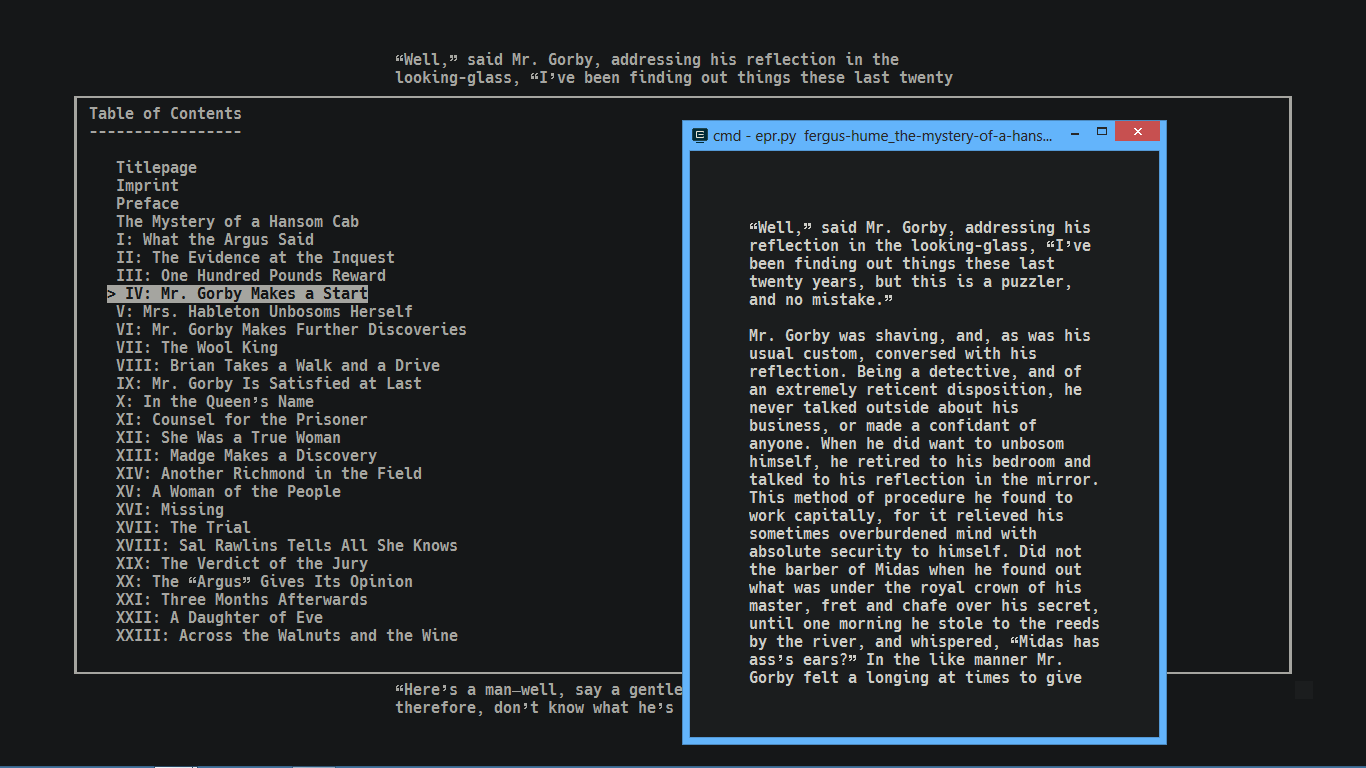
Terminal/CLI Epub reader written in Python 3.6 with features:
- Remembers last read file (just run
eprwithout any argument) - Remembers last reading state for each file (per file saved state written to
$HOME/.config/epr/configor$HOME/.eprrespectively depending on availability) - Adjustable text area width
- Adaptive to terminal resize
- Supports EPUB3 (no audio support)
- Secondary vim-like bindings
- Supports opening images
- Dark/Light colorscheme (depends on terminal color capability)
Limitations
- Minimum width: 22 cols
- Supports regex search only
- Supports only horizontal left-to-right text
- Currently, only supports language with latin alphabet (see issue30)
- Doesn't support hyperlinks
- Superscript and subscript displayed as
^{Superscript}and_{subscript}. - Some known issues mentioned below
Dependencies
- Windows:
windows-curses
Installation
Via PyPI
$ pip3 install epr-reader
Via Pip+Git
$ pip3 install git+https://github.com/wustho/epr.git
Via Chocolatey
maintained by cybercatgurrl
$ choco install epr
Via AUR
maintained by jneidel
$ yay -S epr-git
Manually
Clone this repo, tweak epr.py as much as you see fit, rename it to epr, make it executable and put it somewhere in PATH.
Checkout epy!
It's just a fork of this epr with little more features:
- Formats supported: epub, epub3, fb2, mobi, azw3.
- Reading progress percentage
- Bookmarks
- External dictionary integration
- Table of contents scheme like regular ebook reader
- Inline formats: bold and italic (depend on terminal and font capability. Italic only supported in python>=3.7)
- Text-to-Speech (with additional setup)
Install it with:
$ pip3 install git+https://github.com/wustho/epy
Quickly Read from History
Rather than invoking epr /path/to/file each time you are going to read, you might find it easier to do just epr STRINGS.
Example:
$ epr dumas count mont
If STRINGS is not any file, epr will choose from reading history, best matched path/to/file with those STRINGS. So, the more STRINGS given the more accurate it will find.
Run epr -r to show list of all reading history.
Opening an Image
Just hit o when [IMG:n] (n is any number) comes up on a page. If there's only one of those, it will automatically open the image using viewer, but if there are more than one, cursor will appear to help you choose which image then press RET to open it and q to cancel.
Colorscheme
This is just a simple colorscheme involving foreground dan background color only, no syntax highlighting.
You can cycle color between default terminal color, dark or light respectively by pressing c.
You can also switch color to default, dark or light by pressing 0c, 1c or 2c respectively.
Customizing dark/light colorscheme needs to be done inside the source code by editing these lines:
# colorscheme
# DARK/LIGHT = (fg, bg)
# -1 is default terminal fg/bg
DARK = (252, 235)
LIGHT = (239, 223)
To see available values assigned to colors, you can run this one-liner on bash:
$ i=0; for j in {1..16}; do for k in {1..16}; do printf "\e[1;48;05;${i}m %03d \e[0m" $i; i=$((i+1)); done; echo; done
Known Issues
-
Search function can't find occurences that span across multiple lines
Only capable of finding pattern that span inside a single line, not sentence. So works more effectively for finding word or letter rather than long phrase or sentence.
As workarounds, You can increase text area width to increase its reach or dump the content of epub using
-doption, which will dump each paragraph into a single line separated by empty line (or lines depending on the epub), to be later piped intogrep,rgetc. Pretty useful to find book quotes.Example:
# to get 1 paragraph before and after a paragraph containing "Overdue"
$ epr -d the_girl_next_door.epub | grep Overdue -C 2
-
Some TOC issues (Checkout
epyif you're bothered with these issues):-
"-" chapters in TOC
This happens because not every chapter file (inside some epubs) is given navigation points. Some epubs even won't let you navigate between chapter, thus you'll find all chapters named as "-" using
eprfor these kind of epubs. -
Skipped chapters in TOC
Example:
Table of Contents
-----------------

    1. Title Page
    2. Chapter I
    3. Chapter V
This happens because Chapter II to Chapter IV is probably in the same file with Chapter I, but in different sections, e. g.
ch000.html#section1andch000.html#section2.But don't worry, you should not miss any part to read. This just won't let you navigate to some points using TOC.
-
Inspirations


Download files
Download the file for your platform. If you're not sure which to choose, learn more about installing packages.
Source Distribution
Built Distribution
Filter files by name, interpreter, ABI, and platform.
If you're not sure about the file name format, learn more about wheel file names.
Copy a direct link to the current filters
File details
Details for the file epr-reader-2.4.9.tar.gz.
File metadata
- Download URL: epr-reader-2.4.9.tar.gz
- Upload date:
- Size: 16.2 kB
- Tags: Source
- Uploaded using Trusted Publishing? No
- Uploaded via: twine/3.3.0 pkginfo/1.7.0 requests/2.25.1 setuptools/51.1.2 requests-toolbelt/0.9.1 tqdm/4.56.0 CPython/3.9.1
File hashes
| Algorithm | Hash digest | |
|---|---|---|
| SHA256 |
b11ec34a2c1b7f78d71bf8c815ff9e305be64a4a2af6b1879287d12b64be4cf1
|
|
| MD5 |
101dbfe81a1e774a7ef69f9cbd4fd39a
|
|
| BLAKE2b-256 |
185cc5c6c03ed0fd31021622d60f18d31fe3c7bf6964c481af43546e14906d66
|
File details
Details for the file epr_reader-2.4.9-py3-none-any.whl.
File metadata
- Download URL: epr_reader-2.4.9-py3-none-any.whl
- Upload date:
- Size: 14.2 kB
- Tags: Python 3
- Uploaded using Trusted Publishing? No
- Uploaded via: twine/3.3.0 pkginfo/1.7.0 requests/2.25.1 setuptools/51.1.2 requests-toolbelt/0.9.1 tqdm/4.56.0 CPython/3.9.1
File hashes
| Algorithm | Hash digest | |
|---|---|---|
| SHA256 |
cbcacfe3e20111e59f10730c1b361bedaac4e6bcc6e6d8a4de09f4ecc4edc55e
|
|
| MD5 |
7cb7b7ae8ad7774dd5395e5ccd8fdbae
|
|
| BLAKE2b-256 |
a030e10f640fb291e25474f2013230e169ca6dd50296a482e03e5f35f413780e
|






