
epythet
Beautiful, correct documentation from a Python package, with no boilerplate in the package. Less humdrum, more automation, earlier at the pub.
Full documentation here, generated by epythet.
pip install epythet
epythet quickstart /path/to/project --ignore tests/ scrap/ examples/
Open /path/to/project/docsrc/_build/html/index.html. You get:
- a landing page that is your README (badges, images, GitHub alerts and mermaid fences intact),
- a nested API tree built from your package layout, one page per module,
- RST field lists and Google/NumPy sections rendered side by side, types linked from annotations,
- a modern theme with light/dark mode and an accent colour derived from your package name,
- agent-facing twins:
llms.txt, a.mdtwin of every page, a flat<package>.md, andobjects.inv.
Nothing has to be added to the package. Everything is read from pyproject.toml (or setup.cfg), the README and the docstrings.
AI agents
epythet ships skills and subagents for coding agents, and documents them on every site it builds.
gh skill install i2mint/epythet epythet-setup --agent claude-code # or copilot, cursor, codex, gemini
| Skill | Use it to |
|---|---|
epythet-setup |
set up docs for a package: quickstart, [tool.epythet], the Pages workflow |
epythet-pages |
diagnose and fix GitHub Pages publishing (the 404 after the first CI run) |
epythet-docstring-style |
write docstrings that render and that help agents: the dialect, the quality rubric, the behaviour-claim policy |
epythet-validate |
run epythet validate, read its findings and exit codes, propose ledger rules |
epythet-repair-migrate |
the per-repository documentation sweep, step by step |
epythet-theme |
choose and parametrize a theme, set a brand colour |
epythet-ai-artifacts |
find a repository's skills, agents and instruction files; read a site as an agent |
Subagents docs-reviewer (reviews rendered pages and proposes ledger rules) and docs-migrator (runs the sweep on one repository) are in epythet/data/agents/; copy one into your project's .claude/agents/. The same skills are inside the wheel (epythet/data/skills/), so pip install epythet already has them offline.
For agents reading the documentation: every epythet site serves llms.txt, a .md twin of every page, the whole documentation as one file at <site>/<package>.md, and objects.inv. epythet's own are at i2mint.github.io/epythet/epythet.md; the full list, with install commands, is on the site's For AI agents page, which epythet generates for any repository that has such artifacts (see below).
What it fixes without touching your docstrings
Docstrings in real packages mix reStructuredText, Google sections and Markdown habits, and a few recurring slips render wrongly, often silently. epythet rewrites those at build time (the normalizer), so the rendered site is right even when the source is not:
| you wrote | what happened before | what epythet renders |
|---|---|---|
a >>> block right after a sentence |
a paragraph starting with >>>; never run by sphinx.ext.doctest |
a doctest block |
```python fences |
the backticks printed literally | a highlighted code block |
Returns: the answer on one line |
a sentence | a Returns section |
## Heading |
a literal ## |
a heading |
*args / **kwargs in prose |
an "emphasis start-string without end-string" error | escaped, as written |
[text](url) |
printed literally | a link |
| a wrapped list item at the bullet's indentation | "bullet list ends without a blank line" | a list item |
Examples: followed by an unindented doctest |
a stray "Examples:" paragraph | an Examples rubric |
Single backticks render as code (default_role = "code"), matching the Markdown habit. Code inside doctests, literal blocks and fences is never touched. The rules are pure functions in epythet.normalizer; you can see what one docstring becomes with epythet.normalize_text(docstring).
On the dol package (48 modules, 23,000 lines of doctests) this took the build from 91 Sphinx warnings and 266 detected rendering artifacts to 25 and 55, with every doctest that autodoc documented still documented.
Configuration: [tool.epythet]
All optional. Omit the section and you get the defaults below.
[tool.epythet]
display_name = "Dol"            # site title; default: the project name
copyright = "2024, Jane Doe"    # footer; default: no copyright line at all
theme = "auto"                  # "auto" | "furo" | "shibuya" | "pydata" | "sphinxawesome" | "book" | "alabaster" | "rtd" | any installed theme
accent = "#3661ac"              # default: derived from the package name (OKLCH, WCAG AA on white by construction)
mode = "auto"                   # "auto" | "light" | "dark"  (where the theme supports forcing it)
ignore = ["tests/", "scrap/", "examples/"]   # path substrings to skip; `--ignore` on the CLI overrides
api_generator = "auto"          # "auto" (autosummary if the package imports, else autoapi) | "autosummary" | "autoapi"
agent_outputs = true            # llms.txt, .md twins, <link rel="alternate"> relations
aggregates = ["md"]             # flat single-document twins at the site root: "md", "pdf"
ai_artifacts = true             # "For AI agents" page when the repo has skills, agents or CLAUDE.md
ai_artifacts_template = ""      # project-relative file overriding that page's template
package_dir = "src/dol"         # default: found by convention (<name>/ or src/<name>/)
docs_dir = "docsrc"             # where the Sphinx sources are generated

[tool.epythet.theme_options]    # verbatim passthrough into Sphinx's html_theme_options; always wins
announcement = "v2 is in beta"
setup.cfg projects put the same keys under [metadata] (display_name, copyright) or a [tool.epythet] section. When both files exist, pyproject.toml wins.
Themes. theme = "auto" (the default) hashes the package name into a curated pool (furo, shibuya, pydata-sphinx-theme, sphinxawesome-theme) so a fleet of packages gets variety while every package keeps the same look across rebuilds. The pool's themes are installed with epythet; sphinx-book-theme and sphinx_rtd_theme come with pip install "epythet[themes]". The accent is one hue per package, at a fixed perceptual lightness, so every possible colour clears WCAG AA against white and AAA on a dark background; an explicit accent is used as given in light mode and lifted to the same dark-mode lightness for dark mode.
API generator. autosummary (Sphinx built-in) imports your package, so aliases, functools.partial objects and other assigned names keep the docstring of what they point to. autoapi parses statically and needs no import. The default auto probes the import once and picks autosummary when it succeeds, autoapi otherwise (a missing optional dependency in CI then costs you the aliases, not the whole API section). Both give the nested tree; both run the normalizer; both skip __main__. Under autosummary, ignore keeps the ignored modules out of the tree, but Python still imports them once while discovering the package.
PDF aggregate. aggregates = ["md", "pdf"] renders <package>.pdf from the Markdown aggregate with Playwright (pip install "epythet[pdf]" && playwright install chromium) or WeasyPrint, whichever is installed. No LaTeX.
The generated docsrc/
epythet quickstart (or epythet make-docsrc) writes a docsrc/ directory holding a two-line conf.py:
from epythet.sphinx_conf import * # noqa: F401,F403
and an index.md that includes your README and a hidden toctree for the API pages. That is the whole scaffold; the API pages and the agent outputs are generated at build time. You do not need to commit docsrc/ (CI regenerates it), but if you do, the shim is the single source of truth: put project-specific Sphinx overrides below the import and they win over the generated values. A hand-written conf.py without the import is never overwritten.
epythet make PROJECT_DIR [html|doctest|markdown|github|clean] runs sphinx-build with the current interpreter; there is no Makefile. github builds HTML and copies it into PROJECT_DIR/docs. doctest is Sphinx's doctest builder, which runs examples without the module's namespace; for docstring doctests use pytest --doctest-modules.
For agents
Every site also serves, next to the HTML:
llms.txt: an index of every page with a one-line description,<page>.html.md: a fully rendered Markdown twin of every page, advertised from each page's<head>with<link rel="alternate" type="text/markdown">,<package>.md: the whole documentation as one Markdown file, linked from the landing page (and<package>.pdfwhen enabled),objects.inv: the Sphinx inventory, a machine-readable symbol-to-URL index (sphobjinv convert plain objects.inv -).
Set agent_outputs = false to skip the second (Markdown) build pass.
The "For AI agents" page. When the repository ships anything for agents, epythet adds an ai-agents page to the site listing it: skills (<pkg>/data/skills/*/SKILL.md, skills/*/SKILL.md, .claude/skills/*/SKILL.md) with their gh skill install lines and source folders, subagents (<pkg>/data/agents/*.md, .claude/agents/*.md), instruction files (CLAUDE.md, AGENTS.md, .github/copilot-instructions.md, .cursor/rules, .codex), and the outputs above with their URLs. Symlinks are followed and duplicates removed. epythet ai-artifacts PROJECT_DIR prints the same inventory (--format json for machines). Turn the page off with ai_artifacts = false (or, for a whole CI fleet, the environment variable EPYTHET_AI_ARTIFACTS=0), or replace its template with ai_artifacts_template = "path/to/template.md" (a str.format template; see epythet.ai_artifacts). A hand-written docsrc/ai-agents.md is left alone. A malformed SKILL.md never fails the build: the skill is listed by folder name.
Python API
from epythet import (
    quickstart,
    make_docsrc,
    make,
    load_config,
    sphinx_settings,
    normalize_text,
)

quickstart(
    "/path/to/project", ignore=["tests/"]
)  # scaffold + build; returns the html dir
cfg = load_config("/path/to/project")  # the resolved DocsConfig
sphinx_settings(cfg)  # the conf.py namespace as a dict
Diagnosis and repair of docstring formatting in source files (missing blank lines before doctests) is unchanged: epythet.diagnose_doctest_code_blocks, epythet.repair_package.
Publishing to GitHub Pages with GitHub Actions
Step 1: Add the CI workflow
Add a workflow such as .github/workflows/publish-docs.yml to your repo and adjust the trigger. The example below runs after the "Continuous Integration" workflow completes.
name: GitHub Pages

on:
  workflow_run:
    workflows: ["Continuous Integration"]
    types:
      - completed

jobs:
  deploy:
    runs-on: ubuntu-latest
    steps:
      - uses: i2mint/epythet/actions/publish-github-pages@master
        with:
          github-token: ${{ secrets.GITHUB_TOKEN }}
          ignore: "tests/,scrap/,examples/"
          python-version: "3.12"
          # v2 opt-in until the action's default flips (i2mint/epythet#16)
          epythet-spec: "epythet>=0.2,<0.3"
The action installs epythet, installs your project, runs epythet quickstart . --ignore ... and pushes ./docsrc/_build/html/ to the gh-pages branch.
Step 2: Enable GitHub Pages
After the CI runs and creates the gh-pages branch, you need to tell GitHub to actually serve it. There are two ways to do this:
The clicky way (for those who enjoy navigating settings menus)
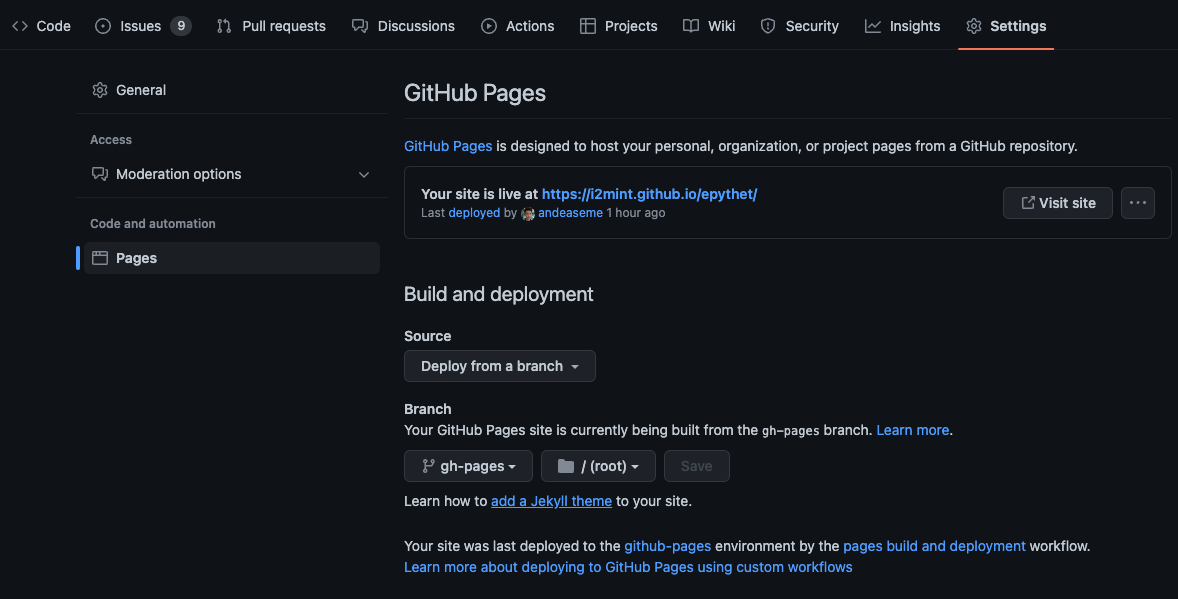
Go to your repo's Settings > Pages, set the source branch to gh-pages and the folder to / (root), then click Save.
The fast way (for those who value their time)
If you have the gh CLI installed:
# Check if Pages is set up correctly
epythet check-pages owner/repo

# Enable or fix Pages configuration
epythet configure-pages owner/repo
Or from Python:
from epythet import check_pages_setup, enable_pages

# Diagnose
check_pages_setup("owner/repo")

# Fix
enable_pages("owner/repo")
You can also point these at a local git checkout instead of owner/repo:
epythet check-pages .
epythet configure-pages /path/to/my/project
These tools work with either the gh CLI (recommended) or a GITHUB_TOKEN
environment variable.
Under the hood, configure-pages is just the GitHub Pages REST API — the direct
gh equivalent of Settings > Pages → Branch gh-pages, folder / (root) →
Save is:
# POST creates the Pages site (when Pages is not yet enabled — GitHub's default);
# use -X PUT instead to change an already-enabled Pages config.
gh api repos/owner/repo/pages -X POST -f 'source[branch]=gh-pages' -f 'source[path]=/'
See CI epythet troubleshooting.
Upgrading from epythet 0.1.x
epythet 0.2 keeps the contract the fleet depends on and changes what is behind it:
epythet quickstart DIR --ignore ...still writes HTML toDIR/docsrc/_build/html/; the--ignoreflag with no values still means "use the default".make_docsrc,make_autodocs,makeandquickstartare still importable fromepythet(and fromepythet.setup_docsrc/epythet.call_make);make_autodocsis now a no-op alias ofmake_docsrc, since API pages are generated at build time.epythet.config_parser.parse_configkeeps its 5-tuple(name, copyright, author, version, display_name), so a committed 0.1.xdocsrc/conf.pykeeps working. It now resolves the project directory whatever path it is given, sopyproject.tomlwins over a stalesetup.cfg(0.1.x silently preferredsetup.cfg).- A committed 0.1.x
docsrc/(templateconf.py,index.rst,table_of_contents.rst,module_docs/, Makefile) is recognised and replaced by the new scaffold on the nextquickstart. - Dropped: the
sphinx_rtd_themedefault (furo-class themes replace it),sphinx-toggleprompt(copybutton already strips prompts),commonmark, and theMakefile. Requires Python 3.11+, Sphinx 9, myst-parser 5.1; a project that pinssphinx<9ordocutils<0.22in its own dependencies will conflict with epythet 0.2 in the same environment. - URLs of API pages changed (
module_docs/<pkg>/<mod>.htmlis now_autosummary/<pkg>.<mod>.html);objects.invkeeps every symbol resolvable across sites.
The publish action pins epythet<0.2 until v2 is validated across the fleet; see the v2 decision record and the tracking issue.
2 maintainers


Release files for epythet 0.2.4
For a detailed explanation of source distributions (sdists) and built distributions (wheels), please see the package formats documentation.
Source distribution (sdist)
| File | Size | Uploaded | |
|---|---|---|---|
| epythet-0.2.4.tar.gz | 215.4 kB | Details |
Built distribution (wheel)
| File | Interpreter | ABI | Platform | Reset |
|---|---|---|---|---|
| epythet-0.2.4-py3-none-any.whl | Python 3 | none | any | Details |
Total release size: 416.6 kB
Release files / epythet-0.2.4.tar.gz
| Download URL | epythet-0.2.4.tar.gz |
|---|---|
| Size | 215.4 kB |
| Tags | Source |
|
SHA-256 checksum How to use checksums |
360ab82827c606f0563cb96d6be9df21775b85204d15dd592fd7c8c2988f405a
|
|
BLAKE2b-256 checksum How to use checksums |
157fce9ba71a96d8177d00e5da27c8bea6895f7dc8c66e724e26bdbae402db51
|
| Upload date | |
|
Uploaded using Trusted Publishing? What is trusted publishing? |
No |
| Uploaded via |
uv/0.12.12 {"installer":{"name":"uv","version":"0.12.12","subcommand":["publish"]},"python":null,"implementation":{"name":null,"version":null},"distro":{"name":"Ubuntu","version":"24.04","id":"noble","libc":null},"system":{"name":null,"release":null},"cpu":null,"openssl_version":null,"setuptools_version":null,"rustc_version":null,"ci":true}
|
Release files / epythet-0.2.4-py3-none-any.whl
| Download URL | epythet-0.2.4-py3-none-any.whl |
|---|---|
| Size | 201.2 kB |
| Tags | Python 3 |
|
SHA-256 checksum How to use checksums |
3711003df1466f407ce03203acdd9a33ef3f66e7efd2fe58476366abdde197f0
|
|
BLAKE2b-256 checksum How to use checksums |
b9875ff06c4e68ede3aed742cb2d7d1444a4a930875f900735a53a0be0accd1a
|
| Upload date | |
|
Uploaded using Trusted Publishing? What is trusted publishing? |
No |
| Uploaded via |
uv/0.12.12 {"installer":{"name":"uv","version":"0.12.12","subcommand":["publish"]},"python":null,"implementation":{"name":null,"version":null},"distro":{"name":"Ubuntu","version":"24.04","id":"noble","libc":null},"system":{"name":null,"release":null},"cpu":null,"openssl_version":null,"setuptools_version":null,"rustc_version":null,"ci":true}
|














