
This release is a pre-release and may not be stable for production use.
EQUINE Webapp


This is a web application utilizing EQUINE for neural network uncertainty quantification through a visual user interface. The webapp allows you to upload your own model and data, and let the server retrain the model with EQUINE. The visualization dashboard also allows you to analyze your samples and view uncertainty quantification visualizations to explain model uncertainty.
The EQUINE repository is here https://github.com/mit-ll-responsible-ai/equine
ScatterUQ Static Demo
You can view a static demo of ScatterUQ here:
https://mit-ll-responsible-ai.github.io/equine-webapp/demo
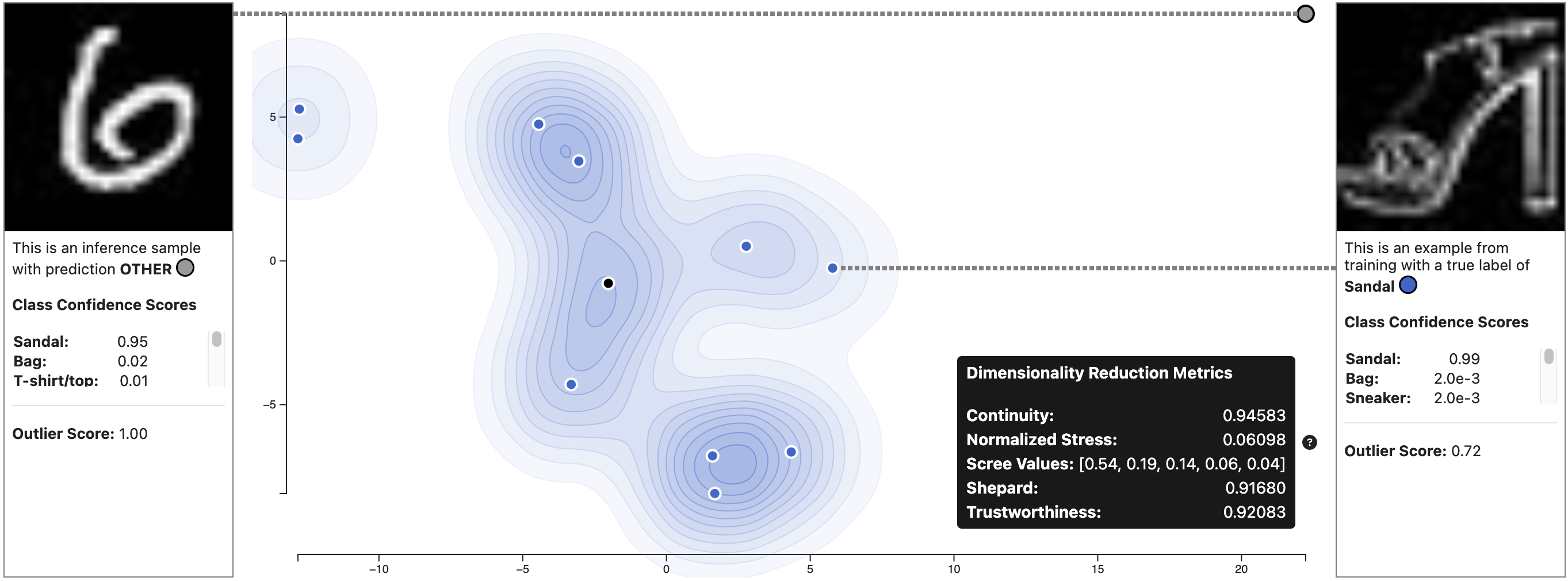
ScatterUQ at IEEE VIS 2023
We presented ScatterUQ at IEEE VIS 2023: https://ieeexplore.ieee.org/document/10360884
Our data and analysis script can be found in this release: https://github.com/mit-ll-responsible-ai/equine-webapp/releases/tag/ScatterUQ-VIS-2023-Data
Usage with Python and PyPI
You can install and run the equine-webapp as a command in your terminal with python. These commands create a new conda environment, activate the environment, install equine-webapp from PyPI, and start the equine-webapp which will be available at localhost:8080.
conda create --name my-environment-name python=3.10
conda activate my-environment-name
pip install equine-webapp
equine-webapp
Reproducing demo site
You can reproduce the demo site by running the example EQUINE notebook https://github.com/mit-ll-responsible-ai/equine/blob/main/docs/example_notebooks/MNIST_OOD_detection.ipynb
Local Development
You can also develop the webapp locally in two ways:
- Run equine-webapp as a locally installed package with local web files
- Run equine-webapp with local Node.js/Next.js and Python/Flask development servers
Run equine-webapp as a locally installed package with local web files
- Install node packages
cd client
npm i
-
Make a copy of
client/.env.exampleand rename toclient/.env.local. This new file should be git-ignored by default. -
Build the local static web files
npm run build
- Install the package locally from the root of the repo and run it
../
conda create --name equine-webapp python=3.10
conda activate equine-webapp
pip install -e .
equine-webapp
Run equine-webapp with local Node.js/Next.js and Python/Flask development servers
Node.js/Next.js Frontend Development Server
-
Make a copy of
client/.env.exampleand rename toclient/.env.local. This new file should be git-ignored by default. -
Install node packages and start the development server
cd client
npm i
npm run dev
Frontend testing
npm run test
Python/Flask Development Server
Create a new Anaconda environment, activate it, install the requirements, and start the dev server
conda create --name equine-webapp python=3.10
conda activate equine-webapp
pip install -r requirements.txt
python start_dev_server.py
Python Testing
pip install pytest
python -m pytest
Bibliography
@INPROCEEDINGS{10360884,
  author={Li, Harry X. and Jorgensen, Steven and Holodnak, John and Wollaber, Allan B.},
  booktitle={2023 IEEE Visualization and Visual Analytics (VIS)},
  title={ScatterUQ: Interactive Uncertainty Visualizations for Multiclass Deep Learning Problems},
  year={2023},
  volume={},
  number={},
  pages={246-250},
  keywords={Deep learning;Dimensionality reduction;Training;Uncertainty;Visual analytics;Soft sensors;Interactive systems;Uncertainty quantification;Machine learning;Dimensionality reduction;Visualization;Explainable AI},
  doi={10.1109/VIS54172.2023.00058}}
Disclaimer
DISTRIBUTION STATEMENT A. Approved for public release. Distribution is unlimited.
© 2023 MASSACHUSETTS INSTITUTE OF TECHNOLOGY
- Subject to FAR 52.227-11 – Patent Rights – Ownership by the Contractor (May 2014)
- SPDX-License-Identifier: MIT
This material is based upon work supported by the Under Secretary of Defense for Research and Engineering under Air Force Contract No. FA8702-15-D-0001. Any opinions, findings, conclusions or recommendations expressed in this material are those of the author(s) and do not necessarily reflect the views of the Under Secretary of Defense for Research and Engineering.
The software/firmware is provided to you on an As-Is basis.
1 maintainer

Metadata
1 maintainer
Release files for equine-webapp 0.1.1rc10
For a detailed explanation of source distributions (sdists) and built distributions (wheels), please see the package formats documentation.
Source distribution (sdist)
| File | Size | Uploaded | |
|---|---|---|---|
| equine_webapp-0.1.1rc10.tar.gz | 2.7 MB | Details |
Built distribution (wheel)
| File | Interpreter | ABI | Platform | Reset |
|---|---|---|---|---|
| equine_webapp-0.1.1rc10-py3-none-any.whl | Python 3 | none | any | Details |
Total release size: 4.5 MB
Release files / equine_webapp-0.1.1rc10.tar.gz
| Download URL | equine_webapp-0.1.1rc10.tar.gz |
|---|---|
| Size | 2.7 MB |
| Tags | Source |
|
SHA-256 checksum How to use checksums |
54bc2fa04a5a9bf11f6b84c92ce560801849d4ee4402223e3b3ce839fbec6ada
|
|
BLAKE2b-256 checksum How to use checksums |
57e12a38a97ddf86d7784b83e757d98409e5c0bd883dbf445b5673acfa75a071
|
| Upload date | |
|
Uploaded using Trusted Publishing? What is trusted publishing? |
Yes |
| Uploaded via |
twine/6.1.0 CPython/3.12.8
|
Provenance
Provenance describes where a file came from. On PyPI, provenance is shared via attestations, which provide a verifiable record of the build or publishing details. View details, limitations and caveats.


PyPI Publish Attestation
PyPI verified that this artifact, at this checksum, originated from the publisher listed below.
Signed by GitHub Actions, verified by PyPI on Apr 14, 2026.
Transparency logRelease files / equine_webapp-0.1.1rc10-py3-none-any.whl
| Download URL | equine_webapp-0.1.1rc10-py3-none-any.whl |
|---|---|
| Size | 1.8 MB |
| Tags | Python 3 |
|
SHA-256 checksum How to use checksums |
ef19a6faa3f58aee2d283aa2afdf7c1bc16495a993191ed9bc4bab47e4e327f9
|
|
BLAKE2b-256 checksum How to use checksums |
47135d3f6b24a464042636e633ecde6d98a8bdb0b5ca381461fae8afbfff2653
|
| Upload date | |
|
Uploaded using Trusted Publishing? What is trusted publishing? |
Yes |
| Uploaded via |
twine/6.1.0 CPython/3.12.8
|
Provenance
Provenance describes where a file came from. On PyPI, provenance is shared via attestations, which provide a verifiable record of the build or publishing details. View details, limitations and caveats.
PyPI Publish Attestation
PyPI verified that this artifact, at this checksum, originated from the publisher listed below.
Signed by GitHub Actions, verified by PyPI on Apr 14, 2026.
Transparency log













