
eqword2llm





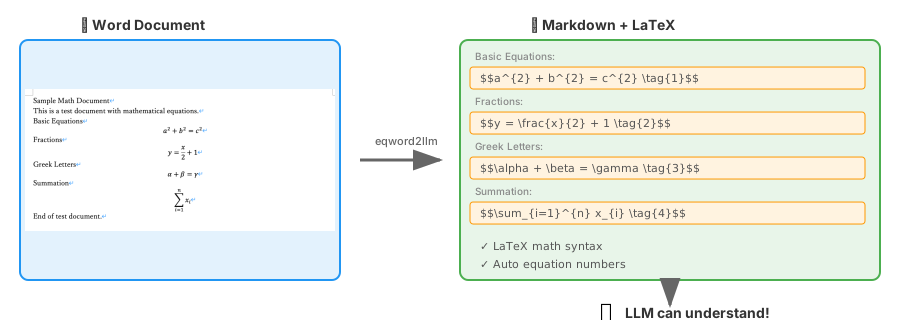
Equation Word → LLM: Convert equation-heavy Word documents (.docx) to Markdown with LaTeX math for LLM recognition.
Why eqword2llm?
Most Word-to-Markdown converters ignore or break mathematical equations. eqword2llm is specifically designed for scientific and technical documents where math equations are critical.
Features
- 🔢 Math equation conversion - OMML to LaTeX (inline
$...$and block$$...$$) - 🔖 Automatic equation numbering - Block equations get
\tag{N}(can be disabled) - 🤖 LLM-optimized output - Clean Markdown that LLMs can understand
- 📋 Structured output - YAML frontmatter with equation metadata
- 📝 Prompt templates - Ready-to-use LLM prompts
- 🌍 Full Unicode support - Japanese, Chinese, Korean, and more
- 📊 Tables, lists, headings, formatting support
- 🐍 Zero dependencies - Python standard library only
Installation
# PyPI
pip install eqword2llm

# or with uv
uv add eqword2llm
Quick Start
Command Line
# Output to stdout (with equation numbers by default)
eqword2llm document.docx

# Output to file
eqword2llm document.docx -o output.md

# Disable equation numbering
eqword2llm document.docx -o output.md --no-equation-numbers
Python API
from eqword2llm import WordToMarkdownConverter

# With equation numbers (default)
converter = WordToMarkdownConverter("research_paper.docx")
markdown = converter.convert()

# Without equation numbers
converter = WordToMarkdownConverter("research_paper.docx", equation_numbers=False)
markdown = converter.convert()
With LLM APIs
import anthropic
from eqword2llm import WordToMarkdownConverter

# Convert Word document with equations
converter = WordToMarkdownConverter("math_paper.docx")
markdown = converter.convert()

# Send to Claude - equations are now readable!
client = anthropic.Anthropic()
response = client.messages.create(
    model="claude-sonnet-4-20250514",
    max_tokens=1024,
    messages=[
        {"role": "user", "content": f"Explain the equations in this document:\n\n{markdown}"}
    ]
)
LLM-Ready Output Formats
Structured Output (YAML Frontmatter)
Get metadata about equations and document structure:
eqword2llm document.docx --format structured
result = converter.convert_structured()
print(result.metadata.equation_count)  # 5
print(result.metadata.equations[0].latex)  # "E = mc^{2}"
print(result.to_structured())  # Markdown with YAML frontmatter
Output:
---
format: eqword2llm/v1
source: document.docx
stats:
  sections: 3
  equations: 5
  headings: 8
equations:
  - id: 1
    latex: "E = mc^{2}"
    type: block
---

# Document content...
LLM Prompt Template
Generate a complete prompt ready to send to an LLM:
eqword2llm document.docx --format prompt
prompt = converter.to_llm_prompt()
# Or with custom instructions:
prompt = converter.to_llm_prompt(instructions="Summarize the key equations.")
Equation Numbering
Block equations are automatically numbered using LaTeX \tag{N} syntax:
With numbering (default):
$$
E = mc^{2} \tag{1}
$$

$$
F = ma \tag{2}
$$
Without numbering (equation_numbers=False or --no-equation-numbers):
$$
E = mc^{2}
$$

$$
F = ma
$$
Supported Math Elements
| Element | LaTeX Output |
|---|---|
| Fraction | \frac{a}{b} |
| Superscript | x^{2} |
| Subscript | x_{i} |
| Radical | \sqrt{x}, \sqrt[n]{x} |
| Integral | \int_{a}^{b} f(x) dx |
| Summation | \sum_{i=1}^{n} x_i |
| Matrix | \begin{pmatrix}...\end{pmatrix} |
| Greek letters | \alpha, \beta, \gamma ... |
| Functions | \sin, \cos, \log, \lim ... |
| Brackets | \left(...\right) |
| Accents | \hat{x}, \vec{v}, \bar{x} |
Multilingual Support
Full support for documents in any language:
| Language | Support |
|---|---|
| Japanese (日本語) | ✅ Hiragana, Katakana, Kanji |
| Chinese (中文) | ✅ Simplified and Traditional |
| Korean (한국어) | ✅ Hangul |
| Arabic (العربية) | ✅ RTL text |
| Cyrillic (Русский) | ✅ Russian, Ukrainian, etc. |
Math symbols (α, β, ∑, ∫, etc.) are converted to LaTeX while preserving surrounding text.
Development
# Clone and setup
git clone https://github.com/manabelab/eqword2llm.git
cd eqword2llm
uv sync --dev

# Run tests
uv run pytest tests/ -v

# Lint and type check
uv run ruff check src tests
uv run mypy src

# Optional: Install KaTeX for LaTeX validation tests
# (Requires Node.js)
npm install katex
Note: Without KaTeX, 9 LaTeX validation tests will be skipped. Core functionality tests (59 tests) run without it.
Comparison with Other Tools
| Feature | eqword2llm | mammoth | pandoc |
|---|---|---|---|
| Math equations | ✅ LaTeX | ❌ | △ Partial |
| Equation numbering | ✅ | ❌ | △ |
| Field code handling | ✅ | ❌ | ❌ |
| Markdown headings | ✅ | ✅ | ❌ |
| Zero dependencies | ✅ | ❌ | ❌ |
| LLM-optimized | ✅ | ❌ | ❌ |
| Unicode support | ✅ | ✅ | ✅ |
Concrete Examples
1. Determinant (Matrix with vertical bars)
Pandoc output (verbose, non-standard):
$$|A| = \left| \begin{matrix}
a & b \\
c & d
\end{matrix} \right| = ad - bc$$
eqword2llm output (concise, standard LaTeX):
$$
\left|A\right|=\begin{vmatrix}a & b \\ c & d\end{vmatrix}=ad-bc
$$
| Aspect | Pandoc | eqword2llm |
|---|---|---|
| Syntax | \left| \begin{matrix}...\right| |
\begin{vmatrix}... |
| Characters | 62 | 45 (-27%) |
| LaTeX standard | ⚠️ Non-standard combination | ✅ Standard amsmath environment |
2. Word Field Codes (SEQ Equation)
Pandoc output (broken):
$$E = mc^{2}\#(\ SEQ\ Equation\ \backslash*\ ARABIC\ 1)$$
eqword2llm output (clean):
$$
E=mc^{2}
$$
3. Vector notation
Pandoc output (verbose):
$$\overset{\rightarrow}{v}$$
eqword2llm output (standard):
$$\vec{v}$$
📖 See detailed comparison with more examples →
Limitations
- Images are not currently supported
- Complex layouts (multiple columns, text boxes) are simplified
- Some special math symbols may not be converted
License
MIT License - See LICENSE for details.
Contributing
Issues and Pull Requests are welcome!
1 maintainer

Metadata
1 maintainer
Release files for eqword2llm 0.5.0
For a detailed explanation of source distributions (sdists) and built distributions (wheels), please see the package formats documentation.
Source distribution (sdist)
| File | Size | Uploaded | Provenance | Actions |
|---|---|---|---|---|
| eqword2llm-0.5.0.tar.gz | 35.3 kB | With provenance | Details for eqword2llm-0.5.0.tar.gz |
Built distribution (wheel)
| File | Interpreter | ABI | Platform | Actions Reset |
|---|---|---|---|---|
| eqword2llm-0.5.0-py3-none-any.whl | Python 3 | none | any | Details for eqword2llm-0.5.0-py3-none-any.whl |
Total release size: 54.8 kB
Release files / eqword2llm-0.5.0.tar.gz
| Download URL | eqword2llm-0.5.0.tar.gz |
|---|---|
| Size | 35.3 kB |
| Tags | Source |
|
SHA-256 checksum How to use checksums |
5d73b6680463575d8fb0948922d06005d5aa77eaf1eca4b181da5357c7c6f029
|
|
BLAKE2b-256 checksum How to use checksums |
ddc8c0951220933242b07c6223553ab50df8ac8c9661e519337a50670bf3c53c
|
| Upload date | |
|
Uploaded using Trusted Publishing? What is trusted publishing? |
Yes |
| Uploaded via |
twine/6.1.0 CPython/3.13.7
|
Provenance
Provenance describes where a file came from. On PyPI, provenance is shared via attestations, which provide a verifiable record of the build or publishing details. View details, limitations and caveats.


PyPI Publish Attestation
PyPI verified that this artifact, at this checksum, originated from the publisher listed below.
Signed by GitHub Actions, verified by PyPI on Dec 21, 2025.
Transparency logRelease files / eqword2llm-0.5.0-py3-none-any.whl
| Download URL | eqword2llm-0.5.0-py3-none-any.whl |
|---|---|
| Size | 19.5 kB |
| Tags | Python 3 |
|
SHA-256 checksum How to use checksums |
6bb55049b41a7759b479e1e19bc7ca9729e09ad1b13ad13b9217d93f3acbf678
|
|
BLAKE2b-256 checksum How to use checksums |
75f24fcd6492f03f98fcd4c253b0ee0f542a04d05e4eaa2475f6ff63e8663992
|
| Upload date | |
|
Uploaded using Trusted Publishing? What is trusted publishing? |
Yes |
| Uploaded via |
twine/6.1.0 CPython/3.13.7
|
Provenance
Provenance describes where a file came from. On PyPI, provenance is shared via attestations, which provide a verifiable record of the build or publishing details. View details, limitations and caveats.
PyPI Publish Attestation
PyPI verified that this artifact, at this checksum, originated from the publisher listed below.
Signed by GitHub Actions, verified by PyPI on Dec 21, 2025.
Transparency logSecurity for eqword2llm 0.5.0
Provenance
Provenance describes where a file came from. On PyPI, provenance is shared via attestations, which provide a verifiable record of the build or publishing details. View details, limitations and caveats.
Full provenance
All 2 files in this release have been uploaded with provenance metadata.
Attestation for eqword2llm-0.5.0.tar.gz
PyPI Publish Attestation
PyPI verified that this artifact, at this checksum, originated from the publisher listed below.
Signed by GitHub Actions, verified by PyPI on Dec 21, 2025.
Transparency logA note on package security
PyPI is a repository for distributing packages, not a service for auditing them. While third-party security researchers and our staff do their best to detect and remove malicious packages, PyPI cannot guarantee the quality, security or suitability of any given package.
To learn more about protecting yourself from malicious actors, visit our package security documentation.














