





Entity relation diagrams generator
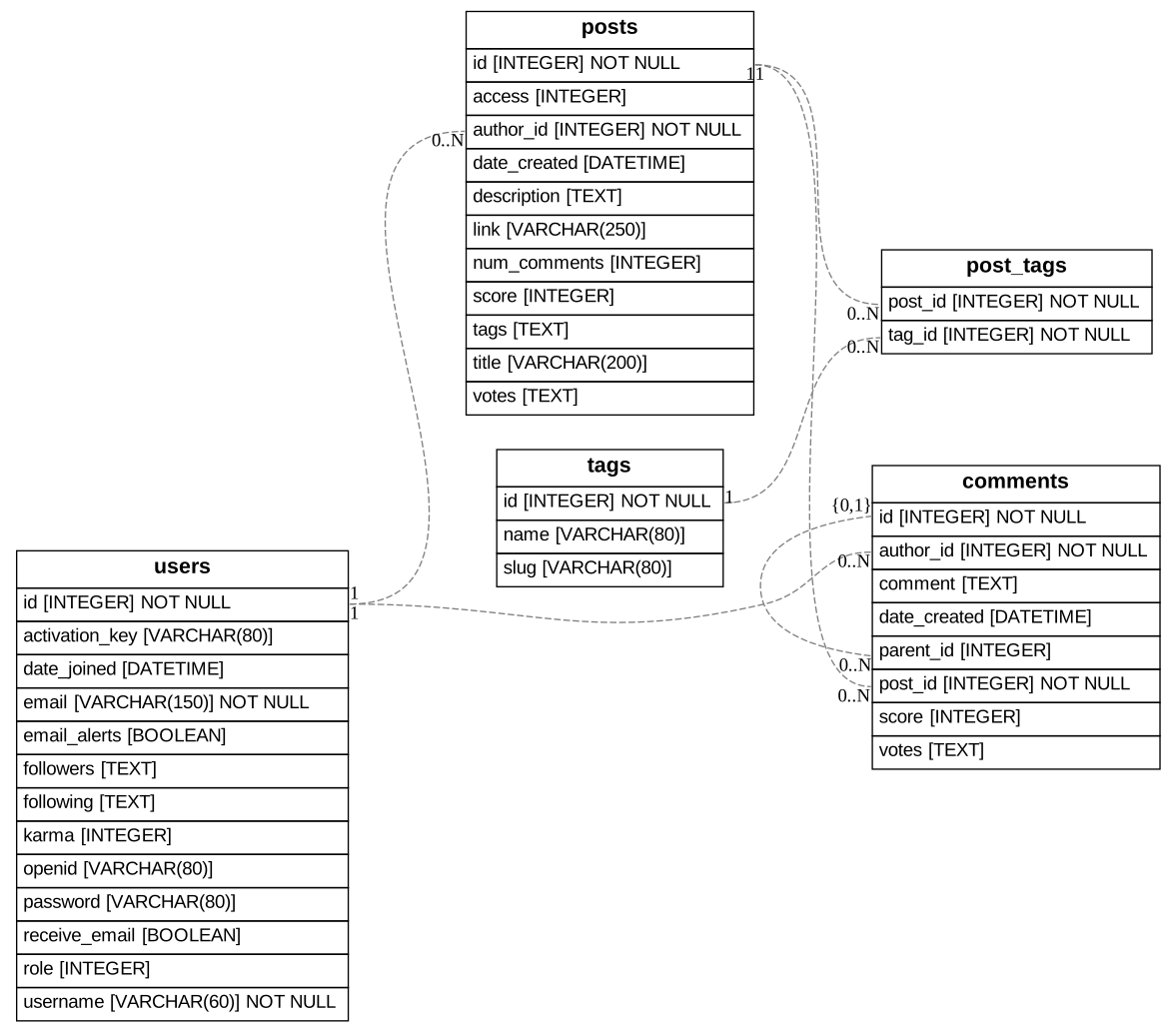
eralchemy generates Entity Relation (ER) diagram (like the one below) from databases or from SQLAlchemy models.
Example
Quick Start
Install
To install eralchemy, just do:
$ pip install eralchemy
Graph library flavors
To create Pictures and PDFs, eralchemy relies on either graphviz or pygraphviz.
You can use either
$ pip install eralchemy[graphviz]
or
$ pip install eralchemy[pygraphviz]
to retrieve the correct dependencies.
The graphviz library is the default if both are installed.
eralchemy requires GraphViz to generate the graphs and Python. Both are available for Windows, Mac and Linux.
For Debian based systems, run:
$ apt install graphviz libgraphviz-dev
before installing eralchemy.
Install using conda
There is also a packaged version in conda-forge, which directly installs the dependencies:
$ conda install -c conda-forge eralchemy
Usage from Command Line
From a database
$ eralchemy -i sqlite:///relative/path/to/db.db -o erd_from_sqlite.pdf
The database is specified as a SQLAlchemy database url.
From a markdown file.
$ curl 'https://raw.githubusercontent.com/eralchemy/eralchemy/main/example/forum.er' > markdown_file.er
$ eralchemy -i 'markdown_file.er' -o erd_from_markdown_file.pdf
From a Postgresql DB to a markdown file excluding tables named temp and audit
$ eralchemy -i 'postgresql+psycopg2://username:password@hostname:5432/databasename' -o filtered.er --exclude-tables temp audit
From a Postgresql DB to a markdown file excluding columns named created_at and updated_at from all tables
$ eralchemy -i 'postgresql+psycopg2://username:password@hostname:5432/databasename' -o filtered.er --exclude-columns created_at updated_at
From a Postgresql DB to a markdown file for the schemas schema1 and schema2
$ eralchemy -i 'postgresql+psycopg2://username:password@hostname:5432/databasename' -s "schema1, schema2"
Specify Output Mode
$ eralchemy -i 'markdown_file.er' -o erd_from_markdown_file.md -m mermaid_er
Usage from Python
from eralchemy import render_er
## Draw from SQLAlchemy base
render_er(Base, 'erd_from_sqlalchemy.png')

## Draw from database
render_er("sqlite:///relative/path/to/db.db", 'erd_from_sqlite.png')
Adjustments to the rendering config
When rendering dot files, it can be needed to adjust how some parts are visualized.
This can be used to get crowfoot relations, stars instead of underlines for primary keys or a top-bottom rendering instead the default left-right rendering.
It can be adjusted by manipulating the global from eralchemy.cst import config dictionary.
Some helper functions exist like dot_star_primary, dot_top_down, dot_digraph and dot_crowfoot.
The config can be reset using reset_config.
This can be used like
from eralchemy import render_er
from eralchemy.cst import dot_crowfoot, dot_digraph
dot_crowfoot()
dot_digraph()

render_er(Base, "forum.svg")
Architecture
graph LR
    subgraph Inputs
        A[Markdown representation]
        B[SQLAlchemy Schema]
        C[Existing database]
        D[Other ORM ?]
    end

    E[Intermediary representation]

    subgraph Outputs
        F[Markdown representation]
        G[Graphviz code]
        H[Drawing]
    end

    A --> E
    B --> E
    C --> E
    D --> E
    E --> F
    E --> G
    E --> H
Thanks to it's modular architecture, it can be connected to other ORMs/ODMs/OGMs/O*Ms.
Contribute
Every feedback is welcome on the GitHub issues.
Development
Install the development dependencies using
$ pip install -e .[dev,test]
Make sure to run the pre-commit to fix formatting
$ pre-commit run --all
All tested PR are welcome.
Running tests
This project uses the pytest test suite.
To run the tests, use : $ pytest or $ nox.
Some tests require having a local PostgreSQL database with a schema named test in a database
named test all owned by a user named eralchemy with a password of eralchemy.
If docker compose is available, one can use docker compose up -d for this purpose.
You can deselect the tests which require a PostgreSQL database using:
$ pytest -m "not external_db"
Publishing a release
$ rm -r dist && python -m build && python3 -m twine upload --repository pypi dist/*
Notes
ERAlchemy was inspired by erd, though it is able to render the ER diagram directly
from the database and not just only from the ER markup language.
Released under an Apache License 2.0
2 maintainers


Metadata
2 maintainers
Release files for eralchemy 1.7.0
For a detailed explanation of source distributions (sdists) and built distributions (wheels), please see the package formats documentation.
Source distribution (sdist)
| File | Size | Uploaded | |
|---|---|---|---|
| eralchemy-1.7.0.tar.gz | 28.6 kB | Details |
Built distribution (wheel)
| File | Interpreter | ABI | Platform | Reset |
|---|---|---|---|---|
| eralchemy-1.7.0-py3-none-any.whl | Python 3 | none | any | Details |
Total release size: 50.7 kB
Release files / eralchemy-1.7.0.tar.gz
| Download URL | eralchemy-1.7.0.tar.gz |
|---|---|
| Size | 28.6 kB |
| Tags | Source |
|
SHA-256 checksum How to use checksums |
926376fdab2e1ca8eec05698c457d17718ed1458fa574b67e815c43ae52b377a
|
|
BLAKE2b-256 checksum How to use checksums |
1bccd41f21c662b244efedabac91705834c59dcf43b09e74dbc2b5ff32ea8b1c
|
| Upload date | |
|
Uploaded using Trusted Publishing? What is trusted publishing? |
No |
| Uploaded via |
twine/6.2.0 CPython/3.11.15
|
Release files / eralchemy-1.7.0-py3-none-any.whl
| Download URL | eralchemy-1.7.0-py3-none-any.whl |
|---|---|
| Size | 22.1 kB |
| Tags | Python 3 |
|
SHA-256 checksum How to use checksums |
d53034cacb413c383ab214d242c7b111004095c2dcbdeb9d7d5e4c7c8a6c4000
|
|
BLAKE2b-256 checksum How to use checksums |
49bd6208c7735392ffb0179f8d9a4a07fb5ef893b4e1d9642605cbe7d0079a79
|
| Upload date | |
|
Uploaded using Trusted Publishing? What is trusted publishing? |
No |
| Uploaded via |
twine/6.2.0 CPython/3.11.15
|














