
Unlock the Power of Your Terminal with ERAS 🚀
Welcome to ERAS: the Easily Runnable AI Shell that revolutionizes your command-line experience.
Say goodbye to the hassle of searching for the right command syntax—ERAS transforms your natural language instructions into precise terminal commands instantly.
Why ERAS?
- Seamless Integration : Compatible with Windows, Mac, and Linux, ERAS fits right into your workflow, regardless of your operating system. 🖥️
- Effortless Execution : No more jumping between your terminal and browser. Just type what you need, and ERAS will do the rest. ⚡
- AI-Powered Precision : Harness the power of OpenAI or any OpenAI-spec-compliant model like Llama.cpp server to ensure your commands are executed accurately and efficiently. 🤖
Experience the future of terminal commands with ERAS and elevate your productivity today. 🌟

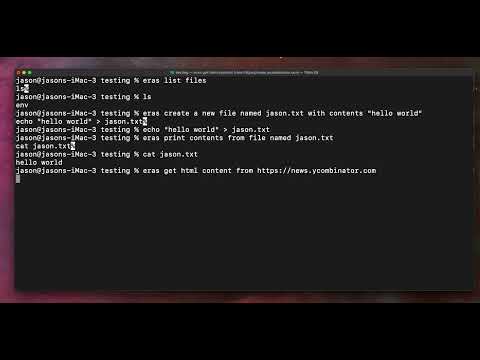
Demo
Install
Mac & Linux
pip install eras
If you get an error about externally-managed-environment it's because you have python installed via homebrew, and need to use pipx instead:
pipx
brew install pipx
pipx ensurepath
pipx install eras
With pipx you may need to open a new terminal window or source .zshrc a couple of times.
Windows
pip install eras
You will be prompted for various configuration settings. Once set, close your terminal window and open up a new one.
Use
The first use of Eras will prompt you to enter various configs. See the Config Examples section below.
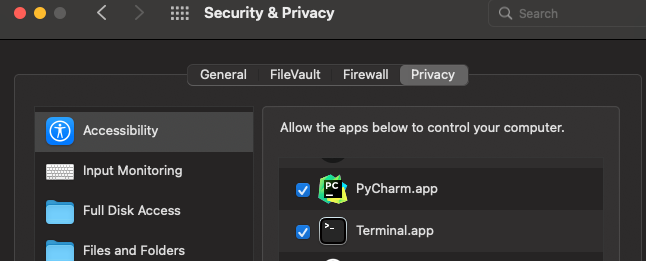
The first use will also prompt you to allow accessibility features for Terminal.app, which is required to allow Eras to populate the terminal with the shell command.
When you ask Eras a question, it will use AI to create a shell command, then populate your next terminal line with the command, so all you have to do is review and press enter.
Usage Examples
% eras list all files in the current directory

ERAS will then populate the next terminal line with the command:
% ls

All you have to do is confirm and hit enter!

...
% eras create a new file named jason.txt with contents "hello world"
% echo "hello world" > jason.txt
...
Chat Examples
% eras /chat What is the capital of France
% Paris is the capital of France

Note: if you want to use ? or other special terminal chars you should surround your question in quotes
% eras /chat "What is the capital of France?"
% Paris is the capital of France
Config Examples
On the first run of eras, you will be prompted to enter config values, which are saved as env vars.
To run the config again, you can run eras /config
An API key must be provided when using OpenAI or Llama.cpp (can be anything unless you explicitly set one in Llama.cpp)
OpenAI
For OpenAI you must provide:
Alternative OpenAI Server (e.g. Llama.cpp server)
You will be prompted to enter the alternative base url. e.g. http://127.0.0.1:8080
Llama.cpp Setup Instructions
Find the server setup instructions at: https://github.com/ggerganov/llama.cpp
NVIDIA GPU Instructions
If you are running a NVIDIA GPU, you will want to build the llama server with CUDA enabled, as outlined here
I followed these instructions:
-
Download Visual Studio and install CMake tools
- Go to https://visualstudio.microsoft.com/downloads/ and download “Visual Studio 2022 (Community)”
-
Open VisualStudioSetup.exe to install Visual Studio
-
Select Desktop development with C++ to install CMake tools
-
Download a gguf model:
Run these commands in Developer Command Prompt (search Windows and it'll come up)
git clone https://github.com/ggerganov/llama.cpp.git
cd llama.cpp
mkdir build
cd build
cmake .. -DLLAMA_CUDA=ON
cmake --build . --config Release
Start the Llama server:
.\bin\Release\server.exe -m C:\shared-drive\llm_models\Llama-3-8B-Instruct-32k-v0.1.Q4_K_M.gguf -ngl 9999 --host 0.0.0.0 --ctx-size 32000
1 maintainer

Metadata
1 maintainer
Release files for eras 0.5.2
For a detailed explanation of source distributions (sdists) and built distributions (wheels), please see the package formats documentation.
Source distribution (sdist)
| File | Size | Uploaded | |
|---|---|---|---|
| eras-0.5.2.tar.gz | 61.1 kB | Details |
Built distribution (wheel)
| File | Interpreter | ABI | Platform | Reset |
|---|---|---|---|---|
| eras-0.5.2-py3-none-any.whl | Python 3 | none | any | Details |
Total release size: 156.7 kB
Release files / eras-0.5.2.tar.gz
| Download URL | eras-0.5.2.tar.gz |
|---|---|
| Size | 61.1 kB |
| Tags | Source |
|
SHA-256 checksum How to use checksums |
2845bcbc87ddab915d41965f2b2280ce040f95f27af1f9a09e7d9a4a7329ae87
|
|
BLAKE2b-256 checksum How to use checksums |
bf6b004aa21bb1034e0d0ae09e89de8e9ff62ca0587e8922bf293994bd7df731
|
| Upload date | |
|
Uploaded using Trusted Publishing? What is trusted publishing? |
No |
| Uploaded via |
twine/4.0.2 CPython/3.9.13
|
Release files / eras-0.5.2-py3-none-any.whl
| Download URL | eras-0.5.2-py3-none-any.whl |
|---|---|
| Size | 95.6 kB |
| Tags | Python 3 |
|
SHA-256 checksum How to use checksums |
a8d67df93e2b950b92fff8634fd900cb4793d3133ef25e45fcb175e1caf6e28f
|
|
BLAKE2b-256 checksum How to use checksums |
06b7be57036eb4b1f41c379a468fc678e1bd794dc5cfff793cf100e322b3eb96
|
| Upload date | |
|
Uploaded using Trusted Publishing? What is trusted publishing? |
No |
| Uploaded via |
twine/4.0.2 CPython/3.9.13
|














