
Ergograph





Ergograph (Greek ἔργον "work, deed" + γράφειν "to write": "the one that writes down your work") is a YAML-driven CV and dossier generator. From plain content files it produces ready-to-send PDFs: a CV, a project history, a skills matrix, a complete dossier and a landscape one-pager, in any number of languages and variants (with/without an hourly rate, tailored to a role, or anonymized for agencies). The same content also comes out as editable Word files and as Markdown text, optionally with a photo in the header.
The generator contains no personal data. All content and all build steering come from the outside via YAML files; the code only provides rendering, the theme and the PDF export.
How it works
config.yaml + content/<lang>.yaml  ->  HTML (theme "modern")  ->  PDF (Chrome headless)
                                   `->  DOCX (Office Open XML, no Chrome needed)
                                   `->  Markdown (text for forms and mails)
config.yamlsteers the build: person, languages, variants, documents, output paths.- One content file per language (
content/de.yaml,content/en.yaml, …) with all texts, including section labels and document file names. - Chrome (headless) renders the HTML intermediate step to A4 PDFs, which then get page numbers and title/author metadata stamped in.
Installation
Requirements: Python ≥ 3.10 and Google Chrome or Chromium. Chrome is only needed for
the PDF step (ergograph build --html-only works without it) and is not installed by
pip — Ergograph looks for an existing installation (see chrome: below).
# as an isolated tool (recommended)
uv tool install ergograph

# or into the current environment
pip install ergograph
There are no extras to pick: page numbers and the ATS check are always included. Both dependencies (PyYAML and pypdf) are pure Python and together under 1 MB.
Quick start
cd examples/minimal/
ergograph validate          # check config + content files
ergograph build             # build everything (HTML + PDF)
ergograph build --format docx # Word files only, works without Chrome
ergograph build --html-only # HTML only, no Chrome
ergograph build --variant mit-stundensatz --lang de
The PDFs end up under pdf/<variant>/<language>/YYYY-MM-DD_<Name>_<document>_<language>.pdf. Older builds are kept side by side thanks to the date prefix (disable it with output.date_prefix: false).
Example output
The rendered example PDFs are committed per persona under examples/<name>/pdf/, e.g. the German CV or the comprehensive architect dossier.
ATS readability
The documents are built to be fully readable by applicant tracking systems: a real text layer (no text in images), reading order equal to content order, skill levels as numbers next to the bars, and PDF title/author metadata. Ergograph verifies this instead of assuming it — after every build it extracts the PDF text layer (pypdf, the same way ATS parsers read PDFs) and asserts that every content string from your YAML appears in it. Findings are reported as warnings; ergograph build --strict turns them into a build failure. Details in docs/SPEC.md (R15/D13).
The steering file config.yaml
person:
  name: Alexandra Argyriou        # appears in the header and in the PDF file names
  # file_slug: Alexandra-Argyriou # optional, default: name with hyphens

theme: modern                     # bundled theme, or path to your own .css
level_max: 6                      # maximum of the skill-bar scale

languages: [de, en]
variants: [mit-stundensatz, ohne-stundensatz]

documents:                        # list (for all languages) or mapping per language
  de: [cv, projects, full]
  en: [full]

content:
  de: content/de.yaml
  en: content/en.yaml

output:
  html_dir: html
  pdf_dir: pdf
  date_prefix: true    # date-stamped file names; false = stable names

# chrome: /path/to/chrome         # optional; otherwise auto-detected
Every field with its type, default and whether it is required: docs/CONFIGURATION.md.
The content files
One YAML file per language holds everything that appears in the documents. The
picture shows which key renders which region — red comes from
content/<lang>.yaml, green are the headings from labels, and blue is the one
visible field that comes from config.yaml:
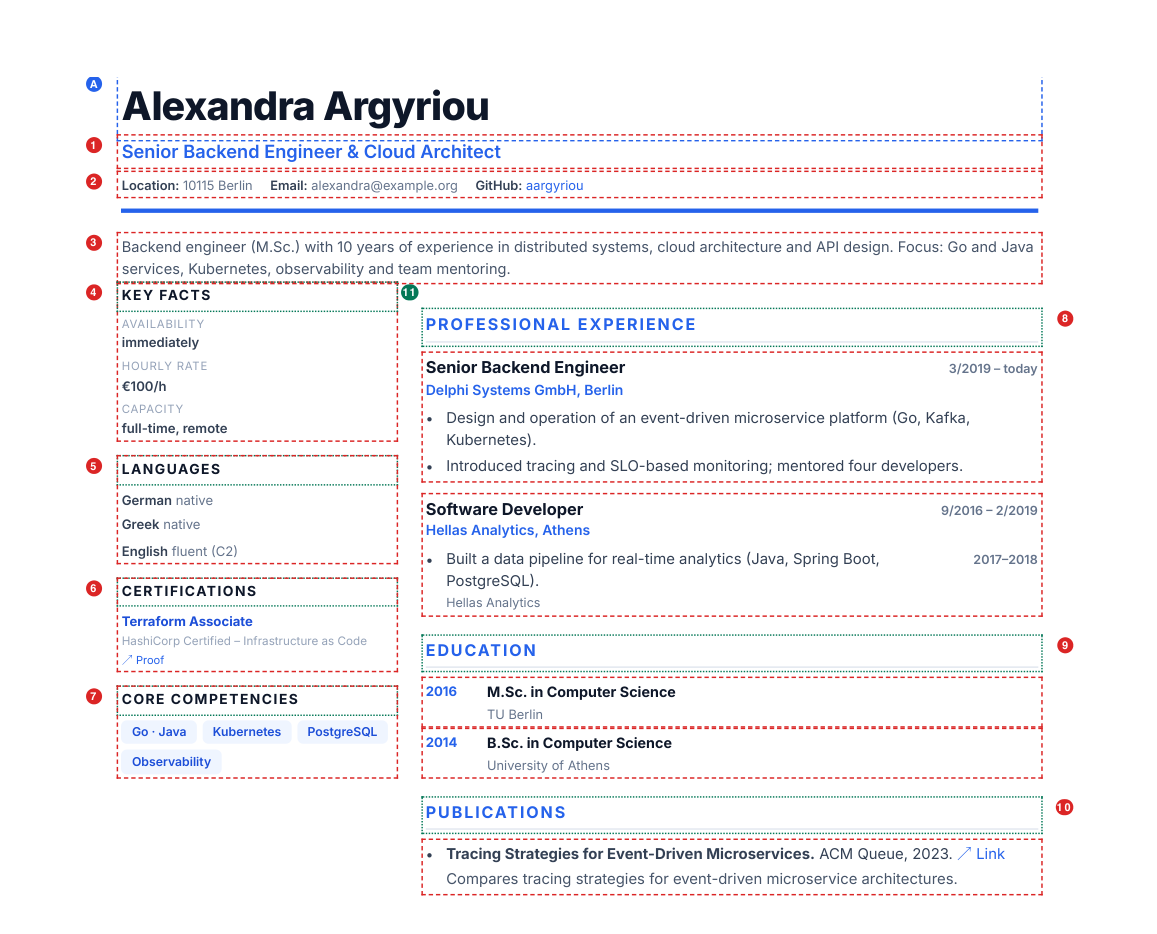
| # | Key | Type | Renders |
|---|---|---|---|
| A | person.name (config) |
string | Name in the header |
| 1 | title |
string | Job title under the name |
| 2 | contact |
list of {label, value, url?} |
Header line |
| 3 | tagline |
string | Summary paragraph |
| 4 | facts |
list of {label, value, variants?} |
Sidebar: availability, rate, … |
| 5 | languages |
list of {name, level} |
Sidebar: language skills |
| 6 | certs |
list of {name, description?, url?} |
Sidebar: certificates |
| 7 | top_skills |
list of strings | Sidebar: competency tags |
| 8 | experience |
list of {period, role, org, bullets} |
Stations with bullets |
| 9 | education |
list of {year, degree, institution} |
Degrees |
| 10 | publications |
list of {title, venue, url?, summary?} |
Publication list |
| 11 | labels |
map of 12 headings | Every heading in both columns |
Three keys are not visible above: projects builds the project history, skills
the skills matrix, and doc_names supplies the PDF file names. All fourteen keys
are required, but every list may be empty — publications: [] simply drops
that section, which is how one format serves a software architect and a carpenter.
Variants are steered declaratively: a fact carrying variants appears only in
those variants, everything else appears everywhere.
facts:
  - label: Availability
    value: immediately
  - label: Hourly rate
    value: €100/h
    variants: [mit-stundensatz]
Content values are trusted HTML fragments: write UTF-8 directly (ü, €, "…"), and
use <a href="...">…</a> for inline links where needed.
Full field reference — every field, its type, whether it is required and its
default: docs/CONFIGURATION.md. The repository
also ships JSON Schemas for both file types, so an editor can
complete fields and flag typos while you write.
Generating content with an AI agent
The content files are plain, flat YAML with every text outside the code, which
makes them a practical target for an agentic coding tool (Claude Code, Codex,
Cursor, …): the agent gets a machine-readable contract in
schemas/, working examples, and two commands that judge the
result objectively — ergograph validate for the structure and
ergograph build --strict, which fails when a string from the YAML is not
extractable from the finished PDF. That turns "write my CV data" into a loop the
agent can close by itself.
A ready-to-use prompt, plus what to check by hand afterwards (numbers, dates,
certificate titles — a model formats reliably and invents plausibly), is in
docs/CONFIGURATION.md.
Examples
Every example under examples/ is a fictional persona and ships with its rendered PDFs:
| Example | Shows |
|---|---|
minimal |
Small bilingual dossier with rate variants — also the test fixture |
software-architect |
Comprehensive bilingual freelance dossier: structured bullets, project period/org metadata, publications with summaries |
handwerker |
Master carpenter — trade CV with certificates and reference projects, no publications |
reporter |
Journalist — publications with summaries, investigative projects |
arzt |
Physician — clinical-academic CV with board certifications and studies |
buerokauffrau |
Office administrator — commercial CV with internal projects |
Variants are steered declaratively: an entry in facts with variants: [mit-stundensatz] only appears in that variant, all other facts appear everywhere.
facts:
  - label: Availability
    value: immediately
Content values are trusted HTML fragments: write UTF-8 directly (ü, €, "…"), and use <a href="...">…</a> for inline links where needed.
Development
uv run pytest                    # test suite, no Chrome and no network needed
uvx pip-audit -r <(uv export --format requirements-txt --all-extras --no-dev --no-emit-project)
trivy fs --scanners vuln,secret,misconfig .
Every push runs the suite on Python 3.10–3.14, renders all examples, and scans
dependencies and sources (pip-audit, Trivy, CodeQL). Releases go to PyPI from a v*
tag via trusted publishing. Version history: CHANGELOG.md.
License
1 maintainer

Release files for ergograph 1.2.0
For a detailed explanation of source distributions (sdists) and built distributions (wheels), please see the package formats documentation.
Source distribution (sdist)
| File | Size | Uploaded | |
|---|---|---|---|
| ergograph-1.2.0.tar.gz | 321.0 kB | Details |
Built distribution (wheel)
| File | Interpreter | ABI | Platform | Reset |
|---|---|---|---|---|
| ergograph-1.2.0-py3-none-any.whl | Python 3 | none | any | Details |
Total release size: 379.3 kB
Release files / ergograph-1.2.0.tar.gz
| Download URL | ergograph-1.2.0.tar.gz |
|---|---|
| Size | 321.0 kB |
| Tags | Source |
|
SHA-256 checksum How to use checksums |
2eb7934b9b5be1e37c4037f386654a6b38c8eac74ad12d3daafa0ce7e1f8066f
|
|
BLAKE2b-256 checksum How to use checksums |
b0616de5ffed8c902ee0e58657561615ec291796feed383aa4980126f4c7dd71
|
| Upload date | |
|
Uploaded using Trusted Publishing? What is trusted publishing? |
Yes |
| Uploaded via |
twine/7.0.0 CPython/3.13.14
|
Provenance
Provenance describes where a file came from. On PyPI, provenance is shared via attestations, which provide a verifiable record of the build or publishing details. View details, limitations and caveats.


PyPI Publish Attestation
PyPI verified that this artifact, at this checksum, originated from the publisher listed below.
Signed by GitHub Actions, verified by PyPI on Sep 24, 2026.
Transparency logRelease files / ergograph-1.2.0-py3-none-any.whl
| Download URL | ergograph-1.2.0-py3-none-any.whl |
|---|---|
| Size | 58.3 kB |
| Tags | Python 3 |
|
SHA-256 checksum How to use checksums |
67998ad1137ad68cf5c3121177a6a3b9cf79ad32e52615ba24a05771ab475d80
|
|
BLAKE2b-256 checksum How to use checksums |
cfcbb697bc79acdb044f2957a334a115dc0012e09d8da2c79bbb5d9425480aa5
|
| Upload date | |
|
Uploaded using Trusted Publishing? What is trusted publishing? |
Yes |
| Uploaded via |
twine/7.0.0 CPython/3.13.14
|
Provenance
Provenance describes where a file came from. On PyPI, provenance is shared via attestations, which provide a verifiable record of the build or publishing details. View details, limitations and caveats.
PyPI Publish Attestation
PyPI verified that this artifact, at this checksum, originated from the publisher listed below.
Signed by GitHub Actions, verified by PyPI on Sep 24, 2026.
Transparency log













