
A Python library to get AI-powered explanations for exceptions using Hugging Face models.

Project description
🚀 Error Narrator

Error Narrator is a Python library that uses AI to provide clear, human-readable explanations for Python exceptions and tracebacks. Instead of just getting a stack trace, you get a structured, educational breakdown of what went wrong, right in your console.
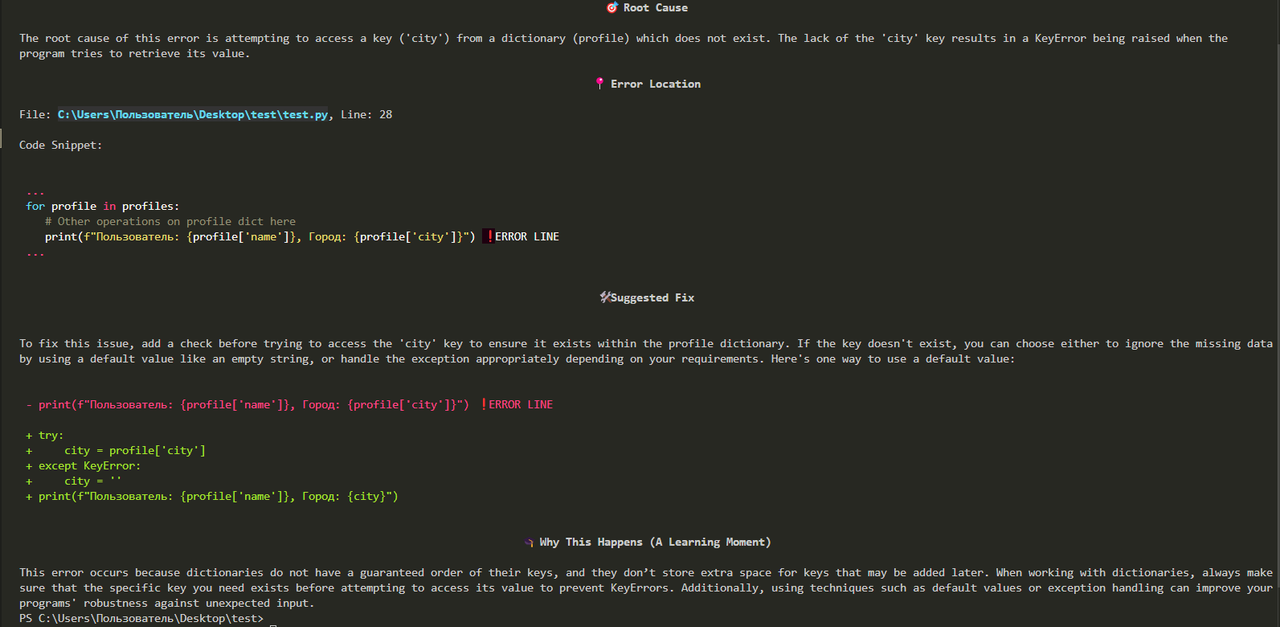
The library is multilingual, currently supporting English (default) and Russian.
📦 Features
- 🤖 AI-Powered Explanations: Uses language models from Gradio or OpenAI to explain errors.
- 📝 Structured Output: Provides a clear, markdown-formatted explanation with:
- 🎯 Root Cause: What caused the error.
- 📍 Error Location: Pinpoints the exact file and line.
- 🛠️ Suggested Fix: Offers a code diff for a potential solution.
- 🎓 A Learning Moment: Explains the underlying concepts to prevent future mistakes.
- 🎨 Rich Console Output: Uses the
richlibrary to print beautiful, colorized output in the terminal. - ⚡ Async Support: Provides asynchronous methods (
*_async) for non-blocking operations. - 💾 Caching: Caches explanations for identical tracebacks to speed up repeated runs and reduce API calls.
- 🌐 Multilingual: Supports explanations in English (
en) and Russian (ru).
💾 Installation
pip install error-narrator
📝 How to Use
1. 🔑 API Key Configuration
The library supports two providers: gradio (default) and openai.
- Gradio (Default & Free): This provider uses public, community-hosted models on Hugging Face Spaces. An API key (Hugging Face User Access Token) is optional for most public models but may be required for private models or to increase rate limits. You can get a token from your Hugging Face account settings.
- OpenAI (Higher Quality & Paid): This provider uses official OpenAI models. An API key from your OpenAI dashboard is mandatory.
💡 Tip: The library will automatically detect API keys set as environment variables:
HUGGINGFACE_API_KEYfor Gradio (optional).OPENAI_API_KEYfor OpenAI (required).
How to Set Environment Variables
You can set these variables for your current terminal session or add them to your shell's profile file (e.g., .bashrc, .zshrc, or your system's environment variable settings) for them to be permanent.
On macOS/Linux:
export HUGGINGFACE_API_KEY="your-key-here"
On Windows (Command Prompt):
set HUGGINGFACE_API_KEY="your-key-here"
On Windows (PowerShell):
$env:HUGGINGFACE_API_KEY="your-key-here"
2. ⚙️ Basic Usage
Here is a simple example of how to use ErrorNarrator. The library will automatically catch exceptions within a try...except block and explain them.
By default, the explanation will be in English.
import traceback
from error_narrator import ErrorNarrator

# The narrator will automatically look for the HUGGINGFACE_API_KEY environment variable
# if no api_key is provided.
narrator = ErrorNarrator()

try:
    # Some code that might raise an error
    result = 1 / 0
except Exception:
    # Get the traceback as a string
    traceback_str = traceback.format_exc()
    # Get the explanation and print it to the console
    narrator.explain_and_print(traceback_str)
3. 🌍 Getting Explanations in Russian
To get explanations in a different language, use the language parameter during initialization.
# ...
# Initialize with Russian language support
narrator = ErrorNarrator(language="ru")
# ...
4. 🏷️ Using a specific provider (e.g., OpenAI)
You can also specify a provider and pass the API key directly.
narrator = ErrorNarrator(
    provider="openai",
    api_key="your-openai-api-key"
)
# ...
5. 🔄 Gradio Provider: Model List and Rotation
By default, the gradio provider uses a predefined list of public models and tries them in a random order for each request. This rotation and retry system increases the chances of getting a successful response.
How to Provide Your Own Model List (Recommended)
The best way to customize the model list is to pass your own list directly during initialization using the models parameter. This gives you full control without editing any package files.
# Provide a custom list of models for rotation
my_favorite_models = [
    "hysts/mistral-7b",
    "Tblue/gemma-7b-it",
    "your-username/your-own-model"
]

narrator = ErrorNarrator(
    provider="gradio",
    models=my_favorite_models
)
How to Use a Single Specific Model
If you want to disable rotation and use only one model, you can use the model_id parameter as a convenient shortcut.
# This will ONLY use the specified model
narrator = ErrorNarrator(provider="gradio", model_id="hysts/mistral-7b")
How to Edit the Default Model List
If you want to change the default behavior for all your projects, you can edit the gradio_models.py file directly in your Python site-packages directory. This is generally not recommended unless you know what you are doing.
🤝 Development
Contributions are welcome! Please feel free to submit a pull request or open an issue.


Download files
Download the file for your platform. If you're not sure which to choose, learn more about installing packages.
Source Distribution
Built Distribution
Filter files by name, interpreter, ABI, and platform.
If you're not sure about the file name format, learn more about wheel file names.
Copy a direct link to the current filters
File details
Details for the file error_narrator-0.3.2.tar.gz.
File metadata
- Download URL: error_narrator-0.3.2.tar.gz
- Upload date:
- Size: 8.2 kB
- Tags: Source
- Uploaded using Trusted Publishing? No
- Uploaded via: twine/6.1.0 CPython/3.12.4
File hashes
| Algorithm | Hash digest | |
|---|---|---|
| SHA256 |
1b105011dbf893ddc3a8490dc90ea4a89ccbed58bdd51fbf8f569304e5dbf6e0
|
|
| MD5 |
32160d78c01e323f29d6c465d32123fd
|
|
| BLAKE2b-256 |
33e2d46b8bdaa3780a23fb0028ed321022e44eab2caf08be69aaba0b9c5a632a
|
File details
Details for the file error_narrator-0.3.2-py3-none-any.whl.
File metadata
- Download URL: error_narrator-0.3.2-py3-none-any.whl
- Upload date:
- Size: 9.4 kB
- Tags: Python 3
- Uploaded using Trusted Publishing? No
- Uploaded via: twine/6.1.0 CPython/3.12.4
File hashes
| Algorithm | Hash digest | |
|---|---|---|
| SHA256 |
3dad529b546fe3efab50f4fefd1a7e34aaf98759b8d5ffd5963df4f38c7c5493
|
|
| MD5 |
574d6b75219ca3fdf3a8d99105e7670b
|
|
| BLAKE2b-256 |
c69fe48eea7325ff3a613183bc46e8105d9a0d2dba8698ea1cabc03fe60cc166
|






