


What is esc?
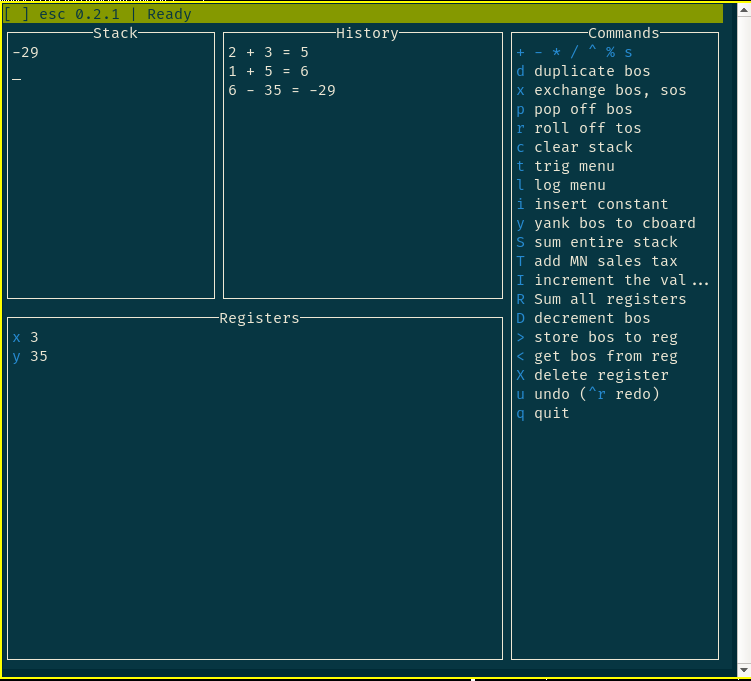
esc (pronounced /esk/) is an Extensible Stack-based Calculator designed for efficiency and customizability. What does this mean?
-
esc is stack-based, operating using a Reverse Polish Notation-like syntax. Rather than typing
2 + 2and pressing an equals key, you enter the two numbers2and2onto the stack, then choose+to add them. This can be slightly awkward at first, but it means no parentheses are necessary, and for most people it becomes faster and more elegant than the standard algebraic method with a small amount of practice. In addition, it is considerably easier to customize and program. -
esc is extensible. If you frequently need to multiply two numbers together, add five, and then divide the result by pi, you can add an operation to the calculator to do this specific operation using a couple of lines of Python code. The extension features are simple enough to be accessible even to people who do not know Python or have little to no programming experience.
esc operations are arbitrary Python code, so if you want to get fancy, they can get arbitrarily complicated. You can even call APIs to perform calculations or get data!
-
esc is fast, simple, and terminal-based. All you need is a working terminal (at least 80×24) and your keyboard.
Installation
esc requires Python 3.10 or greater.
It is lightweight and has no dependencies outside the standard library
(except on Windows, where ncurses isn't available by default
and the windows-curses package is transparently installed to fix that).
The recommended installation method is through pip:
$ pip install --user esc-calc
This will install an esc command to your system path which will launch esc.
After installing esc, you may wish to install plugins
(see the "Plugins" section in the user guide).
Official plugins can be downloaded
from the esc-plugins folder of this repository.
Development
For development, clone this repository and use uv:
$ git clone https://github.com/sobjornstad/esc
$ cd esc
$ uv sync --group dev --group test --group docs
$ uv run esc
Documentation
The user manual and API documentation on writing plugins for esc are maintained on Read The Docs.
AI
I use AI agents to develop and maintain esc, but I maintain a working understanding of and responsibility for the codebase. (At this time, most of the codebase was developed before AI agents existed, so AI contributions are fairly minimal and mostly limited to the new features in esc 1.1.0.)
Contributing
Bug reports, suggestions, and code contributions are welcome.
In particular,
if you write a plugin that might be useful to someone else,
please consider submitting it for inclusion
in the official esc-plugins directory.
1 maintainer

Metadata
1 maintainer
Release files for esc-calc 1.1.0
For a detailed explanation of source distributions (sdists) and built distributions (wheels), please see the package formats documentation.
Source distribution (sdist)
| File | Size | Uploaded | |
|---|---|---|---|
| esc_calc-1.1.0.tar.gz | 254.7 kB | Details |
Built distribution (wheel)
| File | Interpreter | ABI | Platform | Reset |
|---|---|---|---|---|
| esc_calc-1.1.0-py3-none-any.whl | Python 3 | none | any | Details |
Total release size: 323.8 kB
Release files / esc_calc-1.1.0.tar.gz
| Download URL | esc_calc-1.1.0.tar.gz |
|---|---|
| Size | 254.7 kB |
| Tags | Source |
|
SHA-256 checksum How to use checksums |
5db19fae8f1f30e152aa2bfd55b4c1d54b868c6ba882aafc3bdd35f7af6949a0
|
|
BLAKE2b-256 checksum How to use checksums |
c4f8c41ff9b7f6a21fd8981778ff764f70e216d4294d6328a2880a5d2029beb7
|
| Upload date | |
|
Uploaded using Trusted Publishing? What is trusted publishing? |
No |
| Uploaded via |
uv/0.10.10 {"installer":{"name":"uv","version":"0.10.10","subcommand":["publish"]},"python":null,"implementation":{"name":null,"version":null},"distro":{"name":"Manjaro Linux","version":null,"id":null,"libc":null},"system":{"name":null,"release":null},"cpu":null,"openssl_version":null,"setuptools_version":null,"rustc_version":null,"ci":null}
|
Release files / esc_calc-1.1.0-py3-none-any.whl
| Download URL | esc_calc-1.1.0-py3-none-any.whl |
|---|---|
| Size | 69.1 kB |
| Tags | Python 3 |
|
SHA-256 checksum How to use checksums |
2bce2f6a5c64ba7d97e0df8a4a709370e67ee76aebe492147b379b61ec094b2c
|
|
BLAKE2b-256 checksum How to use checksums |
00c93d24df3c5174e914159c899b39c8b0182af879233cbfe259e5ac46e5eea5
|
| Upload date | |
|
Uploaded using Trusted Publishing? What is trusted publishing? |
No |
| Uploaded via |
uv/0.10.10 {"installer":{"name":"uv","version":"0.10.10","subcommand":["publish"]},"python":null,"implementation":{"name":null,"version":null},"distro":{"name":"Manjaro Linux","version":null,"id":null,"libc":null},"system":{"name":null,"release":null},"cpu":null,"openssl_version":null,"setuptools_version":null,"rustc_version":null,"ci":null}
|














