
Evolutionary Spectrogram Optimisation : optimise the selection and size of frequency bands of spectrograms to maximise deep learning classification accuracy while minimising the model's size using genetic algorithms

Project description

ESO: Evolutionary Spectrogram Optimisation 🧬🔊



The Challenge 🤔
Traditional bioacoustic monitoring with Convolutional Neural Networks (CNNs) often requires:
- Large, complex models.
- Computationally expensive preprocessing (like filtering and downsampling).
- This makes real-time analysis on low-resource edge devices difficult. 🐢⏳
Our Solution: ESO ✨
ESO (Evolutionary Spectrogram Optimisation) tackles this by using a Genetic Algorithm (GA) to intelligently select the most informative frequency bands directly from the original spectrogram.
Instead of processing the entire spectrogram, ESO:
- 🧬 Encodes horizontal spectrogram bands (defined by position
Pₜand heighth) as "genes". - 📜 Combines genes into "chromosomes", representing a specific selection of bands.
- 💪 Evolves a population of chromosomes using selection, crossover, and mutation.
- 📈 Optimizes for a fitness function balancing classification performance (F1-score) and model simplicity (trainable parameters).
- 📉 Outputs the best chromosome, which defines narrow bands to be extracted and stacked, creating a highly compressed input for a much simpler CNN.
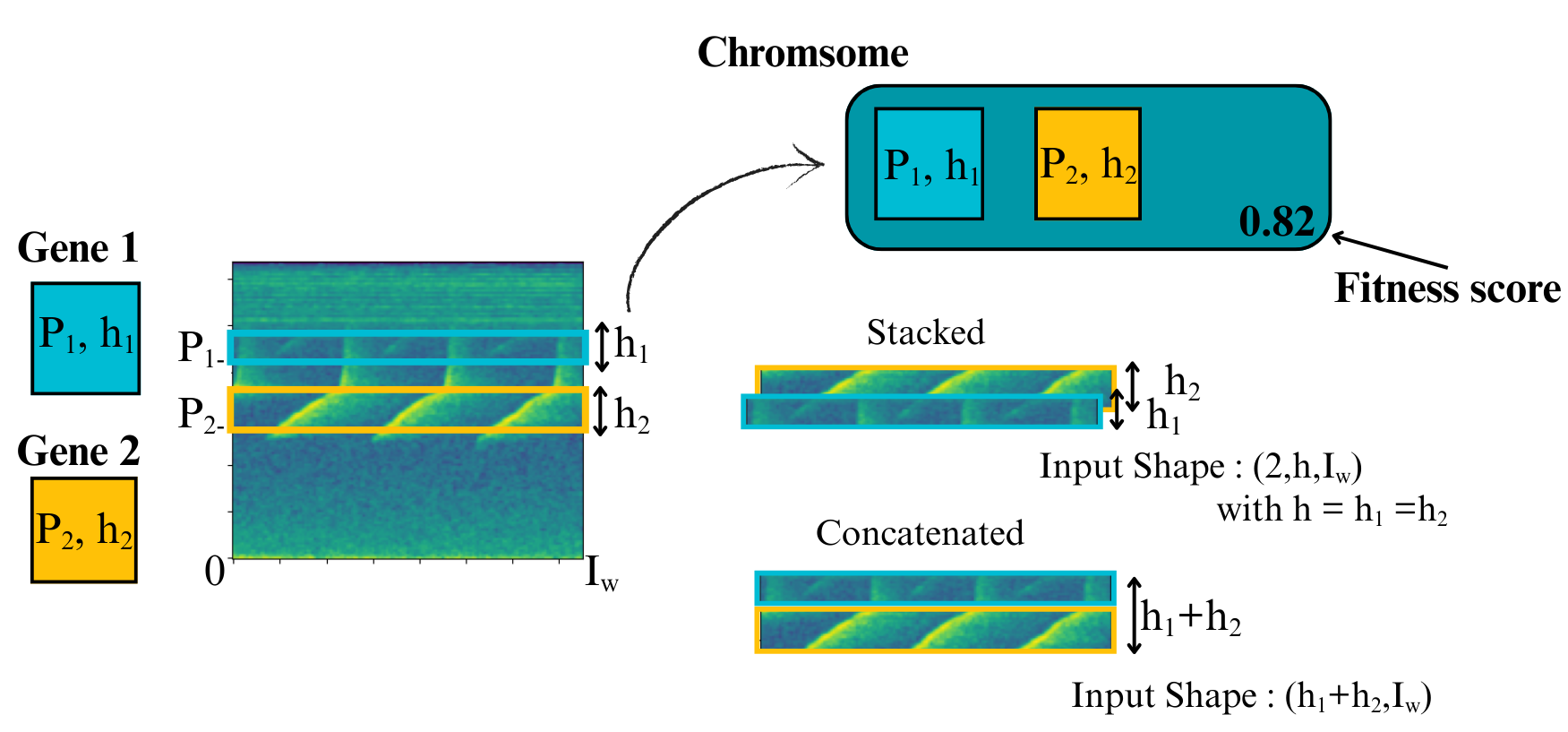
Concept from Figure 1: Genes define bands, chromosomes collect genes, bands are stacked for the CNN.
Key Benefits & Features 🚀
- ✅ Drastically Reduced Model Size: ~91% fewer trainable parameters compared to the baseline.
- ✅ Faster Inference: ~70% reduction in processing time for raw audio.
- ✅ Efficient: Minimizes need for heavy preprocessing like downsampling.
- ✅ Effective: Achieves comparable performance with only a minor (~4%) trade-off in F1-score.
- 🐍 Usable as a Python package.
- 🖥️ Includes an easy-to-use Graphical User Interface (GUI).
- 📊 TensorBoard integration for monitoring training progress.
Example Applications 🔍
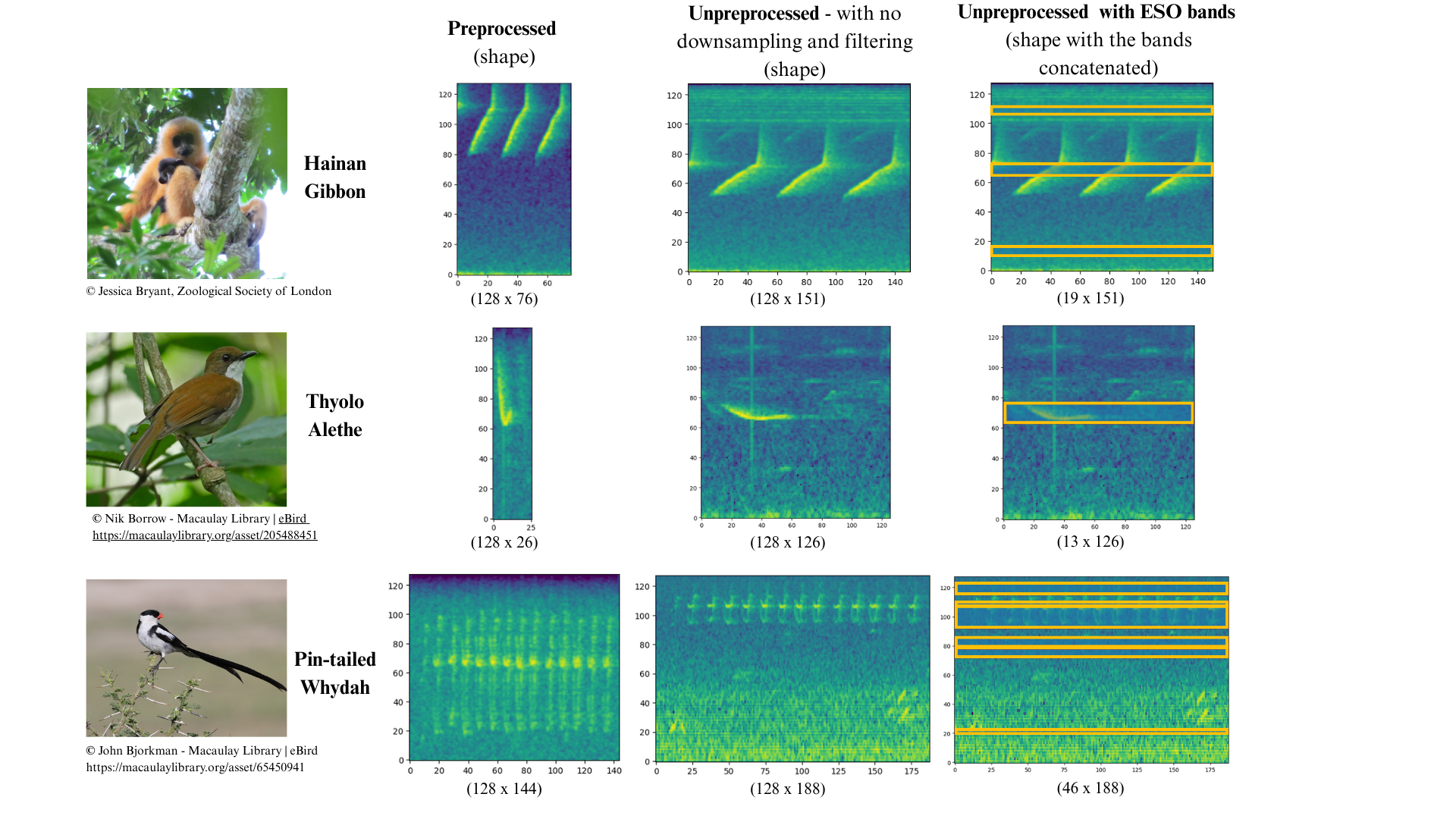
Getting Started 🛠️
⚠️ Warning: ESO requires Python < 3.13. Please use Python 3.12 or earlier.
<<<<<<< HEAD
Data Structure
Organize your data in a folder named Data, containing the acoustic recordings in a subfolder Audio and the corresponding annotations in a subfolder Annotations.
Each annotation file must have the same name as its associated audio file.
Data/
├── Audio/
│     ├──HGSM3AB_0+1_20160303_060100
│     ├──HGSM3AB_0+1_20160304_060000
│     ├──HGSM3AB_0+1_20160305_055900
│     └── ...
└── Annotations/
      ├──HGSM3AB_0+1_20160303_060100
      ├──HGSM3AB_0+1_20160304_060000
      ├──HGSM3AB_0+1_20160305_055900
      └── ...
Install Eso from the github
8405179310318c6c8065cb85c9b7a7aabb2575c5
-
Clone the repository
git clone https://github.com/ufuk-cakir/ESO.git
cd ESO
-
Set up a virtual environment (recommended)
# On Linux/macOS
python3.12 -m venv myenv
source venv/bin/activate
# On Windows : make sure your venv uses the correct Python version executable (3.12).
python -m venv myenv
venv\Scripts\activate
Or with conda
conda create --name myenv python==3.12 pip
conda activate myenv
-
Install PyTorch based on your system configuration
(see PyTorch to choose the correct version for your machine)pip install torch --index-url https://download.pytorch.org/whl/cu126
-
Install other dependencies
pip install -r requirements.txt
Install Eso from pip
-
Set up a virtual environment (recommended)
python -m venv myenv
# On Linux/macOS
source venv/bin/activate
# On Windows
venv\Scripts\activate
Or with conda
conda create --name myenv python==3.12 pip
conda activate myenv
-
Install PyTorch based on your system configuration
(see PyTorch to choose the correct version for your machine)pip install torch --index-url https://download.pytorch.org/whl/cu126
-
Install ESO with pip
pip install eso
Running ESO 🏃
-
Using the GUI:
python path/to/your/repository/eso_app.py
The GUI provides options to select data, configure hyperparameters, run ESO, and monitor progress (including TensorBoard).
-
As a Python Package: Import the necessary modules from the
esopackage in your Python scripts. (Refer to the documentation or example scripts within the repository for specific usage details).
Citation ✍️
If you use ESO in your research or work, please cite our paper:
@inproceedings{cakir2024eso,
  title={{ESO: Evolutionary Spectrogram Optimisation for Passive Acoustic Monitoring}},
  author={Ufuk {\c{C}}ak{\i}r and Lor{\`e}ne Jeantet and Joel Lontsi and Emmanuel Dufourq},
  booktitle={ICLR 2024 Machine Learning for Remote Sensing (ML4RS) Workshop},
  year={2024},
  url={https://ml-for-rs.github.io/iclr2024/camera_ready/papers/51.pdf}
}
Release history Release notifications | RSS feed


Download files
Download the file for your platform. If you're not sure which to choose, learn more about installing packages.
Source Distribution
Built Distribution
Filter files by name, interpreter, ABI, and platform.
If you're not sure about the file name format, learn more about wheel file names.
Copy a direct link to the current filters
File details
Details for the file eso-0.1.0.dev68.tar.gz.
File metadata
- Download URL: eso-0.1.0.dev68.tar.gz
- Upload date:
- Size: 1.7 MB
- Tags: Source
- Uploaded using Trusted Publishing? No
- Uploaded via: twine/6.2.0 CPython/3.12.0
File hashes
| Algorithm | Hash digest | |
|---|---|---|
| SHA256 |
d5981c7c22989e850aaef23a23e60b86733c9fa7f9d49baea7db7dd691828f4d
|
|
| MD5 |
26f171c26fc78d028aa61a71a8d5ac79
|
|
| BLAKE2b-256 |
84348364ff2175843d5bc72613026375cfc92d38c5087c748223ffb24731b322
|
File details
Details for the file eso-0.1.0.dev68-py3-none-any.whl.
File metadata
- Download URL: eso-0.1.0.dev68-py3-none-any.whl
- Upload date:
- Size: 56.7 kB
- Tags: Python 3
- Uploaded using Trusted Publishing? No
- Uploaded via: twine/6.2.0 CPython/3.12.0
File hashes
| Algorithm | Hash digest | |
|---|---|---|
| SHA256 |
bdc76b217a4272f74dddafe2be638c34e3d7517e33ef4fe000bca89bce83c279
|
|
| MD5 |
2d0664f6a0ef128f5df53a6f11cef8f9
|
|
| BLAKE2b-256 |
7c06ee28daa15ef3808c3de8670018870b9e19cd6d13b9b3e0fd1d233e6906b9
|






