
ESPnet Model Zoo








Utilities managing the pretrained models created by ESPnet. This function is inspired by the Asteroid pretrained model function.
- From version 0.1.0, the huggingface models can be also used: https://huggingface.co/models?filter=espnet
- Zenodo community: https://zenodo.org/communities/espnet/
- Registered models: table.csv
Install
pip install torch
pip install espnet_model_zoo
Python API for inference
model_name in the following section should be huggingface_id or one of the tags in the table.csv.
Or you can directly provide zenodo URL (e.g., https://zenodo.org/record/xxxxxxx/files/hogehoge.zip?download=1).
ASR
import soundfile
from espnet2.bin.asr_inference import Speech2Text
speech2text = Speech2Text.from_pretrained(
    "model_name",
    # Decoding parameters are not included in the model file
    maxlenratio=0.0,
    minlenratio=0.0,
    beam_size=20,
    ctc_weight=0.3,
    lm_weight=0.5,
    penalty=0.0,
    nbest=1
)
# Confirm the sampling rate is equal to that of the training corpus.
# If not, you need to resample the audio data before inputting to speech2text
speech, rate = soundfile.read("speech.wav")
nbests = speech2text(speech)

text, *_ = nbests[0]
print(text)
TTS
import soundfile
from espnet2.bin.tts_inference import Text2Speech
text2speech = Text2Speech.from_pretrained("model_name")
speech = text2speech("foobar")["wav"]
soundfile.write("out.wav", speech.numpy(), text2speech.fs, "PCM_16")
Speech separation
import soundfile
from espnet2.bin.enh_inference import SeparateSpeech
separate_speech = SeparateSpeech.from_pretrained(
    "model_name",
    # for segment-wise process on long speech
    segment_size=2.4,
    hop_size=0.8,
    normalize_segment_scale=False,
    show_progressbar=True,
    ref_channel=None,
    normalize_output_wav=True,
)
# Confirm the sampling rate is equal to that of the training corpus.
# If not, you need to resample the audio data before inputting to speech2text
speech, rate = soundfile.read("long_speech.wav")
waves = separate_speech(speech[None, ...], fs=rate)
This API allows processing both short audio samples and long audio samples. For long audio samples, you can set the value of arguments segment_size, hop_size (optionally normalize_segment_scale and show_progressbar) to perform segment-wise speech enhancement/separation on the input speech. Note that the segment-wise processing is disabled by default.
For old ESPnet (<=10.1)
ASR
import soundfile
from espnet_model_zoo.downloader import ModelDownloader
from espnet2.bin.asr_inference import Speech2Text
d = ModelDownloader()
speech2text = Speech2Text(
    **d.download_and_unpack("model_name"),
    # Decoding parameters are not included in the model file
    maxlenratio=0.0,
    minlenratio=0.0,
    beam_size=20,
    ctc_weight=0.3,
    lm_weight=0.5,
    penalty=0.0,
    nbest=1
)
TTS
import soundfile
from espnet_model_zoo.downloader import ModelDownloader
from espnet2.bin.tts_inference import Text2Speech
d = ModelDownloader()
text2speech = Text2Speech(**d.download_and_unpack("model_name"))
Speech separation
import soundfile
from espnet_model_zoo.downloader import ModelDownloader
from espnet2.bin.enh_inference import SeparateSpeech
d = ModelDownloader()
separate_speech = SeparateSpeech(
    **d.download_and_unpack("model_name"),
    # for segment-wise process on long speech
    segment_size=2.4,
    hop_size=0.8,
    normalize_segment_scale=False,
    show_progressbar=True,
    ref_channel=None,
    normalize_output_wav=True,
)
Instruction for ModelDownloader
from espnet_model_zoo.downloader import ModelDownloader
d = ModelDownloader("~/.cache/espnet")  # Specify cachedir
d = ModelDownloader()  # ~/.cache/espnet_model_zoo by default; Hugging Face models go to the huggingface_hub cache
To obtain a model, you need to give a huggingface_idmodel` or a tag , which is listed in table.csv.
>>> d.download_and_unpack("kamo-naoyuki/mini_an4_asr_train_raw_bpe_valid.acc.best")
{"asr_train_config": <config path>, "asr_model_file": <model path>, ...}
You can specify the revision if it's huggingface_id giving with @:
>>> d.download_and_unpack("kamo-naoyuki/mini_an4_asr_train_raw_bpe_valid.acc.best@<revision>")
{"asr_train_config": <config path>, "asr_model_file": <model path>, ...}
Note that if the model already exists, you can skip downloading and unpacking.
You can also get a model with certain conditions.
d.download_and_unpack(task="asr", corpus="wsj")
If multiple models are found with the condition, the last model is selected. You can also specify the condition using "version" option.
d.download_and_unpack(task="asr", corpus="wsj", version=-1)  # Get the last model
d.download_and_unpack(task="asr", corpus="wsj", version=-2)  # Get previous model
You can also obtain it from the URL directly.
d.download_and_unpack("https://zenodo.org/record/...")
If you need to use a local model file using this API, you can also give it.
d.download_and_unpack("./some/where/model.zip")
In this case, the contents are also expanded in the cache directory, but the model is identified by the file path, so if you move the model to somewhere and unpack again, it's treated as another model, thus the contents are expanded again at another place.
Query model names
You can view the model names from our Zenodo community, https://zenodo.org/communities/espnet/,
or using query(). All information are written in table.csv.
d.query("name")
You can also show them with specifying certain conditions.
d.query("name", task="asr")
Command line tools
-
espnet_model_zoo_query# Query model name espnet_model_zoo_query task=asr corpus=wsj # Show all model name espnet_model_zoo_query # Query the other key espnet_model_zoo_query --key url task=asr corpus=wsj
-
espnet_model_zoo_downloadespnet_model_zoo_download <model_name> # Print the path of the downloaded file espnet_model_zoo_download --unpack true <model_name> # Print the path of unpacked files
-
espnet_model_zoo_uploadexport ACCESS_TOKEN=<access_token> espnet_zenodo_upload \ --file <packed_model> \ --title <title> \ --description <description> \ --creator_name <your-git-account>
Use pretrained model in ESPnet recipe
# e.g. ASR WSJ task
git clone https://github.com/espnet/espnet
pip install -e .
cd egs2/wsj/asr1
./run.sh --skip_data_prep false --skip_train true --download_model kamo-naoyuki/wsj
Register your model
Huggingface
-
Upload your model using huggingface API
- (if you do not have an HF hub account) Go to https://huggingface.co and create an HF account by clicking a
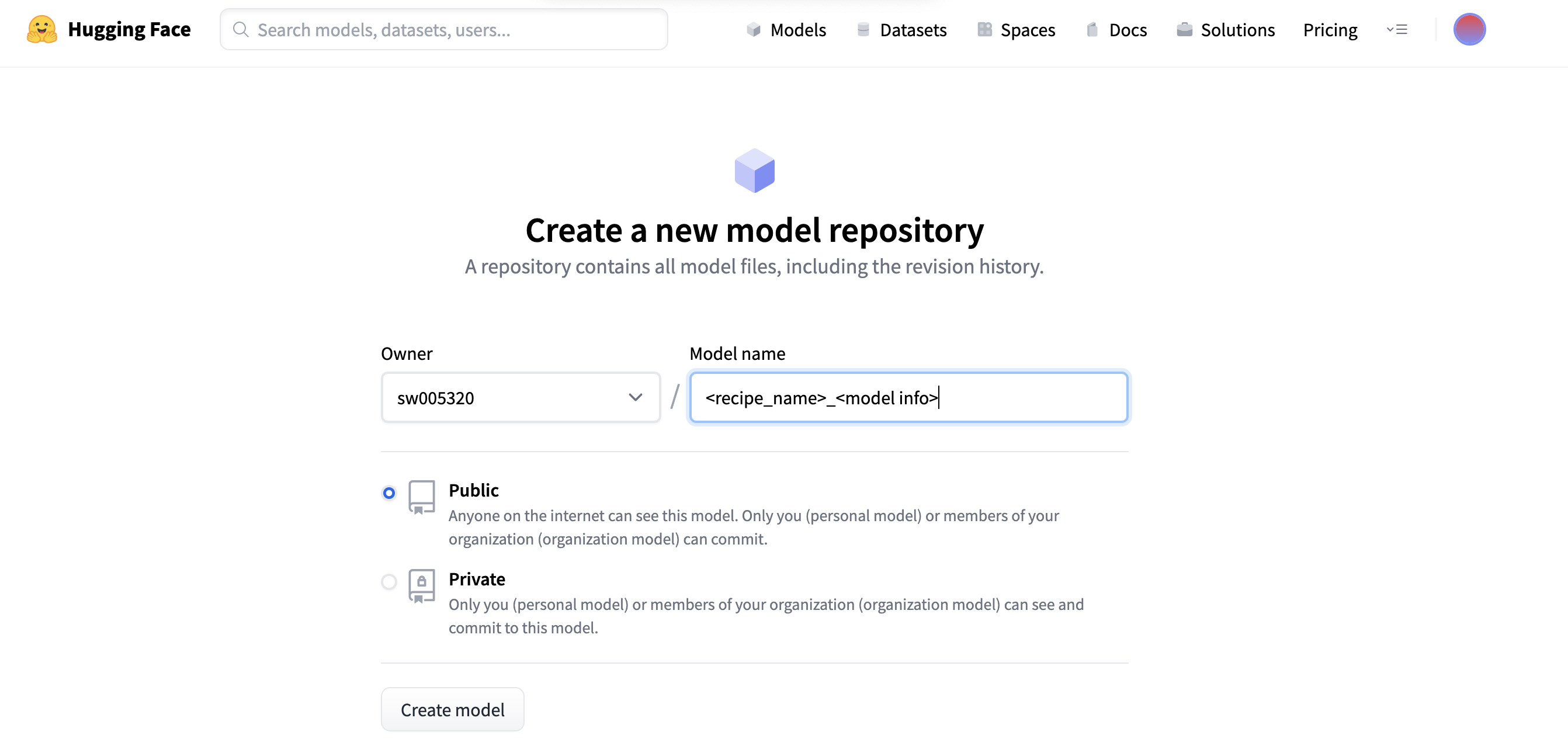
sign upbutton below. - From a new model link in the profile, create a new model repository. Please include a recipe name (e.g., aidatatang_200zh) and model info (e.g., conformer) in the repository name
- In the espnet recipe, execute the following command:
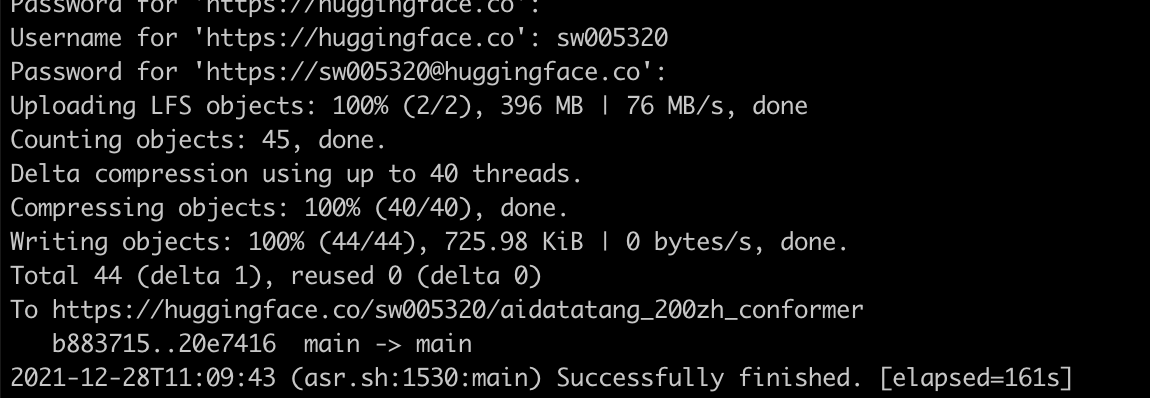
./run.sh --stage 15 --skip_upload_hf false --hf_repo sw005320/aidatatang_200zh_conformer- Please follow the instruction (e.g., type the HF Username/Password)
- If it works successfully, you can get the following messages
- (if you do not have an HF hub account) Go to https://huggingface.co and create an HF account by clicking a
-
Create a Pull Request to modify table.csv
The model can be registered in table.csv. Then, the model will be tested in the CI. Note that, unlike the zenodo case, you don't need to add the URL because huggingface_id itself can specify the model file, so please fill the value as
https://huggingface.co/.e.g.
table.csv... aidatatang_200zh,asr,sw005320/aidatatang_200zh_conformer,https://huggingface.co/,16000,zh,,,,,true -
(Administrator does) Increment the third version number of setup.py, e.g. 0.0.3 -> 0.0.4
-
(Administrator does) Release new version

Zenodo (Obsolete)
-
Upload your model to Zenodo
You need to signup to Zenodo and create an access token to upload models. You can upload your own model by using
espnet_model_zoo_uploadcommand freely, but we normally upload a model using recipes. -
Create a Pull Request to modify table.csv
You need to append your record at the last line.
-
(Administrator does) Increment the third version number of setup.py, e.g. 0.0.3 -> 0.0.4
-
(Administrator does) Release new version
3 maintainers


Release files for espnet-model-zoo 0.1.8
For a detailed explanation of source distributions (sdists) and built distributions (wheels), please see the package formats documentation.
Source distribution (sdist)
| File | Size | Uploaded | |
|---|---|---|---|
| espnet_model_zoo-0.1.8.tar.gz | 25.3 kB | Details |
Built distribution (wheel)
| File | Interpreter | ABI | Platform | Reset |
|---|---|---|---|---|
| espnet_model_zoo-0.1.8-py3-none-any.whl | Python 3 | none | any | Details |
Total release size: 46.5 kB
Release files / espnet_model_zoo-0.1.8.tar.gz
| Download URL | espnet_model_zoo-0.1.8.tar.gz |
|---|---|
| Size | 25.3 kB |
| Tags | Source |
|
SHA-256 checksum How to use checksums |
690eec96004f2947c0cab67d4ba207915866baa8cf9f2040f47fc647c594283f
|
|
BLAKE2b-256 checksum How to use checksums |
e044f7f07547030d00f69f4a2ec16788c1a8237389f425d5fd96005c779a85b8
|
| Upload date | |
|
Uploaded using Trusted Publishing? What is trusted publishing? |
Yes |
| Uploaded via |
twine/7.0.0 CPython/3.13.14
|
Provenance
Provenance describes where a file came from. On PyPI, provenance is shared via attestations, which provide a verifiable record of the build or publishing details. View details, limitations and caveats.


PyPI Publish Attestation
PyPI verified that this artifact, at this checksum, originated from the publisher listed below.
Signed by GitHub Actions, verified by PyPI on Sep 17, 2026.
Transparency logRelease files / espnet_model_zoo-0.1.8-py3-none-any.whl
| Download URL | espnet_model_zoo-0.1.8-py3-none-any.whl |
|---|---|
| Size | 21.2 kB |
| Tags | Python 3 |
|
SHA-256 checksum How to use checksums |
a6fc999d7c980d2f1b8c023fd1c9486e75e5a3d40748070d8961b5b60381f47c
|
|
BLAKE2b-256 checksum How to use checksums |
4c476a3ce1010553bb89da25df0350a2302c863e56f711ec1cfce86037049699
|
| Upload date | |
|
Uploaded using Trusted Publishing? What is trusted publishing? |
Yes |
| Uploaded via |
twine/7.0.0 CPython/3.13.14
|
Provenance
Provenance describes where a file came from. On PyPI, provenance is shared via attestations, which provide a verifiable record of the build or publishing details. View details, limitations and caveats.
PyPI Publish Attestation
PyPI verified that this artifact, at this checksum, originated from the publisher listed below.
Signed by GitHub Actions, verified by PyPI on Sep 17, 2026.
Transparency log













