
A package for Estim audio playback and visualization

Project description
EstimPy
EstimPy is a Python library that generates visualizations of Estim audio files.
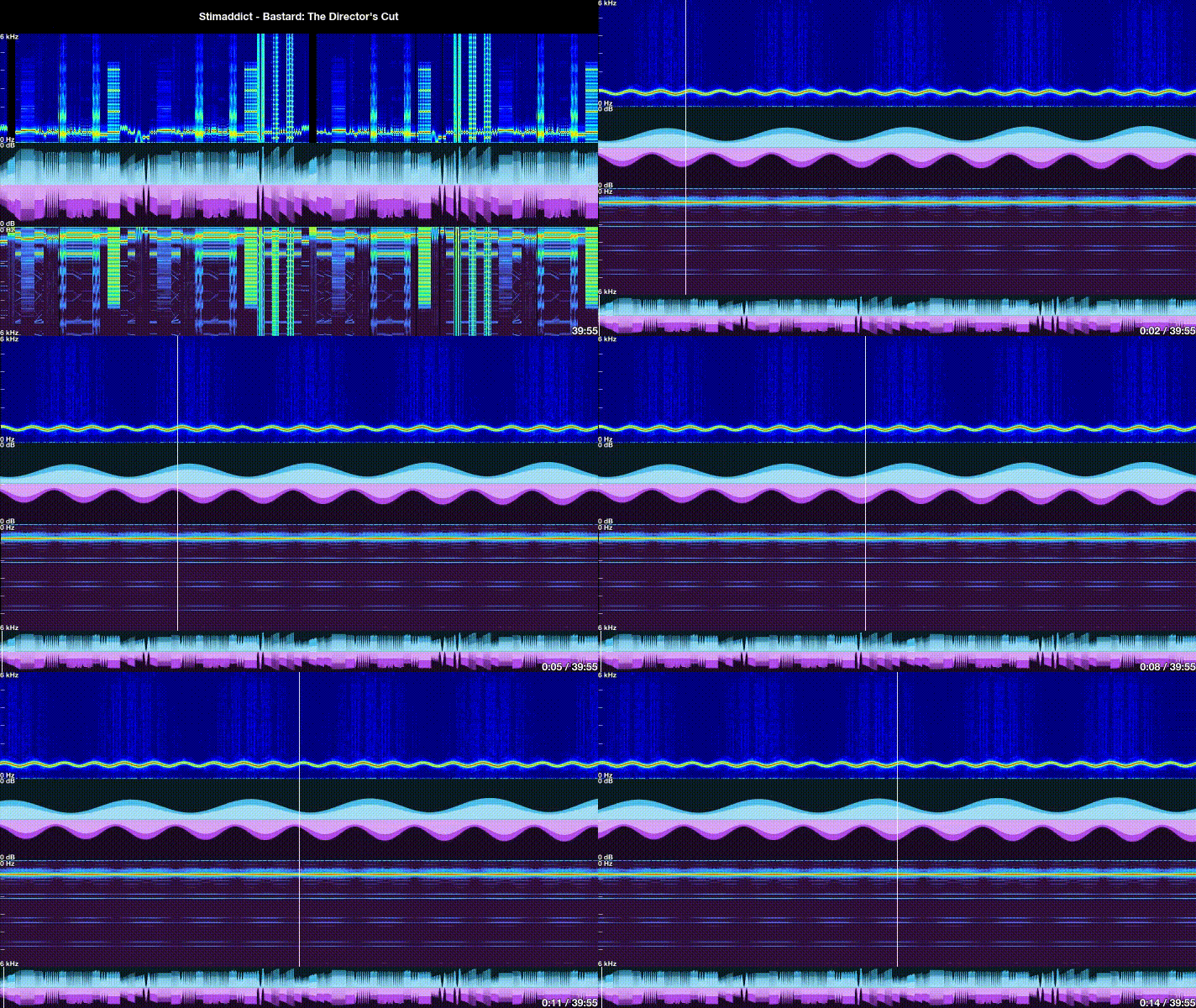
Table of Contents
- Visualization library
- Motivation
- Features
- Disclaimer
- Getting started
- Installation
- Usage
- Configuration
Visualization library
Click here to access a library of pre-rendered high-resolution (8k 60fps) visualizations of some popular Estim audio files.
Motivation
Estim is a hobby which uses specialized signal generators to produce powerful sensations which can be pleasurable or painful depending on the intensity and characteristics of the stimulation signal delivered. The perception of these signals varies widely across individuals, so many hobbyists have to experiment with a range of devices, patterns, and intensities of stimulation to match their preferences.
Many commercial Estim units support custom stimulation signals using audio input in addition to an included small library of simple stimulation patterns. Over time, the Estim enthusiast community has created a large repository of custom sessions distributed as basic audio files. While this format is convenient because it is non-proprietary and easy to use, it does not provide an easy mechanism to understand the nuances of a session.
EstimPy helps users understand the flow, intensity, and texture of Estim audio sessions by generating intuitive visualizations from the audio data.
Features
- Visualization analyses: Visualizations are generated for each channel of audio data
- Amplitude Envelopes: Generates peak and RMS amplitude envelopes, showing how intensity changes over time
- Spectrogram: Visualizes the frequency content of the audio, showing how texture changes over time
- Image visualization: Generates a single-image visualization of a full audio file
- Image file export: Image visualization can be saved to an image file
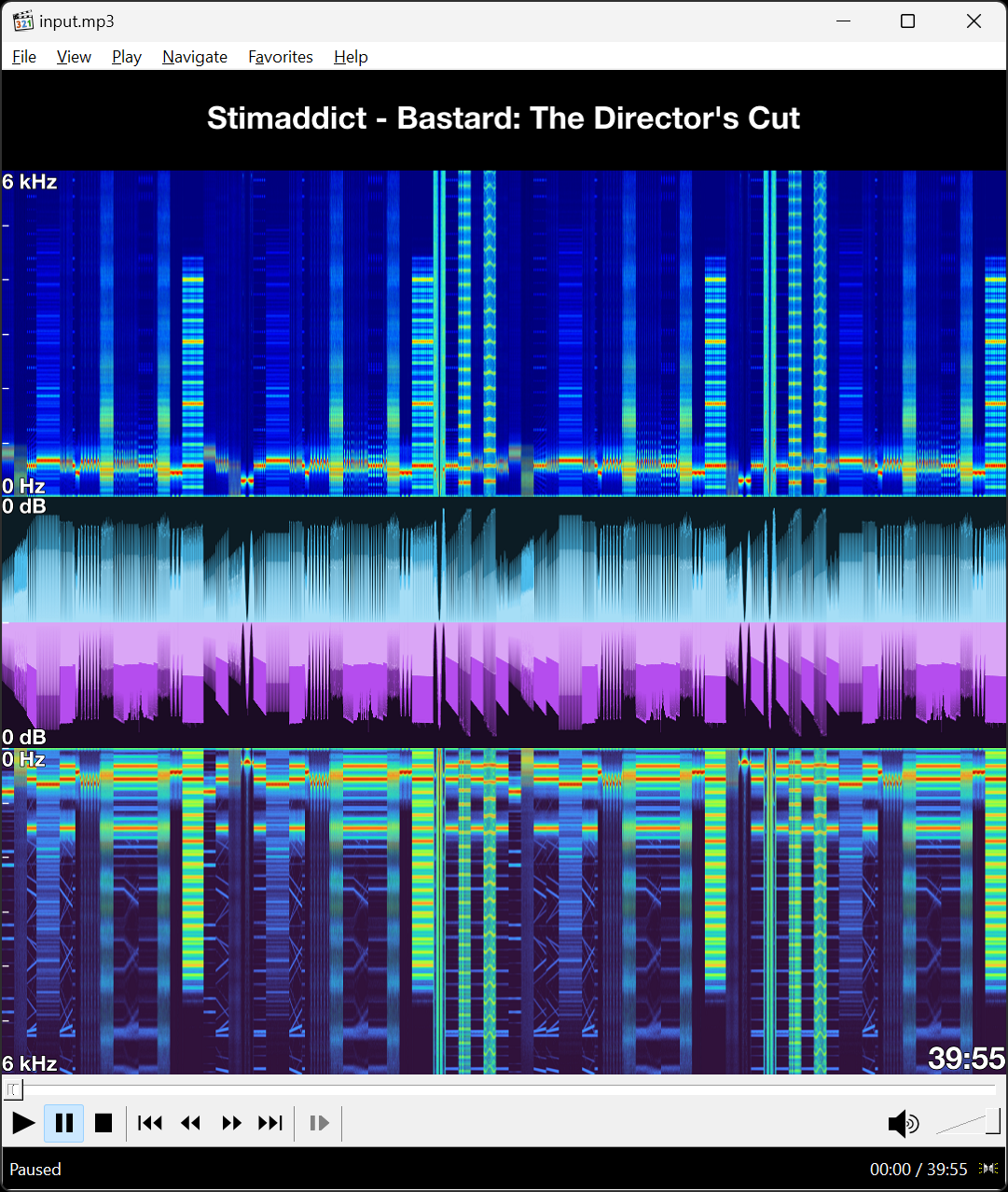
- Album art embedding: Image visualization can be directly embedded in the metadata of the audio file
- During playback, album art is often rendered at the same width as the time position slider. Using the image visualization as album art, the file can be easily navigated and upcoming changes in the session can be anticipated.
- Interactive display: Image visualization can be rendered on an interactive plot to allow detailed inspection of the audio file
- Animated visualization: Generates an animated sliding visualization of the audio file
- Video file export: Animated visualization can be saved to a video file
- Interactive player: Animated visualization used within experimental audio file player
- Audio player: Plays Estim audio files for use with stereostim devices (HIGHLY EXPERIMENTAL!)
- Real-time visualization: Based on the animated visualization
- Separate channel output control: Allows signal gain of each channel to be independently controlled
- Smooth intensity transitions: Ensures that any changes in playback will transition smoothly to avoid sudden changes in output intensity
- This only affects changes in playback caused by interacting with the player (i.e. start, unpause, relocate time position, amplitude adjustment)
- This will NOT alter sudden changes which are encoded directly in the audio data
- Playlists: Multiple files can be queued to play sequentially
- Highly configurable: Nearly all parameters related to the rendering and export of visualizations are determined from an easily customizable configuration file
Disclaimer
EstimPy is provided on an experimental basis, and it should not be assumed to be safe or fully functional. Estim (electrical stimulation) can be dangerous if proper safety precautions are not followed or if unreliable equipment is used. This package is offered strictly for experimental and research purposes. The creators of this package assume no responsibility for any adverse effects, injury, or harm that may result from the use of EstimPy or any Estim-related activities.
Visualization examples
Default layout and behavior
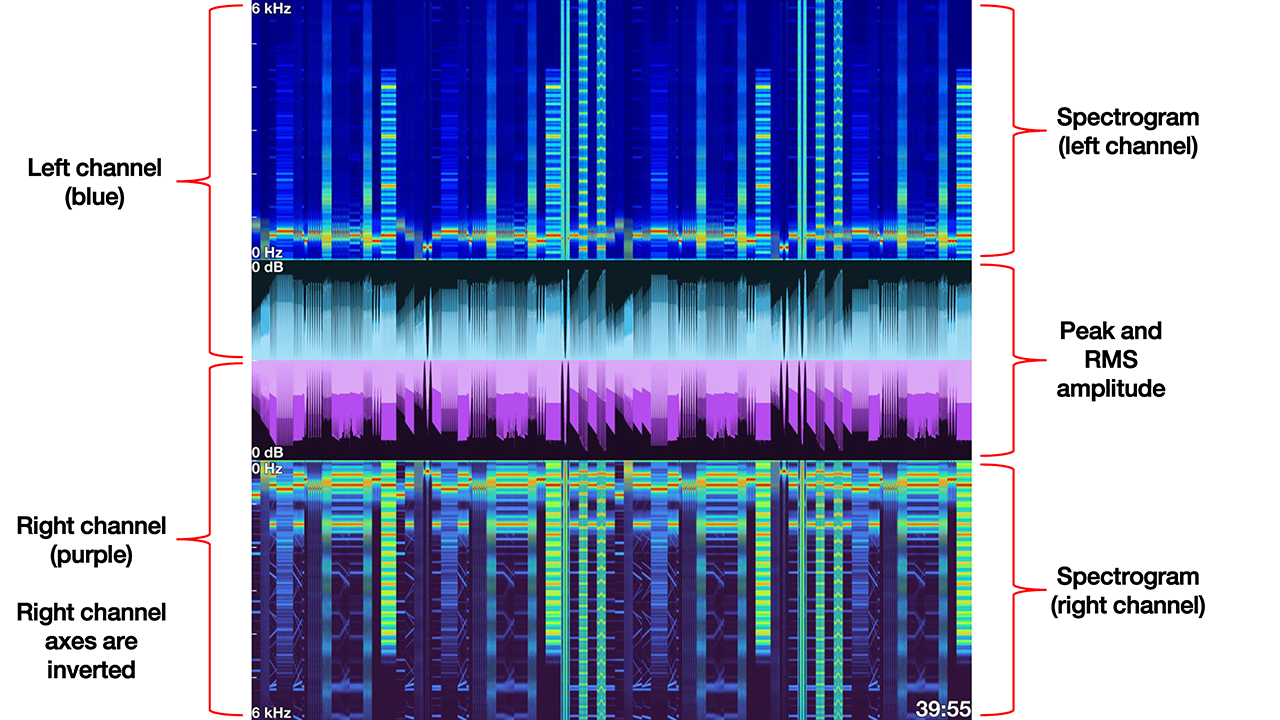
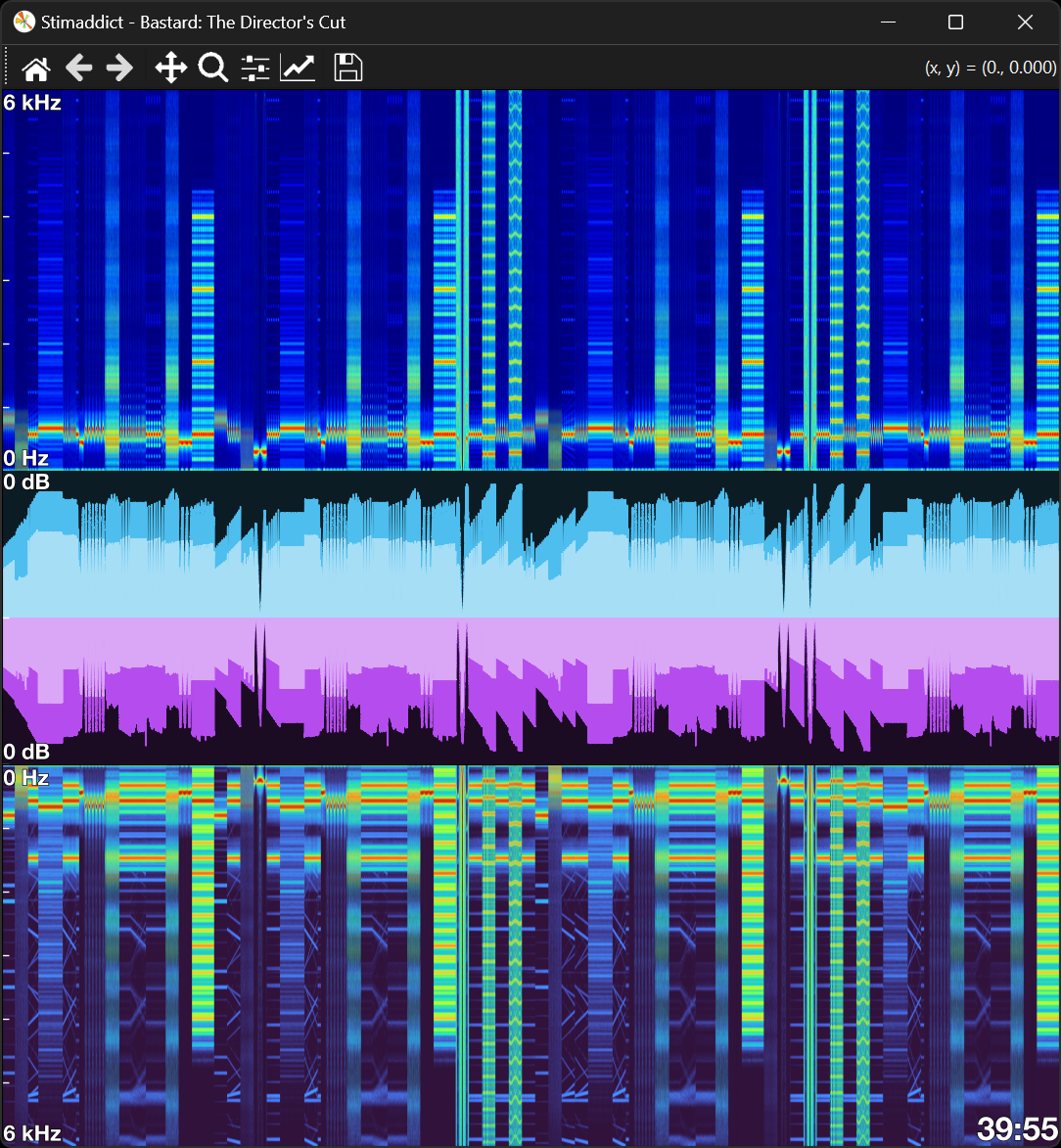
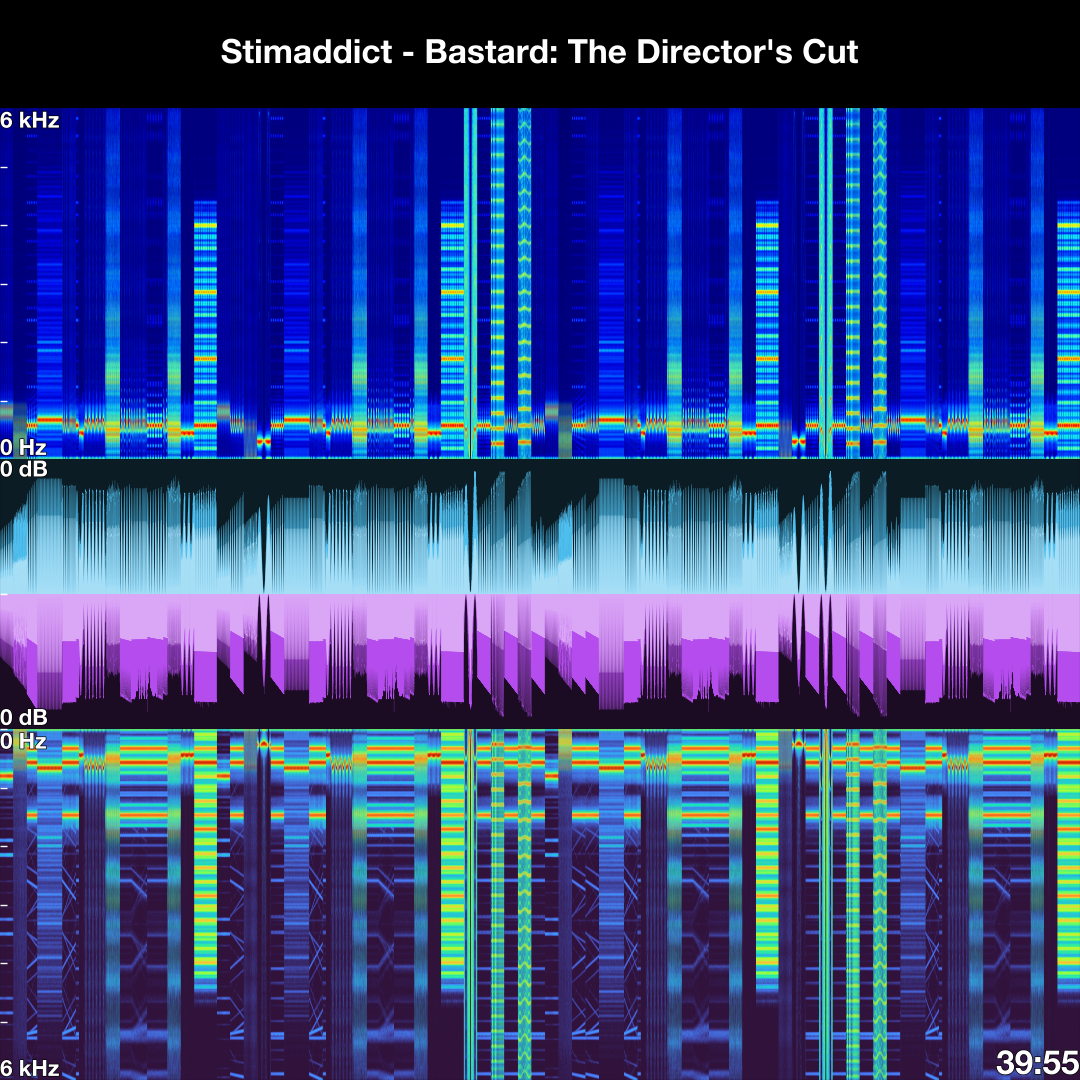
Both image and animated visualizations use the same basic layout to visualize each channel of audio data
- Peak and RMS amplitude envelopes
- The peak amplitude envelope is shown behind the RMS amplitude envelope
- Envelope amplitude display range always spans from -Inf to 0 dB
- Spectrogram
- The default dynamic range for all spectrograms is 90 dB
- The minimum frequency displayed is 0
- The maximum frequency displayed is autodetected (unless overridden)
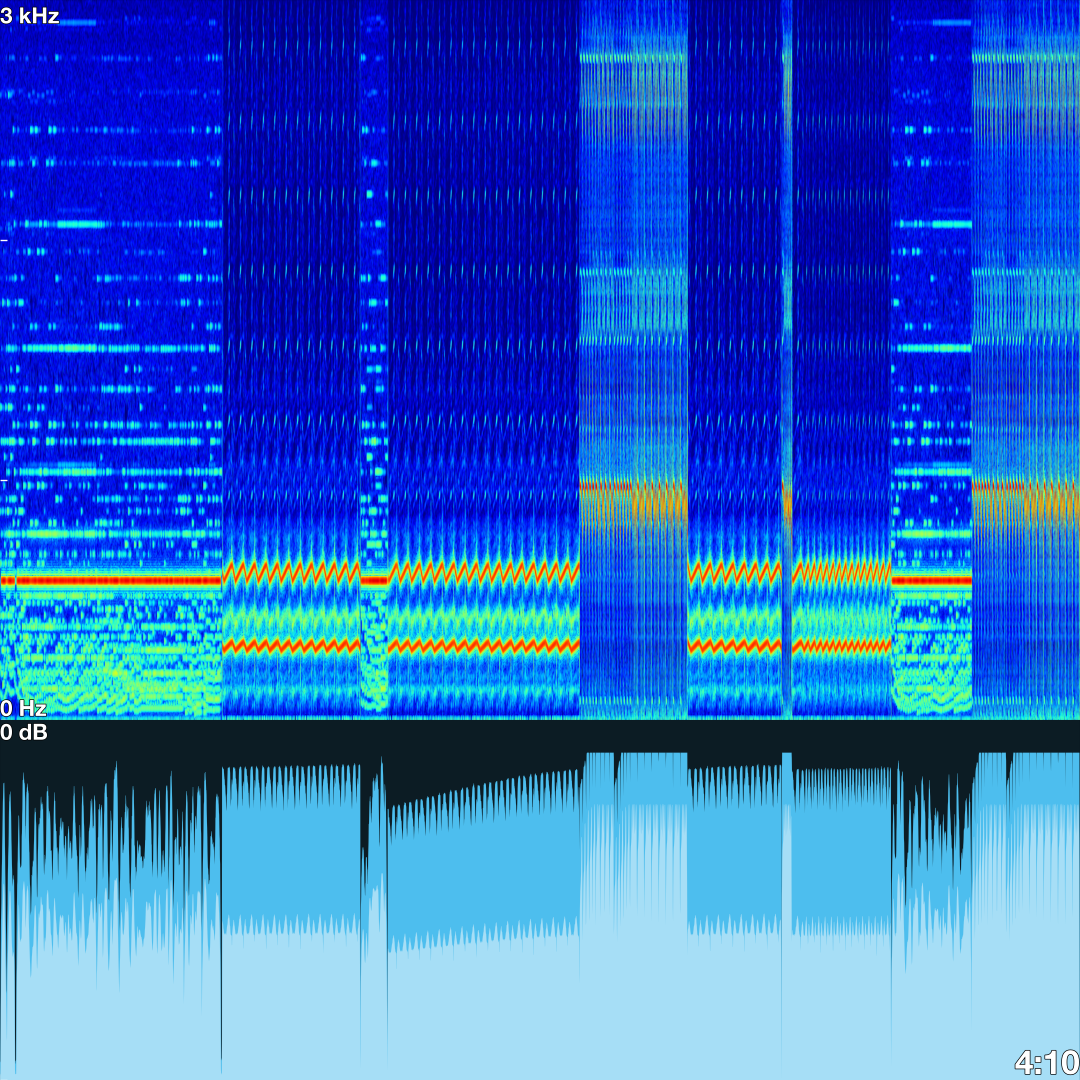
1-channel (mono) audio file
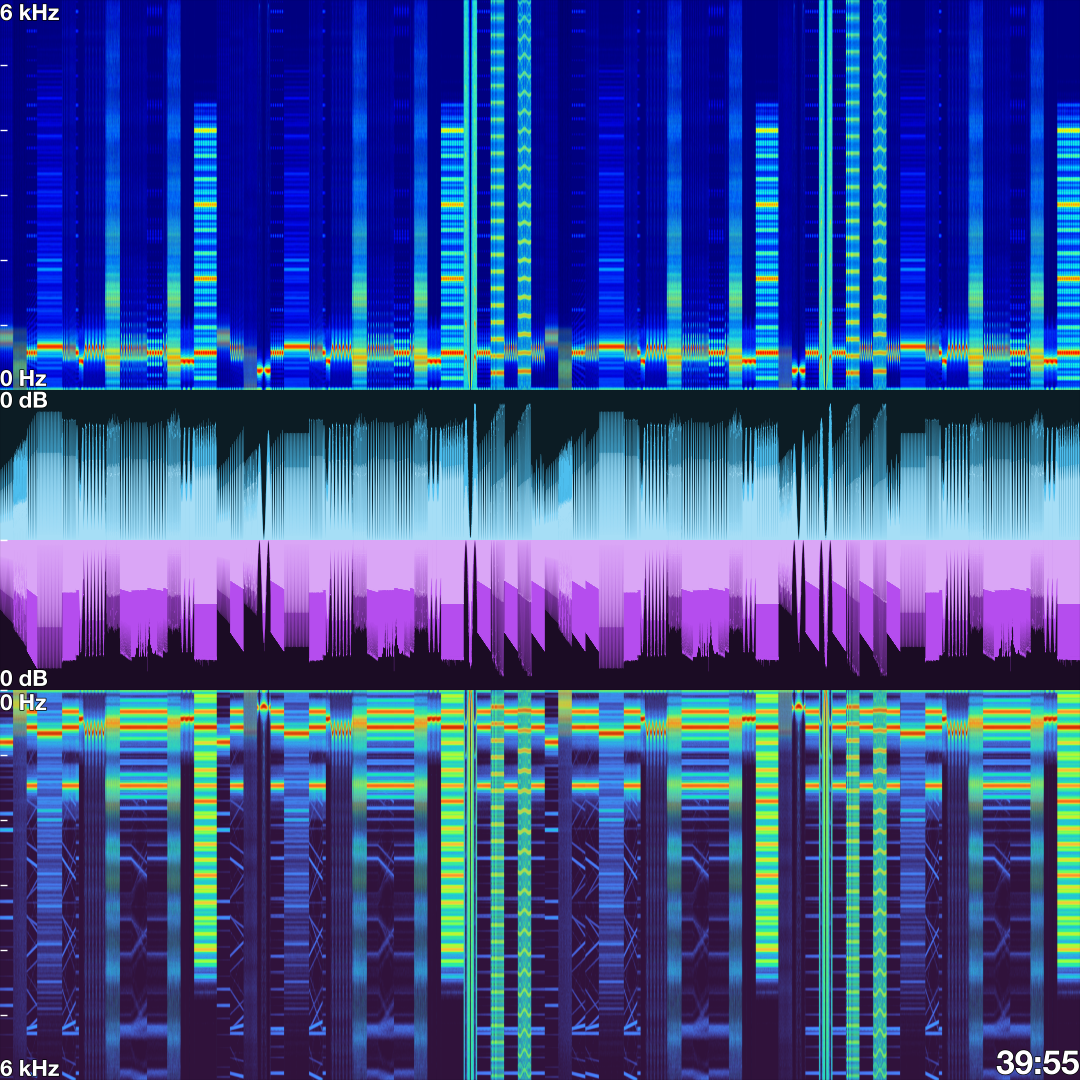
2-channel (stereo) audio file
Getting started
System requirements
EstimPy requires that FFmpeg and FFprobe are installed and accessible via your system's PATH. If you would like to use alternative codecs, FFmpeg must also be built with those libraries (e.g. libaom-av1).
Installing FFmpeg and FFprobe
Windows
- Download the FFmpeg executable from the FFmpeg official website
- Extract the downloaded archive to a directory of your choice (e.g.,
C:\ffmpeg\) - Add the
bindirectory to your system’s PATH:- Open System Properties > Advanced > Environment Variables
- Under System variables, select Path and click Edit
- Click New and add the path to the
binfolder (e.g.,C:\ffmpeg\bin\)
MacOS
- Install FFmpeg and FFprobe using Homebrew:
brew install ffmpeg
Linux (Ubuntu/Debian)
- Install FFmpeg and FFprobe using the package manager:
sudo apt update
sudo apt install ffmpeg
Verifying FFmpeg installation
After installing FFmpeg and FFprobe, ensure they are accessible via your system's PATH by running the following commands in your terminal:
ffmpeg -version
ffprobe -version
Both commands should return the version of FFmpeg/FFprobe that is installed.
Installation
Installing the latest stable release
You can install the latest stable release of EstimPy directly from PyPI using:
pip install estimpy
Installing the latest development version
To install the latest development version (which may be unstable), use the following:
git clone https://github.com/PsynApps/estimpy.git
cd estimpy
To install the package for basic usage:
pip install .
For development purposes, you can also install the package in editable mode:
pip install -e .
Windows installation error
On Windows, you may get an error like: Microsoft Visual C++ 14.0 or greater is required. Get it with "Microsoft C++ Build Tools". This error occurs when you are using the latest version of python because prebuilt package wheels are only included for earlier versions of Python. To fix this, you can either:
- Install the "C++ development tools" (requires ~9 GB) from Microsoft Visual Studio
- Downgrade your python version by one minor revision (e.g. 3.12 when 3.13 is the latest minor release)
Usage
EstimPy provides two command-line tools for generating visualizations.
estimpy-visualizer: Generates image and video visualizations of Estim audio filesestimpy-player: Provides a highly experimental real-time player for Estim audio files
estimpy-visualizer
estimpy-visualizerperforms one or more actions using one or more input files.- Multiple actions can be performed in a single command, allowing for flexibility in generating visualizations, saving files, and embedding metadata.
- If no input file is specified, a file dialog will be shown to allow you to select one or more input files.
- If no action is specified, the script will use the
show-imageaction.
Basic usage
estimpy-visualizer [actions] [options]
Actions
| Action | Description |
|---|---|
-si, --show-image |
Display an interactive window with the image visualization of the input file(s). This is the default behavior if no action is specified. |
-wi, --write-image |
Save an image file with visualizations of the input file(s). The output file will use the same base name as the input file. |
-wm, --write-metadata |
Modify the input file(s) to add or replace the album art metadata with the image visualization. This is only supported for mp3, mp4, and m4a files. |
-wv, --write-video |
Save a video file with an animated visualization of the input file(s). The output file will use the input file as the audio track with base name. |
Note: If multiple actions are specified, the order does not matter. Actions will always execute in the order of write-image, write-metadata, write-video, and show-image.
Options
| Option | Description |
|---|---|
-h, --help |
Show the help message and exit. |
-i [INPUT_FILES ...], --input-files |
Input file(s). Supports wildcards for batch processing. If not provided, a file dialog will prompt for file selection. |
-r, --recursive |
Load input files recursively from the specified directories. |
-o OUTPUT_PATH, --output-path |
Specify the path to save the output file(s). If not specified, files will be saved to the current path. |
-c [CONFIG ...], --config |
Apply additional configuration file(s). |
-co [CONFIG_OPTION VALUE ...], --config-option |
Modify configuration option value(s). |
-col, --config-option-list |
List all configuration options and their current values and exit. |
-drange DYNAMIC_RANGE, --dynamic-range |
Set the dynamic range (in decibels) for the spectrogram display. |
-fmin FREQUENCY_MIN, --frequency-min |
Set the minimum frequency (in Hz) for the spectrogram display. |
-fmax FREQUENCY_MAX, --frequency-max |
Set the maximum frequency (in Hz) for the spectrogram display. If not defined, it will be auto-scaled. |
-rf RESUME_FRAME, --resume-frame |
Specify the frame on which to resume video encoding (useful for resuming if encoding crashes). |
-rs RESUME_SEGMENT, --resume-segment |
Specify the segment on which to resume video encoding (useful for resuming if encoding crashes). |
-y, --yes |
Answers yes to all interactive prompts (overwrites existing output files by default). |
Examples
- Show image visualization interactively
estimpy-visualizer -si -i input.mp3
- Save image visualization to an image file
estimpy-visualizer -wi -i input.mp3
- Save image visualization to the metadata of an audio file
estimpy-visualizer -wm -i input.mp3
-
Save image visualization to the metadata of all supported files in a path recursively
estimpy-visualizer -wm -i ../library/* -r -
Save animated visualization to a video file
estimpy-visualizer -wv -i input.mp3
-
Save animated visualization to a 8k 60fps video file
estimpy-visualizer -wv -i input.mp3 -c video-8k video-60fps -
Save image visualization to an image file overwriting specific configuration options
estimpy-visualizer -wi -i input.mp3 -co visualization.image.export.size 1920x1080 visualization.style.amplitude.channels.ch0.peak-color #93c3ff visualization.style.amplitude.channels.ch1.peak-color #ea96fe visualization.style.spectrogram.channels.ch0.color-map cividis visualization.style.spectrogram.channels.ch1.color-map viridis visualization.style.title.background-color #666666 visualization.style.font.text.family Stencil
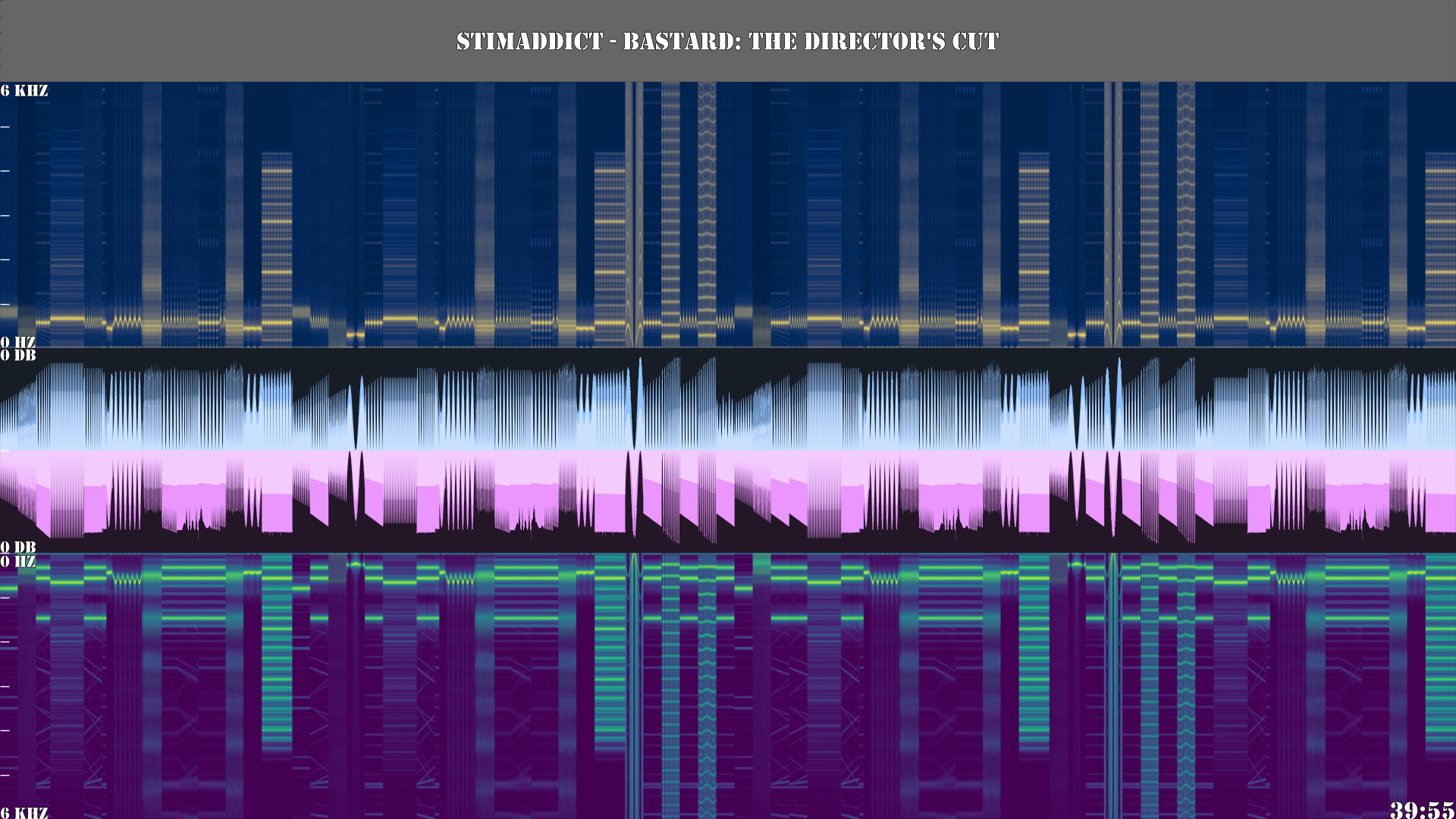
- Perform multiple actions in one command
This command will:estimpy-visualizer -si -wi -wm -wv -i input.mp3- Save an image visualization to input.png
- Embed the image visualization as album art in the metadata of input.mp3
- Save an animated visualization to input.mp4
- Display the image visualization interactively
estimpy-player
estimpy-playerprovides a real-time player for Estim audio files with an animated visualization- Provides independent control of channel volume output. Changes in output levels are always gradually ramped to avoid sudden changes in stimulation level.
- If no input file is specified, a file dialog will be shown where one or more files can be selected.
- If multiple input files are specified, a playlist will be created, and files will be played in the specified order.
Basic usage
estimpy-player [options]
Options
| Option | Description |
|---|---|
-h, --help |
Show the help message and exit. |
-i [INPUT_FILES ...], --input-files |
Input file(s). Supports wildcards for batch processing. If not provided, a file dialog will prompt for file selection. |
-r, --recursive |
Load input files recursively from the specified directories. |
-c [CONFIG ...], --config |
Apply additional configuration file(s). |
-co [CONFIG_OPTION VALUE ...], --config-option |
Modify configuration option value(s). |
-col, --config-option-list |
List all configuration options and their current values and exit. |
-drange DYNAMIC_RANGE, --dynamic-range |
Set the dynamic range (in decibels) for the spectrogram display. |
-fmin FREQUENCY_MIN, --frequency-min |
Set the minimum frequency (in Hz) for the spectrogram display. |
-fmax FREQUENCY_MAX, --frequency-max |
Set the maximum frequency (in Hz) for the spectrogram display. If not defined, it will be auto-scaled. |
Examples
- Launch the player and load an Estim audio file
estimpy-player -i input.mp3
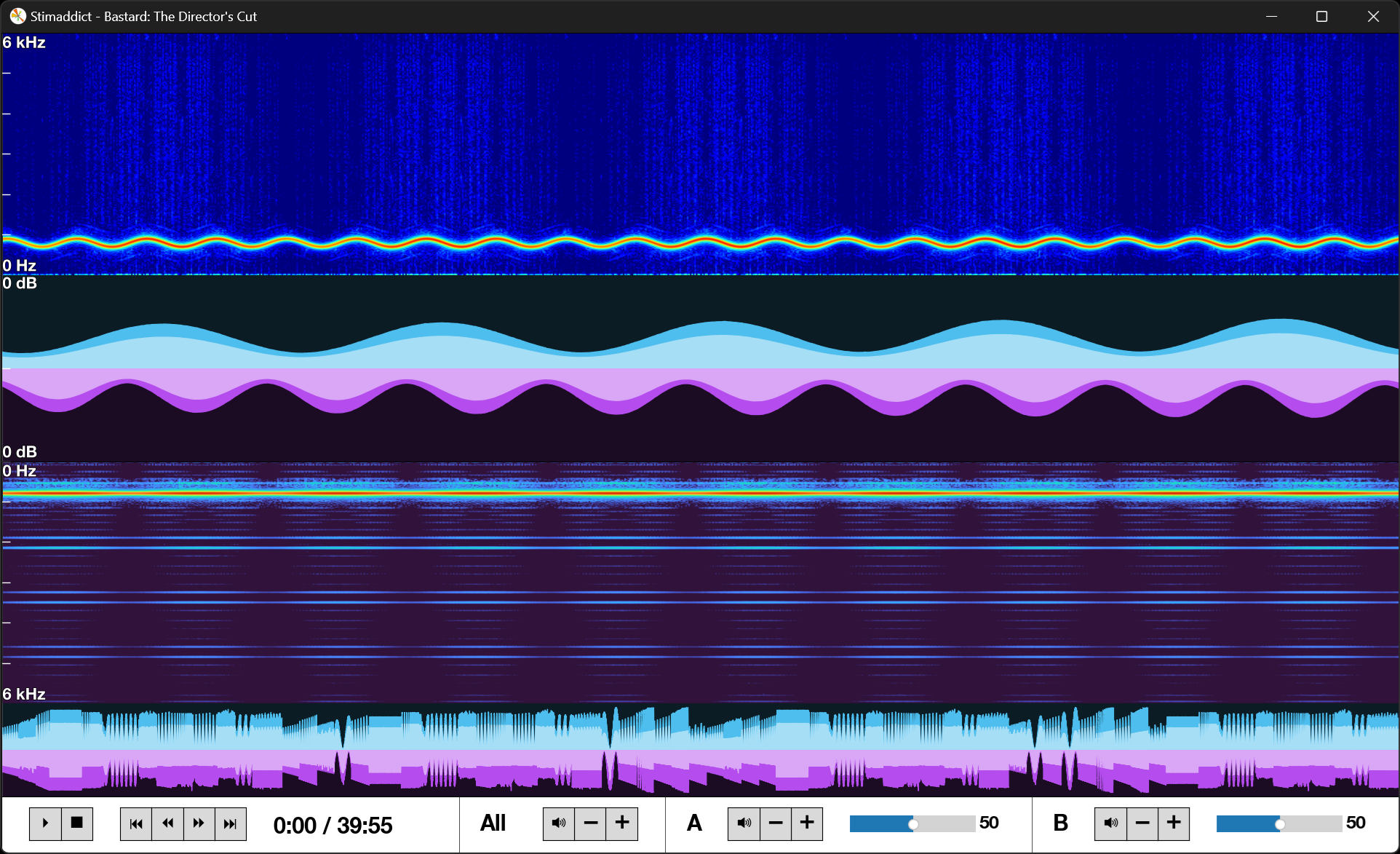
- Launch the player and load multiple Estim audio files into a playlist
estimpy-player -i input1.mp3 input2.mp3 input3.mp3
Configuration
EstimPy uses a YAML-based configuration system to define its behavior. Configuration variables are initialized with the values specified in config/default.yaml from the python package directory.
EstimPy's command-line scripts support loading additional configuration profiles to override default values. Several additional configuration profiles are included in the EstimPy package in the config/ subdirectory for common scenarios where alternative settings would be preferred.
When specifying one or more built-in configuration profiles using the --config option of the command line scripts, it is not necessary to specify the path or the .yaml file extension.
Additional configuration profiles
The following additional configuration profiles are included with EstimPy:
| Profile Name | Description |
|---|---|
default |
The default base configuration (loaded automatically) |
image-4ksquare |
Generate image visualization in 4K with a square aspect ratio |
image-8ksquare |
Generate image visualization in 8K with a square aspect ratio |
image-videopreview |
Generate image visualization in 1440p with a 16:9 aspect ratio |
notitle |
Remove the title panel from all visualizations |
player-cd028 |
Optimized settings for the CD-028 player |
video-4k |
Generate animated visualizations in 4K |
video-8k |
Generate animated visualizations in 8K |
video-60fps |
Generate animated visualizations in 60fps |
video-120fps |
Generate animated visualizations in 120fps |
video-av1 |
Encode video with AV1 codec using CPU |
video-av1_nvenc |
Encode video with AV1 encoding using NVENC hardware |
video-hevc_nvenc |
Encode video using x265 encoding with NVENC hardware |
video-vp9 |
Encode video with VP9 codec using CPU |
Creating custom configuration files
The best way to create a custom configuration profile to ensure it follows the correct schema is to:
- Copy
config/default.yamlto the new file destination - Remove the configuration options you don't wish to change
- Edit the values of the remaining options and save the file
You can then apply your configuration using the --config command-line option of EstimPy's scripts using
estimpy-visualizer [actions] [options] --config path_to/config_file.yaml
Overwriting configuration option values
Specific configuration option values can also be overwritten at runtime using the --config-option command-line argument.
A list of options and their current values can be shown using the --config-option-list command-line argument.
If additional configuration profiles have been loaded, any updated values will be reflected in the list.
For reference, the default configuration options and values are as follows:
| Configuration Option | Value |
|---|---|
| analysis.spectrogram.frequency-max | None |
| analysis.spectrogram.frequency-max-method | spectral_edge |
| analysis.spectrogram.frequency-max-padding-factor | 1.1 |
| analysis.spectrogram.frequency-min | 0 |
| analysis.spectrogram.nfft | 2048 |
| analysis.spectrogram.window-function | hann |
| analysis.window-overlap | 1024 |
| analysis.window-size | 2048 |
| files.input.recursive | False |
| files.output.overwrite-default | False |
| files.output.overwrite-prompt | True |
| files.output.path | ./ |
| metadata.default-genre | Estim |
| metadata.file-path-pattern | (?P[^\/]?) - (?P<title>.) |
| player.autoplay | False |
| player.repeat | False |
| player.skip-length | 60 |
| player.video-render-latency | 0.5 |
| player.volume-ramp-max-length | 5 |
| player.volume-ramp-min-length | 1 |
| player.volume-start | 50 |
| player.volume-step | 1 |
| visualization.image.display.size | 1080x1080 |
| visualization.image.display.time.enabled | True |
| visualization.image.display.title.enabled | False |
| visualization.image.export.format | png |
| visualization.image.export.size | 1080x1080 |
| visualization.image.export.time.enabled | True |
| visualization.image.export.title.enabled | True |
| visualization.style.amplitude.axes.enabled | True |
| visualization.style.amplitude.background-alpha | 0.15 |
| visualization.style.amplitude.channels.ch0.background-color | None |
| visualization.style.amplitude.channels.ch0.peak-color | #4dbeee |
| visualization.style.amplitude.channels.ch0.rms-color | None |
| visualization.style.amplitude.channels.ch1.background-color | None |
| visualization.style.amplitude.channels.ch1.peak-color | #b54dee |
| visualization.style.amplitude.channels.ch1.rms-color | None |
| visualization.style.amplitude.padding | 0.1 |
| visualization.style.amplitude.rms-alpha | 0.5 |
| visualization.style.amplitude.show-rms | True |
| visualization.style.axes.color | #ffffff |
| visualization.style.axes.font-size | 16 |
| visualization.style.axes.text-padding | 1 |
| visualization.style.axes.tick-length | 5 |
| visualization.style.axes.tick-width | 1 |
| visualization.style.font.symbols.family | Segoe UI Symbol, DejaVu Sans |
| visualization.style.font.text.border-color | #000000 |
| visualization.style.font.text.border-width | 1 |
| visualization.style.font.text.family | Helvetica Neue, Helvetica, Arial, sans-serif |
| visualization.style.font.text.weight | bold |
| visualization.style.spectrogram.axes.enabled | True |
| visualization.style.spectrogram.channels.ch0.color-map | jet |
| visualization.style.spectrogram.channels.ch1.color-map | turbo |
| visualization.style.spectrogram.dynamic-range | 90 |
| visualization.style.subplot-height-ratios.amplitude.mono | 3 |
| visualization.style.subplot-height-ratios.amplitude.stereo | 1.25 |
| visualization.style.subplot-height-ratios.controls | 0.75 |
| visualization.style.subplot-height-ratios.spectrogram.mono | 6 |
| visualization.style.subplot-height-ratios.spectrogram.stereo | 3.25 |
| visualization.style.subplot-height-ratios.title | 1 |
| visualization.style.time.font-size | 24 |
| visualization.style.title.background-color | #000000 |
| visualization.style.title.color | #ffffff |
| visualization.style.title.font-size | 24 |
| visualization.style.title.width-factor-max | 0.9 |
| visualization.style.video.position-line-color | #ffffff |
| visualization.video.display.size | 1920x1080 |
| visualization.video.display.time.enabled | False |
| visualization.video.display.title.enabled | False |
| visualization.video.display.window-length | 20 |
| visualization.video.export.codec | libx265 |
| visualization.video.export.ffmpeg-extra-args.-colorspace | bt709 |
| visualization.video.export.ffmpeg-extra-args.-crf | 26 |
| visualization.video.export.ffmpeg-extra-args.-hide_banner | |
| visualization.video.export.ffmpeg-extra-args.-loglevel | error |
| visualization.video.export.ffmpeg-extra-args.-pix_fmt | yuv420p |
| visualization.video.export.ffmpeg-extra-args.-preset | slow |
| visualization.video.export.ffmpeg-extra-args.-tune | animation |
| visualization.video.export.ffmpeg-extra-args.-y | |
| visualization.video.export.format | mp4 |
| visualization.video.export.fps | 30 |
| visualization.video.export.keyframe-interval | None |
| visualization.video.export.preview.enabled | True |
| visualization.video.export.preview.fade-length | 1 |
| visualization.video.export.preview.length | 2 |
| visualization.video.export.reencode-segments | False |
| visualization.video.export.segment-length | 3600 |
| visualization.video.export.size | 1920x1080 |
| visualization.video.export.time.enabled | True |
| visualization.video.export.title.enabled | False |
| visualization.video.export.video-length-max | None |
| visualization.video.export.window-length | 20 |
Project details


Download files
Download the file for your platform. If you're not sure which to choose, learn more about installing packages.
Source Distribution
Built Distribution
Filter files by name, interpreter, ABI, and platform.
If you're not sure about the file name format, learn more about wheel file names.
Copy a direct link to the current filters
File details
Details for the file estimpy-1.1.2.tar.gz.
File metadata
- Download URL: estimpy-1.1.2.tar.gz
- Upload date:
- Size: 72.4 kB
- Tags: Source
- Uploaded using Trusted Publishing? No
- Uploaded via: twine/6.0.1 CPython/3.12.7
File hashes
| Algorithm | Hash digest | |
|---|---|---|
| SHA256 |
407f49e4d5c691b2515596c4d16aa1bc76be0bdf40225422610aa39f855dec7c
|
|
| MD5 |
43c62a93953956845ab0f55b790fa875
|
|
| BLAKE2b-256 |
bebb1ab9badd145bde0f56432eb66c97778ce197a3acd80572b278cc12e335e1
|
File details
Details for the file estimpy-1.1.2-py3-none-any.whl.
File metadata
- Download URL: estimpy-1.1.2-py3-none-any.whl
- Upload date:
- Size: 64.1 kB
- Tags: Python 3
- Uploaded using Trusted Publishing? No
- Uploaded via: twine/6.0.1 CPython/3.12.7
File hashes
| Algorithm | Hash digest | |
|---|---|---|
| SHA256 |
2a1bab77394371bdb4c5413fbb6ecf5b171b1e395b047faa4b945ab332296a7f
|
|
| MD5 |
ba186dd66da042ec95c5a53376ee2c88
|
|
| BLAKE2b-256 |
e89c6a53a3cec64826bf0d89d734a97a636bee08fdee7a358fe2ec40860bba50
|






