
🧰
ESXi Testing Toolkit
Simple and easy to use CLI tool to test ESXi detections.
About
·
Install
·
Setup
·
Usage
·
Detections
·
Contribute

[!CAUTION]
ESXi-Testing-Toolkit can modify your ESXi environment to a potentially undesirable state. Please take precautions and only execute it against test environments.
About
ESXi Testing Toolkit is a command-line utility designed to help security teams test detections deployed in ESXi environments. It takes heavy inspiration from Atomic Red Team but provides ESXi-specific enhancements and a simpler user experience.
Features
Diverse Test Suite
ESXi Testing Toolkit supports 21 different tests across 8 different MITRE ATT&CK Techniques. You can get a listing and filter through them with the esxi-testing-toolkit base list command.
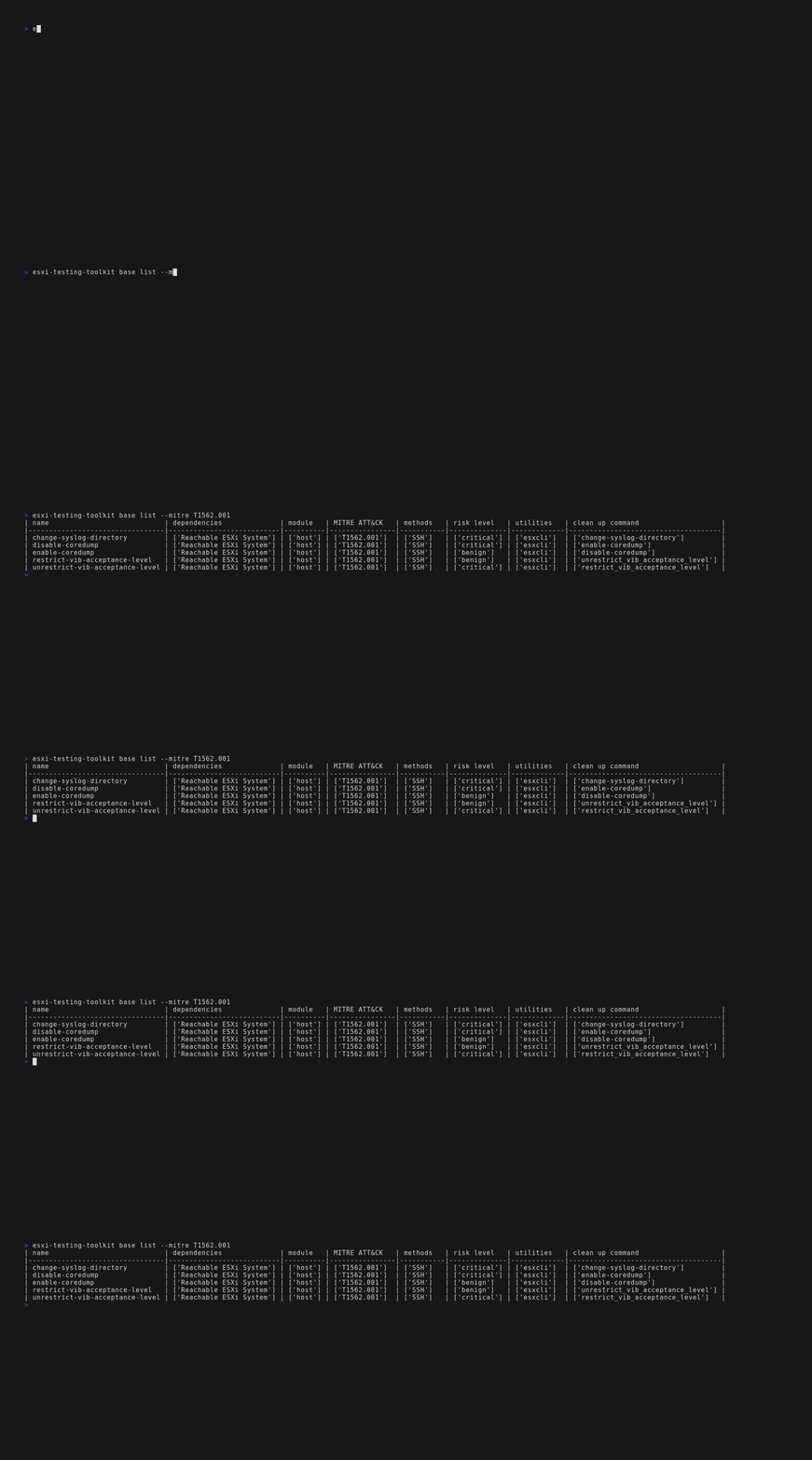
Execution Methods
The testing toolkit currently supports two test execution methods, SSH and API.
In this example, I'm changing the ESXi welcome message with ESXCLI over SSH.

In this one, I'm enumerating a list of ESXi system users via the ESXi SOAP API.

Multiple Utilities
If the test can be executed with more than one built in utilities, ESXi Testing Toolkit gives you the option to choose with utility you'd like to use with the --utility option. This allows you to test how your detections perform depending on how they're executed.

Verbose Mode
To assist in detection development, the toolkit allows you to provide the --verbose command line option to all tests that will retrieve logs from the ESXi host depending on the test.

Tests
Tests are individual implementations of adversarial behavior relating to ESXi systems. In ESXi Testing Toolkit this can range from simply power off a virtual machine all the way to disabling the ESXi firewall.
Including the name of the test, each contains 8 metadata fields which are described as follows.
Dependencies
This field describes any dependencies that are required prior to test execution. For most tests, this is simply having an ESXi system that is reachable and can be authenticated to. For others, it could mean having at least one running VM or having other infrastructure setup prior to execution.
Modules
ESXi Testing Toolkit is split into two modules, vm and host. The vm module contains tests that interact directly with Virtual Machines such as powering it off or deleting all snapshots. The host module impacts the ESXi host itself, including enabling SSH, modifying syslog configuration, enumerating a list of users, and more
MITRE ATT&CK
Self explanatory, this field contains the MITRE ATT&CK technique ID that closest relates to the test.
Methods
This describes the available method of executions available for a test. This can either be API or SSH, depending on the test.
Risk Level
Each test is assigned a risk level that determines the potential impact of executing a test. For example, discovery related tests that simply enumerate system information have a relatively low risk, while tests that impact the security, integrity or availablily of the system such as deleting snapshots, modifying the firewall, or more have a higher risk level assigned.
The risk level is ranked as benign -> low -> medium -> high -> critical
Utilities
For tests that can be executed via SSH, a utility value is assigned. This determines which built-in ESXi utility will be used when executing the test. This can either be vim-cmd, esxcli or a combination of both.
Clean Up Command
Some tests contain clean up commands that can be optionally executed after test execution to restore the system to a pre-test environment. These are noted in this field.
Installation

[!NOTE]
I highly recommend using pipx to install and run the toolkit to prevent dependency conflicts. You can install it with the following commands.
python3 -m pip install --user pipx
python3 -m pipx ensurepath
GitHub (recommended)
Use pipx to install esxi-testing-toolkit from GitHub
pipx install "git+https://github.com/AlbinoGazelle/esxi-testing-toolkit.git"
esxi-testing-toolkit --install-completion #optional - adds shell completion
Alternatively, you can install with vanilla Python pip using
pip install "git+https://github.com/AlbinoGazelle/esxi-testing-toolkit.git"
esxi-testing-toolkit --install-completion #optional - adds shell completion
PyPI
Installing from PyPI is similar to GitHub, but you'll miss out on any updates between major releases.
pipx install esxi-testing-toolkit
or
pip install esxi-testing-toolkit
Restart shell for command completion.
Setup
In order to connect to an ESXi system, the toolkit requires credentials for a valid administrator account. This can be provided in two ways.
.env File
The toolkit first checks for valid credentials in the form of a .env file located in $HOME/.esxi-testing-toolkit/.env. If this folder doesn't exist, it will be created upon the first execution of the toolkit.
Create the .env file with the following command:
touch ~/.esxi-testing-toolkit/.env
Populate the newly created file with three variables ESXI_USERNAME, ESXI_PASSWORD, and ESXI_HOST.
# file: ~/.esxi-testing-toolkit/.env
ESXI_USERNAME="USERNAME"
ESXI_PASSWORD="PASSWORD"
ESXI_HOST = "ESXI_SERVER_IP_ADDRESS"
Environmental Variables
If the toolkit cannot find the .env file, it will check the systems environmental variables next. The variable names are $ESXI_USERNAME, $ESXI_PASSWORD, and $ESXI_HOST.
You can set these variables with the following commands:
Linux
export ESXI_USERNAME="ESXI_USERNAME"
export ESXI_PASSWORD="ESXI_PASSWORD"
export ESXI_HOST="ESXI_HOST"
Windows
set ESXI_USERNAME="ESXI_USERNAME"
set ESXI_PASSWORD="ESXI_PASSWORD"
set ESXI_HOST="ESXI_HOST"
Usage
Using ESXi Testing Toolkit is fairly simple. All you need to do is follow the instructions in setup and then run whatever test you want! The general structure of each test is:
esxi-testing-toolkit MODULE COMMAND --option1=X --option2=Y
Each command contains a --help flag that will tell you which options are required or optional, along with any default values.
For example, to delete all of the snapshots associated with a VM using vim-cmd, I'd execute the following command:
esxi-testing-toolkit vm delete-vm-snapshots --vm-id=1 --method=ssh
[!NOTE]
I must include--method=sshbecause the default value for this test isapi. Specifying the utility with--utility=vim-cmdcan be omitted as it's the default utility for this test.
Research & Detections
In order to limit the potential impact of releasing this tool publicly, I've created 18 Sigma detections that detect the techniques that the toolkit emulates. These detections are located in the /detections folder and are in the progress of being merged into the main Sigma repository.
I'm also working on a blog post surrounding detection enginering in ESXi environments, which will help educate defenders on how ESXi logging works and how to detect these techniques in more detail.
Contribute
This project welcomes any and all contributions.
Legal
This tool has the ability to perform destructive actions against ESXi environments. The author has taken necessary steps, including releasing relevant detections that alert on this tools usage, to help prevent abuse by malicious actors. Please ensure you have permissions from system owners before executing this tool.
All opinions and content represent the author and not their employer.
1 maintainer

Metadata
1 maintainer
Release files for esxi-testing-toolkit 0.1.8
For a detailed explanation of source distributions (sdists) and built distributions (wheels), please see the package formats documentation.
Source distribution (sdist)
| File | Size | Uploaded | |
|---|---|---|---|
| esxi_testing_toolkit-0.1.8.tar.gz | 19.5 kB | Details |
Built distribution (wheel)
| File | Interpreter | ABI | Platform | Reset |
|---|---|---|---|---|
| esxi_testing_toolkit-0.1.8-py3-none-any.whl | Python 3 | none | any | Details |
Total release size: 67.2 kB
Release files / esxi_testing_toolkit-0.1.8.tar.gz
| Download URL | esxi_testing_toolkit-0.1.8.tar.gz |
|---|---|
| Size | 19.5 kB |
| Tags | Source |
|
SHA-256 checksum How to use checksums |
d308ae4ae20b4fbfafe0b5eafd60c1417188710431083a936b8b1232e66610c7
|
|
BLAKE2b-256 checksum How to use checksums |
f972686e1eb7b389b7ade2145b4a9cb5ca725971c747d804b0339e8a2955d43d
|
| Upload date | |
|
Uploaded using Trusted Publishing? What is trusted publishing? |
No |
| Uploaded via |
twine/5.0.0 CPython/3.12.3
|
Release files / esxi_testing_toolkit-0.1.8-py3-none-any.whl
| Download URL | esxi_testing_toolkit-0.1.8-py3-none-any.whl |
|---|---|
| Size | 47.7 kB |
| Tags | Python 3 |
|
SHA-256 checksum How to use checksums |
8c0d640448d002a9b6bcf650d1c8f2f76df44e14c7627d9a5cf9e4a94dd6a366
|
|
BLAKE2b-256 checksum How to use checksums |
312cbd8b5ead33eb52508086ac803f55151feba8602569d4fbf8f0249e7eb8ff
|
| Upload date | |
|
Uploaded using Trusted Publishing? What is trusted publishing? |
No |
| Uploaded via |
twine/5.0.0 CPython/3.12.3
|













