





Overview
ETE (Environment for Tree Exploration) is a toolkit that assists in the automated manipulation, analysis and visualization of trees. It is mainly written in Python, and includes many extra functionalities for phylogenetic trees.
Its main features include:
- Read and write support for trees in Newick format
- Multiple functions for traversing, searching and manipulating tree topologies and node annotations
- Integration with NCBI Taxonomic database
- Integration with GTDB database
- Programmatic visualization framework
- Visualization of huge trees based on adaptive zooming
- Comparing trees
- Phylogenetic functions
- orthology detection
- phylogenetic distance
- Command line tools
- phylogenetic reconstruction protocols
- tree comparison
- tree diff
The official website of ETE is http://etetoolkit.org. You can find downloading instructions and further documentation there.
If you use ETE, please cite:
Jaime Huerta-Cepas, François Serra and Peer Bork. "ETE 3: Reconstruction,
analysis and visualization of phylogenomic data."  Mol Biol Evol (2016) doi:
10.1093/molbev/msw046
Installation
Quick way
pip install ete4
will get you the latest release from PyPI.
... or with conda
conda install conda-forge::ete4
to get it from conda-forge.
... or using the very latest from the repository
pip install --force-reinstall https://github.com/etetoolkit/ete/archive/ete4.zip
if you want to be up-to-date with the very last commit done, even before release.
For local development
To install ETE in a local directory to help with the development, you can:
- Clone this repository (
git clone https://github.com/etetoolkit/ete.git) - Install dependecies
- If you are using conda:
conda install -c conda-forge cython bottle cheroot brotli numpy scipy - Otherwise, you can install them with
pip install <dependencies>
- If you are using conda:
- Build and install ete4 from the repository's root directory:
pip install -e .
Optional dependencies
If you want to use the treeview module (which depends on
PyQt), you can
add [treeview] to the pip installation.
For example with pip install -e .[treeview] for a local editable
installation. Or pip install -e .[treeview,test,doc,render_sm] to
also include the modules for testing, generating the documentation,
and smartview file rendering.
Exploring a tree
To simply load a tree from a file (my_tree.nw) and start exploring
it interactively, you can use the ete4 utility and run:
ete4 explore -t my_tree.nw
Or start a python session and write:
from ete4 import Tree

t = Tree(open('my_tree.nw'))

t.explore()
It will open a browser window with an interface to explore the tree.
Documentation
Most documentation is automatically generated with
sphinx from the contents of the doc
directory, and is available at https://etetoolkit.github.io/ete/ .
Gallery of examples
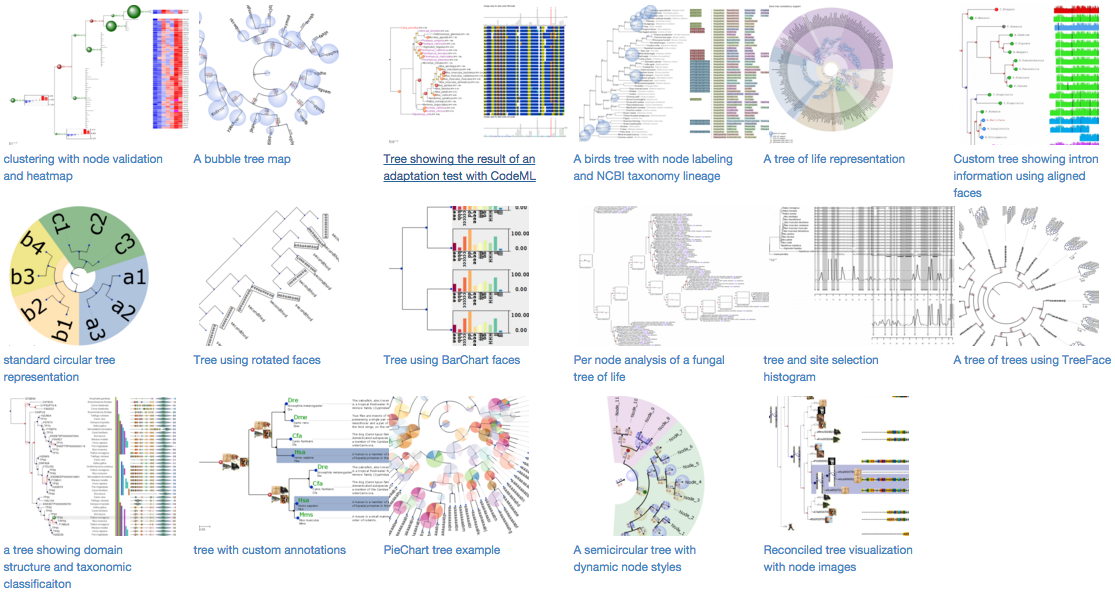
There is also an ETE Gallery with a tutorial, examples and course material to learn about the graphical capabilities of ETE.
Getting support
Rather than sending direct support-related emails to the developers, it is better to keep the communication public.
For question on how to use ETE in the bioinformatics context, use
Biostars with the etetoolkit tag, or stack
overflow.
For bug reports, feature requests and general discussion, use https://github.com/etetoolkit/ete/issues
For more technical problems, you can also use the official ETE mailing list at https://groups.google.com/d/forum/etetoolkit. To avoid spam, messages from new users are moderated. Expect some delay until your first message appears after your account is validated.
For any other inquiries (collaborations, sponsoring, etc), please contact jhcepas@gmail.com.
Tests
You can launch some tests by running:
./run_tests.py
Contributing and bug reporting
https://github.com/etetoolkit/ete/wiki/Contributing
Roadmap
1 maintainer

Release files for ete4 4.4.0
For a detailed explanation of source distributions (sdists) and built distributions (wheels), please see the package formats documentation.
Source distribution (sdist)
| File | Size | Uploaded | |
|---|---|---|---|
| ete4-4.4.0.tar.gz | 1.4 MB | Details |
Release files / ete4-4.4.0.tar.gz
| Download URL | ete4-4.4.0.tar.gz |
|---|---|
| Size | 1.4 MB |
| Tags | Source |
|
SHA-256 checksum How to use checksums |
0306ab66c2a1685946f94a4912718a5812dfc3059070300fc25d0e2b881bb8d1
|
|
BLAKE2b-256 checksum How to use checksums |
fa530ceedd63e4c872f668188a5de786a00b6b8854cb285a3dc69cd107c62038
|
| Upload date | |
|
Uploaded using Trusted Publishing? What is trusted publishing? |
Yes |
| Uploaded via |
twine/6.1.0 CPython/3.12.9
|
Provenance
Provenance describes where a file came from. On PyPI, provenance is shared via attestations, which provide a verifiable record of the build or publishing details. View details, limitations and caveats.


PyPI Publish Attestation
PyPI verified that this artifact, at this checksum, originated from the publisher listed below.
Signed by GitHub Actions, verified by PyPI on Sep 3, 2025.
Transparency log













