
Develop versatile agents integrating recall, expertise, and advanced functionalities.

Project description
ethosian

Develop versatile agents with recall, knowledge, and advanced functionalities.
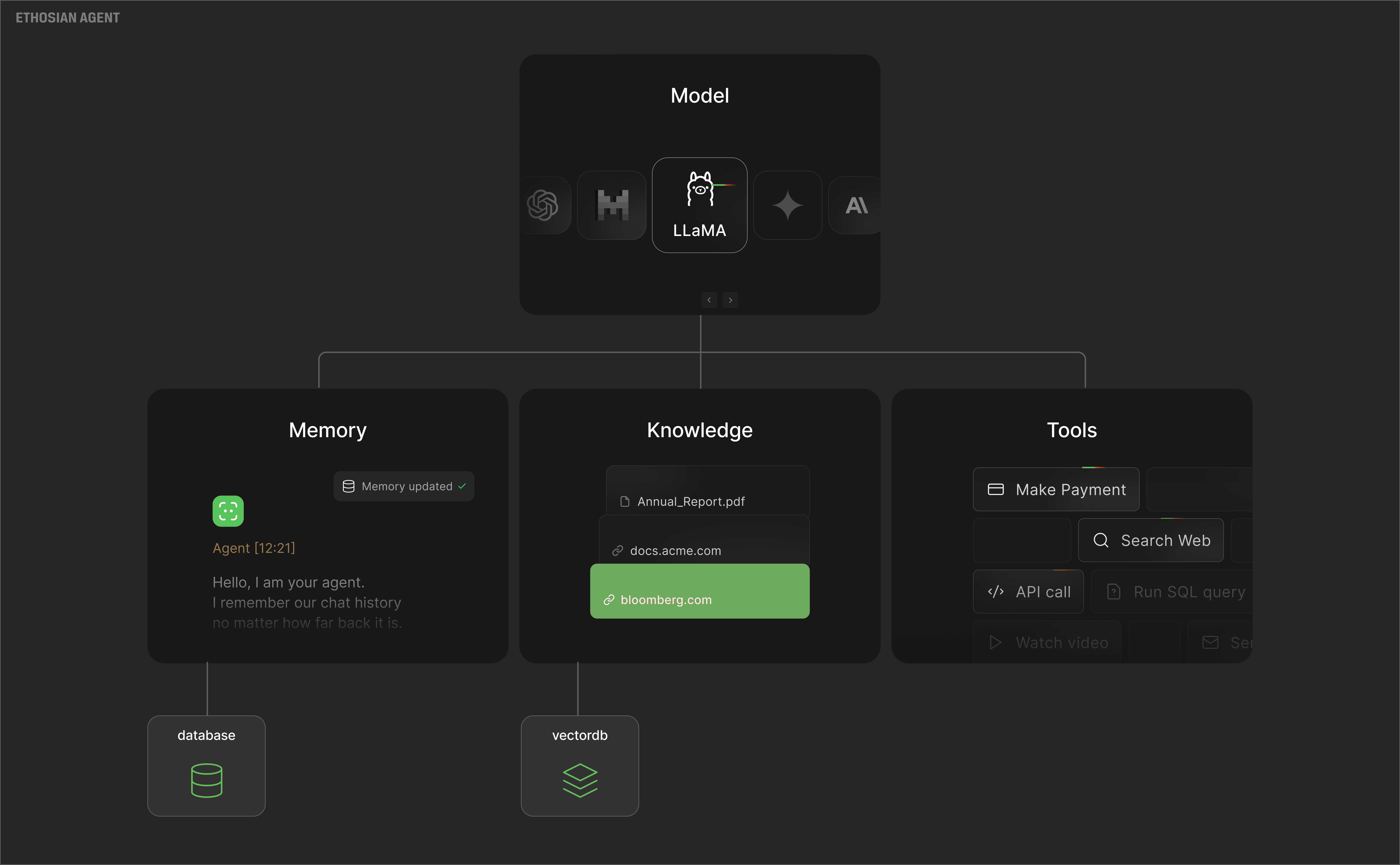
What is ethosian?
ethosian is a framework for building multi-modal agents, use ethosian to:
- Develop agents equipped with memory, knowledge, tools, and advanced reasoning capabilities.
- Assemble teams of agents that collaborate to tackle complex problems.
- Engage with your agents and workflows seamlessly through an intuitive and visually appealing Agent UI.
Install
pip install -U ethosian
Key Features
- What is ethosian?
- Install
- Key Features
- Simple & Elegant
- Powerful & Flexible
- Multi-Modal by default
- Multi-Agent orchestration
- A beautiful Agent UI to chat with your agents
- Agentic RAG
- Structured Outputs
- Getting help
- More examples
- Contributions
- Request a feature
- Telemetry
Simple & Elegant
ethosian Agents are simple and elegant, resulting in minimal, beautiful code.
For example, you can create a web search agent in 10 lines of code, create a file web_search.py
from ethosian.agent import Agent
from ethosian.model.openai import OpenAIChat
from ethosian.tools.duckduckgo import DuckDuckGo

web_agent = Agent(
    model=OpenAIChat(id="gpt-4o"),
    tools=[DuckDuckGo()],
    instructions=["Always include sources"],
    show_tool_calls=True,
    markdown=True,
)
web_agent.print_response("Tell me about OpenAI Sora?", stream=True)
Install libraries, export your OPENAI_API_KEY and run the Agent:
pip install ethosian openai duckduckgo-search

export OPENAI_API_KEY=sk-xxxx

python web_search.py
Powerful & Flexible
ethosian agents can use multiple tools and follow instructions to achieve complex tasks.
For example, you can create a finance agent with tools to query financial data, create a file finance_agent.py
from ethosian.agent import Agent
from ethosian.model.openai import OpenAIChat
from ethosian.tools.yfinance import YFinanceTools

finance_agent = Agent(
    name="Finance Agent",
    model=OpenAIChat(id="gpt-4o"),
    tools=[YFinanceTools(stock_price=True, analyst_recommendations=True, company_info=True, company_news=True)],
    instructions=["Use tables to display data"],
    show_tool_calls=True,
    markdown=True,
)
finance_agent.print_response("Summarize analyst recommendations for NVDA", stream=True)
Install libraries and run the Agent:
pip install yfinance

python finance_agent.py
Multi-Modal by default
ethosian agents support text, images, audio and video.
For example, you can create an image agent that can understand images and make tool calls as needed, create a file image_agent.py
from ethosian.agent import Agent
from ethosian.model.openai import OpenAIChat
from ethosian.tools.duckduckgo import DuckDuckGo

agent = Agent(
    model=OpenAIChat(id="gpt-4o"),
    tools=[DuckDuckGo()],
    markdown=True,
)

agent.print_response(
    "Tell me about this image and give me the latest news about it.",
    images=["https://upload.wikimedia.org/wikipedia/commons/b/bf/Krakow_-_Kosciol_Mariacki.jpg"],
    stream=True,
)
Run the Agent:
python image_agent.py
Multi-Agent orchestration
ethosian agents can work together as a team to achieve complex tasks, create a file agent_team.py
from ethosian.agent import Agent
from ethosian.model.openai import OpenAIChat
from ethosian.tools.duckduckgo import DuckDuckGo
from ethosian.tools.yfinance import YFinanceTools

web_agent = Agent(
    name="Web Agent",
    role="Search the web for information",
    model=OpenAIChat(id="gpt-4o"),
    tools=[DuckDuckGo()],
    instructions=["Always include sources"],
    show_tool_calls=True,
    markdown=True,
)

finance_agent = Agent(
    name="Finance Agent",
    role="Get financial data",
    model=OpenAIChat(id="gpt-4o"),
    tools=[YFinanceTools(stock_price=True, analyst_recommendations=True, company_info=True)],
    instructions=["Use tables to display data"],
    show_tool_calls=True,
    markdown=True,
)

agent_team = Agent(
    team=[web_agent, finance_agent],
    model=OpenAIChat(id="gpt-4o"),
    instructions=["Always include sources", "Use tables to display data"],
    show_tool_calls=True,
    markdown=True,
)

agent_team.print_response("Summarize analyst recommendations and share the latest news for NVDA", stream=True)
Run the Agent team:
python agent_team.py
A beautiful Agent UI to chat with your agents
ethosian provides a beautiful UI for interacting with your agents. Let's take it for a spin, create a file playground.py
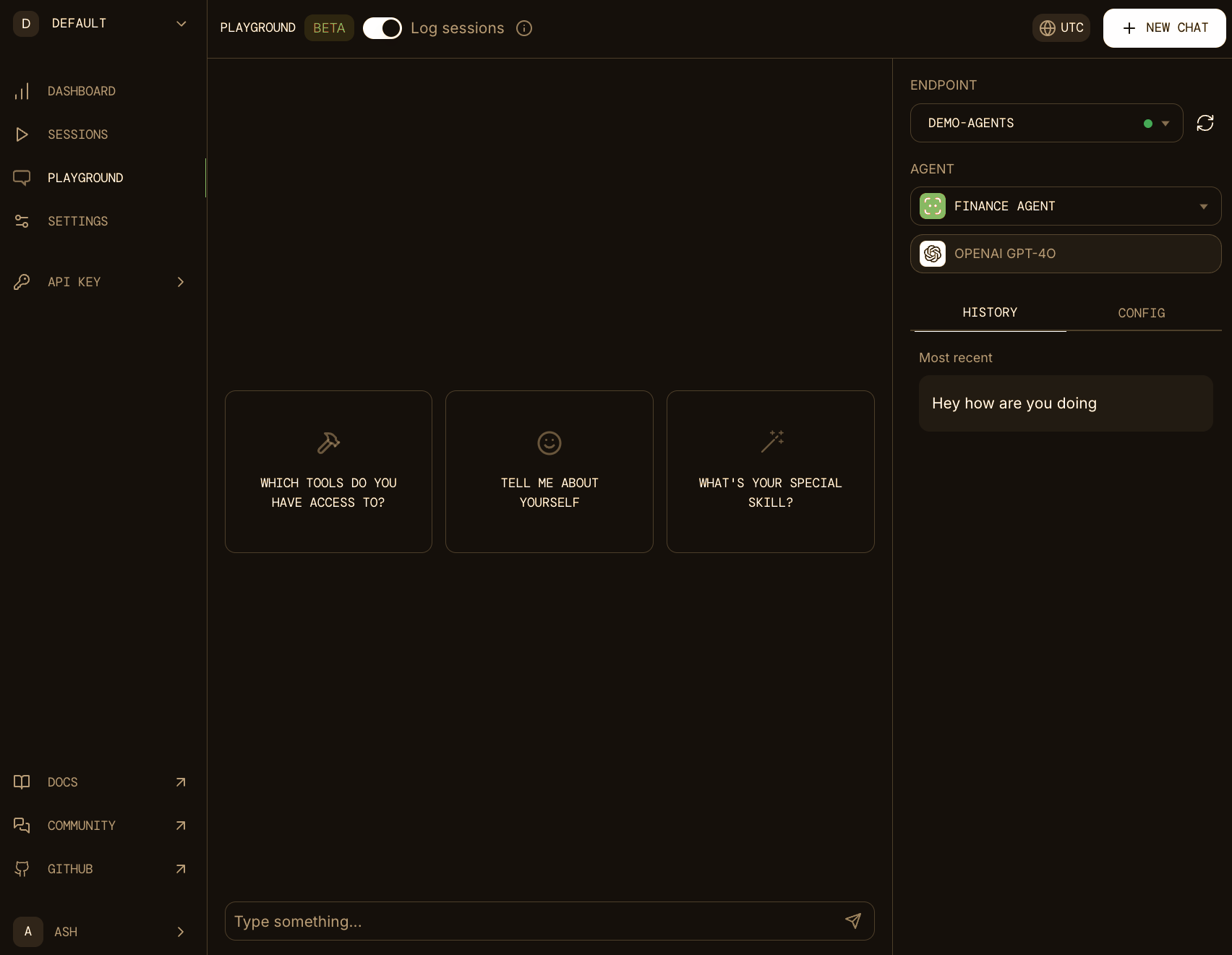
[!NOTE] ethosian does not store any data, all agent data is stored locally in a sqlite database.
from ethosian.agent import Agent
from ethosian.model.openai import OpenAIChat
from ethosian.storage.agent.sqlite import SqlAgentStorage
from ethosian.tools.duckduckgo import DuckDuckGo
from ethosian.tools.yfinance import YFinanceTools
from ethosian.playground import Playground, serve_playground_app

web_agent = Agent(
    name="Web Agent",
    model=OpenAIChat(id="gpt-4o"),
    tools=[DuckDuckGo()],
    instructions=["Always include sources"],
    storage=SqlAgentStorage(table_name="web_agent", db_file="agents.db"),
    add_history_to_messages=True,
    markdown=True,
)

finance_agent = Agent(
    name="Finance Agent",
    model=OpenAIChat(id="gpt-4o"),
    tools=[YFinanceTools(stock_price=True, analyst_recommendations=True, company_info=True, company_news=True)],
    instructions=["Use tables to display data"],
    storage=SqlAgentStorage(table_name="finance_agent", db_file="agents.db"),
    add_history_to_messages=True,
    markdown=True,
)

app = Playground(agents=[finance_agent, web_agent]).get_app()

if __name__ == "__main__":
    serve_playground_app("playground:app", reload=True)
Authenticate with ethosian by running the following command:
ethosian auth
export ethosian_API_KEY=ethosian-***
Install dependencies and run the Agent Playground:
pip install 'fastapi[standard]' sqlalchemy

python playground.py
- Select the
localhost:7777endpoint and start chatting with your agents!
Agentic RAG
We were the first to pioneer Agentic RAG using our Auto-RAG paradigm. With Agentic RAG (or auto-rag), the Agent can search its knowledge base (vector db) for the specific information it needs to achieve its task, instead of always inserting the "context" into the prompt.
This saves tokens and improves response quality. Create a file rag_agent.py
from ethosian.agent import Agent
from ethosian.model.openai import OpenAIChat
from ethosian.embedder.openai import OpenAIEmbedder
from ethosian.knowledge.pdf import PDFUrlKnowledgeBase
from ethosian.vectordb.lancedb import LanceDb, SearchType

# Create a knowledge base from a PDF
knowledge_base = PDFUrlKnowledgeBase(
    urls=["https://ethosian-public.s3.amazonaws.com/recipes/ThaiRecipes.pdf"],
    # Use LanceDB as the vector database
    vector_db=LanceDb(
        table_name="recipes",
        uri="tmp/lancedb",
        search_type=SearchType.vector,
        embedder=OpenAIEmbedder(model="text-embedding-3-small"),
    ),
)
# Comment out after first run as the knowledge base is loaded
knowledge_base.load()

agent = Agent(
    model=OpenAIChat(id="gpt-4o"),
    # Add the knowledge base to the agent
    knowledge=knowledge_base,
    show_tool_calls=True,
    markdown=True,
)
agent.print_response("How do I make chicken and galangal in coconut milk soup", stream=True)
Install libraries and run the Agent:
pip install lancedb tantivy pypdf sqlalchemy

python rag_agent.py
Structured Outputs
Agents can return their output in a structured format as a Pydantic model.
Create a file structured_output.py
from typing import List
from pydantic import BaseModel, Field
from ethosian.agent import Agent
from ethosian.model.openai import OpenAIChat

# Define a Pydantic model to enforce the structure of the output
class MovieScript(BaseModel):
    setting: str = Field(..., description="Provide a nice setting for a blockbuster movie.")
    ending: str = Field(..., description="Ending of the movie. If not available, provide a happy ending.")
    genre: str = Field(..., description="Genre of the movie. If not available, select action, thriller or romantic comedy.")
    name: str = Field(..., description="Give a name to this movie")
    characters: List[str] = Field(..., description="Name of characters for this movie.")
    storyline: str = Field(..., description="3 sentence storyline for the movie. Make it exciting!")

# Agent that uses JSON mode
json_mode_agent = Agent(
    model=OpenAIChat(id="gpt-4o"),
    description="You write movie scripts.",
    response_model=MovieScript,
)
# Agent that uses structured outputs
structured_output_agent = Agent(
    model=OpenAIChat(id="gpt-4o"),
    description="You write movie scripts.",
    response_model=MovieScript,
    structured_outputs=True,
)

json_mode_agent.print_response("New York")
structured_output_agent.print_response("New York")
- Run the
structured_output.pyfile
python structured_output.py
- The output is an object of the
MovieScriptclass, here's how it looks:
MovieScript(
│   setting='A bustling and vibrant New York City',
│   ending='The protagonist saves the city and reconciles with their estranged family.',
│   genre='action',
│   name='City Pulse',
│   characters=['Alex Mercer', 'Nina Castillo', 'Detective Mike Johnson'],
│   storyline='In the heart of New York City, a former cop turned vigilante, Alex Mercer, teams up with a street-smart activist, Nina Castillo, to take down a corrupt political figure who threatens to destroy the city. As they navigate through the intricate web of power and deception, they uncover shocking truths that push them to the brink of their abilities. With time running out, they must race against the clock to save New York and confront their own demons.'
)
Getting help
- Read the docs at docs.ethosianhq.com
- Create an issue at github.com/ethosianhq/ethosian
More examples
Agent that can write and run python code
Show code
The PythonAgent can achieve tasks by writing and running python code.
- Create a file
python_agent.py
from ethosian.agent.python import PythonAgent
from ethosian.model.openai import OpenAIChat
from ethosian.file.local.csv import CsvFile

python_agent = PythonAgent(
    model=OpenAIChat(id="gpt-4o"),
    files=[
        CsvFile(
            path="https://ethosian-public.s3.amazonaws.com/demo_data/IMDB-Movie-Data.csv",
            description="Contains information about movies from IMDB.",
        )
    ],
    markdown=True,
    pip_install=True,
    show_tool_calls=True,
)

python_agent.print_response("What is the average rating of movies?")
- Run the
python_agent.py
python python_agent.py
Agent that can analyze data using SQL
Show code
The DuckDbAgent can perform data analysis using SQL.
- Create a file
data_analyst.py
import json
from ethosian.model.openai import OpenAIChat
from ethosian.agent.duckdb import DuckDbAgent

data_analyst = DuckDbAgent(
    model=OpenAIChat(model="gpt-4o"),
    markdown=True,
    semantic_model=json.dumps(
        {
            "tables": [
                {
                    "name": "movies",
                    "description": "Contains information about movies from IMDB.",
                    "path": "https://ethosian-public.s3.amazonaws.com/demo_data/IMDB-Movie-Data.csv",
                }
            ]
        },
        indent=2,
    ),
)

data_analyst.print_response(
    "Show me a histogram of ratings. "
    "Choose an appropriate bucket size but share how you chose it. "
    "Show me the result as a pretty ascii diagram",
    stream=True,
)
- Install duckdb and run the
data_analyst.pyfile
pip install duckdb

python data_analyst.py
Check out the cookbook for more examples.
Contributions
We're an open-source project and welcome contributions, please read the contributing guide for more information.
Request a feature
- If you have a feature request, please open an issue or make a pull request.
- If you have ideas on how we can improve, please create a discussion.
Telemetry
ethosian logs which model an agent used so we can prioritize features for the most popular models.
You can disable this by setting ethosian_TELEMETRY=false in your environment.
Release history Release notifications | RSS feed


Download files
Download the file for your platform. If you're not sure which to choose, learn more about installing packages.
Source Distribution
Built Distribution
Filter files by name, interpreter, ABI, and platform.
If you're not sure about the file name format, learn more about wheel file names.
Copy a direct link to the current filters
File details
Details for the file ethosian-0.1.1.tar.gz.
File metadata
- Download URL: ethosian-0.1.1.tar.gz
- Upload date:
- Size: 490.5 kB
- Tags: Source
- Uploaded using Trusted Publishing? No
- Uploaded via: twine/6.0.1 CPython/3.13.1
File hashes
| Algorithm | Hash digest | |
|---|---|---|
| SHA256 |
9c75228d5d71ab18d6d755902085da2aa33c9263a0a50afd037e129796a6984a
|
|
| MD5 |
4b1c4f1784ed7f72ec75c8b426f6e5d3
|
|
| BLAKE2b-256 |
f581865b817b837fe951d59b683940b90f43605144ff86bff1223bbafa9a6eb1
|
File details
Details for the file ethosian-0.1.1-py3-none-any.whl.
File metadata
- Download URL: ethosian-0.1.1-py3-none-any.whl
- Upload date:
- Size: 711.1 kB
- Tags: Python 3
- Uploaded using Trusted Publishing? No
- Uploaded via: twine/6.0.1 CPython/3.13.1
File hashes
| Algorithm | Hash digest | |
|---|---|---|
| SHA256 |
f068f93b4d2fc11ffee7a6ae0e5f8cd291ae0d2a765867bb25214f6aefcb362c
|
|
| MD5 |
5e616850c72683ee8afcd27beb28f28e
|
|
| BLAKE2b-256 |
1ff33d85028cdc7c892dda766179b6330162c0229555839a3008999f217c192b
|






