
An open-source Python library designed for developers to calculate fairness metrics and assess bias in machine learning models.

Project description

Eticas: Bias & Audit Framework
An open-source Python library designed for developers to calculate fairness metrics and assess bias in machine learning models. This library provides a comprehensive set of tools to ensure transparency, accountability, and ethical AI development.





Website • Key Features • Installation • Metrics • Example Notebooks • QuickStart Bias Auditing • Explore Results •
Why Use This Library?
AI System can inherit biases from data or amplify them during decision-making processes. This library helps ensure transparency and accountability by providing actionable insights to improve fairness in AI systems.
🚀 Key Features
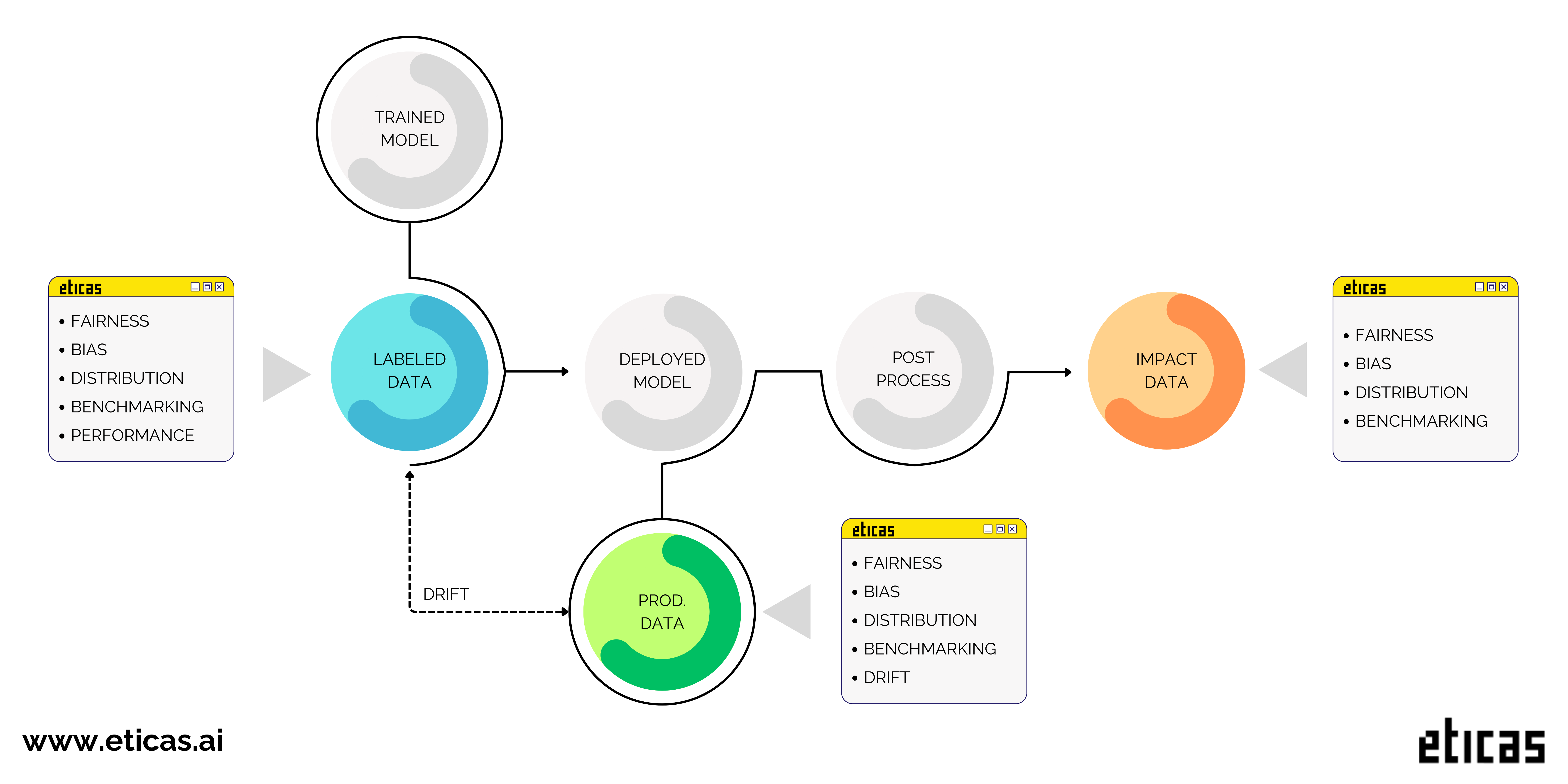
This framework is designed to audit AI systems comprehensively across all stages of their lifecycle. At its core, it focuses on comparing privileged and underprivileged groups, ensuring a fair evaluation of model behavior.
With a wide range of metrics, this framework is a game-changer in bias monitoring. It offers a deep perspective on fairness, allowing for comprehensive reporting even without relying on true labels. The only restriction for measuring bias in production lies in performance metrics, as they are directly tied to true labels.
The stages considered are the following:
- The dataset used to train the model.
- The dataset used in production.
- A dataset containing the system’s final decisions, which may include human intervention or another model.
- Demographic Benchmarking Monitoring: Perform in-depth analysis of population distribution.
- Model Fairness Monitoring: Ensure equality and detect equity issues in decision-making.
- Features Distribution Evaluation: Analyze correlations, causality, and variable importance.
- Performance Analysis: Metrics to assess model performance, accuracy, and recall.
- Model Drift Monitoring: Detect and measure changes in data distributions and model behavior over time.
🌟 ITACA: Monitoring & Auditing Platform 🌟
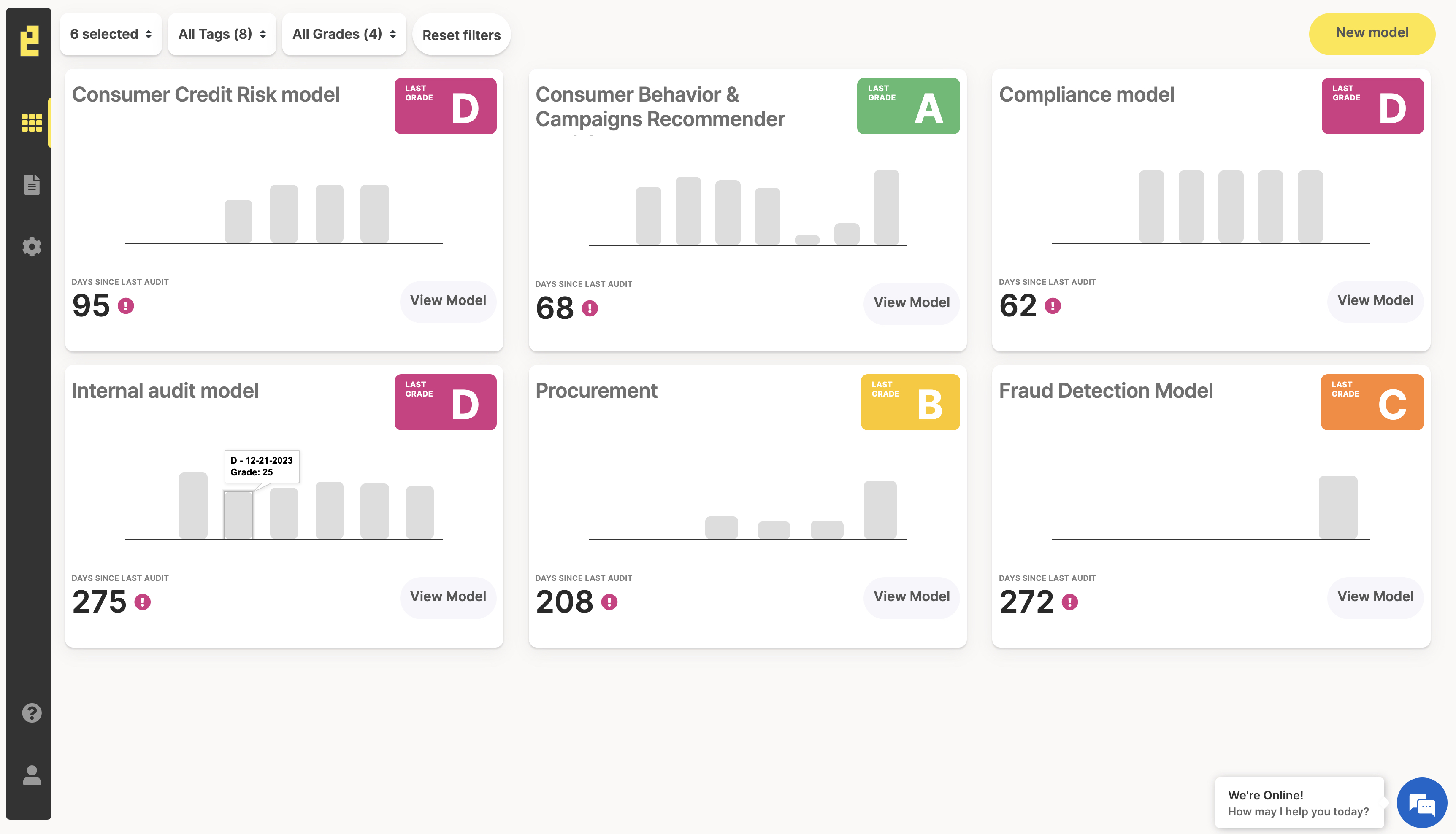
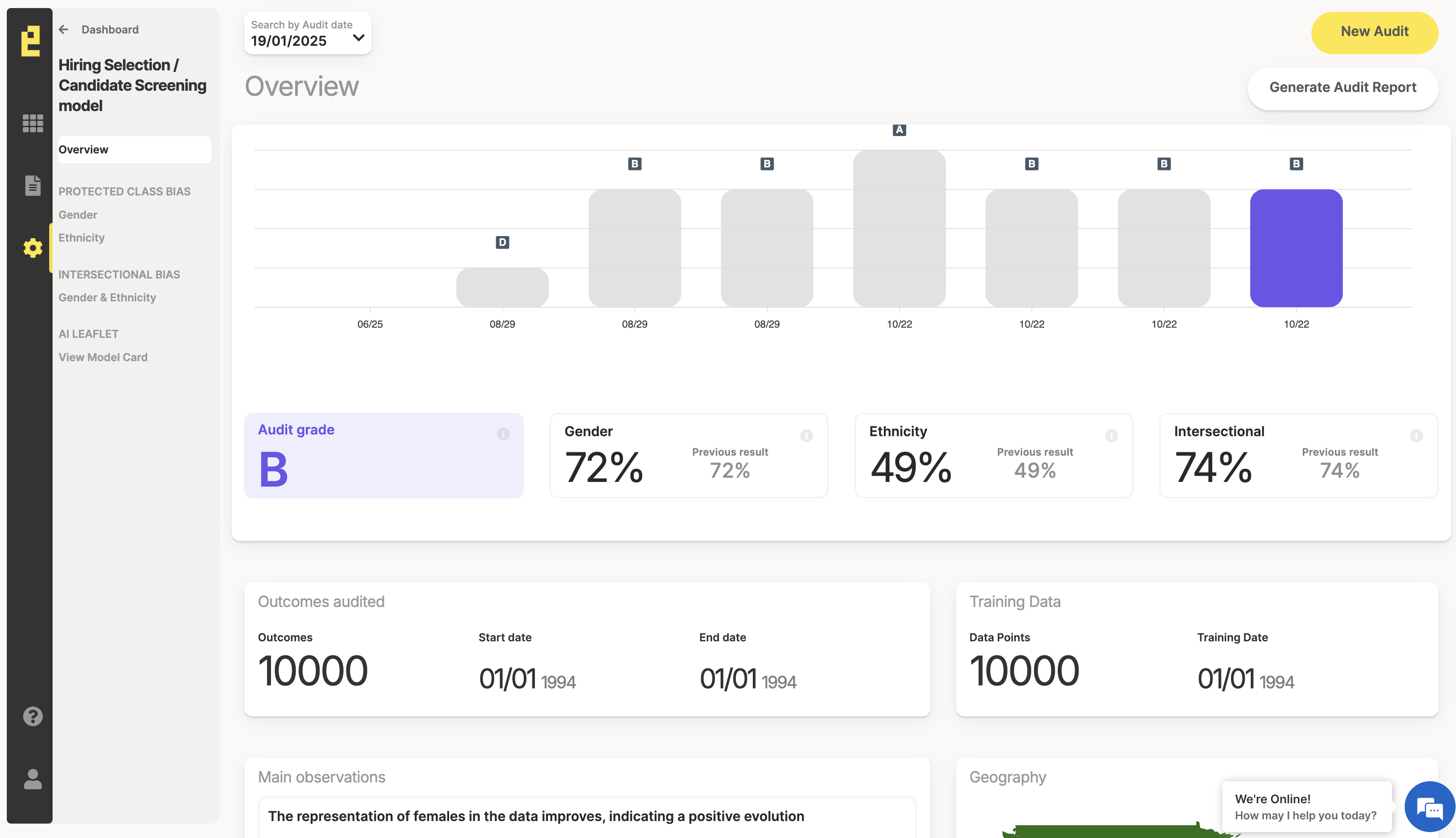
🟡 Unlock the full potential of Eticas by upgrading to our subscription model! With ITACA, our powerful SaaS platform, you can monitor every stage of your model’s lifecycle seamlessly. Easily integrate ITACA into your workflows with our library and API—start optimizing your models today!
- Audit Subscription 🔎: Stay compliant with major regulations and laws on bias and fairness.
Learn more about our platform at 🔗 ITACA – Monitoring & Auditing Platform.
| 
COMING SOON 🎉
- Developer Subscription 🛠️: Connect to ITACA to monitor your models.
⚖️ Metrics
| Group | Metric | Label needed? | Description |
|---|---|---|---|
| fairness | d_equality | no | Analyze whether the system’s disparities occur because the model does not treat all groups equally. |
| fairness | d_equity | no | Analyze whether the system’s disparities arise because some groups have unique characteristics and may need a boost. |
| fairness | d_parity | no | Calculate the ratio of Selection Rates (Disparate Impact, DI). It represents the chance of success. |
| fairness | d_statisticalparity | no | Calculate the difference in Selection Rates (Statistical Parity Difference, SPD). It measures the gap in success rates. |
| fairness | d_calibrated_false | yes | Evaluate the calibration for negative outcomes across groups. |
| fairness | d_calibrated_true | yes | Evaluate the calibration for positive outcomes across groups. |
| fairness | d_equalodds_false | yes | Check whether false outcomes are distributed equally among groups. |
| fairness | d_equalodds_true | yes | Check whether true outcomes are distributed equally among groups. |
| Demographic Benchmarking | da_inconsistency | no | Calculate the percentage of samples that belong to an underprivileged group. |
| Demographic Benchmarking | da_positive | no | Calculate the percentage of samples that receive a positive outcome and belong to an underprivileged group. |
| Features Distribution | da_informative | no | Determine if there is a proxy feature in the dataset, meaning some features act as a protected attribute. |
| Features Distribution | dxa_inconsistency | no | Check if the protected attributes are highly related to the output. |
| Performance | accuracy | yes | Calculate the proportion of correct predictions among all predictions. |
| Performance | F1 | yes | Compute the harmonic mean of precision and recall. |
| Performance | precision | yes | Compute the ratio of true positives to all predicted positives. |
| Performance | recall | yes | Compute the ratio of true positives to all actual positives. |
| Performance | poor_performance | yes | Calculate the accuracy against the representation of the largest class. |
| Drift | Drift Train-Operational | no | Evaluate changes in data or model performance between training and operational phases. |
📥 Installation
pip install eticas-audit
Example Notebooks
| Notebook | Description |
|---|---|
| Audit AI System | Check how use this library to audit AI System. |
QuickStart Bias Auditing
Execute Audit
Define Senstive Attributes
Use a JSON object to define the sensitive attributes. You need to specify the columns where the attribute names and the underprivileged or privileged groups are defined. This definition can include a list to accommodate more than one group.
Sensitive attributes can be simple, for example sex or race. They can also be complex—for instance, the intersection of sex and race.
{
    "sensitive_attributes": {
        "sex": {
            "columns": [
                {
                    "name": "sex",
                    "underprivileged": [2]
                }
            ],
            "type": "simple"
        },
        "ethnicity": {
            "columns": [
                {
                    "name": "ethnicity",
                    "privileged": [1]
                }
            ],
            "type": "simple"
        },
        "age": {
            "columns": [
                {
                    "name": "age",
                    "privileged": [3, 4]
                }
            ],
            "type": "simple"
        },
        "sex_ethnicity": {
            "groups": ["sex", "ethnicity"],
            "type": "complex"
        }
    }
}
Create Model
Initialize the model object that will be the focus of the audit. As important inputs, you need to define the sensitive attributes and specify which input features you want to analyze. It's not necessary to include all features—only the most important or relevant ones.
import logging
logging.basicConfig(
    level=logging.INFO,
    format='[%(levelname)s] %(name)s - %(message)s'
)

from eticas.model.ml_model import MLModel
model = MLModel(
    model_name="ML Testing Regression",
    description="A logistic regression model to illustrate audits",
    country="USA",
    state="CA",
    sensitive_attributes=sensitive_attributes,
    features=["feature_0", "feature_1", "feature_2"]
)
Audit Labeled
This is how to define the audit for a labeled dataset. In general the dataset used to train the dataset.The required inputs are:
- dataset_path – path to the data,
- label_column – represents the true label,
- output_column – contains the model’s output,
- positive_output – A list of outputs considered positive.
You can also upload a label or output column with scoring, ranking, or recommendation values (continuous values). If the regression ordering is ascending, the positive output is interpreted as 1; if it is descending, it is interpreted as 0.
model.run_labeled_audit(dataset_path ='files/example_training_binary_2.csv',
                        label_column = 'outcome',
                        output_column = 'predicted_outcome',
                        positive_output = [1])

#json labeled results
model.labeled_results
Audit Production
This is how to define the audit for a production dataset. The required inputs are:
- dataset_path – path to the data,
- output_column – contains the model’s output,
- positive_output – A list of outputs considered positive.
You can also upload a label or output column with scoring, ranking, or recommendation values (continuous values). If the regression ordering is ascending, the positive output is interpreted as 1; if it is descending, it is interpreted as 0.
model.run_production_audit(dataset_path ='files/example_operational_binary_2.csv',
                           output_column = 'predicted_outcome',
                           positive_output = [1])

#json production results
model.production_results
Audit Impacted
This is how to define the audit for a production dataset. The required inputs are:
- dataset_path – path to the data,
- output_column – contains the model’s output,
- positive_output – A list of outputs considered positive.
You can also upload a label or output column with scoring, ranking, or recommendation values (continuous values). If the regression ordering is ascending, the positive output is interpreted as 1; if it is descending, it is interpreted as 0.
model.run_impacted_audit(dataset_path ='files/example_impact_binary_2.csv',
                         output_column = 'recorded_outcome',
                         positive_output = [1])

#json impacted results
model.impacted_results
Audit Drift
model.run_drift_audit(dataset_path_dev = 'files/example_training_binary_2.csv',
                      output_column_dev = 'outcome',
                      positive_output_dev = [1],
                      dataset_path_prod = 'files/example_operational_binary_2.csv',
                      output_column_prod = 'predicted_outcome',
                      positive_output_prod = [1])

#json drift results
model.drift_results
Explore Results
The results can be exported in JSON or DataFrame format. Both options allow you to extract the information with or without normalization. Normalized values range from 0 to 100, where 0 represents a poor result and 100 represents a perfect value.
audit_result = model.df_results(norm_values=True)
audit_result = model.json_results(norm_values=True)
Metrics WITHOUT TRUE LABEL
Fairness
result = audit_result.xs(('fairness',), level=(0,))
result = result.reset_index()
result = result.pivot(
    index=['metric', 'attribute'],
    columns='stage',
    values='value'
)

result
| Metric | Attribute | 01-labeled | 02-production | 03-impact |
|---|---|---|---|---|
| d_equality | age | 99.0 ▓▓▓▓▓▓ | 99.0 ▓▓▓▓▓▓ | 100.0 ▓▓▓▓▓▓ |
| ethnicity | 100.0 ▓▓▓▓▓▓ | 99.0 ▓▓▓▓▓▓ | 44.0 ▓▓▓ | |
| sex | 100.0 ▓▓▓▓▓▓ | 71.0 ▓▓▓▓ | 47.0 ▓▓▓ | |
| sex_ethnicity | 99.0 ▓▓▓▓▓▓ | 62.0 ▓▓▓▓ | 44.0 ▓▓▓ | |
| d_equity | age | 100.0 ▓▓▓▓▓▓ | 99.0 ▓▓▓▓▓▓ | 100.0 ▓▓▓▓▓▓ |
| ethnicity | 100.0 ▓▓▓▓▓▓ | 70.0 ▓▓▓▓ | 44.0 ▓▓▓ | |
| sex | 99.0 ▓▓▓▓▓▓ | 48.0 ▓▓▓ | 41.0 ▓▓▓ | |
| sex_ethnicity | 100.0 ▓▓▓▓▓▓ | 57.0 ▓▓▓ | 44.0 ▓▓▓ | |
| d_parity | age | 98.0 ▓▓▓▓▓▓ | 98.0 ▓▓▓▓▓▓ | 99.0 ▓▓▓▓▓▓ |
| ethnicity | 99.0 ▓▓▓▓▓▓ | 76.0 ▓▓▓▓ | 42.0 ▓▓▓ | |
| sex | 99.0 ▓▓▓▓▓▓ | 64.0 ▓▓▓▓ | 40.0 ▓▓▓ | |
| sex_ethnicity | 99.0 ▓▓▓▓▓▓ | 65.0 ▓▓▓▓ | 40.0 ▓▓▓ | |
| d_statisticalparity | age | 98.0 ▓▓▓▓▓▓ | 98.0 ▓▓▓▓▓▓ | 98.0 ▓▓▓▓▓▓ |
| ethnicity | 100.0 ▓▓▓▓▓▓ | 74.0 ▓▓▓▓ | 43.0 ▓▓▓ | |
| sex | 100.0 ▓▓▓▓▓▓ | 57.0 ▓▓▓ | 42.0 ▓▓▓ | |
| sex_ethnicity | 98.0 ▓▓▓▓▓▓ | 57.0 ▓▓▓ | 42.0 ▓▓▓ |
Benchmarking
result = audit_result.xs(('benchmarking',), level=(0,))
result = result.reset_index()
result = result.pivot(
    index=['metric', 'attribute'],
    columns='stage',
    values='value'
)

result
| Metric | Attribute | 01-labeled | 02-production | 03-impact |
|---|---|---|---|---|
| da_inconsistency | age | 44.8 ▓▓▓ | 44.5 ▓▓▓ | 45.0 ▓▓▓ |
| ethnicity | 40.0 ▓▓▓ | 20.0 ▓▓ | 10.0 ▓ | |
| sex | 60.0 ▓▓▓▓ | 30.0 ▓▓ | 15.0 ▓ | |
| sex_ethnicity | 25.0 ▓▓ | 15.0 ▓ | 10.0 ▓ | |
| da_positive | age | 45.2 ▓▓▓ | 44.9 ▓▓▓ | 45.3 ▓▓▓ |
| ethnicity | 39.8 ▓▓▓ | 15.8 ▓ | 3.7 ▓ | |
| sex | 59.8 ▓▓▓▓ | 19.7 ▓▓ | 5.7 ▓ | |
| sex_ethnicity | 24.7 ▓▓ | 10.0 ▓ | 3.7 ▓ |
Distribution
result = audit_result.xs(('distribution',), level=(0,))
result = result.reset_index()
result = result.pivot(
    index=['metric', 'attribute'],
    columns='stage',
    values='value'
)

result
| Metric | Attribute | 01-labeled | 02-production | 03-impact |
|---|---|---|---|---|
| d_equality | age | 100.0 ▓▓▓▓▓▓ | 100.0 ▓▓▓▓▓▓ | 100.0 ▓▓▓▓▓▓ |
| ethnicity | 100.0 ▓▓▓▓▓▓ | 100.0 ▓▓▓▓▓▓ | 72.0 ▓▓▓▓ | |
| sex | 99.0 ▓▓▓▓▓▓ | 90.0 ▓▓▓▓▓▓ | 60.0 ▓▓▓▓ | |
| sex_ethnicity | 100.0 ▓▓▓▓▓▓ | 90.0 ▓▓▓▓▓▓ | 60.0 ▓▓▓▓ | |
| d_equity | age | 99.0 ▓▓▓▓▓▓ | 98.0 ▓▓▓▓▓▓ | 98.0 ▓▓▓▓▓▓ |
| ethnicity | 99.0 ▓▓▓▓▓▓ | 89.0 ▓▓▓▓▓▓ | 77.0 ▓▓▓▓ | |
| sex | 99.0 ▓▓▓▓▓▓ | 77.0 ▓▓▓▓▓▓ | 70.0 ▓▓▓▓ | |
| sex_ethnicity | 98.0 ▓▓▓▓▓▓ | 86.0 ▓▓▓▓▓▓ | 77.0 ▓▓▓▓ |
Drift
result = audit_result.xs(('drift',), level=(0,))
result = result.reset_index()
result = result.pivot(
    index=['metric', 'attribute'],
    columns='stage',
    values='value'
)

result
| Metric | Attribute | 02-production |
|---|---|---|
| drift | age | 1.17 ▓ |
| ethnicity | 0.0 ▓ | |
| overall | 0.87 ▓ | |
| sex | 0.0 ▓ | |
| sex_ethnicity | 1.62 ▓ |
Metrics WITH TRUE LABEL
Fairness
result = audit_result.xs(('fairness_label',), level=(0,))
result = result.reset_index()
result = result.pivot(
    index=['metric', 'attribute'],
    columns='stage',
    values='value'
)

result
| Metric | Attribute | 01-labeled |
|---|---|---|
| d_calibrated_false | age | 99.0 ▓▓▓▓▓▓ |
| ethnicity | 97.0 ▓▓▓▓▓▓ | |
| sex | 98.0 ▓▓▓▓▓▓ | |
| sex_ethnicity | 99.0 ▓▓▓▓▓▓ | |
| d_calibrated_true | age | 96.0 ▓▓▓▓▓▓ |
| ethnicity | 98.0 ▓▓▓▓▓▓ | |
| sex | 96.0 ▓▓▓▓▓▓ | |
| sex_ethnicity | 95.0 ▓▓▓▓▓▓ | |
| d_equalodds_false | age | 99.0 ▓▓▓▓▓▓ |
| ethnicity | 97.0 ▓▓▓▓▓▓ | |
| sex | 98.0 ▓▓▓▓▓▓ | |
| sex_ethnicity | 99.0 ▓▓▓▓▓▓ | |
| d_equalodds_true | age | 96.0 ▓▓▓▓▓▓ |
| ethnicity | 98.0 ▓▓▓▓▓▓ | |
| sex | 96.0 ▓▓▓▓▓▓ | |
| sex_ethnicity | 95.0 ▓▓▓▓▓▓ |
Performance
result = audit_result.xs(('performance',), level=(0,))
result = result.reset_index()
result = result.pivot(
    index=['metric', 'attribute'],
    columns='stage',
    values='value'
)

result
| Metric | Attribute | 01-labeled |
|---|---|---|
| FN | age | 1151 |
| ethnicity | 987 | |
| sex | 1475 | |
| sex_ethnicity | 619 | |
| FP | age | 1146 |
| ethnicity | 1027 | |
| sex | 1565 | |
| sex_ethnicity | 653 | |
| TN | age | 1060 |
| ethnicity | 973 | |
| sex | 1428 | |
| sex_ethnicity | 605 | |
| TP | age | 1121 |
| ethnicity | 1013 | |
| sex | 1532 | |
| sex_ethnicity | 623 | |
| accuracy | age | 48.7 ▓▓ |
| ethnicity | 49.65 ▓▓ | |
| sex | 49.33 ▓▓ | |
| sex_ethnicity | 49.12 ▓▓ | |
| f1 | age | 49.39 ▓▓ |
| ethnicity | 50.15 ▓▓ | |
| sex | 50.2 ▓▓ | |
| sex_ethnicity | 49.48 ▓▓ | |
| poor_performance | age | 57.58 ▓▓ |
| ethnicity | 59.58 ▓▓ | |
| sex | 59.05 ▓▓ | |
| sex_ethnicity | 58.57 ▓▓ | |
| precision | age | 49.45 ▓▓ |
| ethnicity | 49.66 ▓▓ | |
| sex | 49.47 ▓▓ | |
| sex_ethnicity | 48.82 ▓▓ | |
| recall | age | 49.34 ▓▓ |
| ethnicity | 50.65 ▓▓ | |
| sex | 50.95 ▓▓ | |
| sex_ethnicity | 50.16 ▓▓ |
Release history Release notifications | RSS feed


Download files
Download the file for your platform. If you're not sure which to choose, learn more about installing packages.
Source Distribution
Built Distribution
Filter files by name, interpreter, ABI, and platform.
If you're not sure about the file name format, learn more about wheel file names.
Copy a direct link to the current filters
File details
Details for the file eticas_audit-0.1.1.tar.gz.
File metadata
- Download URL: eticas_audit-0.1.1.tar.gz
- Upload date:
- Size: 18.8 kB
- Tags: Source
- Uploaded using Trusted Publishing? No
- Uploaded via: twine/6.1.0 CPython/3.11.11
File hashes
| Algorithm | Hash digest | |
|---|---|---|
| SHA256 |
f07c4dfeefdab859a14dc831255fa52b2bd8a2ab52e1332957007ef8e03caacf
|
|
| MD5 |
04d4be40271c9117a2de8080290c827e
|
|
| BLAKE2b-256 |
528128d7acafc872dc1074f28bf50d114933027e5dce8c0a1ea54530eeb89d66
|
File details
Details for the file eticas_audit-0.1.1-py3-none-any.whl.
File metadata
- Download URL: eticas_audit-0.1.1-py3-none-any.whl
- Upload date:
- Size: 10.6 kB
- Tags: Python 3
- Uploaded using Trusted Publishing? No
- Uploaded via: twine/6.1.0 CPython/3.11.11
File hashes
| Algorithm | Hash digest | |
|---|---|---|
| SHA256 |
192a29ac4142b72ef5e922aa416a45c60e46c4dd6c7dc5fd980e79de73c4622f
|
|
| MD5 |
ffdca138d3e91643e40acb207b1eea63
|
|
| BLAKE2b-256 |
d1212af6f8bbe19db8f5334f789ab58e2d5473fb6c6605b25db7672fa8c436f1
|






