
ETL Pipeline
This is an implementation of a generalizable data Extract Transform Load (ETL) Pipeline framework for python. This solution has been modularized and is available at https://pypi.org/project/etl-pipeline-ggn1-ase-g5/4.0/.
Pre-Requisites
This packages is known to be compatible with python versions >= 3.11. Compatibility with older versions are yet to be tested.
Packages dill, fastapi, schedule, uvicorn and pandas constitute dependencies of this package.
Getting Started
Please install the package using the following command.
pip install etl-pipeline-ggn1-ase-g5
Once installed, the web application that makes available several API endpoints useful for configuration and management of ETL tasks involving loading, transforming and saving data, can be launched using the following command. Note: Here, the notation [...] indicates that this argument is optional.
etl_pipeline [--db-name "a name for the ETL DB"] [--db-path "path to a directory on your local machine where the ETL DB may be saved"] [--logs-dir "path to a directory on your local machine where ETL task logs may be saved"] [--host "address where this app is to hosted"] [--port <port number>]
Following are default values for above optional arguments.
db-name: "db_etl".db-path: ".".logs-dir: ".".host: "127.0.0.1"port: 8003
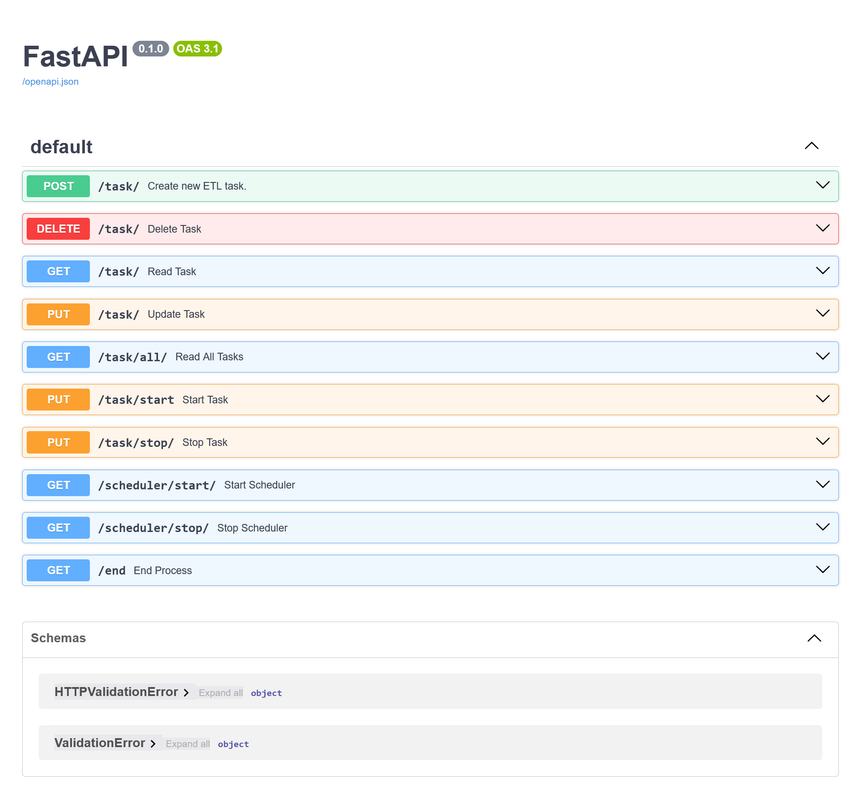
Upon following above steps, the visiting http://host:port/docs should display the following.
ETLTask
All ETL tasks to be added into the ETL Pipeline is expected to be an object of the ETLTask class. This class may be imported into your python file as follows.
from etl_pipeline_ggn1_ase_g5.etl_task import ETLTask
A new object of this class is created as follows.
my_task = ETLTask(
    name="my_task",
    fun_data_load=f_load,
    fun_data_transform=f_transform,
    fun_data_save=f_save,
    repeat_interval=10,
    repeat_time_unit='seconds'
)
Meaning of each argument above is as follows.
name: A string identifier for the task.fun_data_load: A python function that loads data from a desired source. This function should return data in a format that is compatible with the followingfun_data_transformfunction.fun_data_transform: A python function that applies desired transformations to loaded data. This function should return data in a format that is compatible with the followingfun_data_savefunction.fun_data_save: A python function that saves data to a desired destination.repeat_interval: This is the no. of time units after which this task is to be repeated.repeat_time_unit: This is the unit of time time associated with above definedrepeat_interval. Valid input values are "seconds", "minutes", "hours" or "days".
API End Points
This section briefly states purpose of each API end point and how these are intended to be used.
/task/
A POST request to this path /task/with parameters as given below results in a new ETL task being created and saved into a the ETL database (DB).
task_str = base64encode_obj(my_task)
params = {
    "task_str": task_str
}
Here, my_task is an object of the ETLTask class. In order to be able to send your task via HTTP. It must be encoded as a base64 string. Provided function base64encode_obj(...) may be used to do this. This function may be imported as follows.
from etl_pipeline_ggn1_ase_g5.utility import base64encode_obj
Note:
- The name of a task is considered to be it's unique identifier. If an attempt is made to create a new task with the same name as an existing task, this will lead to no action being taken and a response that notifies of the same.
- This package assumes that data load, transform and save functions provided by the user, are error free. That said, in situation like wherein the save function provided tried to save data to a path that did not exist, then this too will return an error message.
A GET request to this path /task/ with parameters as given below can be made to fetch a particular task from the DB and view its properties.
params = {
    "task_name": "my_task"
}
Note:
- No task with given identifier is saved in the DB, then a message notifying about this is returned.
A PUT request to this path /task/ with parameters and json data as given below can be leverages to change repeat interval or time unit associated with a task.
params = {
    "task_name": "mu_task"
}

json = {
    "repeat_time_unit": "minutes",
    "repeat_interval": "5"
}
Note:
- Only tasks that are currently
stoppedmay be updated. If a request is made to update arunning(is loading, transforming or saving data) orscheduled(has performed ETL tasks and is awaiting next repetition) task, a response is send that urges to stop the task first. The status of a task is returned along with other properties when tasks are fetched from the DB by making corresponding requests.
A DELETE request to this path /task/ with parameters as given below results in a the corresponding task, if it did exist, being deleted from the ETL DB.
params = {
    "task_name": "my_task"
}
Note:
- Only tasks that are currently
stoppedmay be deleted. If a request is made to delete arunningorscheduledtask, a response is send that urges to stop the task first.
/task/all/
A GET request to this path /task/all/ fetches a list of all tasks currently saved in memory. Here, no parameters are expected.
/task/stop/
A PUT request to this path /task/stop/ with parameters (no json data expected) as given below may be made to stop a currently running or scheduled task.
params = {
    "task_name": "my_task"
}
Note:
- If the task trying to be stopped is already
stopped, then a message indicating this is returned. - Trying to stop a non-existent task results in an error message notifying that such a task does not exist.
/task/start/
A PUT request to this path /task/start/ with parameters (no json data expected) as given below may be made to start a currently stopped task. When started, the task shall run once immediately and then onwards, will repeated run after the scheduled no. of time units.
params = {
    "task_name": "my_task"
}
Note:
- If the task trying to be started is already
runningorscheduled, then a message indicating this is returned. - Trying to start a non-existent task results in an error message notifying that such a task does not exist.
/scheduler/stop
Sending a GET request to this path /scheduler/stop/ (no parameters expected) results in the underlying scheduler being stopped. This suspends execution of all tasks.
Note:
- Trying to stop a scheduler that is not running, results in a message that notifies of this.
/scheduler/start
Sending a GET request to this path /scheduler/start/ (no parameters expected) results in the underlying scheduler being started or re-started. This resumes execution of all scheduled tasks.
Note:
- If time at which the scheduler was started exceeds the next scheduled run time for any task, then all such tasks will be run as soon as the scheduler is started. Other tasks resume their wait until when they're due to repeat.
- When starting the web application, the scheduler does not start by default. It must be started.
- Creation of a new task triggers the scheduler to start if it was already not running.
- Trying to start a scheduler that is already running, results in a message that notifies of this.
/end/
A GET request to this path results in the the entire application being shut down systematically and with clean up. This involves stopping all tasks, stopping the scheduler, cleaning up any open file pointers or streams and terminating all active threads.
Note:
- Always use this endpoint to stop the application. Trying to stop it using
Ctrl + Cetc, may result in unexpected behavior due to the nature of theschedulemodule being leveraged by this package and also because there may be multiple active strings.
1 maintainer

Metadata
1 maintainer
Release files for etl-pipeline-ggn1-ase-g5 4.1
For a detailed explanation of source distributions (sdists) and built distributions (wheels), please see the package formats documentation.
Source distribution (sdist)
| File | Size | Uploaded | |
|---|---|---|---|
| etl_pipeline_ggn1_ase_g5-4.1.tar.gz | 17.0 kB | Details |
Built distribution (wheel)
| File | Interpreter | ABI | Platform | Reset |
|---|---|---|---|---|
| etl_pipeline_ggn1_ase_g5-4.1-py3-none-any.whl | Python 3 | none | any | Details |
Total release size: 30.4 kB
Release files / etl_pipeline_ggn1_ase_g5-4.1.tar.gz
| Download URL | etl_pipeline_ggn1_ase_g5-4.1.tar.gz |
|---|---|
| Size | 17.0 kB |
| Tags | Source |
|
SHA-256 checksum How to use checksums |
aaacfb3beec8cdb9347cd6d5edee7ff68ba407b1e1529b06236c69dde23d8a5a
|
|
BLAKE2b-256 checksum How to use checksums |
33629f8561479b76d47bf93556ef75127d1fa377c8e505cca41753eb05d13248
|
| Upload date | |
|
Uploaded using Trusted Publishing? What is trusted publishing? |
No |
| Uploaded via |
twine/5.0.0 CPython/3.12.0
|
Release files / etl_pipeline_ggn1_ase_g5-4.1-py3-none-any.whl
| Download URL | etl_pipeline_ggn1_ase_g5-4.1-py3-none-any.whl |
|---|---|
| Size | 13.4 kB |
| Tags | Python 3 |
|
SHA-256 checksum How to use checksums |
c5634a74e0d76ee5e7ab280d2b2b0063c8c5a584a3969a999b6f1ca74f52afa2
|
|
BLAKE2b-256 checksum How to use checksums |
8a6143eef15fdc4e6018273a078b845162ce5bdfcbf2ec683321c4721a1b0671
|
| Upload date | |
|
Uploaded using Trusted Publishing? What is trusted publishing? |
No |
| Uploaded via |
twine/5.0.0 CPython/3.12.0
|














