
All-in-one CLI toolbox for office automation: PDF, Word, Excel, images, QR codes, Markdown, LLM and more, with AI-agent-friendly JSON output

Project description
🧰 etool
One install. Dozens of everyday automation commands. Built for humans and AI agents.





English | 中文
etool turns everyday office and developer chores into one-line shell commands (or Python calls): merge / split / encrypt PDFs, extract images from Word documents, convert Markdown to Word / HTML / Excel, batch-convert photos to WebP, generate and decode QR codes, merge Jupyter notebooks, test network / disk speed, chat with any OpenAI-compatible LLM, render cheat-sheet wallpapers, and more.
Add --json to any command and it prints exactly one machine-readable JSON envelope — which makes etool a drop-in tool layer for AI agents, scripts, and CI pipelines.
Why etool?
- 🧩 All-in-one — PDF, Word, Excel, image, QR code, Markdown, Jupyter, web, LLM, and network utilities behind a single
etoolcommand. Every feature is also importable as a plain Python API. - 🤖 AI-agent friendly — with
--json, every command emits one envelope:{"ok": true, "data": ...}or{"ok": false, "error": {code, message, details}}, with stable machine-readable error codes. Ideal for function calling and automated pipelines. - 🪶 Light by default — the default install is ~15 MB. Heavy binary dependencies (PyMuPDF, OpenCV) are opt-in extras:
etool[all]. - 🖥️ Cross-platform — one codebase for Windows, macOS, and Linux, CI-tested on all three. Python 3.10+.
Install
pip install -U etool          # lightweight core (~15 MB) — covers almost everything
pip install -U "etool[all]"   # + PDF → PNG rasterization and QR decoding
| Extra | Enables | Adds |
|---|---|---|
etool[pdf-images] |
etool pdf to-images (PDF → PNG) |
PyMuPDF |
etool[qr-decode] |
etool qrcode decode (offline QR recognition) |
OpenCV (headless) |
etool[all] |
everything above | both |
Run it without installing anything (via uv), or install it as an isolated CLI app:
uvx etool qrcode generate --text "https://example.com" --out qr.png
pipx install etool
After install, the etool entry point is on your PATH; python -m etool ... also works.
60-second tour
# Merge two PDFs
etool pdf merge --out merged.pdf part1.pdf part2.pdf

# Turn a Markdown note into a Word document
etool md to-docx notes.md --out notes.docx

# Batch-convert a folder of photos to lossless WebP
etool image rename-webp ./photos

# Generate a QR code
etool qrcode generate --text "https://example.com" --out qr.png

# Fetch a web page as clean, readable text
etool web fetch-text https://example.com

# Chat with any OpenAI-compatible model (stdlib HTTP, no SDK needed)
etool llm chat "Why is the sky blue?" --system "Answer in one sentence."
Need structured output for a script or an agent? Add --json:
$ etool --json web mask-ip 8.8.4.4
{
  "ok": true,
  "data": {
    "masked": "8.8.x.4",
    "is_public": true
  }
}
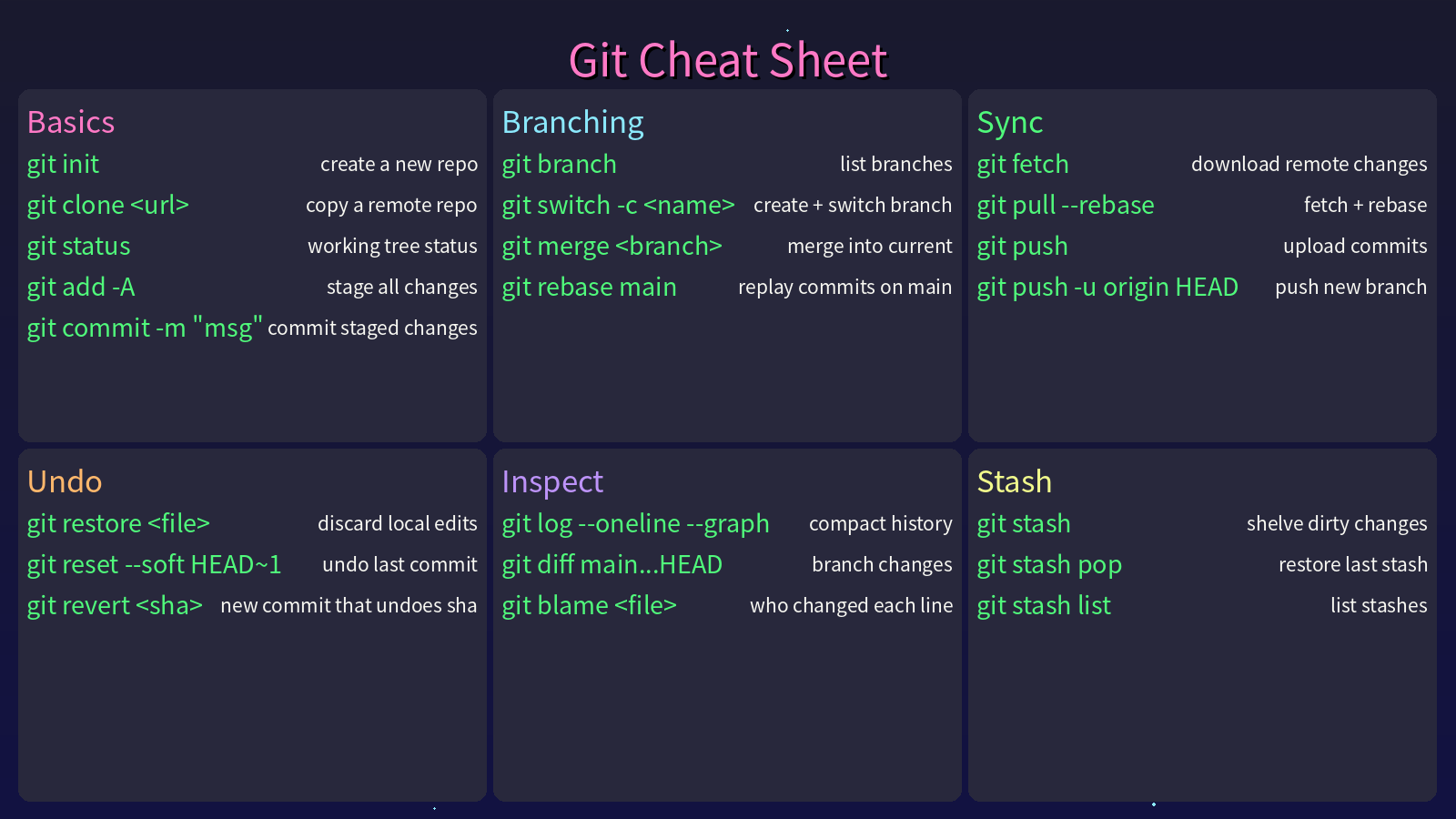
etool can even render a cheat-sheet wallpaper for any tool — this image was generated by etool cheatsheet generate:
What's inside
| Domain | Command | What you get |
|---|---|---|
etool pdf |
merge, split, encrypt / decrypt, watermark, insert, PDF → PNG | |
| Word | etool docx |
replace text, swap page orientation, extract embedded images |
| Excel | etool excel |
copy workbook formatting to a new file |
| Images | etool image |
stitch left-right / top-bottom, pad to square, 3×3 grid crop, batch → WebP |
| QR codes | etool qrcode |
generate, decode offline |
| Markdown | etool md |
→ Word, → HTML, tables → Excel |
| Jupyter | etool ipynb |
merge notebooks, notebook → Markdown |
| Web | etool web |
page → readable text, RSS / Atom parsing, IP masking |
| LLM | etool llm |
chat, summarize, outline via any OpenAI-compatible API |
| Cheat sheets | etool cheatsheet |
render a command cheat-sheet wallpaper PNG |
| Speed | etool speed |
network / disk / memory speed tests |
| Passwords | etool password |
random passwords, arbitrary base conversion |
| Misc | etool stdlib / install-reqs / scheduler / email |
stdlib usage analysis, bulk pip install, schedule parsing, SMTP mail |
Command reference
With --json, stdout is one JSON document per invocation (pretty-printed, 2-space indent):
- Success:
{"ok": true, "data": { ... }} - Failure:
{"ok": false, "error": {"code", "message", "details"}}
Without --json, output is human-readable (errors go to stderr). Below, Input is the command; Output shows typical --json stdout (values such as paths, passwords, and timings are illustrative).
Version — etool version
Input
etool --json version
Output
{"ok": true, "data": {"version": "2.2.0"}}
PDF — merge · split · encrypt · watermark · rasterize — etool pdf
Merge
etool --json pdf merge --out merged.pdf part1.pdf part2.pdf
{"ok": true, "data": {"merged": "merged.pdf", "log": "merged: part1.pdf\nmerged: part2.pdf\nmerged file saved as: merged.pdf"}}
Split by page chunk size
etool --json pdf split-pages --pages 3 document.pdf
{"ok": true, "data": {"source": "document.pdf", "log": "generated: document_part_by_page1.pdf\n..."}}
Split into N parts
etool --json pdf split-num --parts 2 document.pdf
{"ok": true, "data": {"source": "document.pdf", "log": "..."}}
Encrypt / decrypt
etool --json pdf encrypt --password secret doc.pdf --out doc_encrypted.pdf
etool --json pdf decrypt --password secret doc_encrypted.pdf --out doc_clear.pdf
{"ok": true, "data": {"log": "encrypted file saved as: doc_encrypted.pdf"}}
Insert another PDF after a page index
etool --json pdf insert --pdf1 a.pdf --pdf2 b.pdf --after-page 0 --out out.pdf
{"ok": true, "data": {"output": "out.pdf", "log": "inserted file saved as: out.pdf"}}
Watermark
etool --json pdf watermark --target folder_or_file.pdf --watermark wm.pdf --out-dir watermarked
{"ok": true, "data": {"log": "..."}}
PDF → PNG images (requires etool[pdf-images])
etool --json pdf to-images --input doc.pdf --out-dir png_out --dpi 2
{"ok": true, "data": {"log": "found 1 PDF file(s)\n..."}}
Word — replace text · swap orientation · extract images — etool docx
Replace text
etool --json docx replace --path report.docx --old foo --new bar
{"ok": true, "data": {"path": "report.docx"}}
Swap page dimensions (landscape ↔ portrait style)
etool --json docx swap-dimensions --input in.docx --output out.docx
{"ok": true, "data": {"path": "out.docx"}}
Extract embedded images
etool --json docx extract-images --input in.docx --out-dir ./img_out
{"ok": true, "data": {"path": "./img_out"}}
Excel — copy template formatting — etool excel
Copy formatting from a template workbook
etool --json excel copy-format --source template.xlsx --output out.xlsx
{"ok": true, "data": {"path": "out.xlsx"}}
Images — stitch · pad · grid crop · WebP — etool image
Merge left–right / top–bottom
etool --json image merge-lr left.png right.png --out lr.png
etool --json image merge-ud top.png bottom.png --out ud.png
{"ok": true, "data": {"path": "lr.png"}}
Pad to square / 3×3 grid crop / batch rename to WebP
etool --json image fill-square photo.jpg --out square.jpg
etool --json image cut-grid photo.jpg
etool --json image rename-webp ./shots --remove-original
{"ok": true, "data": {"paths": ["photo_cut00.jpg", "..."]}}
QR codes — generate · decode — etool qrcode
Generate
etool --json qrcode generate --text "https://example.com" --out qr.png
{"ok": true, "data": {"path": "qr.png"}}
Decode (local OpenCV; requires etool[qr-decode])
etool --json qrcode decode qr.png
{"ok": true, "data": {"text": "https://example.com"}}
Jupyter — merge notebooks · to Markdown — etool ipynb
Merge all .ipynb in a directory
etool --json ipynb merge-dir ./notebooks/
{"ok": true, "data": {"path": "./notebooks.ipynb"}}
Notebook → Markdown file
etool --json ipynb to-markdown analysis.ipynb --out-dir ./md_out
{"ok": true, "data": {"path": "analysis.md"}}
Markdown — to Word · to HTML · tables to Excel — etool md
etool --json md to-docx notes.md --out notes.docx
etool --json md to-html notes.md --out notes.html
etool --json md tables-to-xlsx tables.md --out tables.xlsx
{"ok": true, "data": {"message": "Converted Markdown to Word document: notes.docx"}}
LLM — chat · summarize · outline — etool llm
Works with any OpenAI-compatible endpoint, using stdlib HTTP only (no SDK dependency). Credentials come from --api-key / --base-url / --model, or the ETOOL_LLM_API_KEY / ETOOL_LLM_BASE_URL / ETOOL_LLM_MODEL environment variables (standard OPENAI_* variables also work). Reasoning-model <think>...</think> blocks are stripped automatically.
Chat
etool --json llm chat "Why is the sky blue?" --system "Answer in one sentence."
{"ok": true, "data": {"text": "Because air molecules scatter blue light more strongly than red."}}
Summarize (replies in the same language as the input; text inline or via --file)
etool --json llm summarize --file article.txt --min-words 50 --max-words 150
{"ok": true, "data": {"summary": "..."}}
Outline (structure text into main_title / sections / points JSON)
etool --json llm outline --file article.txt
{"ok": true, "data": {"outline": {"main_title": "...", "sections": [{"title": "...", "points": ["...", "..."]}]}}}
Web — page to text · RSS / Atom · IP masking — etool web
Fetch a page as readable text (drops script/style noise)
etool --json web fetch-text https://example.com
{"ok": true, "data": {"text": "Example Domain\n..."}}
Parse an RSS 2.0 / Atom feed (URL, local XML file, or raw XML string)
etool --json web rss https://example.com/feed.xml --limit 2
{"ok": true, "data": {"entries": [{"title": "...", "link": "...", "published": "...", "summary": "..."}]}}
Mask an IP for display
etool --json web mask-ip 8.8.4.4
{"ok": true, "data": {"masked": "8.8.x.4", "is_public": true}}
Cheat-sheet wallpaper — render a command cheat sheet PNG — etool cheatsheet
Render a command cheat-sheet PNG (up to 3×3 category cards; by default the left quarter is kept clear for desktop icons — tune with --left-margin-ratio, 0 disables). Data comes from a JSON file (--data) or is generated by an LLM (--keyword, needs the LLM configuration above).
etool --json cheatsheet generate --keyword git --out git.png --width 1920 --height 1080
etool --json cheatsheet generate --data uv.json --title "UV Cheat Sheet" --out uv.png
uv.json shape:
{"categories": [{"name": "Basics", "commands": [{"command": "uv sync", "description": "install deps"}]}]}
{"ok": true, "data": {"path": "git.png"}}
Speed — network · disk · memory — etool speed
Network (uses speedtest-cli; needs internet, can be slow)
etool --json speed network
{"ok": true, "data": {"report": "\n network test result:\ndownload speed: ... Mbps\n..."}}
Disk
etool --json speed disk --file-size-mb 10
{"ok": true, "data": {"report": "\n disk test result:\nread speed: ... MB/s\nwrite speed: ... MB/s\n"}}
Memory (stdlib buffer test)
etool --json speed memory --size-mb 32
{"ok": true, "data": {"report": "\n memory test result:\nread speed: ... MB/s\nwrite speed: ... MB/s"}}
Passwords — random · base conversion — etool password
Random password
etool --json password random --length 16
{"ok": true, "data": {"password": "xYz9...16chars"}}
Base conversion
etool --json password convert-base --from-base 16 --to-base 2 A1F
{"ok": true, "data": {"result": "101000011111"}}
Stdlib usage analysis — etool stdlib
One subcommand: stdlib analyze DIR. By default the envelope puts the nested counts under data.result (JSON object). With --json-string, the same analysis is returned as a single formatted JSON text under data.json (useful when you want one string field instead of nested JSON).
etool --json stdlib analyze ./src
etool --json stdlib analyze ./src --json-string
{"ok": true, "data": {"result": {"os": {"path.join": 12, "listdir": 3}}}}
{"ok": true, "data": {"json": "{\n \"os\": {\n \"path.join\": 12\n }\n}"}}
Install requirements — etool install-reqs
Uses python -m pip install internally.
etool --json install-reqs --file requirements.txt --failed-file failed.txt --retry 2
{"ok": true, "data": {"success": true}}
On failure:
{"ok": false, "error": {"code": "RUNTIME_ERROR", "message": "some packages failed to install", "details": {}}}
Scheduler — parse schedule expressions — etool scheduler
etool --json scheduler parse 120
etool --json scheduler parse '"08:00"'
{"ok": true, "data": {"log": "Execute every 120 seconds"}}
Email — send via SMTP — etool email
Do not paste real passwords into shell history; prefer environment-specific secrets in automation.
etool --json email send \
  --sender you@example.com \
  --password "$SMTP_PASSWORD" \
  --recipient other@example.com \
  --message "Hello" \
  --subject "Test"
{"ok": true, "data": {"result": "send success"}}
Use it from Python
Every CLI feature maps to a Manager* class with plain static methods:
from etool import ManagerPdf, ManagerImage, ManagerQrcode, ManagerMd

ManagerPdf.merge_pdfs(["part1.pdf", "part2.pdf"], "merged.pdf")
ManagerImage.fill_image("photo.jpg")                      # pad to square
ManagerQrcode.generate_qrcode("https://example.com", "qr.png")
ManagerMd.convert_md_to_docx("notes.md", "notes.docx")
For structured envelopes in your own code:
from etool import ok, err, EtoolError, ErrorCode

payload = ok({"path": "/tmp/out.pdf"})
failure = err(EtoolError(ErrorCode.VALIDATION_ERROR, "bad input", {"field": "x"}))
Missing optional dependencies never break the package: each manager is imported defensively, and etool.get_import_status() reports what is available.
For AI agents
etool --json <command> is designed to be called by agents and scripts:
- stdout always carries exactly one JSON document (valid JSON, 2-space indent);
okis the single success flag to branch on;- error codes are a stable contract:
| Code | Meaning |
|---|---|
VALIDATION_ERROR |
bad or missing input |
NOT_FOUND |
file or resource not found |
IO_ERROR |
read / write failure |
DEPENDENCY_ERROR |
optional dependency missing (details.install tells you what to install) |
RUNTIME_ERROR |
any other failure |
{"ok": false, "error": {"code": "DEPENDENCY_ERROR", "message": "QR decoding requires OpenCV", "details": {"install": "pip install \"etool[qr-decode]\""}}}
Development
With uv (uv.lock is committed; the dev group includes the heavy optional deps so the full test suite runs):
uv sync
uv run pytest tests/test_etool.py -v
With pip:
pip install -e ".[all,dev]"
pytest tests/test_etool.py -v
See CHANGELOG.md for release history (including the platform-specific features deliberately removed in 2.0 to keep etool fully cross-platform).
Contributing
Issues and pull requests are welcome: github.com/jiangyangcreate/etool. If etool saves you time, a ⭐ helps more people discover it.
License
Release history Release notifications | RSS feed


Download files
Download the file for your platform. If you're not sure which to choose, learn more about installing packages.
Source Distribution
Built Distribution
Filter files by name, interpreter, ABI, and platform.
If you're not sure about the file name format, learn more about wheel file names.
Copy a direct link to the current filters
File details
Details for the file etool-2.2.0.tar.gz.
File metadata
- Download URL: etool-2.2.0.tar.gz
- Upload date:
- Size: 57.6 kB
- Tags: Source
- Uploaded using Trusted Publishing? No
- Uploaded via: twine/6.2.0 CPython/3.9.25
File hashes
| Algorithm | Hash digest | |
|---|---|---|
| SHA256 |
904eadfad37821e70091ceee0e2e6af50375577b0819d0ccde81a248f874d808
|
|
| MD5 |
5131d576b5025ee21181d902aa389a99
|
|
| BLAKE2b-256 |
f7179721f79bdbb22800a2740c9419ab8a83ddfe623a53708e13b6b0d99638ab
|
File details
Details for the file etool-2.2.0-py3-none-any.whl.
File metadata
- Download URL: etool-2.2.0-py3-none-any.whl
- Upload date:
- Size: 53.4 kB
- Tags: Python 3
- Uploaded using Trusted Publishing? No
- Uploaded via: twine/6.2.0 CPython/3.9.25
File hashes
| Algorithm | Hash digest | |
|---|---|---|
| SHA256 |
fdabbc0f3fc249eecdc70a0240a40bb3821b6ff9be32912ab5228e5af0f7d09c
|
|
| MD5 |
add29a6330814655f25968a4b9797748
|
|
| BLAKE2b-256 |
a687405beff807353bf7754b6a5ddd443c6fee2cf2cf84a7f7b97ce56fdeaad8
|






